
Apache POI – Reading and Writing Excel file in Java
来源于:https://www.mkyong.com/java/apache-poi-reading-and-writing-excel-file-in-java/
In this article, we will discuss about how to read and write an excel file using Apache POI
1. Basic definitions for Apache POI library
This section briefly describe about basic classes used during Excel Read and Write.
HSSFis prefixed before the class name to indicate operations related to a Microsoft Excel 2003 file.XSSFis prefixed before the class name to indicate operations related to a Microsoft Excel 2007 file or later.XSSFWorkbookandHSSFWorkbookare classes which act as an Excel WorkbookHSSFSheetandXSSFSheetare classes which act as an Excel WorksheetRowdefines an Excel rowCelldefines an Excel cell addressed in reference to a row.
2. Download Apache POI
Apache POI library is easily available using Maven Dependencies.
<dependency>

  <groupId>org.apache.poi</groupId>

  <artifactId>poi-ooxml</artifactId>

  <version>3.15</version>

</dependency>
3. Apache POI library – Writing a Simple Excel
The below code shows how to write a simple Excel file using Apache POI libraries. The code uses a 2 dimensional data array to hold the data. The data is written to a XSSFWorkbook object. XSSFSheet is the work sheet being worked on. The code is as shown below:
package com.mkyong;

import org.apache.poi.ss.usermodel.Cell;

import org.apache.poi.ss.usermodel.Row;

import org.apache.poi.xssf.usermodel.XSSFSheet;

import org.apache.poi.xssf.usermodel.XSSFWorkbook;

import java.io.FileNotFoundException;

import java.io.FileOutputStream;

import java.io.IOException;

public class ApachePOIExcelWrite {

    private static final String FILE_NAME = "/tmp/MyFirstExcel.xlsx";

    public static void main(String[] args) {

        XSSFWorkbook workbook = new XSSFWorkbook();

        XSSFSheet sheet = workbook.createSheet("Datatypes in Java");

        Object[][] datatypes = {

                {"Datatype", "Type", "Size(in bytes)"},

                {"int", "Primitive", 2},

                {"float", "Primitive", 4},

                {"double", "Primitive", 8},

                {"char", "Primitive", 1},

                {"String", "Non-Primitive", "No fixed size"}

        };

        int rowNum = 0;

        System.out.println("Creating excel");

        for (Object[] datatype : datatypes) {

            Row row = sheet.createRow(rowNum++);

            int colNum = 0;

            for (Object field : datatype) {

                Cell cell = row.createCell(colNum++);

                if (field instanceof String) {

                    cell.setCellValue((String) field);

                } else if (field instanceof Integer) {

                    cell.setCellValue((Integer) field);

                }

            }

        }

        try {

            FileOutputStream outputStream = new FileOutputStream(FILE_NAME);

            workbook.write(outputStream);

            workbook.close();

        } catch (FileNotFoundException e) {

            e.printStackTrace();

        } catch (IOException e) {

            e.printStackTrace();

        }

        System.out.println("Done");

    }

}
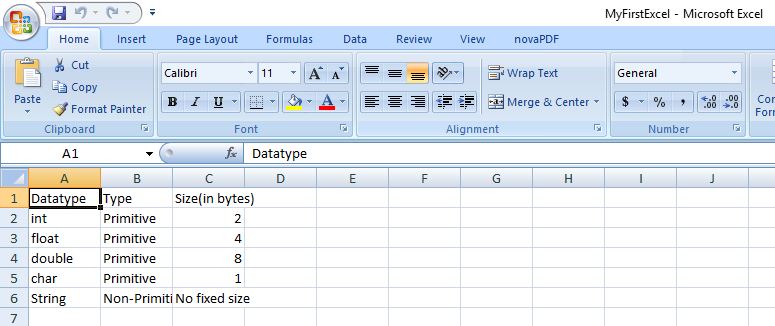
On executing the above code, you get below excel as an output.
4. Apache POI library – Reading an Excel file
The below code explains how to read an Excel file using Apache POI libraries. The function getCellTypeEnum is deprecated in version 3.15 and will be renamed to getCellType from version 4.0 onwards.
package com.mkyong;

import org.apache.poi.ss.usermodel.*;

import org.apache.poi.xssf.usermodel.XSSFWorkbook;

import java.io.File;

import java.io.FileInputStream;

import java.io.FileNotFoundException;

import java.io.IOException;

import java.util.Iterator;

public class ApachePOIExcelRead {

    private static final String FILE_NAME = "/tmp/MyFirstExcel.xlsx";

    public static void main(String[] args) {

        try {

            FileInputStream excelFile = new FileInputStream(new File(FILE_NAME));

            Workbook workbook = new XSSFWorkbook(excelFile);

            Sheet datatypeSheet = workbook.getSheetAt(0);

            Iterator<Row> iterator = datatypeSheet.iterator();

            while (iterator.hasNext()) {

                Row currentRow = iterator.next();

                Iterator<Cell> cellIterator = currentRow.iterator();

                while (cellIterator.hasNext()) {

                    Cell currentCell = cellIterator.next();

                    //getCellTypeEnum shown as deprecated for version 3.15

                    //getCellTypeEnum ill be renamed to getCellType starting from version 4.0

                    if (currentCell.getCellTypeEnum() == CellType.STRING) {

                        System.out.print(currentCell.getStringCellValue() + "--");

                    } else if (currentCell.getCellTypeEnum() == CellType.NUMERIC) {

                        System.out.print(currentCell.getNumericCellValue() + "--");

                    }

                }

                System.out.println();

            }

        } catch (FileNotFoundException e) {

            e.printStackTrace();

        } catch (IOException e) {

            e.printStackTrace();

        }

    }

}
On executing the above code, you get the below output.
Datatype--Type--Size(in bytes)--

int--Primitive--2.0--

float--Primitive--4.0--

double--Primitive--8.0--

char--Primitive--1.0--

String--Non-Primitive--No fixed size--
References
- Details about deprecation of getCellTypeEnum
- Apache POI reference regarding Deprecation
- Apache POI Maven Repo
- Apache POI API docs
Apache POI – Reading and Writing Excel file in Java的更多相关文章
- Read / Write Excel file in Java using Apache POI
Read / Write Excel file in Java using Apache POI 2014-04-18 BY DINESH LEAVE A COMMENT About a year o ...
- 【Java】使用Apache POI生成和解析Excel文件
概述 Excel是我们平时工作中比较常用的用于存储二维表数据的,JAVA也可以直接对Excel进行操作,分别有jxl和poi,2种方式. HSSF is the POI Project's pure ...
- apache poi根据模板导出excel
需要预先新建编辑好一个excel文件,设置好样式. 编辑好输出的数据,根据excel坐标一一对应. 支持列表数据输出,列表中列合并. 代码如下: package com.icourt.util; im ...
- java使用org.apache.poi读取与保存EXCEL文件
一.读EXCEL文件 package com.ruijie.wis.cloud.utils; import java.io.FileInputStream; import java.io.FileNo ...
- 利用Apache POI 实现简单的Excel表格导出
1.利用POI API实现简单的Excel表格导出 首先假设一个学生实体类: package com.sun.poi.domain; import java.io.Serializable; impo ...
- Java 使用Apache POI读取和写入Excel表格
1,引入所用的包 <dependency> <groupId>org.apache.poi</groupId> <artifactId>poi-ooxm ...
- 使用Apache poi来编写导出excel的工具类
在JavaWeb开发的需求中,我们会经常看到导出excel的功能需求,然后java并没有提供操作office文档的功能,这个时候我们就需要使用额外的组件来帮助我们完成这项功能了. 很高兴Apache基 ...
- 转:Apache POI Tutorial
Welcome to Apache POI Tutorial. Sometimes we need to read data from Microsoft Excel Files or we need ...
- 如何用Apache POI操作Excel文件-----如何在已有的Excel文件中插入一行新的数据?
在POI的第一节入门中,我们提供了两个简单的例子,一个是如何用Apache POI新建一个工作薄,另外一个例子是,如果用Apache POI新建一个工作表.那么在这个章节里面,我将会给大家演示一下,如 ...
随机推荐
- VC6 下 libpng 库的编译与初步使用
VC6 下 libpng 库的编译与初步使用 目录 libong 库的介绍 VC6 下 libpng 的编译 下载 libpng 与 zlib 进行编译 得到 .lib 文件 初步使用 对 VC6 ...
- Selenium2+python自动化35-获取元素属性
前言 通常在做断言之前,都要先获取界面上元素的属性,然后与期望结果对比.本篇介绍几种常见的获取元素属性方法. 一.获取页面title 1.有很多小伙伴都不知道title长在哪里,看下图左上角. 2.获 ...
- 《软件开发与创新:ThoughtWorks文集:续集》
<软件开发与创新:ThoughtWorks文集:续集> 基本信息 原书名:The thoughtWorks anthology, volume 2:More essays on softw ...
- [ IOS ] 视图控制对象ViewController的生命周期
init-初始化程序 viewDidLoad-加载视图 viewWillAppear-UIViewController对象的视图即将加入窗口时调用: viewDidApper-UIViewContro ...
- Top N的MapReduce程序MapReduce for Top N items
In this post we'll see how to count the top-n items of a dataset; we'll again use the flatland book ...
- 编译打包工具sbt的镜像设置
sbt可以和maven共用一个镜像,公司内部有的自然最后不过 创建文件:~/.sbt/repositories [repositories] local aliyun: http://maven.al ...
- Lambda表达式 简介 语法 示例 匿名内部类
在AS中使用 Lambda 表达式 Demo地址:https://github.com/baiqiantao/MultiTypeTest.git Gradle(Project级别)中添加classpa ...
- 高人对libsvm的经典总结(全面至极)
==>转自:http://blog.163.com/crazyzcs@126/blog/static/129742050201061192243911/ http://www.ilovematl ...
- mysql时间操作函数和存储过程
因为业务须要统计一批数据.用到关于mysql的时间操作函数和存储过程,问题已经基本解决.把过程记录下: 1. mysql的语句中不支持直接用循环.循环仅仅能在存储过程中使用. 2. 写为文件时,注意一 ...
- Oracle综合数据库管理命令集
sqlplus SANKYU/SANKYU@ORADB_192.168.25.235 cmd: exp .......(最后不要加;号)--sankyuexp SANKYU/SANKYU@SUNNY ...