
springboot情操陶冶-初识springboot
前言:springboot由于其轻便和去配置化等的特性已经被广泛应用,基于时代潮流以及不被鄙视,笔者于是开辟此篇开始认识springboot
前话
springboot是基于spring而开发的轻量级框架,所以在学习springboot之前,务必对spring的工作模式和源码有一定的了解。笔者此处就不展开了,如果有兴趣可直接戳以下链接阅读即可
Spring源码情操陶冶-ContextLoaderListener
springboot框架概览
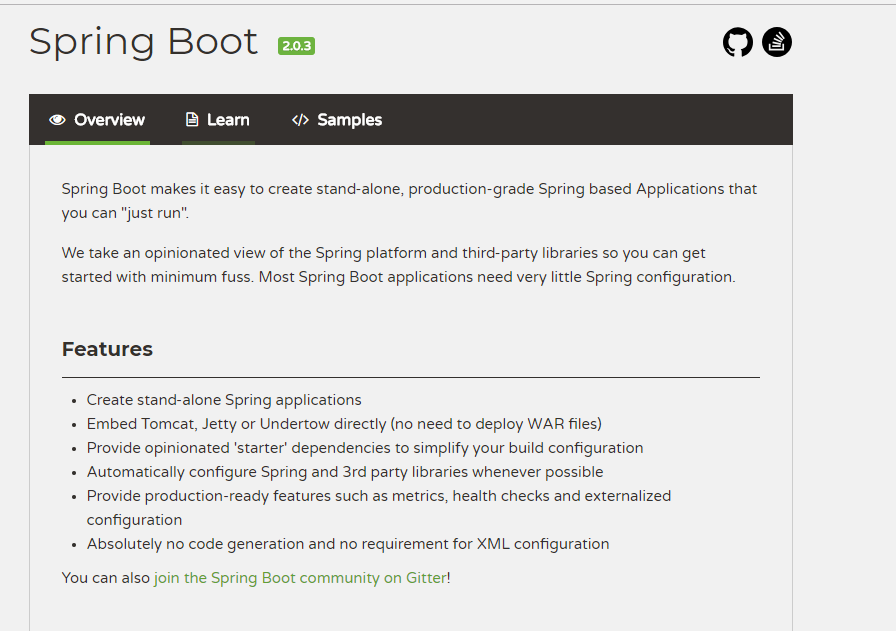
具体更多的信息,可参考spring官网#springboot。笔者此处对上述的配图作下简单的翻译
springboot是什么
springboot让用户可以更为简单的去创建独立的、基于spring的应用程序并且运行简单化。
springboot固执的认为通过spring平台和其他的第三方包就可以轻松的运行相应的程序。并且说明大部分的springboot应用只需要少部分的spring配置,也就是去配置化
springboot特点
创建独立的Spring应用程序
直接内置Tomcat/Jetty/UnderTow等web容器(去war方式部署运行)
提供starter依赖以简化用户的构建配置
当需要的时候自动配置Spring和第三方依赖包
提供准生产特征,比如metrics(度量)、heath checks(健康检查)、externalized configuration(外部化配置)
无代码生成和无XML配置要求
springboot用法
笔者此处不分析springboot的相关用法,相关内容在官方的文档上已经提的非常清楚,有兴趣的直接戳链接前往阅读。Spring Boot Reference
普通方式运行
jdk(1.8)/springboot(2.0.3.RELEASE)/spring(5.0.7.RELEASE)
maven配置
<?xml version="1.0" encoding="UTF-8"?>

<project xmlns="http://maven.apache.org/POM/4.0.0" xmlns:xsi="http://www.w3.org/2001/XMLSchema-instance"

         xsi:schemaLocation="http://maven.apache.org/POM/4.0.0 http://maven.apache.org/xsd/maven-4.0.0.xsd">

    <modelVersion>4.0.0</modelVersion>

    <groupId>com.example</groupId>

    <artifactId>demo</artifactId>

    <version>0.0.1-SNAPSHOT</version>

    <packaging>jar</packaging>

    <name>demo-springboot</name>

    <description>Demo project for Spring Boot</description>

    <parent>

        <groupId>org.springframework.boot</groupId>

        <artifactId>spring-boot-starter-parent</artifactId>

        <version>2.0.3.RELEASE</version>

        <relativePath/> <!-- lookup parent from repository -->

    </parent>

    <properties>

        <project.build.sourceEncoding>UTF-8</project.build.sourceEncoding>

        <project.reporting.outputEncoding>UTF-8</project.reporting.outputEncoding>

        <java.version>1.8</java.version>

    </properties>

    <dependencies>

        <dependency>

            <groupId>org.springframework.boot</groupId>

            <artifactId>spring-boot-starter</artifactId>

        </dependency>

        <dependency>

            <groupId>org.springframework.boot</groupId>

            <artifactId>spring-boot-starter-test</artifactId>

            <scope>test</scope>

        </dependency>

    </dependencies>

    <build>

        <plugins>

            <plugin>

                <groupId>org.springframework.boot</groupId>

                <artifactId>spring-boot-maven-plugin</artifactId>

            </plugin>

        </plugins>

    </build>

</project>
启动类
package com.example.demo;

import org.springframework.boot.SpringApplication;

import org.springframework.boot.autoconfigure.SpringBootApplication;

@SpringBootApplication

public class DemoSpringbootApplication {

    public static void main(String[] args) {

        SpringApplication.run(DemoSpringbootApplication.class, args);

    }

}
web方式运行
jdk(1.8)/springboot(2.0.3.RELEASE)/spring(5.0.7.RELEASE)
maven配置
<?xml version="1.0" encoding="UTF-8"?>

<project xmlns="http://maven.apache.org/POM/4.0.0" xmlns:xsi="http://www.w3.org/2001/XMLSchema-instance"

         xsi:schemaLocation="http://maven.apache.org/POM/4.0.0 http://maven.apache.org/xsd/maven-4.0.0.xsd">

    <modelVersion>4.0.0</modelVersion>

    <groupId>com.example</groupId>

    <artifactId>demo-springboot-web</artifactId>

    <version>0.0.1-SNAPSHOT</version>

    <packaging>jar</packaging>

    <name>demo-springboot-web</name>

    <description>Demo project for Spring Boot</description>

    <parent>

        <groupId>org.springframework.boot</groupId>

        <artifactId>spring-boot-starter-parent</artifactId>

        <version>2.0.3.RELEASE</version>

        <relativePath/> <!-- lookup parent from repository -->

    </parent>

    <properties>

        <project.build.sourceEncoding>UTF-8</project.build.sourceEncoding>

        <project.reporting.outputEncoding>UTF-8</project.reporting.outputEncoding>

        <java.version>1.8</java.version>

    </properties>

    <dependencies>

        <dependency>

            <groupId>org.springframework.boot</groupId>

            <artifactId>spring-boot-starter-web</artifactId>

        </dependency>

        <dependency>

            <groupId>org.springframework.boot</groupId>

            <artifactId>spring-boot-starter-test</artifactId>

            <scope>test</scope>

        </dependency>

    </dependencies>

    <build>

        <plugins>

            <plugin>

                <groupId>org.springframework.boot</groupId>

                <artifactId>spring-boot-maven-plugin</artifactId>

            </plugin>

        </plugins>

    </build>

</project>
启动类
package com.example.demospringbootweb;

import org.springframework.boot.SpringApplication;

import org.springframework.boot.autoconfigure.SpringBootApplication;

@SpringBootApplication

public class DemoSpringbootWebApplication {

    public static void main(String[] args) {

        SpringApplication.run(DemoSpringbootWebApplication.class, args);

    }

}
小结
笔者以此篇作为springboot的开篇,后续便对springboot的源码作下简单的分析,方便读者和笔者知其所以然而了如其然
springboot情操陶冶-初识springboot的更多相关文章
- springboot情操陶冶-web配置(九)
承接前文springboot情操陶冶-web配置(八),本文在前文的基础上深入了解下WebSecurity类的运作逻辑 WebSecurityConfigurerAdapter 在剖析WebSecur ...
- springboot情操陶冶-web配置(七)
参数校验通常是OpenApi必做的操作,其会对不合法的输入做统一的校验以防止恶意的请求.本文则对参数校验这方面作下简单的分析 spring.factories 读者应该对此文件加以深刻的印象,很多sp ...
- springboot情操陶冶-web配置(四)
承接前文springboot情操陶冶-web配置(三),本文将在DispatcherServlet应用的基础上谈下websocket的使用 websocket websocket的简单了解可见维基百科 ...
- springboot情操陶冶-web配置(二)
承接前文springboot情操陶冶-web配置(一),在分析mvc的配置之前先了解下其默认的错误界面是如何显示的 404界面 springboot有个比较有趣的配置server.error.whit ...
- springboot情操陶冶-web配置(三)
承接前文springboot情操陶冶-web配置(二),本文将在前文的基础上分析下mvc的相关应用 MVC简单例子 直接编写一个Controller层的代码,返回格式为json package com ...
- springboot情操陶冶-web配置(一)
承接前文springboot情操陶冶-@SpringBootApplication注解解析,在前文讲解的基础上依次看下web方面的相关配置 环境包依赖 在pom.xml文件中引入web依赖,炒鸡简单, ...
- springboot情操陶冶-@ConfigurationProperties注解解析
承接前文springboot情操陶冶-@Configuration注解解析,本文将在前文的基础上阐述@ConfigurationProperties注解的使用 @ConfigurationProper ...
- springboot情操陶冶-jmx解析
承接前文springboot情操陶冶-@Configuration注解解析,近期笔者接触的项目中有使用到了jmx的协议框架,遂在前文的基础上讲解下springboot中是如何整合jmx的 知识储备 J ...
- springboot情操陶冶-@Conditional和@AutoConfigureAfter注解解析
承接前文springboot情操陶冶-@Configuration注解解析,本文将在前文的基础上阐述@AutoConfigureAfter和@Conditional注解的作用与解析 1.@Condit ...
随机推荐
- QT—QTextEdit控件显示日志
功能:利用QTextEdit开发一个日志显示窗口.没有太多操作,需要实现的是日志自动向上滚动,总体的日志量可以控制在x行(比如300行)以内:其他的应用功能我后面继续添加 #include <Q ...
- 锐捷交换机配置DHCP SERVER给固定的MAC地址分配静态IP
今天突发奇想,想给自己的手机分配固定地址,使得接入公司无线网络时每次都取到同一ip地址,这样可以排除认证登录问题. 上网溜达一下,记录下锐捷官方的[常见问题]如下,经验证可行. 需求: 给MAC地址为 ...
- zipkin
转:https://blog.csdn.net/liaokailin/article/details/52077620 zipkin为分布式链路调用监控系统,聚合各业务系统调用延迟数据,达到链路调用监 ...
- swust oj 1012
哈希表(链地址法处理冲突) 1000(ms) 10000(kb) 2542 / 6517 采用除留余数法(H(key)=key %n)建立长度为n的哈希表,处理冲突用链地址法.建立链表的时候采用尾插法 ...
- Java基础实训
- python从入门到实践-7章用户输入和while循环
#!/user/bin/env python# -*- coding:utf-8 -*- # input() 可以让程序暂停工作# int(input('please input something: ...
- xgboost 多gpu支持 编译
xgboost 多gpu支持 编译 Ubuntu 18.04.2Linux 4.15.0-46-genericgcc (Ubuntu 7.3.0-27ubuntu1~18.04) 7.3.0 cuda ...
- python+SQLAlchemy+爬虫
python+SQLAlchemy+爬虫 前面分享了SQLAlchemy的知识,这次我共享一下学习用python开发爬虫再把爬出来的数据放到用SQLAlchemy的数据库上面的知识,当然我这个是带测试 ...
- 一种简单的 rem 单位基准设置
1rem 换算成的像素值等于 html 元素的 font-size 值 如果 设置 html 的 font-size 为 100px, 那么设计稿的 像素转换成 rem 只需要除以 100 即可. f ...
- sqlserver 电脑重启以后服务突然无法启动 报错
可能是sql server 评估期已过 在升级中输入产品密钥试试