
ELK-elkstack-使用消息队列
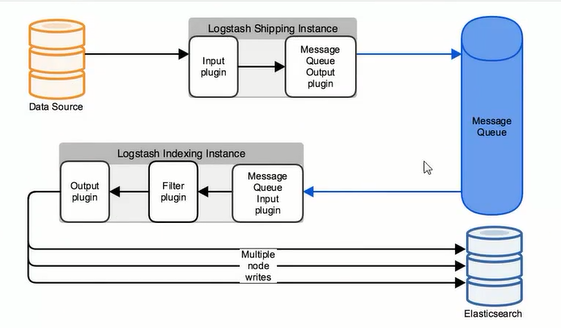
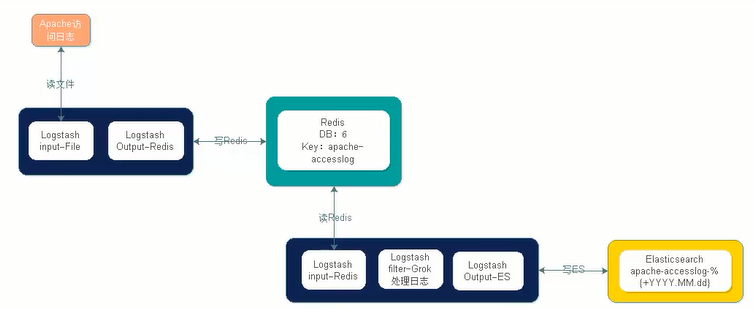
日志通过logstash收集到redis,之后从logstash从redis读取数据存入到ES
1. logstash使用redis测试
通过标准输入到redis中
logstash配置与启动
 [yun@mini03 config]$ pwd

 /app/logstash/config

 [yun@mini03 config]$ cat redis_test.conf

 input{

   stdin{}

 }

 filter{

 }

 output{

   redis {

     data_type => "list"

     # 生产环境需要规划

     db =>

     host => "mini03"

     port =>

     key => "redis_test"

   }

 }

 ### 使用yun用户即可

 [yun@mini03 ~]$ /app/logstash/bin/logstash -f /app/logstash/config/redis_test.conf

 …………

 654321zhags
redis查看
 [root@mini03 ~]# redis-cli -h mini03 -p

 mini03:> select

 OK

 mini03:[]> KEYS *  # 生产环境禁止使用该命令

 ) "redis_test"

 mini03:[]> type redis_test

 list

 mini03:[]> llen redis_test

 (integer)

 mini03:[]> lindex redis_test -

 "{\"host\":\"mini03\",\"message\":\"654321zhags\",\"@timestamp\":\"2018-08-29T13:58:02.184Z\",\"@version\":\"1\"}"
2. httpd日志收集到redis中
logstash配置与启动
 [yun@mini03 config]$ pwd

 /app/logstash/config

 [yun@mini03 config]$ cat redis_httpd_test.conf

 input{

   file{

     path => ["/var/log/httpd/access_log"]

     type => "httpd-access-log"

     start_position => "beginning"

   }

 }

 filter{

 }

 output{

   redis {

     data_type => "list"

     # 生产环境需要规划

     db =>

     host => "mini03"

     port =>

     key => "apache-access-log"

   }

 }

 #### 使用root用户,涉及权限

 [root@mini03 ~]# /app/logstash/bin/logstash -f /app/logstash/config/redis_httpd_test.conf  # 使用root用户
使用谷歌、火狐或者IE浏览器访问
redis查看
[root@mini03 ~]# redis-cli -h mini03 -p 6379

mini03:6379> select 1

OK

mini03:6379[1]> KEYS *

1) "apache-access-log"

2) "redis_test"

mini03:6379[1]> llen apache-access-log

(integer) 28

mini03:6379[1]> lindex apache-access-log -1

"{\"message\":\"10.0.0.1 - - [29/Aug/2018:22:08:30 +0800] \\\"GET /aaabbb/?aaa=bbb HTTP/1.1\\\" 404 205 \\\"-\\\" \\\"Mozilla/5.0 (Windows NT 10.0; Win64; x64; rv:61.0) Gecko/20100101 Firefox/61.0\\\"\",\"type\":\"httpd-access-log\",\"path\":\"/var/log/httpd/access_log\",\"host\":\"mini03\",\"@timestamp\":\"2018-08-29T14:08:31.442Z\",\"@version\":\"1\"}"
3. logstash从redis读取数据标准输出
注意:该logstash在mini02上读取mini03上redis的数据
读取之后先使用grok进行过滤
之后进行标准输出【命令行输出】
logstash配置与启动
[yun@mini02 config]$ pwd

/app/logstash/config

[yun@mini02 config]$ cat redis_stdout.conf

input{

  redis {

    data_type => "list"

    db => 1

    host => "mini03"

    port => 6379

    key => "apache-access-log"

  }

}

filter{

  grok {

    match => { "message" => "%{HTTPD_COMBINEDLOG}" }

  }

}

output{

  stdout { codec => rubydebug }

}

###### 使用yun用户即可

[yun@mini02 ~]$ /app/logstash/bin/logstash -f /app/logstash/config/redis_stdout.conf

……………………

{

        "request" => "/noindex/css/fonts/Bold/OpenSans-Bold.ttf",

        "message" => "10.0.0.1 - - [30/Aug/2018:17:22:13 +0800] \"GET /noindex/css/fonts/Bold/OpenSans-Bold.ttf HTTP/1.1\" 404 238 \"http://mini03/noindex/css/open-sans.css\" \"Mozilla/5.0 (Windows NT 10.0; WOW64) AppleWebKit/537.36 (KHTML, like Gecko) Chrome/68.0.3440.106 Safari/537.36\"",

       "@version" => "1",

          "bytes" => "238",

           "auth" => "-",

       "referrer" => "\"http://mini03/noindex/css/open-sans.css\"",

       "response" => "404",

           "type" => "httpd-access-log",

       "clientip" => "10.0.0.1",

     "@timestamp" => 2018-08-30T09:22:13.950Z,

          "ident" => "-",

           "verb" => "GET",

           "path" => "/var/log/httpd/access_log",

           "host" => "mini03",

          "agent" => "\"Mozilla/5.0 (Windows NT 10.0; WOW64) AppleWebKit/537.36 (KHTML, like Gecko) Chrome/68.0.3440.106 Safari/537.36\"",

      "timestamp" => "30/Aug/2018:17:22:13 +0800",

    "httpversion" => "1.1"

}

{

        "request" => "/?refresh=1m&orgId=1",

        "message" => "10.0.0.1 - - [30/Aug/2018:17:22:13 +0800] \"GET /?refresh=1m&orgId=1 HTTP/1.1\" 403 4897 \"-\" \"Mozilla/5.0 (Windows NT 10.0; WOW64) AppleWebKit/537.36 (KHTML, like Gecko) Chrome/68.0.3440.106 Safari/537.36\"",

       "@version" => "1",

          "bytes" => "4897",

           "auth" => "-",

       "referrer" => "\"-\"",

       "response" => "403",

           "type" => "httpd-access-log",

       "clientip" => "10.0.0.1",

     "@timestamp" => 2018-08-30T09:22:13.949Z,

          "ident" => "-",

           "verb" => "GET",

           "path" => "/var/log/httpd/access_log",

           "host" => "mini03",

          "agent" => "\"Mozilla/5.0 (Windows NT 10.0; WOW64) AppleWebKit/537.36 (KHTML, like Gecko) Chrome/68.0.3440.106 Safari/537.36\"",

      "timestamp" => "30/Aug/2018:17:22:13 +0800",

    "httpversion" => "1.1"

}

……………………
4. elkstack-使用redis作为消息队列【汇总】
在mini03的logstash读取httpd的日志,并存储到redis
4.1. mini03的 logstash配置如下:
 [yun@mini03 config]$ pwd

 /app/logstash/config

 [yun@mini03 config]$ cat redis_httpd_test.conf

 input{

   file{

     path => ["/var/log/httpd/access_log"]

     type => "httpd-access-log"

     start_position => "beginning"

   }

 }

 filter{

 }

 output{

   redis {

     data_type => "list"

     # 生产环境需要规划

     db =>

     host => "mini03"

     port =>

     key => "apache-access-log"

   }

 }

 ######## 使用root用户,涉及权限

 [root@mini03 ~]# /app/logstash/bin/logstash -f /app/logstash/config/redis_httpd_test.conf

 ………………
在mini02的logstash读取redis信息,并存储在ES
4.2. mini02的logstash配置
 [yun@mini02 config]$ pwd

 /app/logstash/config

 [yun@mini02 config]$ cat redis_es.conf

 input{

   redis {

     data_type => "list"

     db =>

     host => "mini03"

     port =>

     key => "apache-access-log"

   }

 }

 filter{

   grok {

     match => { "message" => "%{HTTPD_COMBINEDLOG}" }

   }

 }

 output{

   # es有3台,随便指定一台即可  也可以是多台如 ["127.0.0.1:9200","127.0.0.2:9200"]

   elasticsearch {

     hosts => ["mini01:9200", "mini02:9200", "mini03:9200"]

     index => "httpd-access-log-%{+YYYY.MM.dd}"

   }

 }

 ####### 使用yun用户即可

 [yun@mini02 ~]$ /app/logstash/bin/logstash -f /app/logstash/config/redis_es.conf

 ………………
4.3. 浏览器访问httpd
浏览器
 # 可以通过谷歌、火狐、IE访问

 http://mini03/

 http://mini03/indweg.html
Linux命令行访问
 [yun@mini02 ~]$ ab -n40 -c  http://mini03/

 [yun@mini02 ~]$ ab -n40 -c  http://mini03/wet/bdhw/
4.4. 信息查看
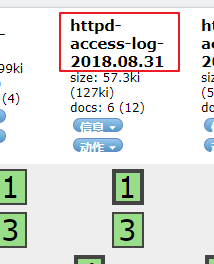
elasticsearch-head查看
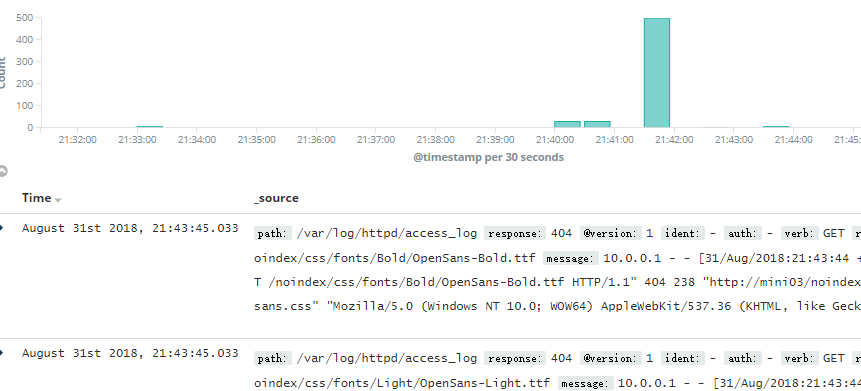
kibana查看
ELK-elkstack-使用消息队列的更多相关文章
- ELKStack之消息队列
redis消息队列 安装redis yum -y install redis 修改配置文件 修改ip 后台运行 启动 systemctl start redis 查看 lsof -i:6379 连接 ...
- ELK之使用kafka作为消息队列收集日志
参考:https://www.cnblogs.com/fengjian2016/p/5841556.html https://www.cnblogs.com/hei12138/p/7805475 ...
- ELK之消息队列选择redis_kafka_rabbitmq
前言描述 生产初级,Service服务较少,访问量较少,随着业务量的不断增加,日志量成倍增长,然后就遇到了消息队列redis被充爆,不能满足应用的情况.针对此情况,我们来分析下可用的消息多列. 官方推 ...
- redis 验证消息队列也是写磁盘的
# 下面的例子将会进行把数据写入磁盘的操作: # 900秒(15分钟)之后,且至少1次变更 # 300秒(5分钟)之后,且至少10次变更 # 60秒之后,且至少10000次变更 # # 注意:你要想不 ...
- 常用的消息队列中间件mq对比
原文地址:https://blog.csdn.net/qq_30764991/article/details/80239076 消息队列中间件是分布式系统中重要的组件,主要解决应用耦合,异步消息,流量 ...
- MQ(1)---消息队列概念和使用场景
消息队列概念和使用场景 声明:本文转自:MQ入门总结(一)消息队列概念和使用场景 写的很好,都不用自己在整理了,非常感谢该作者的用心. 一.什么是消息队列 消息即是信息的载体.为了让消息发送者和消息接 ...
- Java并发编程原理与实战三十六:阻塞队列&消息队列
一.阻塞队列 1.阻塞队列BlockingQueue ---->可以理解成生产者消费者的模式---->消费者要等待到生产者生产出来产品.---->而非阻塞队列ConcurrentLi ...
- RabbitMQ (十六) 消息队列的应用场景 (转)
原贴 : http://blog.csdn.net/cws1214/article/details/52922267 消息队列中间件是分布式系统中重要的组件,主要解决应用耦合,异步消息,流量削锋等问题 ...
- 消息队列 概念 配合SpringBoot使用Demo
转http://www.jianshu.com/p/048e954dab40 概念: 分布式消息队列 ‘分布式消息队列’包含两个概念 一是‘消息队列’,二是‘分布式’ 那么就先看下消息队列的概念,和为 ...
- MQ入门总结(一)消息队列概念和使用场景
一.消息队列 消息即是信息的载体.为了让消息发送者和消息接收者都能够明白消息所承载的信息(消息发送者需要知道如何构造消息:消息接收者需要知道如何解析消息),它们就需要按照一种统一的格式描述消息,这种统 ...
随机推荐
- Ansible基础认识及安装使用详解(week5_day1_part1)--技术流ken
Ansible简介 ansible是新出现的自动化运维工具,基于Python开发,集合了众多运维工具(puppet.cfengine.chef.func.fabric)的优点,实现了批量系统配置.批量 ...
- shell编程基础(六): 透彻解析查找命令find
find 由于find具有强大的功能,所以它的选项也很多,其中大部分选项都值得我们花时间来了解一下.即使系统中含有网络文件系统( NFS),find命令在该文件系统中同样有效,只要你具有相应的权限. ...
- 使用HttpWebRequest请求API接口以及其他网站资源
很多时候,我们项目需要其他网站的资源,而这个被请求的网站可能属于你们自己开发管理的网站.也可能是公网上其他网站对外开发的API接口,比如说腾讯的微信公众平台的API接口.各大短信服务商的短信API接口 ...
- 将Python脚本打包成可执行文件
Python是一个脚本语言,被解释器解释执行.它的发布方式: .py文件:对于开源项目或者源码没那么重要的,直接提供源码,需要使用者自行安装Python并且安装依赖的各种库.(Python官方的各种安 ...
- C# 输出字符串到文本文件中
写个博客记录下,方便以后使用: public class WriteHelper { public static void WriteFile(object data) { try { string ...
- WPF,强制捕获鼠标事件,鼠标移出控件外依然可以执行强制捕获的鼠标事件
在WPF中,只有鼠标位置在某个控件上的时候才会触发该控件的鼠标事件.例如,有两个控件都注册了MouseDown和MouseUp事件,在控件1上按下鼠标,不要放开,移动到控件2上再放开.在这个过程中,控 ...
- 如何理解php的依赖注入
之前写过关于php依赖注入的文章..最近发现有的朋友对这个还是理解模糊,在这里我想写个简单的实例帮助朋友们理解下...传统的思路是应用程序用到一个A类,就会创建A类并调用A类的方法,假如这个方法内需要 ...
- 22.QT-QXmlStreamReader解析,QXmlStreamWriter写入
XML介绍 XML 用于存储数据,数据的形式类似于树结构(参考: http://www.runoob.com/xml/) 示例如下 <?xml version="1.0" e ...
- MSQL基本增删改语句汇总练习
删除约束注意: 网上说是 ALTER TABLE 表名 DROP CONSTRAINT 约束名; 这里的CONSTRAINT 是指primary key,foreign key,unique,等实际的 ...
- 使用eclipse初步学习vue.js的基本操作 ①
一.vue.js的初步认识 <a href="https://unpkg.com/vue ">vue.js下载</a> 1.抛开手动操作DOM的思维,Vue ...