
mybatis collection解析以及和association的区别
1.collection标签
说到mybatis的collection标签,我们肯定不陌生,可以通过它解决一对多的映射问题,举个例子一个用户对应多个系统权限,通过对用户表和权限表的关联查询我们可以得到好多条记录,但是用户信息这部分在多条记录中是重复的,只有权限不同,我们需要把这多条权限记录映射到这个用户之中,这个时候可以通过collection标签/association标签来解决(虽然assocation标签一般是解决一对一问题的,但它实际上也能实现我们的需求,可以通过后面的源码看出来)
1.1 相关代码和运行结果
实体类和mapper代码
@Data

public class UserDO {

  private Integer userId;

  private String username;

  private String password;

  private String nickname;

  // 将用户的权限信息映射到用户中

  private List<PermitDO> permitDOList;

  public UserDO() {}

  public UserDO(@Param("userId") Integer userId, @Param("username") String username, @Param("password") String password, @Param("nickname") String nickname) {

    this.userId = userId;

    this.username = username;

    this.password = password;

    this.nickname = nickname;

  }

}

@Data

public class PermitDO {

  private Integer id;

  private String code;

  private String name;

  private NodeTypeEnum type;

  private Integer pid;

}

// mybatis代码

public interface UserMapper {

  UserDO getByUserId(@Param("userId") Integer userId);

}

<mapper namespace="org.apache.ibatis.study.mapper.UserMapper">

  <cache readOnly="false" flushInterval="5000" size="100" blocking="false">

  </cache>

  <resultMap id="BaseMap" type="org.apache.ibatis.study.entity.UserDO" autoMapping="true">

     <!--  user_id列用<id>标签,因为对一个用户来说,user_id肯定是唯一的 -->

    <id column="user_id" jdbcType="INTEGER" property="userId" />

    <result column="username" jdbcType="VARCHAR" property="username" />

    <result column="password" jdbcType="VARCHAR" property="password" />

    <result column="nickname" jdbcType="VARCHAR" property="nickname"/>

    <!-- <collection> 映射多条权限记录 -->

    <collection property="permitDOList"

      resultMap="PermitBaseMap">

    </collection>

  </resultMap>

  <resultMap id="PermitBaseMap" type="org.apache.ibatis.study.entity.PermitDO">

    <id column="id" jdbcType="INTEGER" property="id"/>

    <result column="code" jdbcType="VARCHAR" property="code"/>

    <result column="name" jdbcType="VARCHAR" property="name"/>

    <result column="type" jdbcType="TINYINT" property="type"/>

    <result column="pid" jdbcType="INTEGER" property="pid"/>

  </resultMap>

  <resultMap id="BaseMap1" type="org.apache.ibatis.study.entity.UserDO" autoMapping="false">

    <constructor>

      <idArg column="user_id" name="userId" jdbcType="INTEGER" />

      <arg column="username" name="username" jdbcType="VARCHAR" />

      <arg column="password" name="password" jdbcType="VARCHAR" />

      <arg column="nickname" name="nickname" jdbcType="VARCHAR" />

    </constructor>

  </resultMap>

  <sql id="BaseFields">

    user_id, username, password, nickname

  </sql>

  <select id="getByUserId" resultMap="BaseMap" resultOrdered="true">

    select u.*, p.*

    from user u

    inner join user_permit up on u.user_id = up.user_id

    inner join permit p on up.permit_id = p.id

    <trim prefix="where" prefixOverrides="and | or">

      and u.user_id = #{userId, jdbcType=INTEGER}

    </trim>

  </select>

</mapper>
public class Test {
public static void main(String[] args) throws IOException {
try (InputStream inputStream = Resources.getResourceAsStream("mybatis-config.xml")) {
// 构建session工厂 DefaultSqlSessionFactory
SqlSessionFactory sqlSessionFactory = new SqlSessionFactoryBuilder().build(inputStream);
SqlSession sqlSession = sqlSessionFactory.openSession();
UserMapper userMapper = sqlSession.getMapper(UserMapper.class);
UserDO userDO = userMapper.getByUserId(1);
System.out.println(userDO);
}
}
}运行结果如下,可以看到权限记录映射到属性permitDOList 的list列表了

1.2 collection部分源码解析
通过PreparedStatement查询完之后得到ResultSet结果集,之后需要将结果集解析为java的pojo类中,下面通过源码简单讲下是如何解析的
  public void handleRowValues(ResultSetWrapper rsw, ResultMap resultMap, ResultHandler<?> resultHandler, RowBounds rowBounds, ResultMapping parentMapping) throws SQLException {

    // 是否有嵌套的resultMaps

    if (resultMap.hasNestedResultMaps()) {

      ensureNoRowBounds();

      checkResultHandler();

      handleRowValuesForNestedResultMap(rsw, resultMap, resultHandler, rowBounds, parentMapping);

    } else {

      // 无嵌套

      handleRowValuesForSimpleResultMap(rsw, resultMap, resultHandler, rowBounds, parentMapping);

    }

  }
根据有无嵌套分成两层逻辑,有嵌套resultMaps就是指<resultMap>标签下有子标签<collection>或<association>,分析下第一层
  private void handleRowValuesForNestedResultMap(ResultSetWrapper rsw, ResultMap resultMap, ResultHandler<?> resultHandler, RowBounds rowBounds, ResultMapping parentMapping) throws SQLException {

    final DefaultResultContext<Object> resultContext = new DefaultResultContext<>();

    ResultSet resultSet = rsw.getResultSet();

    // 跳过offset行

    skipRows(resultSet, rowBounds);

    // 上一次获取的数据

    Object rowValue = previousRowValue;

    // 已获取记录数量小于limit

    while (shouldProcessMoreRows(resultContext, rowBounds) && !resultSet.isClosed() && resultSet.next()) {

      // 鉴别器解析

      final ResultMap discriminatedResultMap = resolveDiscriminatedResultMap(resultSet, resultMap, null);

      // 创建缓存key resultMapId + (columnName + columnValue)....

      final CacheKey rowKey = createRowKey(discriminatedResultMap, rsw, null);

      // 部分对象(可能存在对象内容缺失未完全合并)

      Object partialObject = nestedResultObjects.get(rowKey);

      // issue #577 && #542

      // 关于resultOrdered的理解,举例若查询得到四条记录a,a,b,a , 相同可以合并。

      // 那么当resultOrdered=true时,最后可以得到三条记录,第一条和第二条合并成一条、第三条单独一条、第四条也是单独一条记录

      // resultOrdered=false时,最后可以得到两条记录,第一条、第二条和第四条会合并成一条,第三条单独一条记录

      // 另外存储到resultHandler的时机也不一样,resultOrdered=true是等遇到不可合并的记录的时候才把之前已经合并的记录存储,

      // 而resultOrdered=false是直接存储的后续有合并的记录再处理添加到集合属性中

      if (mappedStatement.isResultOrdered()) {

        // partialObject为null,说明这一条记录不可与上一条记录进行合并了,那么清空nestedResultObjects防止之后出现有可合并的记录的时候继续合并

        // 然后将记录存储到resultHandler里面

        if (partialObject == null && rowValue != null) {

          nestedResultObjects.clear();

          storeObject(resultHandler, resultContext, rowValue, parentMapping, resultSet);

        }

        rowValue = getRowValue(rsw, discriminatedResultMap, rowKey, null, partialObject);

      } else {

        // 处理resultSet的当前这一条记录

        rowValue = getRowValue(rsw, discriminatedResultMap, rowKey, null, partialObject);

        if (partialObject == null) {

          // 将记录存储到resultHandler里面

          storeObject(resultHandler, resultContext, rowValue, parentMapping, resultSet);

        }

      }

    }
这段代码主要是创建了一个缓存key,主要是根据resultMapId和<id>标签的column和对应的columvalue来创建的(若没有<id>标签,则会使用所有的<result>标签的column和columnValue来创建),以此缓存键来区分记录是否可合并。nestedResultObjects是一个储存结果的map,以缓存键为key,实体类(本例中为UserDO)为value,若能以cacheKey取到值,则说明本条记录可合并。
  private Object getRowValue(ResultSetWrapper rsw, ResultMap resultMap, CacheKey combinedKey, String columnPrefix, Object partialObject) throws SQLException {

    final String resultMapId = resultMap.getId();

    Object rowValue = partialObject;

    // rowValue不等于null时,说明此条记录可合并

    if (rowValue != null) {

      final MetaObject metaObject = configuration.newMetaObject(rowValue);

      putAncestor(rowValue, resultMapId);

      applyNestedResultMappings(rsw, resultMap, metaObject, columnPrefix, combinedKey, false);

      ancestorObjects.remove(resultMapId);

    } else {

      final ResultLoaderMap lazyLoader = new ResultLoaderMap();

      // 创建result接收对象,本例中是UserDO对象

      rowValue = createResultObject(rsw, resultMap, lazyLoader, columnPrefix);

      if (rowValue != null && !hasTypeHandlerForResultObject(rsw, resultMap.getType())) {

        final MetaObject metaObject = configuration.newMetaObject(rowValue);

        boolean foundValues = this.useConstructorMappings;

        // 是否将查询出来的字段全部映射 默认false

        if (shouldApplyAutomaticMappings(resultMap, true)) {

          foundValues = applyAutomaticMappings(rsw, resultMap, metaObject, columnPrefix) || foundValues;

        }

        // 设置需要映射的属性值,不管有嵌套ResultMap的

        foundValues = applyPropertyMappings(rsw, resultMap, metaObject, lazyLoader, columnPrefix) || foundValues;

        // 存放第一条数据

        putAncestor(rowValue, resultMapId);

        // 处理有嵌套的resultMapping

        foundValues = applyNestedResultMappings(rsw, resultMap, metaObject, columnPrefix, combinedKey, true) || foundValues;

        ancestorObjects.remove(resultMapId);

        foundValues = lazyLoader.size() > 0 || foundValues;

        rowValue = foundValues || configuration.isReturnInstanceForEmptyRow() ? rowValue : null;

      }

      // 将最终结果放入到nestedResultObjects中

      if (combinedKey != CacheKey.NULL_CACHE_KEY) {

        nestedResultObjects.put(combinedKey, rowValue);

      }

    }

    return rowValue;

  }
getRowValue方法主要是将ResultSet解析为实体类对象,applyPropertyMappings填充<id><result>标签的实体属性值
  private boolean applyNestedResultMappings(ResultSetWrapper rsw, ResultMap resultMap, MetaObject metaObject, String parentPrefix, CacheKey parentRowKey, boolean newObject) {

    boolean foundValues = false;

    for (ResultMapping resultMapping : resultMap.getPropertyResultMappings()) {

      // 嵌套id

      final String nestedResultMapId = resultMapping.getNestedResultMapId();

      // resultMapping有嵌套的map才继续 <association> <collection>

      if (nestedResultMapId != null && resultMapping.getResultSet() == null) {

        try {

          final String columnPrefix = getColumnPrefix(parentPrefix, resultMapping);

          // 获取嵌套(经过一次鉴权)的ResultMap

          final ResultMap nestedResultMap = getNestedResultMap(rsw.getResultSet(), nestedResultMapId, columnPrefix);

          if (resultMapping.getColumnPrefix() == null) {

            // try to fill circular reference only when columnPrefix

            // is not specified for the nested result map (issue #215)

            Object ancestorObject = ancestorObjects.get(nestedResultMapId);

            if (ancestorObject != null) {

              if (newObject) {

                linkObjects(metaObject, resultMapping, ancestorObject); // issue #385

              }

              continue;

            }

          }

          // 构建嵌套map的key

          final CacheKey rowKey = createRowKey(nestedResultMap, rsw, columnPrefix);

          // 合并cacheKey

          final CacheKey combinedKey = combineKeys(rowKey, parentRowKey);

          // 尝试获取之前是否已经创建过

          Object rowValue = nestedResultObjects.get(combinedKey);

          boolean knownValue = rowValue != null;

          // 实例化集合属性 list复制为空列表

          instantiateCollectionPropertyIfAppropriate(resultMapping, metaObject); // mandatory

          // 存在指定的非空列存在空值则返回false

          if (anyNotNullColumnHasValue(resultMapping, columnPrefix, rsw)) {

            rowValue = getRowValue(rsw, nestedResultMap, combinedKey, columnPrefix, rowValue);

            if (rowValue != null && !knownValue) {

              // 合并记录,设置对象-association或将对象添加到集合属性中-collection

              linkObjects(metaObject, resultMapping, rowValue);

              foundValues = true;

            }

          }

        } catch (SQLException e) {

          throw new ExecutorException("Error getting nested result map values for '" + resultMapping.getProperty() + "'.  Cause: " + e, e);

        }

      }

    }

    return foundValues;

  }
处理嵌套的结果映射,其实就是<collection><association>标签。同时调用getRowValue方法根据<collection>指定的resultMap获取实体对象(这里是PermitDO对象),然后调用linkObjects方法将permitDO对象调用add方法添加到permitDOList中
private void linkObjects(MetaObject metaObject, ResultMapping resultMapping, Object rowValue) {

    final Object collectionProperty = instantiateCollectionPropertyIfAppropriate(resultMapping, metaObject);

    // 属性是集合进行添加 <collection>

    if (collectionProperty != null) {

      final MetaObject targetMetaObject = configuration.newMetaObject(collectionProperty);

      targetMetaObject.add(rowValue);

    } else {

      // 否则是对象 直接进行setter设置 <association>

      metaObject.setValue(resultMapping.getProperty(), rowValue);

    }

  }
最后就把能合并的记录都合并在一起了,不同的权限映射到permitDOList这个集合中了
1.3 <collection>和<association>的相同的和不同点
从上面的代码看来,关于<collection>和<association>标签都属于嵌套结果集了,处理逻辑也是基本相同的没啥区分,换句话来说,把上面的<collection>替换成<association>标签其实也能得到相同的结果,关键还是pojo类中javaType的属性,若属性为List则会创建空的list并将嵌套结果映射添加到list中(即使是一对一的那么list中就只有一条记录),若属性为普通对象则直接进行setter设置。
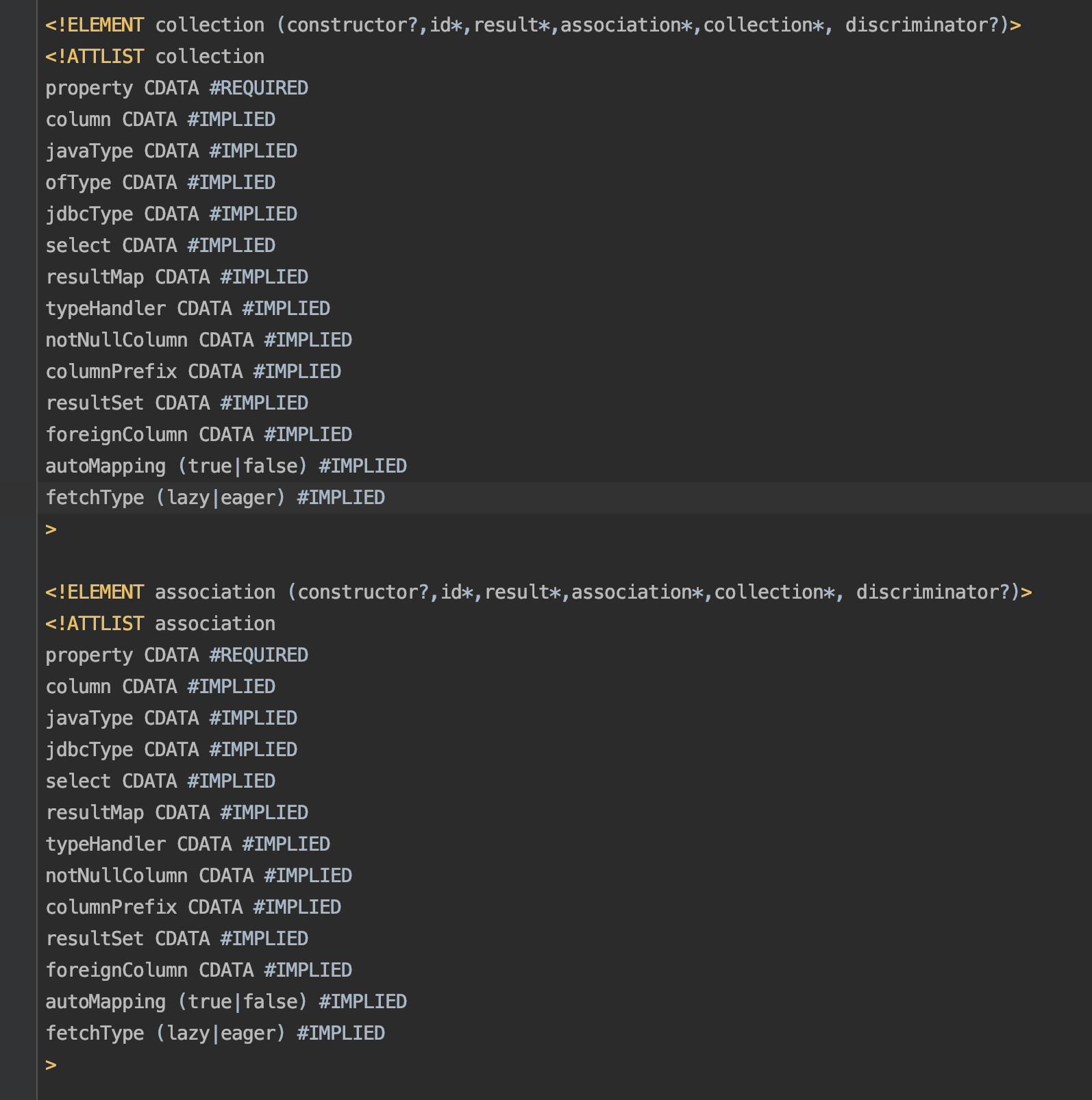
从上面的图中我们可以看到<collection>和<association>标签属性基本相同,<collection>比<association>多了一个ofType属性,这个ofType属性其实就是collection集合中单个元素的javaType属性,<collection>的javaType属性是继承了Collection接口的list或set等java集合属性。
另外在使用习惯上因为我们能确认表和表之间的关系是一对一还是一对多的,能够确认pojo类中的属性javaType是使用list还是普通对象,所以一般情况下一对一使用<association>标签,一对多使用<collection>标签,语义上更清晰更好理解。
最后
如果说的有问题欢迎提出指正讨论,代码提交在gitee上,感兴趣的同学可以下载看看
mybatis collection解析以及和association的区别的更多相关文章
- collection和association的区别于关系
比如同时有User.java和Card.java两个类 User.java如下: public class User{ private Card card_one; private List<C ...
- Mybatis 学习---${ }与#{ }获取输入参数的区别、Foreach的用法
一.Mybatis中用#{}和${}获取输入参数的区别 1.“#{}“和“${}”都可以从接口输入中的map对象或者pojo对象中获取输入的参数值.例如 <mapper namespace=&q ...
- MyBatis Mapper.xml文件中 $和#的区别
MyBatis Mapper.xml文件中 $和#的区别 网上有很多,总之,简略的写一下,作为备忘.例子中假设参数名为 paramName,类型为 VARCHAR . 1.优先使用#{paramN ...
- MyBatis配置文件解析
MyBatis配置文件解析(概要) 1.configuration:根元素 1.1 properties:定义配置外在化 1.2 settings:一些全局性的配置 1.3 typeAliases:为 ...
- MyBatis配置解析
MyBatis配置文件解析(概要) 1.configuration:根元素 1.1 properties:定义配置外在化 1.2 settings:一些全局性的配置 1.3 typeAliases:为 ...
- 互联网轻量级框架SSM-查缺补漏第七天(MyBatis的解析和运行原理)
第七章MyBatis的解析和运行原理 SqlSessionFactory是MyBatis的核心类之一,其最重要的功能就是提供创建MyBatis的核心借口SqlSession,所以要先创建SqlSess ...
- 详细解析 HTTP 与 HTTPS 的区别
详细解析 HTTP 与 HTTPS 的区别 超文本传输协议HTTP协议被用于在Web浏览器和网站服务器之间传递信息,HTTP协议以明文方式发送内容,不提供任何方式的数据加密,如果攻击者截取了Web浏览 ...
- mybatis collection 一对多关联查询,单边分页的问题总结!
若想直接通过sql实现多级关联查询表结构得有2 个必不可少的字段:id ,parentId,levelId id:主键id, parentId:父id levelId:表示第几级(表本身关联查询的时候 ...
- Mybatis的解析和运行原理
Mybatis的解析和运行原理 Mybatis的运行过程大致分为两大步:第一步,读取配置文件缓存到Configuration对象,用以创建 SqlSessionFactory:第二步,SqlSessi ...
随机推荐
- python学习-Day5
目录 今日学习内容详解 流程控制理论 程序执行流程分类: 重点小知识* 分支结构(if 语法) 单 if 分支 if 与 else 分支 if 与 elif 与 else 分支 if嵌套 练习 循环结 ...
- 【机翻】RTnet – 灵活的硬实时网络框架
目录 RTnet – 灵活的硬实时网络框架 0 摘要 1 介绍 2 基础服务 2.1 数据包管理 2.2 UDP/IP 实现 2.3 Driver Layer 2.4 应用程序接口 2.5 捕获扩展 ...
- XCTF练习题---MISC---stegano
XCTF练习题---MISC---stegano flag:flag{1nv151bl3m3554g3} 解题步骤: 1.观察题目,下载附件 2.打开发现是一张PDF图片,尝试转换word无果后,想到 ...
- WPF样式和触发器
理解样式 样式可以定义通用的格式化特征集合. Style 类的属性 Setters.Triggers.Resources.BasedOn.TargetType <Style x:Key=&quo ...
- 漫谈 HTTP 连接
关注「开源Linux」,选择"设为星标" 回复「学习」,有我为您特别筛选的学习资料~ 本文首先会 HTTP 的特点和优缺点,然后会详细介绍 HTTP 长连接和短连接的连接管理,通过 ...
- 关于 MyBatis-Plus 分页查询的探讨 → count 都为 0 了,为什么还要查询记录?
开心一刻 记得上初中,中午午休的时候,我和哥们躲在厕所里吸烟 听见外面有人进来,哥们猛吸一口,就把烟甩了 进来的是教导主任,问:你们干嘛呢? 哥们鼻孔里一边冒着白烟一边说:我在生气 环境搭建 依赖引入 ...
- 更换国内镜像源进行pip安装
Linux中当我们需要安装某个模块时(比如tensorflow2.0.0),常见有三种方法: pip install tensorflow==2.0.0 pip install https://pyp ...
- 论文阅读 DyREP:Learning Representations Over Dynamic Graphs
5 DyREP:Learning Representations Over Dynamic Graphs link:https://scholar.google.com/scholar_url?url ...
- 运维:ITIL V3
TIL 简史 在20 世纪80 年代末期,英国商务部(OGC,Office Government Commerce)发布了ITIL .OGC 最初的目标是通过应用IT 来提升政府业务的效率:目标是能够 ...
- Python数据分析--Numpy常用函数介绍(3)
摘要:先汇总相关股票价格,然后有选择地对其分类,再计算移动均线.布林线等. 一.汇总数据 汇总整个交易周中从周一到周五的所有数据(包括日期.开盘价.最高价.最低价.收盘价,成交量等),由于我们的数据是 ...