
RobotFramework+Appium 升级Appium v1.10.0后,执行click element时报错:InvalidSelectorException: Message: Locator Strategy 'css selector' is not supported for this session,解决办法
报错信息如下:
debug] [35m[XCUITest][39m Connection to WDA timed out
[debug] [35m[XCUITest][39m Connection to WDA timed out[info] [35m[HTTP][39m [37m-->[39m [37mPOST[39m [37m/wd/hub/session/0fa5e52b-19f3-4c08-87c7-053b1e9ed018/elements[39m
[info] [35m[HTTP][39m [90m{"using":"css selector","value":"[id=\"SVW_LoginChoiceView.swift130001\"]"}[39m
[debug] [35m[W3C (0fa5e52b)][39m Calling AppiumDriver.findElements() with args: ["css selector","[id=\"SVW_LoginChoiceView.swift130001\"]","0fa5e52b-19f3-4c08-87c7-053b1e9ed018"]
[debug] [35m[XCUITest][39m Executing command 'findElements'
[debug] [35m[BaseDriver][39m Valid locator strategies for this request: xpath, id, name, class name, -ios predicate string, -ios class chain, accessibility id
[debug] [35m[W3C (0fa5e52b)][39m Encountered internal error running command: InvalidSelectorError: Locator Strategy 'css selector' is not supported for this session
[debug] [35m[W3C (0fa5e52b)][39m at XCUITestDriver.validateLocatorStrategy (/Applications/Appium.app/Contents/Resources/app/node_modules/appium-base-driver/lib/basedriver/driver.js:344:13)
[debug] [35m[W3C (0fa5e52b)][39m at XCUITestDriver.validateLocatorStrategy (/Applications/Appium.app/Contents/Resources/app/node_modules/appium-xcuitest-driver/lib/driver.js:918:11)
[debug] [35m[W3C (0fa5e52b)][39m at XCUITestDriver.helpers.findElOrElsWithProcessing (/Applications/Appium.app/Contents/Resources/app/node_modules/appium-base-driver/lib/basedriver/commands/find.js:28:8)
[debug] [35m[W3C (0fa5e52b)][39m at XCUITestDriver.commands.findElements (/Applications/Appium.app/Contents/Resources/app/node_modules/appium-base-driver/lib/basedriver/commands/find.js:60:21)
[debug] [35m[W3C (0fa5e52b)][39m at curCommandCancellable._bluebird.default.resolve.then (/Applications/Appium.app/Contents/Resources/app/node_modules/appium-base-driver/lib/basedriver/driver.js:291:18)
[debug] [35m[W3C (0fa5e52b)][39m at tryCatcher (/Applications/Appium.app/Contents/Resources/app/node_modules/appium-base-driver/node_modules/bluebird/js/main/util.js:26:23)
[debug] [35m[W3C (0fa5e52b)][39m at Promise._settlePromiseFromHandler (/Applications/Appium.app/Contents/Resources/app/node_modules/appium-base-driver/node_modules/bluebird/js/main/promise.js:510:31)
[debug] [35m[W3C (0fa5e52b)][39m at Promise._settlePromiseAt (/Applications/Appium.app/Contents/Resources/app/node_modules/appium-base-driver/node_modules/bluebird/js/main/promise.js:584:18)
[debug] [35m[W3C (0fa5e52b)][39m at Promise._settlePromiseAtPostResolution (/Applications/Appium.app/Contents/Resources/app/node_modules/appium-base-driver/node_modules/bluebird/js/main/promise.js:248:10)
[debug] [35m[W3C (0fa5e52b)][39m at Async._drainQueue (/Applications/Appium.app/Contents/Resources/app/node_modules/appium-base-driver/node_modules/bluebird/js/main/async.js:128:12)
[debug] [35m[W3C (0fa5e52b)][39m at Async._drainQueues (/Applications/Appium.app/Contents/Resources/app/node_modules/appium-base-driver/node_modules/bluebird/js/main/async.js:133:10)
[debug] [35m[W3C (0fa5e52b)][39m at Immediate.Async.drainQueues (/Applications/Appium.app/Contents/Resources/app/node_modules/appium-base-driver/node_modules/bluebird/js/main/async.js:15:14)
[debug] [35m[W3C (0fa5e52b)][39m at runCallback (timers.js:696:18)
[debug] [35m[W3C (0fa5e52b)][39m at tryOnImmediate (timers.js:667:5)
[debug] [35m[W3C (0fa5e52b)][39m at processImmediate (timers.js:649:5)
[info]
解决办法:
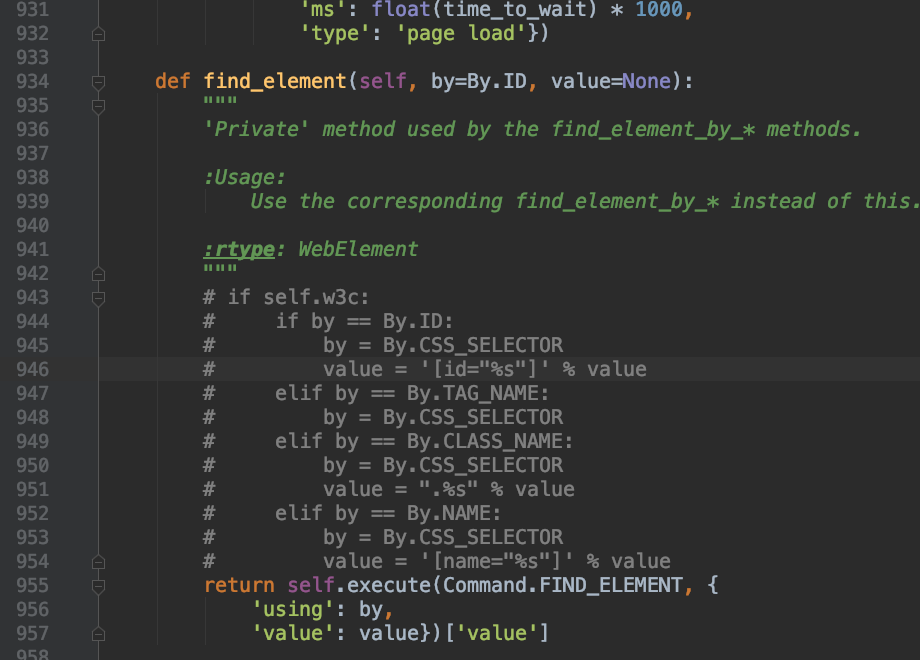
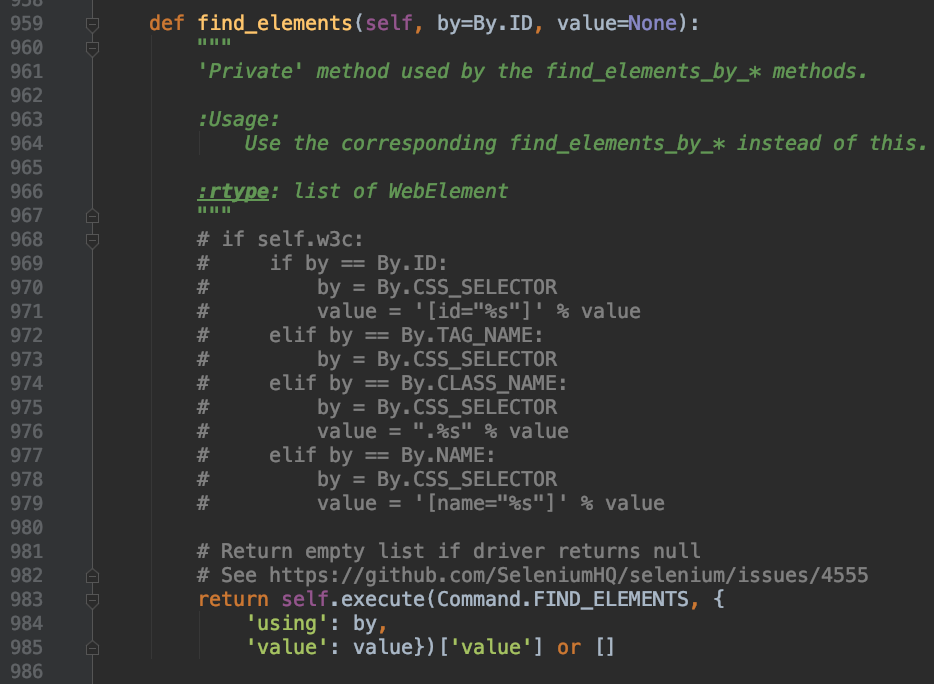
在python文件夹下找到site-pankages/selenium/webdriver/remote/webdriver.py中找到def find_element和def find_elements,注释掉if self.w3c;
保存后,再次运行,成功解决。
RobotFramework+Appium 升级Appium v1.10.0后,执行click element时报错:InvalidSelectorException: Message: Locator Strategy 'css selector' is not supported for this session,解决办法的更多相关文章
- Appium 运行脚本报错InvalidSelectorException: Message: Locator Strategy 'css selector' is not supported for (转)
现象:Appium运行脚本报错InvalidSelectorException: Message: Locator Strategy 'css selector' is not supported f ...
- Appium问题解决方案(5)- selenium.common.exceptions.InvalidSelectorException: Message: Locator Strategy 'name' is not supported for this session
背景 使用Appium Server 1.15.1版本 执行了以下脚本 test = driver.find_element_by_name("自动化测试") print(test ...
- Appium新版本遇到的问题,不能通过 name 去定位元素抛 Message: Locator Strategy 'name' is not supported for this session
环境: 1.Appium: 1.15.1 2.Python: 3.7.0 3.Selenium: 3.141.0 4.IDE: Pycharm 5.PC:Windows 10 问题:在 Pycharm ...
- DPA 9.1.85 升级到DPA 10.0.352流程
SolarWinds DPA的升级其实是一件非常简单的事情,这里介绍一下从DPA 9.1.95升级到 DPA 10.0.352版本的流程.为什么要升级呢? DPA给用户发的邮件已经写的非常清楚了(如下 ...
- 从零到一,利用kubeadm在ubuntu server 16.04 64位系统离线安装kubernetes v1.10.0
说明 初步接触kubernets,记录学习过程 本教程目的利用kubeadm在ubuntu server 16.04 64位系统离线安装kubernets v1.10.0 环境信息 节点IP地址 角色 ...
- Kube-OVN v1.10.0:新增Windows节点支持,用户自定义子网ACL等10+硬核功能
在Kube-OVN社区小伙伴的共同努力下,Kube-OVN v1.10.0于五月份正式发布.Kube-OVN v1.10.0版本中,我们一如既往地对Kube-OVN 的功能.性能.稳定性和易用性进行了 ...
- CentOS6 系统下升级python后yum命令使用时报错
CentOS6 系统下升级python后yum命令使用时报错,如下: [root@xxxxxxx]#yumFile"/usr/bin/yum",line30exceptKeyboa ...
- tomcat启动后,页面浏览时报错 Unable to compile class for JSP的解决方案
转:tomcat启动后,页面浏览时报错 Unable to compile class for JSP的解决方案 检查tomcat与web工程对应版本,tomcat中对应版本的jar包拷贝到web工程 ...
- Python3安装Celery模块后执行Celery命令报错
1 Python3安装Celery模块后执行Celery命令报错 pip3 install celery # 安装正常,但是执行celery 命令的时候提示没有_ssl模块什么的 手动在Python解 ...
随机推荐
- IDI Open 2016 H 字符串模拟题
H - Palindrome Names 题意:给定一个字符串,每次可以向末尾添加一个字符或者更改一个字符.求使得字符串为回文串(从前往后和从后往前读一样)所花费的最小步数. 题解: 看来需要多思考啊 ...
- KiCad EDA 5.1.2 使用圆形板框时出现无法走线的问题
KiCad EDA 5.1.2 使用圆形板框时出现无法走线的问题 看到官方已经修复,等着官方发布新的版本 5.1.3. Steps to reproduce: 1) create new board. ...
- Python基础:14生成器
yield表达式只用于定义生成器函数,且只能存在于函数的定义体中.只要一个函数内部使用了yield表达式,则该函数就成为生成器函数. 当调用生成器函数时,它返回一个称为生成器的迭代器.然后该生成器控制 ...
- HSV 和 HLS颜色空间
颜色空间 颜色空间是特定的颜色组织:它提供了将颜色分类,并以数字图像表示的方法. RGB 是红绿蓝颜色空间.你可以将其视为 3D 空间,在这种情况下是立方体,其中任何颜色都可以用 R.G 和 B 值的 ...
- 21Hash算法以及暴雪Hash
一:哈希表简介 哈希表是一种查找效率极高的数据结构,理想情况下哈希表插入和查找操作的时间复杂度均为O(1),任何一个数据项可以在一个与哈希表长度无关的时间内计算出一个哈希值(key),然后在常量时间内 ...
- iptables 规则(Rules)
iptables的每一条规则(rule),都是由两部分组成的,第一部分包含一或多个「过滤条件」其作用是检查包是否符合处理条件(所有条件都必须成立才算数) :第而部分称为「目标」,用於決定如何处置符合条 ...
- H3C MAC地址
- 析构函数 p157
析构函数 确保对象的各部分被正确的清除,及做一些用户指定的其他清理工作. 当对象超出它的作用域时,编译器将自动调用析构函数:手动用new在堆上分配的对象空间,需要调用'delete 对象地址'进行手动 ...
- centos linux ip地址无法连接数据库,ssh登录服务器时必须使用22端口
问题一:连接数据库时直接使用ip地址无法连接,必须使用ssh方式才能连接? 问题二:ssh登录服务器时必须使用22端口,在/etc/ssh/sshd_config中添加了10086端口,防火墙中已开启 ...
- Vue 设置class样式
<!DOCTYPE html> <html lang="en"> <head> <meta charset="UTF-8&quo ...