
linq操作符:连接操作符
linq中的连接操作符主要包括Join()和GroupJoin()两个。
一、Join()操作符
Join()操作符非常类似于T-SQL中的inner join,它将两个数据源进行连接,根据两个数据源中相等的值进行匹配。例如:可以将产品表和产品类别表进行连接,得到产品名称和与其对应的类型名称。下面看看Join()方法的定义:
 public static IEnumerable<TResult> Join<TOuter, TInner, TKey, TResult>(this IEnumerable<TOuter> outer, IEnumerable<TInner> inner, Func<TOuter, TKey> outerKeySelector,
Func<TInner, TKey> innerKeySelector, Func<TOuter, TInner, TResult> resultSelector);

 public static IEnumerable<TResult> Join<TOuter, TInner, TKey, TResult>(this IEnumerable<TOuter> outer, IEnumerable<TInner> inner, Func<TOuter, TKey> outerKeySelector,
Func<TInner, TKey> innerKeySelector, Func<TOuter, TInner, TResult> resultSelector, IEqualityComparer<TKey> comparer);
从Join()方法的定义中可以看到:Join操作符的方法原型非常复杂,从方法原型可以看到,参数outer和inner是需要连接的两个输入集合。其中outer代表的是调用的集合。当Join操作符被调用时,首先列举inner序列中的所有元素,为序列中每一个类型为U的元素调用委托InnerKeySelector,生成一个类型为K的的对象innerKey作为连接关键字。(相当于数据库中的外键),将inner序列中的每一个元素和其对应的连接关键字innerKey存储在一个临时哈希表中;其次列举outer序列中的所有元素,为每一个类型为T的元素调用委托outerKeySelector,生成一个类型为K的对象outKey用作连接关键字,在第一步生成的临时哈希表中查找与outKey相等的对应的innerKey对象,如果找到对应的记录,会将当前outer序列中的类型为T的元素和对应的inner序列中类型为U的元素作为一组参数传递给委托resultSelector,resultSelector会根据这两个参数返回一个类型为V的对象,此类型为V的对象会被添加到Join操作符的输出结果序列中去。Join操作符返回一个类型为IEnumerable<T>的序列。来看下面的例子:
1、新建Category和Product两个类,其类定义分别如下:
Category:
 using System;

 using System.Collections.Generic;

 using System.Linq;

 using System.Text;

 using System.Threading.Tasks;

 namespace ConnectOperation

 {

     public class Category

     {

         public int Id { get; set; }

         public string CategoryName { get; set; }

         public DateTime CreateTime { get; set; }

     }

 }
Product:
 using System;

 using System.Collections.Generic;

 using System.Linq;

 using System.Text;

 using System.Threading.Tasks;

 namespace ConnectOperation

 {

     public class Product

     {

         public int Id { get; set; }

         public int CategoryId { get; set; }

         public string Name { get; set; }

         public double Price { get; set; }

         public DateTime CreateTime { get; set; }

     }

 }
2、在Main()方法中调用:
using System;

using System.Collections.Generic;

using System.Linq;

using System.Text;

using System.Threading.Tasks;

namespace ConnectOperation

{

    class Program

    {

        static void Main(string[] args)

        {

            // 初始化数据

            List<Category> listCategory = new List<Category>()

            {

              new Category(){ Id=,CategoryName="计算机",CreateTime=DateTime.Now.AddYears(-)},

              new Category(){ Id=,CategoryName="文学",CreateTime=DateTime.Now.AddYears(-)},

              new Category(){ Id=,CategoryName="高校教材",CreateTime=DateTime.Now.AddMonths(-)},

              new Category(){ Id=,CategoryName="心理学",CreateTime=DateTime.Now.AddMonths(-)}

            };

            List<Product> listProduct = new List<Product>()

            {

               new Product(){Id=,CategoryId=, Name="C#高级编程第10版", Price=100.67,CreateTime=DateTime.Now},

               new Product(){Id=,CategoryId=, Name="Redis开发和运维", Price=69.9,CreateTime=DateTime.Now.AddDays(-)},

               new Product(){Id=,CategoryId=, Name="活着", Price=,CreateTime=DateTime.Now.AddMonths(-)},

               new Product(){Id=,CategoryId=, Name="高等数学", Price=,CreateTime=DateTime.Now.AddMonths(-)},

               new Product(){Id=,CategoryId=, Name="国家宝藏", Price=52.8,CreateTime=DateTime.Now.AddMonths(-)}

            };

            // 1、查询表达式

            var queryExpress = from c in listCategory

                               join p in listProduct on c.Id equals p.CategoryId

                               select new { Id = c.Id, CategoryName = c.CategoryName, ProductName = p.Name, PublishTime = p.CreateTime };

            Console.WriteLine("查询表达式输出:");

            foreach (var item in queryExpress)

            {

                Console.WriteLine($"id:{item.Id},CategoryName:{item.CategoryName},ProductName:{item.ProductName},PublishTime:{item.PublishTime}");

            }

            Console.WriteLine("方法语法输出:");

            // 方法语法

            var queryFun = listCategory.Join(listProduct, c => c.Id, p => p.CategoryId, (c, p) => new { Id = c.Id, CategoryName = c.CategoryName, ProductName = p.Name, PublishTime = p.CreateTime });

            foreach (var item in queryFun)

            {

                Console.WriteLine($"id:{item.Id},CategoryName:{item.CategoryName},ProductName:{item.ProductName},PublishTime:{item.PublishTime}");

            }

            Console.ReadKey();

        }

    }

}
结果:

从结果中可以看出:Join()操作符只会输出两个结合中相同的元素,和T-SQL中的inner join类似。
在T-SQL中除了内连接以外,还有左连接和右连接,那么使用Join()是不是也可以实现左连接和右连接呢?请看下面的例子。
使用Join()实现左连接。
using System;

using System.Collections.Generic;

using System.Linq;

using System.Text;

using System.Threading.Tasks;

namespace ConnectOperation

{

    class Program

    {

        static void Main(string[] args)

        {

            // 初始化数据

            List<Category> listCategory = new List<Category>()

            {

              new Category(){ Id=,CategoryName="计算机",CreateTime=DateTime.Now.AddYears(-)},

              new Category(){ Id=,CategoryName="文学",CreateTime=DateTime.Now.AddYears(-)},

              new Category(){ Id=,CategoryName="高校教材",CreateTime=DateTime.Now.AddMonths(-)},

              new Category(){ Id=,CategoryName="心理学",CreateTime=DateTime.Now.AddMonths(-)}

            };

            List<Product> listProduct = new List<Product>()

            {

               new Product(){Id=,CategoryId=, Name="C#高级编程第10版", Price=100.67,CreateTime=DateTime.Now},

               new Product(){Id=,CategoryId=, Name="Redis开发和运维", Price=69.9,CreateTime=DateTime.Now.AddDays(-)},

               new Product(){Id=,CategoryId=, Name="活着", Price=,CreateTime=DateTime.Now.AddMonths(-)},

               new Product(){Id=,CategoryId=, Name="高等数学", Price=,CreateTime=DateTime.Now.AddMonths(-)},

               new Product(){Id=,CategoryId=, Name="国家宝藏", Price=52.8,CreateTime=DateTime.Now.AddMonths(-)}

            };

            // 1、使用查询表达式实现左连接

            var listLeft = from c in listCategory

                           join p in listProduct on c.Id equals p.CategoryId

                           into cpList

                           from cp in cpList.DefaultIfEmpty()

                           select new

                           {

                               Id = c.Id,

                               CategoryName = c.CategoryName,

                               ProductName = cp == null ? "无产品名称" : cp.Name,

                               PublishTime = cp == null ? "无创建时间" : cp.CreateTime.ToString()

                           };

            foreach (var item in listLeft)

            {

                Console.WriteLine($"id:{item.Id},CategoryName:{item.CategoryName},ProductName:{item.ProductName},PublishTime:{item.PublishTime}");

            }

            Console.ReadKey();

        }

    }

}
结果:

从结果中可以看出:左表listCategory中的数据全部输出了,listCategory中分类为4的在listProduct中没有对应的产品记录,所以该项的ProductName和PublishTime输出为空。
注意:
在左连接中,有可能右表中没有对应的记录,所以使用Select投影操作符的时候要注意判断是否为null,否则程序会报错,看下面的例子:
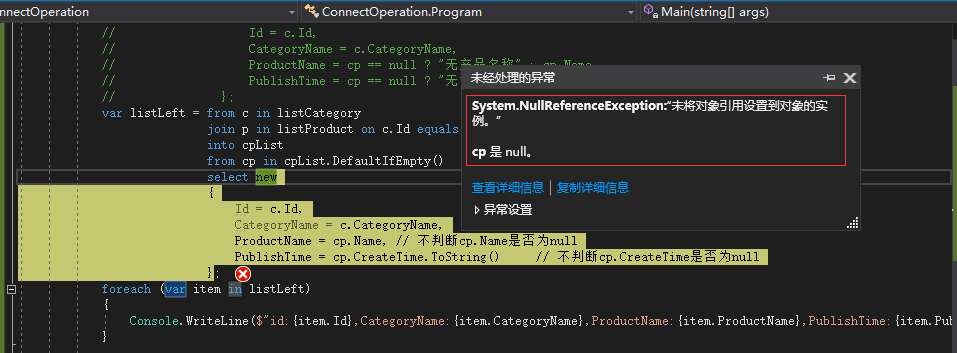
使用方法语法实现左连接要使用下面要讲的GroupJoin(),所以使用方法语法实现左连接放到GroupJoin()中进行讲解。
右连接
其实实现右连接只需要将上面例子中的左表和右边换一下顺序即可。看下面的例子:
using System;

using System.Collections.Generic;

using System.Linq;

using System.Text;

using System.Threading.Tasks;

namespace ConnectOperation

{

    class Program

    {

        static void Main(string[] args)

        {

            // 初始化数据

            List<Category> listCategory = new List<Category>()

            {

              new Category(){ Id=,CategoryName="计算机",CreateTime=DateTime.Now.AddYears(-)},

              new Category(){ Id=,CategoryName="文学",CreateTime=DateTime.Now.AddYears(-)},

              new Category(){ Id=,CategoryName="高校教材",CreateTime=DateTime.Now.AddMonths(-)},

              new Category(){ Id=,CategoryName="心理学",CreateTime=DateTime.Now.AddMonths(-)}

            };

            List<Product> listProduct = new List<Product>()

            {

               new Product(){Id=,CategoryId=, Name="C#高级编程第10版", Price=100.67,CreateTime=DateTime.Now},

               new Product(){Id=,CategoryId=, Name="Redis开发和运维", Price=69.9,CreateTime=DateTime.Now.AddDays(-)},

               new Product(){Id=,CategoryId=, Name="活着", Price=,CreateTime=DateTime.Now.AddMonths(-)},

               new Product(){Id=,CategoryId=, Name="高等数学", Price=,CreateTime=DateTime.Now.AddMonths(-)},

               new Product(){Id=,CategoryId=, Name="国家宝藏", Price=52.8,CreateTime=DateTime.Now.AddMonths(-)}

            };

            // 使用查询表达式实现右连接

            var listRight = from p in listProduct

                            join c in listCategory on p.CategoryId equals c.Id

                            into pcList

                            from pc in pcList.DefaultIfEmpty()

                            select new

                            {

                                Id = p.Id,

                                CategoryName = pc == null ? "无分类名称" : pc.CategoryName,

                                ProductName = p.Name,

                                PublishTime = p.CreateTime

                            };

            foreach (var item in listRight)

            {

                Console.WriteLine($"id:{item.Id},CategoryName:{item.CategoryName},ProductName:{item.ProductName},PublishTime:{item.PublishTime}");

            }

            Console.ReadKey();

        }

    }

}
结果:

从结果中可以看出:listProduct中的数据全部输出了,listCategory中如果没有相应的记录就输出空值。
注意:
在右连接中也需要和左连接一样进行null值的判断。
二、GroupJoin()操作符
GroupJoin()操作符常用于返回“主键对象-外键对象集合”形式的查询,例如“产品类别-此类别下的所有产品”。
GroupJoin操作符也用于连接两个输入序列,但与Join操作符不同稍有不同,Join操作符在列举outer序列元素时,会将一个outer序列元素和其对应的inner序列元素作为一组参数传递给委托resultSelector委托,这就意味着如果某一个outer序列元素有多个对应的inner序列元素,Join操作符将会分多次将outer序列元素和每一个对应的inner序列元素传递给委托resultSelector。使用GroupJoin操作符时,如果某一个outer序列元素有多个对应的inner序列元素,那么这多个对应的inner序列元素会作用一个序列一次性传递给委托resultSelecotr,可以针对此序列添加一些处理逻辑。下面看看GroupJoin()操作符的定义:
 public static IEnumerable<TResult> GroupJoin<TOuter, TInner, TKey, TResult>(this IEnumerable<TOuter> outer, IEnumerable<TInner> inner, Func<TOuter, TKey> outerKeySelector,

  Func<TInner, TKey> innerKeySelector, Func<TOuter, IEnumerable<TInner>, TResult> resultSelector);

 public static IEnumerable<TResult> GroupJoin<TOuter, TInner, TKey, TResult>(this IEnumerable<TOuter> outer, IEnumerable<TInner> inner, Func<TOuter, TKey> outerKeySelector,

 Func<TInner, TKey> innerKeySelector, Func<TOuter, IEnumerable<TInner>, TResult> resultSelector, IEqualityComparer<TKey> comparer);
留意变红的那个委托,注意,与Join操作符的不同点就是一个outer序列中如果有多个对应的inner序列元素,会作为一个集合IEnumerable<TInner>传递到此委托。来看下面的例子:
 using System;

 using System.Collections.Generic;

 using System.Linq;

 using System.Text;

 using System.Threading.Tasks;

 namespace ConnectOperation

 {

     class Program

     {

         static void Main(string[] args)

         {

             // 初始化数据

             List<Category> listCategory = new List<Category>()

             {

               new Category(){ Id=,CategoryName="计算机",CreateTime=DateTime.Now.AddYears(-)},

               new Category(){ Id=,CategoryName="文学",CreateTime=DateTime.Now.AddYears(-)},

               new Category(){ Id=,CategoryName="高校教材",CreateTime=DateTime.Now.AddMonths(-)},

               new Category(){ Id=,CategoryName="心理学",CreateTime=DateTime.Now.AddMonths(-)}

             };

             List<Product> listProduct = new List<Product>()

             {

                new Product(){Id=,CategoryId=, Name="C#高级编程第10版", Price=100.67,CreateTime=DateTime.Now},

                new Product(){Id=,CategoryId=, Name="Redis开发和运维", Price=69.9,CreateTime=DateTime.Now.AddDays(-)},

                new Product(){Id=,CategoryId=, Name="活着", Price=,CreateTime=DateTime.Now.AddMonths(-)},

                new Product(){Id=,CategoryId=, Name="高等数学", Price=,CreateTime=DateTime.Now.AddMonths(-)},

                new Product(){Id=,CategoryId=, Name="国家宝藏", Price=52.8,CreateTime=DateTime.Now.AddMonths(-)}

             };

             // 使用GroupJoin()实现左连接

             var listLeftFun = listCategory.GroupJoin(listProduct, c => c.Id, p => p.CategoryId, (c, listp) => listp.DefaultIfEmpty(new Product()).Select(z =>

                  new

                  {

                      Id = c.Id,

                      CategoryName = c.CategoryName,

                      ProduceName = z.Name,

                      ProductPrice = z.Price

                  })).ToList();

             foreach (var item in listLeftFun)

             {

                 foreach (var p in item)

                 {

                     Console.WriteLine($"CategoryId:{p.Id},CategoryName:{p.CategoryName},ProduceName:{p.ProduceName},ProductPrice:{p.ProductPrice}");

                 }

             }

             Console.ReadKey();

         }

     }

 }
结果:

结果可以看出:使用GroupJoin()操作符可以用Lambda表达式实现左连接。
右连接
只需要调整上面例子中两张表的顺序即可。
 using System;

 using System.Collections.Generic;

 using System.Linq;

 using System.Text;

 using System.Threading.Tasks;

 namespace ConnectOperation

 {

     class Program

     {

         static void Main(string[] args)

         {

             // 初始化数据

             List<Category> listCategory = new List<Category>()

             {

               new Category(){ Id=,CategoryName="计算机",CreateTime=DateTime.Now.AddYears(-)},

               new Category(){ Id=,CategoryName="文学",CreateTime=DateTime.Now.AddYears(-)},

               new Category(){ Id=,CategoryName="高校教材",CreateTime=DateTime.Now.AddMonths(-)},

               new Category(){ Id=,CategoryName="心理学",CreateTime=DateTime.Now.AddMonths(-)}

             };

             List<Product> listProduct = new List<Product>()

             {

                new Product(){Id=,CategoryId=, Name="C#高级编程第10版", Price=100.67,CreateTime=DateTime.Now},

                new Product(){Id=,CategoryId=, Name="Redis开发和运维", Price=69.9,CreateTime=DateTime.Now.AddDays(-)},

                new Product(){Id=,CategoryId=, Name="活着", Price=,CreateTime=DateTime.Now.AddMonths(-)},

                new Product(){Id=,CategoryId=, Name="高等数学", Price=,CreateTime=DateTime.Now.AddMonths(-)},

                new Product(){Id=,CategoryId=, Name="国家宝藏", Price=52.8,CreateTime=DateTime.Now.AddMonths(-)}

             };

             var listRightFun = listProduct.GroupJoin(listCategory, p => p.CategoryId, c => c.Id, (p, listc) => listc.DefaultIfEmpty(new Category()).Select(z =>

             new

             {

                 id = p.Id,

                 ProductName = p.Name,

                 ProductPrice = p.Price,

                 CategoreName = z.CategoryName

             }));

             foreach (var item in listRightFun)

             {

                 foreach (var p in item)

                 {

                     Console.WriteLine($"id:{p.id},ProduceName:{p.ProductName},ProductPrice:{p.ProductPrice},CategoryName:{p.CategoreName}");

                 }

             }

         }

     }

 }
结果:

linq操作符:连接操作符的更多相关文章
- Linq学习之操作符
一.环境搭建 下面将逐步搭建我们学习的环境,这个环境不仅仅是这次需要使用,以后的教程一样需要使用这个环境.所以请大家务必按照 搭建这里的环境否则会影响你后面的学习. 我们用到的几张表 通知消息表: 用 ...
- LINQ标准查询操作符(三)——Aggregate、Average、Distinct、Except、Intersect、Union、Empty、DefaultIfEmpty、Range、Repeat
七.聚合操作符 聚合函数将在序列上执行特定的计算,并返回单个值,如计算给定序列平均值.最大值等.共有7种LINQ聚合查询操作符:Aggregate.Average.Count.LongCount.Ma ...
- Linq 标准查询操作符三
本文介绍了LINQ标准查询操作符.没有这些操作符,LINQ就不会存在.本文为理解这些操作符的功能提供了很好的基础.了解它们将会很有帮助,因为LINQ的各种Provider都是基于这些操作符来完成各自丰 ...
- Linq的查询操作符
Linq有表达式语法和调用方法的语法.两者是可以结合使用,通常情况下也都是结合使用.表达式语法看上去比较清晰而调用方法的语法实现的功能更多,在此文章中介绍的是表达式语法.方法语法可以看System.L ...
- Linq标准查询操作符
Linq的出现让代码简洁了不少.之前在项目中基本都在使用它,但是没有完整的整理过,今天借这个周末,将其进行整理,方便后期对其的使用.Linq的操作可以分为聚合,连接,转换,元素操作符,相等操作,生成 ...
- LINQ 标准查询操作符
本文介绍了LINQ标准查询操作符.没有这些操作符,LINQ就不会存在.本文为理解这些操作符的功能提供了很好的基础.了解它们将会很有帮助,因为LINQ的各种Provider都是基于这些操作符来完成各自丰 ...
- SQL连接操作符介绍(循环嵌套, 哈希匹配和合并连接)
今天我将介绍在SQLServer 中的三种连接操作符类型,分别是:循环嵌套.哈希匹配和合并连接.主要对这三种连接的不同.复杂度用范例的形式一一介绍. 本文中使用了示例数据库AdventureWorks ...
- LINQ标准查询操作符详解(转)
一. 关于LINQ LINQ 英文全称是“Language-Integrated Query”,中文为“语言集成查询”,它是微软首席架构师.Delphi 之父和C# 之父——Anders ...
- python的字符串连接操作符+
如图, 运行后提示错误,这是“+” 是字符串连接操作符,字符串连接只能在被连接的每一个都是字符串时起作用.而以上程序试图将一个字符串同一个非字符串连接会引发一个异常,所以会报错. 正确的为: 或者是:
随机推荐
- 利用nginx搭建RTMP视频点播、直播、HLS服务器
开发环境 Ubuntu 14.04 server nginx-1.8.1 nginx-rtmp-module nginx的服务器的搭建 安装nginx的依赖库 sudo apt-get update ...
- ansible 学习记录
Ansible 的重新学习记录 这里我的Ansible的宿主机是centos 7.2系统,这里我通过yum 安装Ansible 1.配置epel源 sudo yum -y install epel-r ...
- 为jqgrid添加统计金额页脚
为jqgrid增加自定义用户数据 设计统计的金额总和 最后在jgrid组件中添加 最后的效果为:
- webBrowser获取cookie
private void BtnOpenUrl_Click(object sender, EventArgs e) { if (txtUrl.Text != "") { Myweb ...
- pc客户端网页录音和压缩
web录音的功能,也就是怎么使用 getUserMedia 音频上传 栗子中最后返回的是Blob数据 return new Blob([dataview], { type: type }) 因为对ht ...
- 定义log_query_time的值
默认超过10秒的sql才会被记录在慢查询日志里.可以通过long_query_time控制.如果是临时修改:set global long_query_time=4;(把超过4秒的sql记录到慢查询日 ...
- 使用putty部署远程J2EE环境
以前没弄过,开个帖子记录一下. 基本上要做的就是安装JDK.安装tomcat.安装sql. 1.安装JDK JDK在本机上,需要传输到远程linux服务器上.为了存放我们上传的文件.打开putty,进 ...
- SECURITY ONION:防御领域的kali
https://securityonion.net/ Security Onion is a free and open source Linux distribution for intrusion ...
- RHEL7 富规则删除
1. 查看已经创建好的富规则 firewall-cmd --list-rich-rules 2. 删除富规则(******代表已经创建好的完整富规则内容) firewall-cmd --remove- ...
- Ubuntu14.04 64bit 编译安装nginx1.7+php5.4+mysql5.6
我的操作系统是Ubuntu14.04,其它linux系统的操作流程类似. 主要安装的软件是nginx1.7+php5.4+mysql5.6 1. 创建必要目录 sudo mkdir ~/setup s ...