
SVN 执行cleanup报错:Cleanup failed to process the following paths
SVN 执行cleanup报错:Cleanup failed to process the following paths
先来说下这个错误的原因:用SVN在使用过程中,各种原因中途取消或中断,导致需要执行cleanup,但是由于上次操作未完成,在.svn/wc.db中的work_queue表中记录了SVN的工作队列,所以在执行cleanup时就报错了。
解决方法:清空.svn/wc.db中的work_queue表中的工作队列,让SVN没有”Previous operation(上一个操作的信息)”,就可以正常执行cleanup命令了
不多说了,上操作步骤
1、需要在官网上下载Sqlite3.exe(http://www.sqlite.org/download.html)
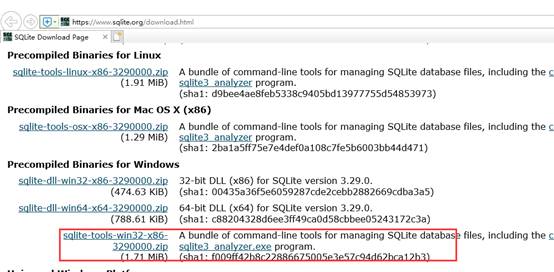
2、下载后解压文件,将解压文件都拷贝到项目路径下的”.svn”中,与”wc.db”同级目录
这里注意下:默认”.svn”时隐藏的,通过文件夹选项”显示隐藏的文件、文件夹和驱动器”设置显示”.svn”文件夹
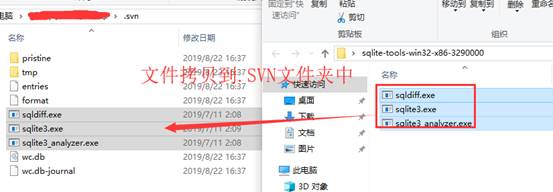
3、然后就是执行命令了,执行查询和删除命令
1)通过cmd命令控制台将目录转到svn版本控制的文件夹的.SVN
2)查询命令:可查询work_queue 表中是否有工作队列(嘿嘿,有点多余,因为都知道有了,不然也不来找解决方法了)
sqlite3 wc.db "select * from work_queue"
3)删除命令:删除work_queue 表中的工作队列
sqlite3 wc.db "delete from work_queue"
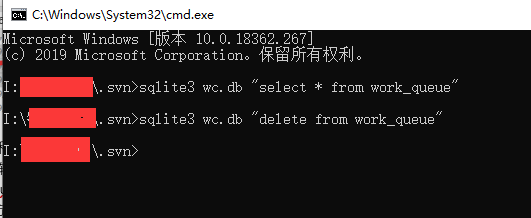
最后,再去试下cleanup,就好了
SVN 执行cleanup报错:Cleanup failed to process the following paths的更多相关文章
- svn报错cleanup failed–previous operation has not finished; run cleanup if it was interrupted的解决办法
今天在svn提交的时候它卡顿了一下,我以为已经提交完了,就按了一下,结果就再也恢复不了,也继续不了了... 报错 cleanup failed–previous operation has not f ...
- svn报错cleanup failed–previous operation has not finished; run cleanup if it was interrupte...
今天在svn提交的时候它卡顿了一下,我以为已经提交完了,就按了一下,结果就再也恢复不了,也继续不了了... 报错 cleanup failed–previous operation has not f ...
- svn-clearup 报错的处理(Cleanup failed to process the following paths...)
在使用 svn 客户端执行操作失败后,执行 Clean up 操作也报错:Cleanup failed to process the following paths... ,一直不知道是什么原因.通常 ...
- SVN Cleanup failed to process the following paths错误的解决
在使用TortoiseSVN工具执行Cleanup操作时经常出现Cleanup failed to process the following paths的错误,具体如下图: 网上搜索了一下,找到了解 ...
- 解决SVN Cleanup时遇到错误信息:Cleanup failed to process the following paths:xxxxxxx Previous operation has not finished: run 'cleanup' if it was interrupted Please execute the 'Cleanup' command.
解决SVN Cleanup时遇到错误信息:Cleanup failed to process the following paths:xxxxxxx Previous operation has no ...
- 执行opatch apply 报错 OPatch failed with error code 73
.执行opatch apply 报错 OPatch failed [oracle@ora_11g 14275605]$ /opt/oracle/product/db_1/OPatch/opatch a ...
- Cleanup failed to process the following paths错误的解决
在使用TortoiseSVN工具执行Cleanup操作时经常出现Cleanup failed to process the following paths的错误,具体如下图: 网上搜索了一下,找到了解 ...
- selenium执行js报错
selenium执行js报错 Traceback (most recent call last): dr.execute_script(js) File "C:\Python27\l ...
- ionic报错: Failed to load resource
隔了一天,才发现是代码写错了 出错的原因是在ts 文件中使用这样的定义 data: [] = ['高新区', '经开区', '其他园区']; 错误在于这个定义的类型,不能是 [],修改成 any就没有 ...
随机推荐
- redis列表和有序集合
redis中的list数据类型是可以插入重复数据的,有去重的需求的话可以用redis有序集合数据类型 Redis Zadd 命令用于将一个或多个成员元素及其分数值加入到有序集当中. 如果某个成员已经是 ...
- 如何禁用maven下载进度指示?
方法 mvn -B ..或者mvn --batch-mode ...
- php5.6安装及php-fpm优化配置
1,安装依赖包: yum install -y gcc gcc-c++ zlib zlib-devel pcre pcre-devel gd libjpeg libjpeg-devel libpn ...
- nginx check健康检查
nginx利用第三方模块nginx_upstream_check_module来检查后端服务器的健康情况 大家都知道,前段nginx做反代,如果后端服务器宕掉的话,nginx是不能把这台realser ...
- [转帖]18W喂不饱有必要买30W充电器吗?iPhone 11 Pro Max充电评测
18W喂不饱有必要买30W充电器吗?iPhone 11 Pro Max充电评测 https://www.cnbeta.com/articles/tech/895237.htm 改天买一个 设备玩一玩 ...
- Java面试题代码篇
1.统计字符串中的各种字符的个数并对其排序 package JavaMianSiTest; public class TongJIZiFu { public static void main(Stri ...
- 去掉右键Open Folderas Intellij IDEA Project
解决: WIN+R键打开运行,输入regedit 打开注册表 在地址栏输入: 计算机\HKEY_CLASSES_ROOT\Directory\Background\shell\Powershell 然 ...
- web 系统发展历程
文章目录 web系统的发展历程 ------- **单机`mysql`的美好年代** ------ **Memcached(缓存)+Mysql+垂直拆分** ------ **mysql 主从读写分离 ...
- C++:盾神与条状项链
实现代码如下: #include<cstdlib> #include <string> #include <iostream> using namespace st ...
- js基础——数组的概念及其方法
数组: 概念:是一种特殊的对象. 与普通对象的区别:a.普通对象使用字符串作为属性名,而数组使用数字作为索引来操作元素: b.数组的存储性能比普通对象好 数组的标志:[ ] 数组的索引:是从0开始的整 ...