
(转载)如何创建一个以管理员权限运行exe 的快捷方式? How To Create a Shortcut That Lets a Standard User Run An Application as Administrator
How To Create a Shortcut That Lets a Standard User Run An Application as Administrator

Want to allow a standard user account to run an application as administrator without a UAC or password prompt? You can easily create a shortcut that uses the runas command with the /savecred switch, which saves the password.
Note that using /savecred could be considered a security hole – a standard user will be able to use the runas /savecred command to run any command as administrator without entering a password. However, it’s still useful for situations where this doesn’t matter much – perhaps you want to allow a child’s standard user account to run a game as Administrator without asking you.
We’ve also covered allowing a user to run an application as Administrator with no UAC prompts by creating a scheduled task.
Enabling the Administrator Account
First you’ll need to enable the built-in Administrator account, which is disabled by default.
To do so, search for Command Prompt in the Start menu, right-click the Command Prompt shortcut, and select Run as administrator.
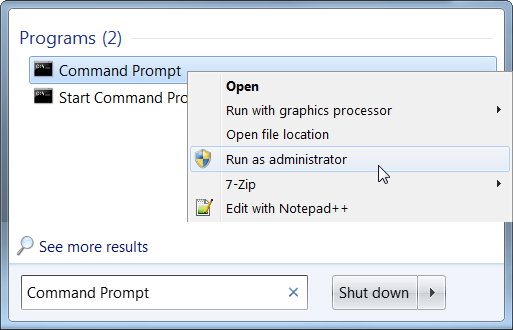
Run the following command in the elevated Command Prompt window that appears:
net user administrator /active:yes
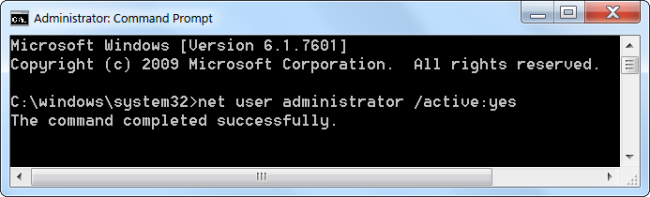
The Administrator user account is now enabled, although it has no password.
To set a password, open the Control Panel, select User Accounts and Family Safety, and select User Accounts. Click the Manage another account link in the User Accounts window.
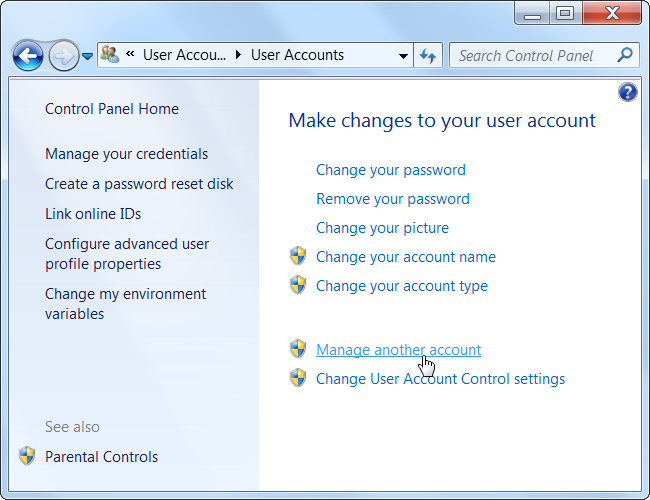
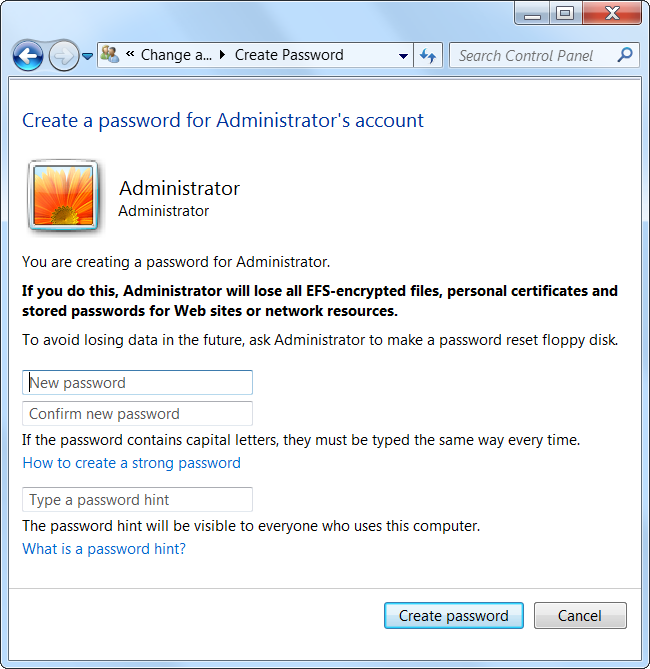
Select the Administrator account, click Create a password, and create a password for the Administrator account.
Creating the Shortcut
Now we’ll create a new shortcut that launches the application with Administrator privileges.
Right-click the desktop (or elsewhere), point to New, and select Shortcut.
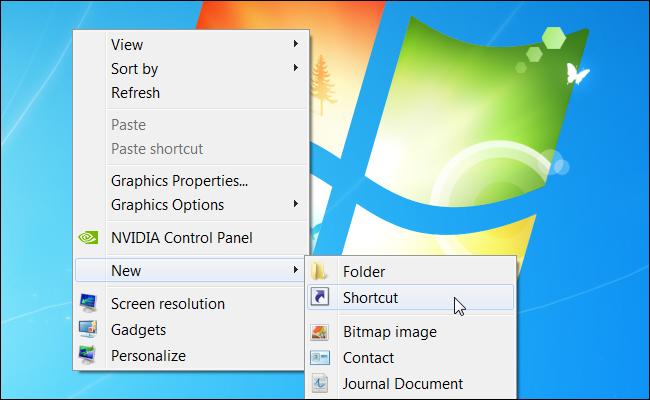
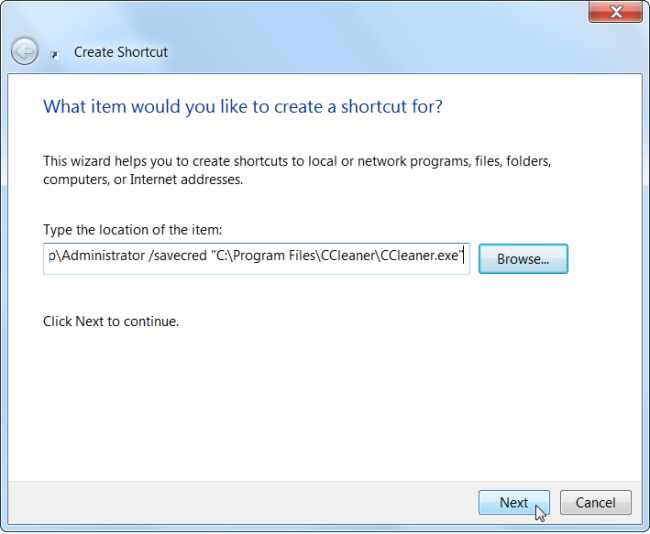
Enter a command based on the following one into the box that appears:
runas /user:%computername%\Administrator /savecred “C:\Path\To\Program.exe“
Replace ComputerName with the name of your computer and C:\Path\To\Program.exe with the full path of the program you want to run. For example, if your computer’s name was Laptop and you wanted to run CCleaner, you’d enter the following path:
runas /user:%computername%\Administrator /savecred “C:\Program Files\CCleaner\CCleaner.exe”
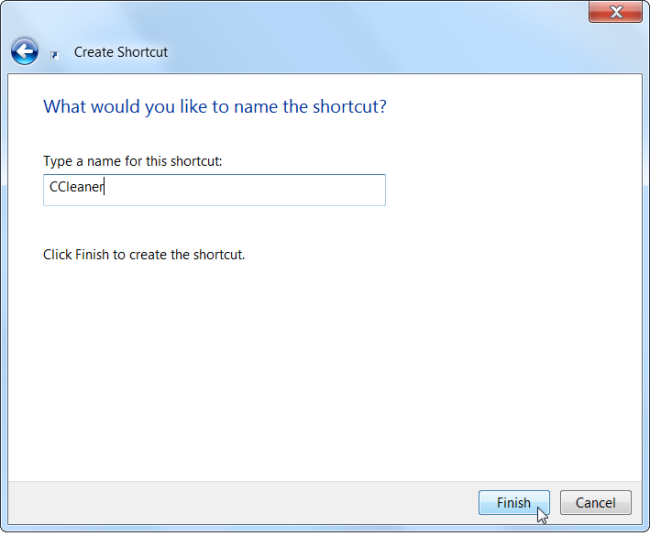
Enter a name for the shortcut.
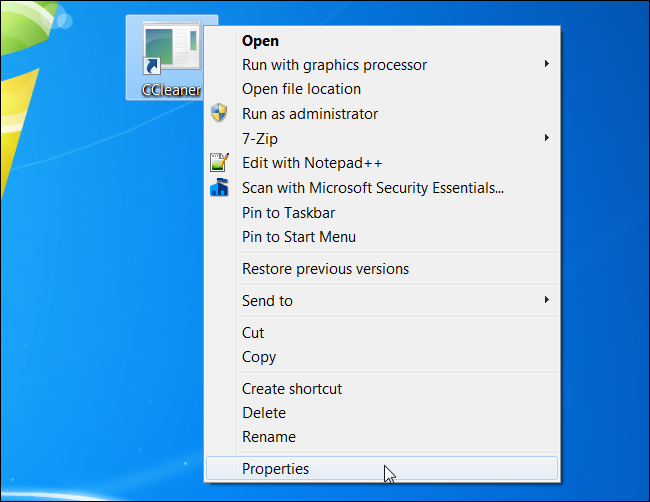
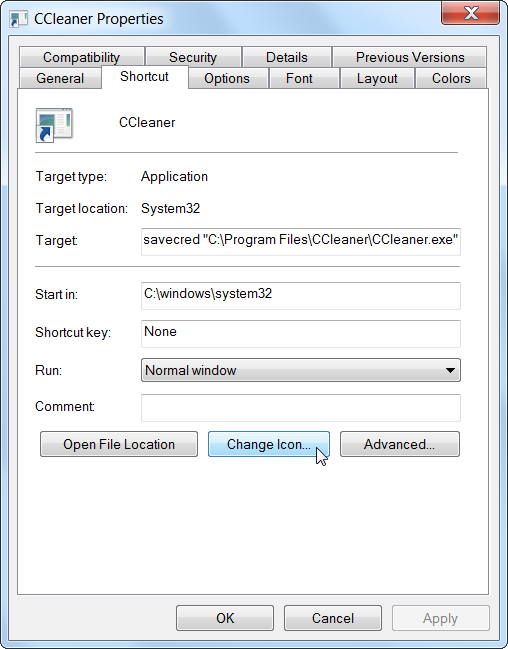
To select an icon for your new shortcut, right-click it and select Properties.
Click the Change Icon button in the Properties window.
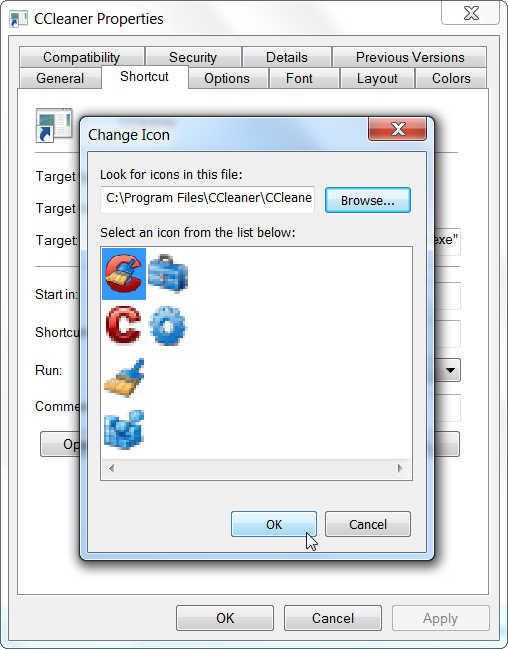
Select an icon for your shortcut. For example, you can browser to CCleaner.exe and choose an icon associated with it. If you’re using an other program, browse to its .exe file and select your preferred icon.
The first time you double-click your shortcut, you’ll be prompted to enter the Administrator account’s password, which you created earlier.

This password will be saved – the next time you double-click the shortcut, the application will launch as Administrator without asking you for a password.
As we mentioned above, the standard user account now has the ability to run any application as Administrator without entering a password (using the runas /savecred command to launch any .exe file), so bear that in mind.
The Administrator password is saved in the Windows Credential Manager – if you want to remove the saved password, you can do it from there.
(转载)如何创建一个以管理员权限运行exe 的快捷方式? How To Create a Shortcut That Lets a Standard User Run An Application as Administrator的更多相关文章
- bat 判断 bat 是否是以管理员权限运行,和自动以管理员权限运行
bat 判断 bat 是否是以管理员权限运行,和自动以管理员权限运行 判断 @echo off net.exe session 1>NUL 2>NUL && ( goto ...
- sharepoint 脚本 强迫以管理员权限运行
#region 关键代码:强迫以管理员权限运行 $currentWi = [Security.Principal.WindowsIdentity]::GetCurrent() $currentWp = ...
- vs2005 ,2008,2010中引入app.manifest(即c#程序在win7下以管理员权限运行方法)
打开VS2005.VS2008.VS2010工程,查看工程文件夹中的Properties文件夹下是否有app.manifest这个文件:如没有,按如下方式创建:鼠标右击工程在菜单中选择“属性”,点击工 ...
- Visual Studio 中用管理员权限运行、调试程序
原文:Visual Studio 中用管理员权限运行.调试程序 一个Sample小程序,用于验证WoW64的Windows Registry的读写访问.在Visual Studio 2010中调试运行 ...
- 如何设置默认以管理员权限运行cmd
设置cmd以管理员权限运行 目的:创建或删除文件等命令时,需要管理员权限运行cmd(linux以root用户登录). 例如,创建日志目录. 方法一: 1.激活administrator用户 2 ...
- RobotFramework环境配置:默认以管理员权限运行cmd
设置cmd以管理员权限运行 目的:创建或删除文件等命令时,需要管理员权限运行cmd(linux以root用户登录). 例如,创建日志目录. 方法一: 1.激活administrator用户 2 ...
- C#程序以管理员权限运行(ZT)
本文转载:http://www.cnblogs.com/Interkey/p/RunAsAdmin.html 在Vista 和 Windows 7 及更新版本的操作系统,增加了 UAC(用户账户控制) ...
- 让InstallShield 2015 Limited Edition for Visual Studio 2015生成的setup.exe双击时以管理员权限运行
转载:http://blog.csdn.net/zztoll/article/details/52096700 如题,如何让InstallShield 2015 Limited Edition for ...
- 如何让QT程序以管理员权限运行(UAC)
方案一:(仅适用于使用msvc编译器) 在PRO文件中添加一行指令即可, QMAKE_LFLAGS += /MANIFESTUAC:"level='requireAdministrator' ...
随机推荐
- JAVA遇见HTML——Servlet篇:Servlet基础
代码实现: HelloServlet package servlet; import java.io.IOException; import java.io.PrintWriter; import j ...
- 添加索引:BLOB/TEXT column 'xxx' used in key specification without a key length
问题 1. 将DataFrame数据保存到mysql后,添加索引出现错误提示: BLOB/TEXT column used in key specification without a key len ...
- JQuery 实践--扩展JQuery
Why扩展JQuery通过扩展可以利用JQuery所提供的现有代码基础.避免从头编写代码 有效扩展JQuery的规则扩展JQuery的两种形式: $上直接定义实用工具函数 和JQuery包装集进行操作 ...
- 本地启动服务,两个进程分别监听两个端口,导致两个 URL 不同
问题描述: 本地启了两个服务:A(http://localhost:8001) B(http://localhost:8000),A 项目要怎么才能关联到 B 项目,也就是 A 项目请求怎么跳到 B ...
- Celery和Flask
第一章:Celery 第二章:Flask登录 第三章:flask简介 第四章:flask应用启动流程 第五章:路由第六章:上下文 第七章:请求 第八章:响应 第九章:session
- python 关键参数和默认值
def hello_key(greeting='hello', name='world'): print('%s, %s' % (greeting, name)) hello_key() hello_ ...
- .pid文件
pid文件为进程文件,默认的在每个/var/run/目录下生成,当使用systemctl进行进程启动的时候,在这个目录下就会生成相应的pid文件,今天在进行poc测试的时候,对进程执行了enable操 ...
- 国庆集训Day1
T1 divide 题意: 有\(n\)个数 \(a_1, a_2,..., a_n\) 有m个数\(b_1, b_2,..., b_n\) 令\(a = a_1\times a_2\,\times ...
- windows游戏编程了解消息事件模型
本系列文章由jadeshu编写,转载请注明出处.http://blog.csdn.net/jadeshu/article/details/22309265 作者:jadeshu 邮箱: jades ...
- python的openpyxl的使用笔记
openpyxl模块介绍 openpyxl模块是一个读写Excel 2010文档的Python库,如果要处理更早格式的Excel文档,需要用到额外的库,openpyxl是一个比较综合的工具,能够同时读 ...