
Web API 简单示例
一、RESTful和Web API
Representational State Transfer (REST) is a software architecture style consisting of guidelines and best practices for creating scalable web services. REST is a coordinated set of constraints applied to the design of components in a distributed hypermdedia system that can lead to a more performant and maintainable architecture. -- wikipedia
ASP.NET Web API is a framework that makes it easy to build HTTP services that reach a broad range of clients, including browsers and mobile devices. ASP.NET Web API is an ideal platform for building RESTful applications on the .NET Framework.
原来RESTful是一种软件架构风格(REST是一种设计风格,而不是一种标准),而ASP.NET Web API是其在.NET平台的一种标准/实现。目前在三种主流的Web Services实现方案中,因为REST模式与复杂的SOAP和XML -PRC相比更加简洁,越来越多的web服务开始采用REST风格设计和实现。
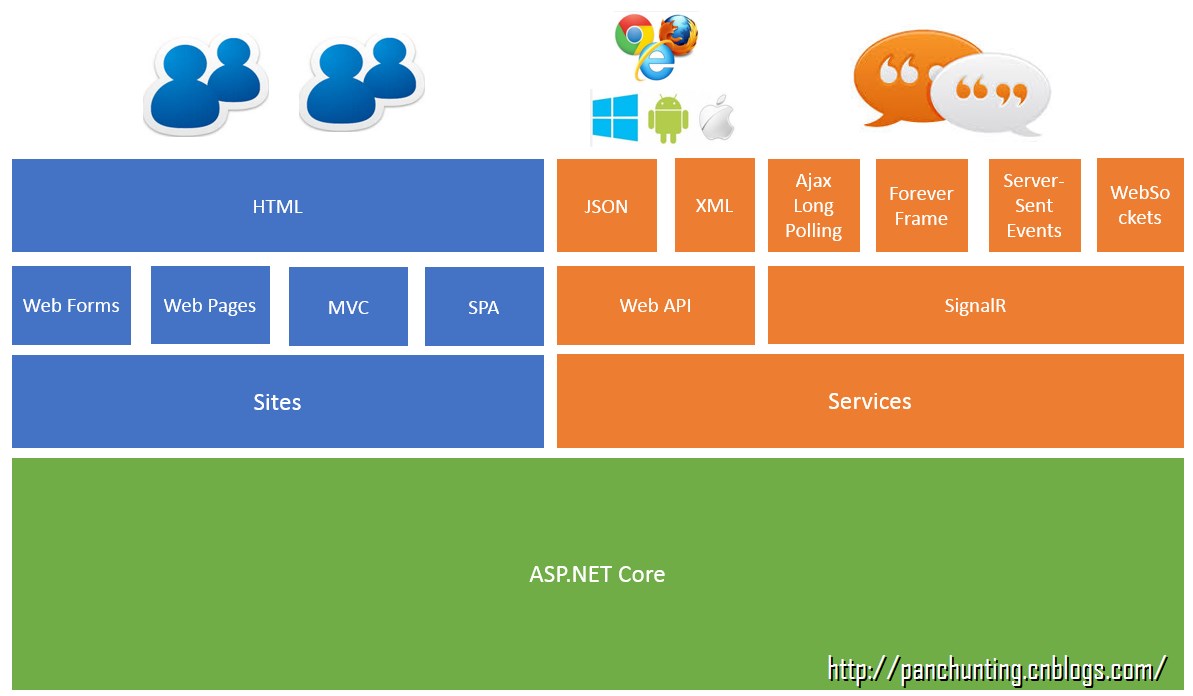
ASP.NET整体框架结构如下图。可以看出,Web API支持JSON和XML,面向的是多种客户终端,包括多浏览器和各种移动设备。
二、简单示例
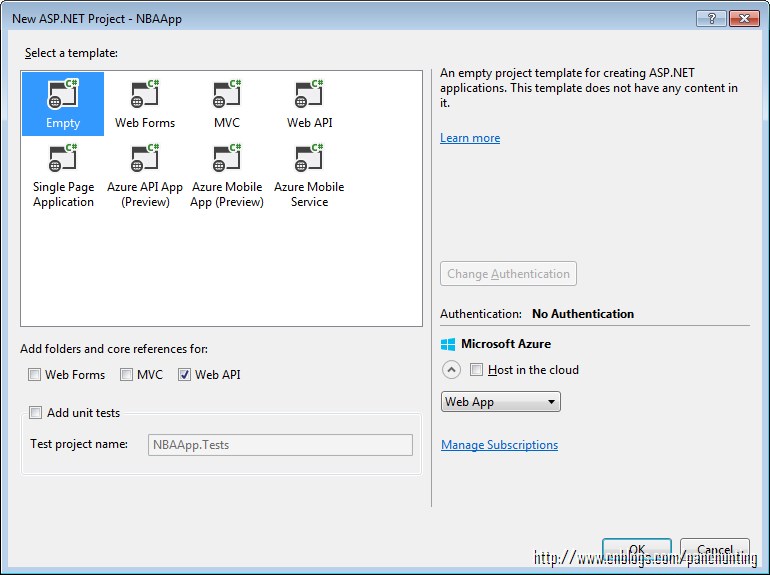
新建ASP.NET Web Application,命名NBAApp

选择Empty模板,下面选择Web API,更改Authentication为No Authentication
新建一个Model - Player
using System;

using System.Collections.Generic;

using System.Linq;

using System.Web;

namespace NBAApp.Models

{

    public class Player

    {

        public int Id { get; set; }

        public int No { get; set; }

        public string Name { get; set; }

        public string Position { get; set; }

        public string Team { get; set; }

    }

}
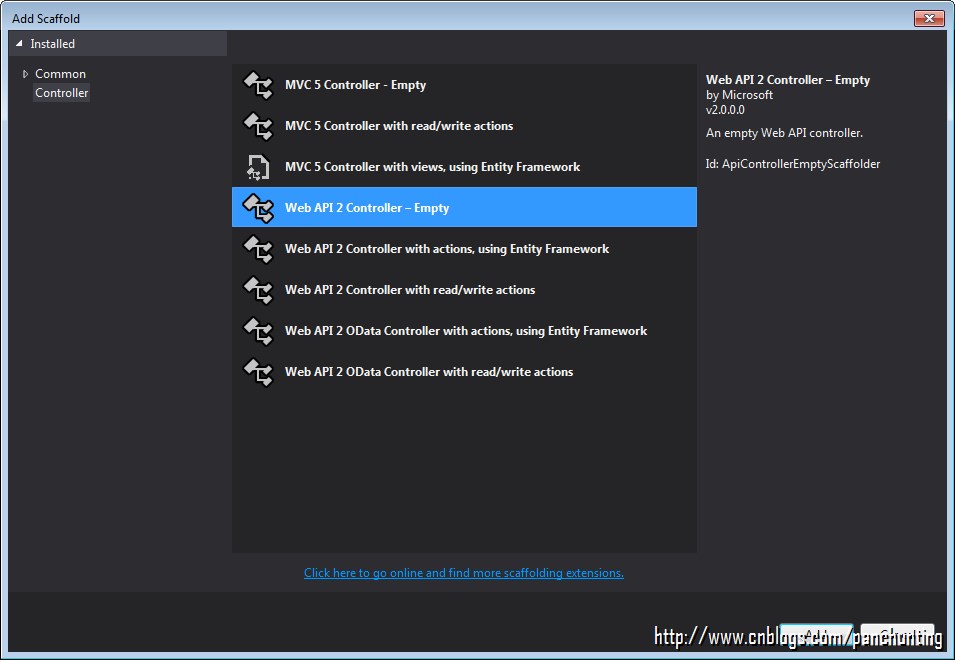
新建Controller - PlayersController,模板选择Web API 2 Controller - Empty
编辑代码如下
using NBAApp.Models;

using System;

using System.Collections.Generic;

using System.Linq;

using System.Net;

using System.Net.Http;

using System.Web.Http;

namespace NBAApp.Controllers

{

    public class PlayersController : ApiController

    {

        Player[] players = new Player[] {

            new Player { Id = , No = , Name = "Chris Paul", Position = "Point Guard", Team = "Los Angeles Clippers" },

            new Player { Id = , No = , Name = "Dwyane Wade", Position = "Shooting Guard", Team = "Miami Heat" },

            new Player { Id = , No = , Name = "LeBron James", Position = "Forward", Team = "Cleveland Cavaliers" },

            new Player { Id = , No = , Name = "Tim Duncan", Position = "Power forward", Team = "San Antonio Spurs" },

            new Player { Id = , No = , Name = "Marc Gasol", Position = "Center", Team = "Memphis Grizzlies" }

        };

        public IEnumerable<Player> GetAllPlayers()

        {

            return players;

        }

        public IHttpActionResult GetPlayer(int id)

        {

            var player = players.FirstOrDefault<Player>(p => p.Id == id);

            if (player == null)

            {

                return NotFound();

            }

            return Ok(player);

        }

    }

}
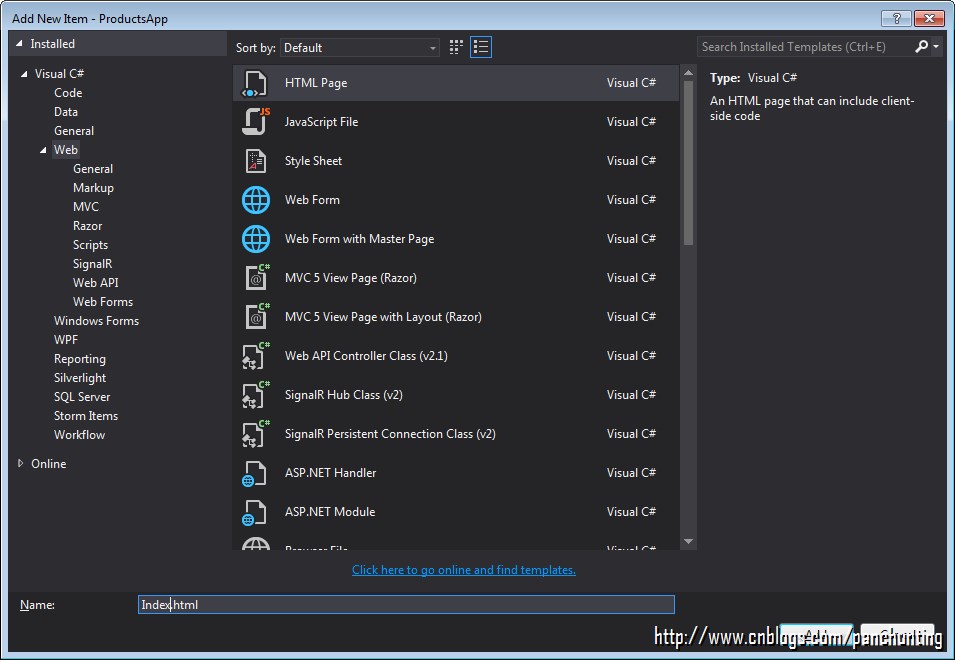
添加Html - Index.html页面
编辑代码如下
<!DOCTYPE html>

<html xmlns="http://www.w3.org/1999/xhtml">

<head>

    <title>NBA App</title>

</head>

<body>

    <div>

        <h2>All Players</h2>

        <ul id="players" />

    </div>

    <div>

        <h2>Search by ID</h2>

        <input type="text" id="prodId" size="5" />

        <input type="button" value="Search" onclick="find();" />

        <p id="player" />

    </div>

    <script src="http://ajax.aspnetcdn.com/ajax/jQuery/jquery-2.0.3.min.js"></script>

    <script>

        var uri = 'api/players';

        $(document).ready(function () {

            // Send an AJAX request

            $.getJSON(uri)

                .done(function (data) {

                    // On success, 'data' contains a list of players.

                    $.each(data, function (key, item) {

                        // Add a list item for the player.

                        $('<li>', { text: formatItem(item) }).appendTo($('#players'));

                    });

                });

        });

        function formatItem(item) {

            return item.Id + ": " + item.Name + "(" + item.No + ')' + " - " + item.Team + "(" + item.Position + ")";

        }

        function find() {

            var id = $('#prodId').val();

            $.getJSON(uri + '/' + id)

                .done(function (data) {

                    $('#player').text(formatItem(data));

                })

                .fail(function (jqXHR, textStatus, err) {

                    $('#player').text('Error: ' + err);

                });

        }

    </script>

</body>

</html>
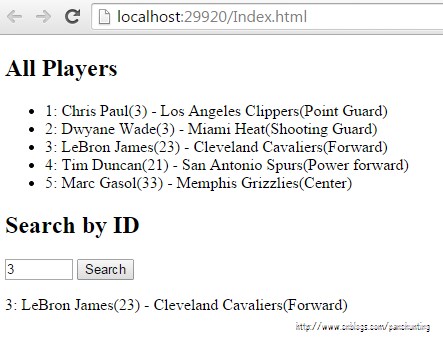
执行效果如下(Chrome浏览器)
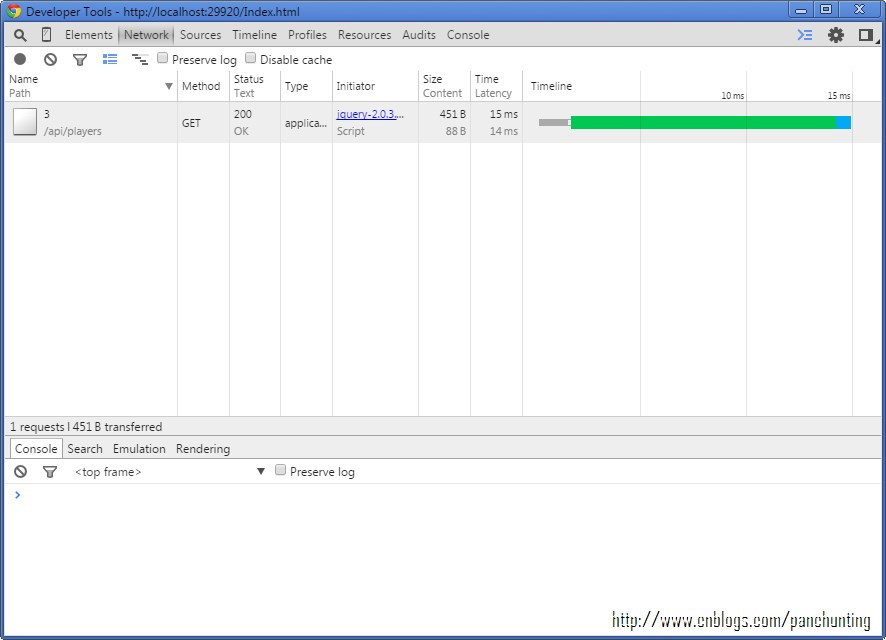
F12调出Developer Tools,点击红点Recording Network Log,刷新页面,结果如下
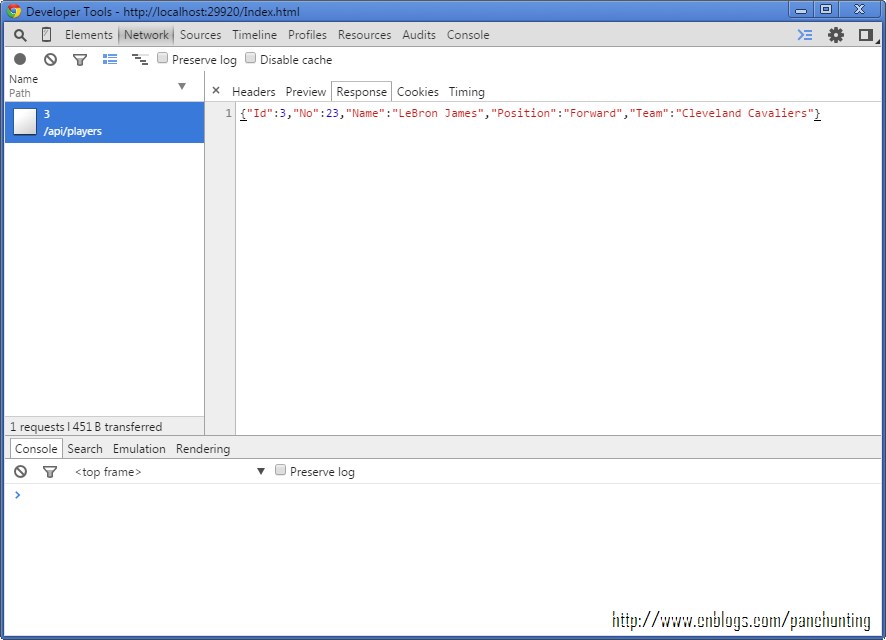
点击进去,并选择Response标签,可以清楚地看到传输交换的是JSON格式的字符
代码下载
Web API 简单示例的更多相关文章
- ASP.NET Web API 开篇示例介绍
ASP.NET Web API 开篇示例介绍 ASP.NET Web API 对于我这个初学者来说ASP.NET Web API这个框架很陌生又熟悉着. 陌生的是ASP.NET Web API是一个全 ...
- ASP.NET Web API使用示例
原文地址:https://blog.csdn.net/chinacsharper/article/details/21333311 上篇博客讲解rest服务开发时,曾经提到过asp.net mvc中的 ...
- webservice和wcf和web.api简单介绍
转自:无废话的wcf等等 在.net平台下,有大量的技术让你创建一个HTTP服务,像Web Service,WCF,现在又出了Web API.在.net平台下,你有很多的选择来构建一个HTTP Ser ...
- C#版ASP.NET Web API使用示例
为更好更快速的上手Webapi设计模式的接口开发,本文详细解释了在Web API接口的开发过程中,我们可能会碰到各种各样的问题总结了这篇,希望对大家有所帮助. 1:在接口定义中确定MVC的get或者P ...
- ASP.net Web API综合示例
目录 概述 功能介绍 程序结构 服务器端介绍 客户端介绍 “契约” Web API设计规则 并行写入冲突与时间戳 身份验证详解 Web API验证规则 客户端MVVM简介 Web.Config 本DE ...
- ASP.NET Web API 入门示例详解
REST服务已经成为最新的服务端开发趋势,ASP.NET Web API即为.NET平台的一种轻量级REST架构. ASP.NET Web API直接借鉴了ASP.NET MVC的设计,两者具有非常类 ...
- 关于ASP.NET MVC4 Web API简单总结
原文地址:http://www.cnblogs.com/lei2007/archive/2013/02/01/2888706.html wcf web api 和 asp.net web api , ...
- ASP.NET MVC Web API使用示例
上篇博客讲解rest服务开发时,曾经提到过asp.net mvc中的rest api,由于篇幅原因,没有在上篇博客中进行讲解,这里专门拿出来进行讨论.还是一样引用上次的案例,用asp.net mvc提 ...
- web api简单验证实现办法
需要使用WEBAPI,但是有验证问题没解决.后来参考网上文章做了一下DEMO 思路: 就是根据用户的账号在服务端加密一个字符串,然后返回给用户端. 具体: 一个用户编号用于唯一身份识别,密码,一个密钥 ...
随机推荐
- CSS 知识汇总
1: inline-block 元素 IE6 7下只有 inline 的元素有 inline-block, 比如 span元素,如果要使其它元素有 inline-block,比如 div 有 in ...
- EAS linux挂载数据盘
查看数据盘名称 fdisk -l 假设没有挂载的数据盘为/dev/xvdb 格式化数据盘 mkfs.ext3 /dev/xvdb 添加自动挂载 mkdir /data echo '/dev/xvdb ...
- LinQ 高级查询
高级查询 模糊查(包含):.Contains(name) 开头:.StartsWith(name) 结尾:.EndsWith(name) 个数:.Count() 最大值:Max(r => r.p ...
- afterTextChanged() callback being called without the text being actually changed
afterTextChanged() callback being called without the text being actually changed up vote8down votefa ...
- JSF 嵌套
<ui:composition xmlns="http://www.w3.org/1999/xhtml" xmlns:ui="http://java.sun.com ...
- 用window.showModelDialog() 打开的页面的返回值
有两个页面也个 Default1.aspx 另外一个是 Default2.aspx Default1.aspx 有个按钮是用来打开Default2.aspx页面的 按钮的js代码是 var win ...
- fastjson基本使用 (待大量完善)
参考: http://blog.csdn.net/wx_962464/article/details/37612861 maven库下载 fastjson基本使用 import java.util.A ...
- .NET Remoting原理及应用实例:
Remoting:(本文摘自百度百科) 简介: 什么是Remoting,简而言之,我们可以将其看作是一种分布式处理方 式.从微软的产品角度来看,可以说Remoting就是DCOM的一种升 ...
- linux中的开机和关机命令
与关机.重新启动相关的命令 * 将数据同步写入硬盘中的命令 sync * 惯用的关机命令 shutdown * 重新启动.关机 reboot halt poweroff sync 强制将内存中的 ...
- Shi-Tomasi角点检测
代码示例: #include <opencv2/highgui/highgui.hpp> #include <opencv2/imgproc/imgproc.hpp> #inc ...