
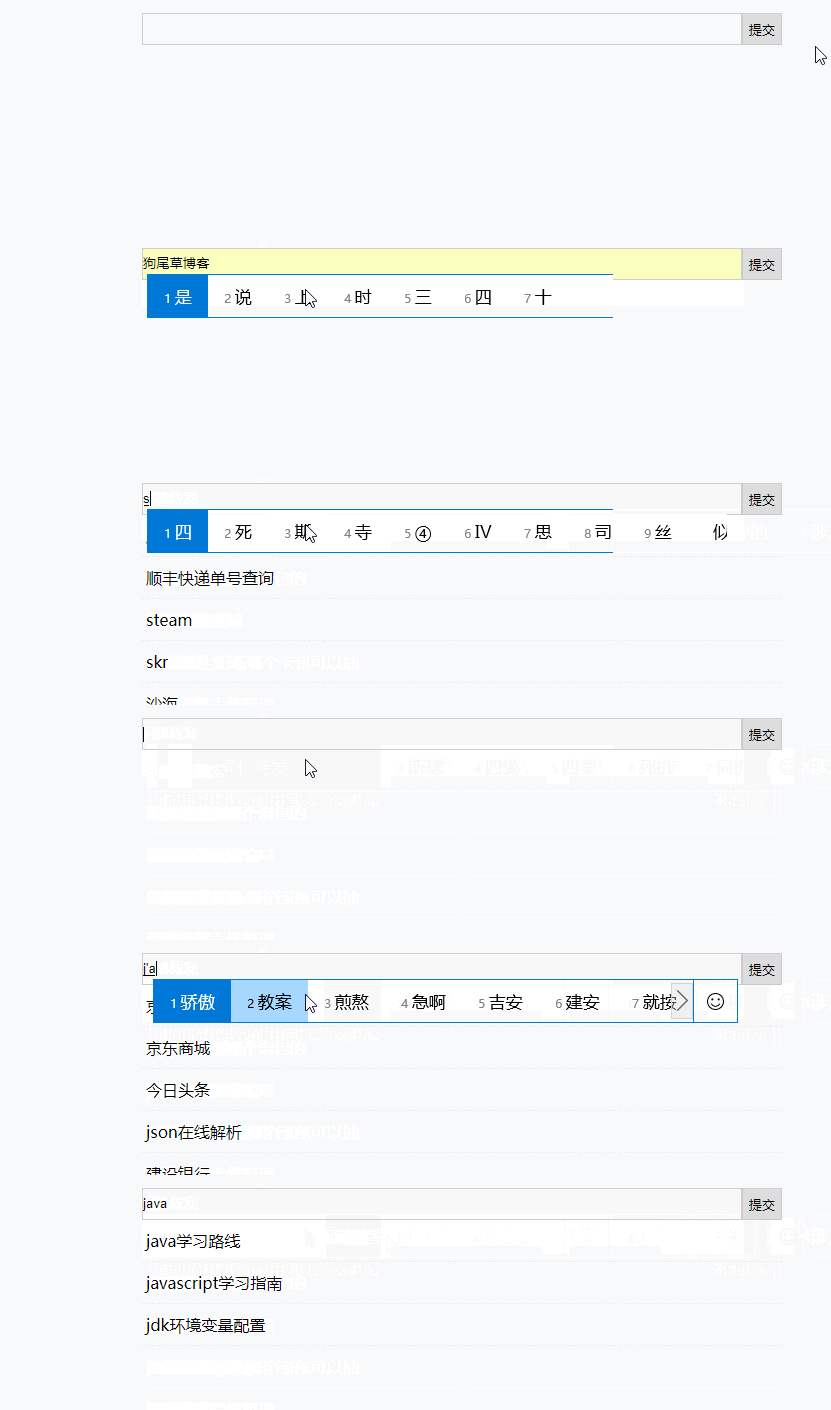
js实现百度,淘宝搜索功能
.gif)
function byClassName(sClassName){

    if(document.getElementsBYClassName){

        return document.getElementsByClassName(sClassName);

    } else {

        var allTagsName = document.getElementsByTagName('*');

        var result = [];

        for(var i = 0; i<allTagsName.length;i++){

            if(allTagsName[i].className === sClassName){

                result.push(allTagsName[i]);

            }

        }

        return result;

    }

}
var oTxt = byClassName('txt')[0];

var oBtn = byClassName('btn')[0];

var oList = byClassName('list')[0];

oTxt.onpropertychange = oTxt.oninput  = function(){

//    先创建一个script标签,引入接口

    var oScript = document.createElement('script');

    oScript.src = 'https://suggest.taobao.com/sug?code=utf-8&q='+ this.value+'&_ksTS=1519875402602_594&callback=callback';

//    将script标签添加到页面中

    document.body.appendChild(oScript);

//    移除标签

    document.body.removeChild(oScript);

}

//创建回调函数接收数据

function callback(data){

    oList.innerHTML = '';

    data.result.forEach( v => {

        var oLi = document.createElement('li');

        oLi.innerHTML = v;

        oList.appendChild(oLi);

        oLi.onclick = function(){

            oTxt.value = oLi.innerHTML;

            oList.innerHTML = '';

        }

    });

}
<!DOCTYPE html>

<html lang="en">

<head>

    <meta charset="UTF-8">

    <title>百度搜索</title>

    <style type="text/css">

        * {

            margin: 0;

            padding: 0;

            box-sizing: border-box;

        }

        form[name=search-form] {

            margin: 40px auto 0;

            width: 640px;

        }

        input[name='search-content'] {

            width: 600px;

            line-height: 30px;

            border:1px solid #ccc;

            vertical-align: bottom;

            outline: none;

        }

        input[name='search-btn'] {

            width: 40px;

            height: 32px;

            border: 1px solid #ccc;

            outline: none;

            cursor: pointer;

        }

        #list {

            list-style: none;

            margin: 0 auto;

            width: 640px;

        }

        #list li {

            padding: 10px 4px;

            border-bottom: 1px dashed #eee;

        }

    </style>

</head>

<body>

    <form action="javascript:;" name="search-form">

        <input type="text" name="search-content"><input type="submit" name="search-btn">

    </form>

    <ul id="list"></ul>

    <script>

        var oForm = document.forms['search-form'];

        var oContent = oForm.elements['search-content'];

        var oList = document.getElementById('list');

        // 定义回调函数

        function callback(data) {

            oList.innerHTML = '';

            data.s.forEach( v => {

                var oLi = document.createElement('li');

                oLi.innerHTML = v;

                oList.appendChild(oLi);

            });

        }

        oContent.onpropertychange = oContent.oninput = function () {

            var oScript =document.createElement('script');

            oScript.src = 'https://sp0.baidu.com/5a1Fazu8AA54nxGko9WTAnF6hhy/su?wd=' + this.value + '&json=1&p=3&sid=1464_25548_21101_18559_17001_20719&req=2&csor=1&cb=callback';

            document.body.appendChild(oScript);

            document.body.removeChild(oScript);

        };

    </script>

</body>

</html>
<!DOCTYPE html>

<html>

<head>

<meta charset="utf-8" />

<title>跨域请求数据</title>

<style>

    *{

        margin: 0;

        padding: 0;

    }

    ul li{

        list-style: none;

    }

    form{

        width: 640px;

        margin: 30px auto 0;

        position: relative;

    }

    input{

        box-sizing: border-box;

        outline: none;

    }

    .txt{

        width: 600px;

        line-height: 30px;

        vertical-align: bottom;

        border: 1px solid #ccc;

    }

    .btn{

        width: 40px;

        height: 32px;

        border: 1px solid #ccc;

        cursor: pointer;

    }

    .list{

        position: absolute;

    }

    .list li{

        width: 592px;

        padding: 10px 4px;

        cursor: pointer;

    }

    .list li:hover{

        background: #eee;

    }

</style>

</head>

<body>

    <form action="javascript:;">

        <input class="txt" type="text" /><input class="btn" type="submit" />

    <ul class="list"></ul>

    </form>

    <script src="js/common.js"></script>

    <script src="js/index.js"></script>

</body>

</html>
js实现百度,淘宝搜索功能的更多相关文章
- JS实现选择菜单栏(配合慕课网淘宝搜索框的课程)
以下是关于实现慕课网淘宝搜索框的JS代码,不过只有选择菜单栏(其余比较容易实现). <!doctype html> <html> <head> <!--在IE ...
- vue实现淘宝购物车功能
淘宝购物车功能,效果如下图 非常简单的逻辑,没有做代码的封装,代码如下 <div class="list-container"> <div class=" ...
- selenium+PhantomJS 抓取淘宝搜索商品
最近项目有些需求,抓取淘宝的搜索商品,抓取的品类还多.直接用selenium+PhantomJS 抓取淘宝搜索商品,快速完成. #-*- coding:utf-8 -*-__author__ =''i ...
- solr入门之參考淘宝搜索提示功能优化拼音加汉字搜索功能
首先看一下从淘宝输入搜索keyword获取到的一些数据信息: 第一张:使用拼音的全程来查询 能够看到提示的是匹配的转换的拼音的方式,看最后一个提示项 这里另一个在指定分类文件夹下搜索的功能,难道后台还 ...
- js 实现淘宝放大镜功能,可更改配置参数 带完整版解析代码[magnifier.js]
前言: 本人纯小白一个,有很多地方理解的没有各位大牛那么透彻,如有错误,请各位大牛指出斧正!小弟感激不尽. 本篇文章为您分析一下原生JS写淘宝放大镜效果 基本功能: 运 ...
- 百度搜索词&淘宝搜索词 接口实现
百度和淘宝并没有正式的提供一个公开API给我们用,但是经过分析他们的源代码,还是找到了解决方法. 1 2 3 4 5 6 7 8 9 /*baidu&taobao callback*/ fun ...
- 百度-淘宝-360搜索引擎搜索API
百度(baidu) Api地址:http://suggestion.baidu.com/su?wd=设计&p=3&cb=window.bdsug.sug window.bdsug.su ...
- 学习用java基于webMagic+selenium+phantomjs实现爬虫Demo爬取淘宝搜索页面
由于业务需要,老大要我研究一下爬虫. 团队的技术栈以java为主,并且我的主语言是Java,研究时间不到一周.基于以上原因固放弃python,选择java为语言来进行开发.等之后有时间再尝试pytho ...
- Android 淘宝搜索记录分析及千牛数据库名称关联
一 taobao搜索关键字分析1.导出淘宝数据文件夹.2.搜索search 找到search文件夹.查看里面可疑文件如history_8d4255cc9c9199c6ec3be940936986b9. ...
随机推荐
- Android 7.1 快捷方式 Shortcuts
转载请注明出处:王亟亟的大牛之路 前些天就看到相关内容了,但是最近吸毒比较深(wow),所以没有紧跟潮流,今天补一篇. 先安利:https://github.com/ddwhan0123/Useful ...
- Package Manager Console的使用
Find-Package PM> Find-Package autofac https://docs.microsoft.com/en-us/nuget/tools/ps-ref-find-pa ...
- 爬虫框架Scrapy之Item Pipeline
Item Pipeline 当Item在Spider中被收集之后,它将会被传递到Item Pipeline,这些Item Pipeline组件按定义的顺序处理Item. 每个Item Pipeline ...
- Graph_Master(连通分量_G_Trajan+Thought)
Graph_Master~(连通分量) 题目大意:给出m条边(隧道,无向),每条边连接两个点(矿场).要在这些矿场中建设救援出口,防止矿场坍塌造成人员伤亡,问最少需要几个救援出口,以及对应方案数.(假 ...
- 【cs231n】神经网络学习笔记3
+ mu) * v # 位置更新变了形式 对于NAG(Nesterov's Accelerated Momentum)的来源和数学公式推导,我们推荐以下的拓展阅读: Yoshua Bengio的Adv ...
- 独家git clone 加速方法
git clone 独家方法 最近需要下载网上很多github库,所以git clone 4kb/s 的速度可以把人逼疯,为了加速git clone才有了这篇博客 网上有很多加速的方案 比如 blog ...
- .aspx页面 引用命名空间 (Import 指令,web.config)
单个页面 要引用其他命名空间,在页面中写: < %@ import namespace="system.text" %> 注:即可,需要引用多个命名空间,不能写多个na ...
- 测试php语句执行时间
$start = microtime(true); $elapsed = microtime(true) - $start; echo "That took $elapsed seconds ...
- python一个元素全为数的列表做差分
woc = [7, 5, 7, 3, 5, 1, 2] diff = [ wo[i]-wo[i+1] for i in range(len(wo)-1) ]
- 将springboot项目发布到独立的tomcat中运行
在开发阶段我们推荐使用内嵌的tomcat进行开发,因为这样会方便很多,但是到生成环境,我希望在独立的tomcat容器中运行,因为我们需要对tomcat做额外的优化,这时我们需要将工程打包成war包发进 ...