
[Javascript] Gradient Fills on the HTML5 Canvas
window.onload = function() {

    var canvas = document.getElementById("canvas"),

        context = canvas.getContext("2d");

    var gradient =context.createLinearGradient(100,100,100,200);

    gradient.addColorStop(1,"blue");   // show blue at the bottom

    gradient.addColorStop(0,"yellow"); // show yellow on the top

    context.fillStyle=gradient;

    context.fillRect(100,100,100,100);

};

window.onload = function() {

    var canvas = document.getElementById("canvas"),

        context = canvas.getContext("2d");

    var gradient =context.createLinearGradient(100,100,100,200);

    gradient.addColorStop(1,"blue");   // show blue at the bottom

    gradient.addColorStop(0.75, "pink"); //close to the bottom

    gradient.addColorStop(0,"yellow"); // show yellow on the top

    context.fillStyle=gradient;

    context.fillRect(100,100,100,100);

};

window.onload = function() {

    var canvas = document.getElementById("canvas"),

        context = canvas.getContext("2d");

    var gradient =context.createLinearGradient(100,100,200,100);

    gradient.addColorStop(1,"blue");   // show blue at the bottom

    gradient.addColorStop(0.75, "pink"); //close to the bottom

    gradient.addColorStop(0,"yellow"); // show yellow on the top

    context.fillStyle=gradient;

    context.fillRect(100,100,100,100);

};

----------------------------
window.onload = function() {

    var canvas = document.getElementById("canvas"),

        context = canvas.getContext("2d");

    var gradient = context.createRadialGradient(100,100,0,100,100,50);

    gradient.addColorStop(0, "white");

    gradient.addColorStop(1, "black");

    context.fillStyle = gradient;

    context.beginPath();

    context.arc(100,100,50,0,Math.PI * 2);

    context.closePath();

    context.fill();

};

var gradient = context.createRadialGradient(100,100,20,100,100,50);

var gradient = context.createRadialGradient(100,100,20,100,100,80);

var gradient = context.createRadialGradient(100,100,20,100,100,30);
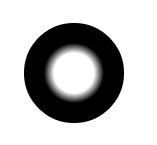
var gradient = context.createRadialGradient(120,80,0,110,90,60);

[Javascript] Gradient Fills on the HTML5 Canvas的更多相关文章
- 【JavaScript游戏开发】使用HTML5+Canvas+JavaScript 封装的一个超级马里奥游戏(包含源码)
这个游戏基本上是建立在JavaScript模块化的开发基础上进行封装的,对游戏里面需要使用到的游戏场景进行了封装,分别实现了Game,Sprite,enemy,player, base,Animati ...
- 【JavaScript游戏开发】使用HTML5 canvas开发的网页版中国象棋项目
//V1.0 : 实现棋子的布局,画布及游戏场景的初始化 //V2.0 : 实现棋子的颜色改变 //V3.0 :实现所有象棋的走棋规则 //V4.0 : 实现所有棋子的吃子功能 完整的项目源码已经开源 ...
- 惊艳!9个不可思议的 HTML5 Canvas 应用试验
HTML5 <canvas> 元素给网页中的视觉展示带来了革命性的变化.Canvas 能够实现各种让人惊叹的视觉效果和高效的动画,在这以前是需要 Flash 支持或者 JavaScript ...
- HTML5 Canvas 高仿逼真 3D 布料图案效果
HTML5 规范引进了很多新特性,其中最令人期待的之一就是 Canvas 元素,HTML5 Canvas 提供了通过 JavaScript 绘制图形的方法,非常强大.下面给大家分享一个 HTML5 C ...
- 自己写的HTML5 Canvas + Javascript五子棋
看到一些曾经只会灌水的网友,在学习了前端之后,已经能写出下载量几千几万的脚本.样式,帮助大众,成为受欢迎的人,感觉满羡慕的.我也想学会前端技术,变得受欢迎呀.于是心血来潮,开始学习前端知识,并写下了这 ...
- 高性能动画!HTML5 Canvas JavaScript框架KineticJS
高性能动画!HTML5 Canvas JavaScript框架KineticJS KineticJS是一款开源的HTML5 Canvas JavaScript框架,能为桌面和移动应用提供高性能动画,并 ...
- Bring Your Charts to Life with HTML5 Canvas and JavaScript
Bring Your Charts to Life with HTML5 Canvas and JavaScript Bring Your Charts to Life with HTML5 Canv ...
- 纯JavaScript实现HTML5 Canvas六种特效滤镜
纯JavaScript实现HTML5 Canvas六种特效滤镜 小试牛刀,实现了六款简单常见HTML5 Canvas特效滤镜,并且封装成一个纯 JavaScript可调用的API文件gloomyfi ...
- JavaScript+html5 canvas实现本地截图教程
这篇文章主要介绍了JavaScript+html5 canvas实现本地截图教程,对截图功能感兴趣的小伙伴们可以参考一下 最近有时间了解了下html5的各API,发现新浪微博的头像设置是使用canva ...
随机推荐
- 如何查看Linux的磁盘空间还有多少
无论是Linux还是unix,都提供了很多工具来查看磁盘空间的大小. 1. df命令,df命令,可以查看当前文件系统占用的空间的大小,以及剩余的大小,如下例子: Filesystem 1K-b ...
- HDU 5044 TREE
题意:一棵树上两种操作,操作1,改变u到v的每一点的值增加k,操作2,改变u到v每一条边值增加k.最后结束时问,每一点和每一条边的值. 初始时,点和边的值都为0. 分析: 很显然要用树链剖分,将点和边 ...
- [codility]Grocery-store
http://codility.com/demo/take-sample-test/hydrogenium2013 用Dijkstra求最短路径,同时和D[i]比较判断是不是能到.用了优先队列优化,复 ...
- Yii url createUrl redirect相关
一篇文章: 在yii中明明白白生成网址: 在Yii中经常要生成URL,不管是为了自动跳转还是仅仅是一个链接.下面对Yii中的URL生成做了一个总结.提示:以下controllerX代表控制器X,act ...
- ruby mysql数据库操作
require 'mysql' con=Mysql.new('localhost','root','root','test') con.query('set names utf8') rs=con.q ...
- Android 内核初识(6)SystemServer进程
简介 SystemServer的进程名实际上叫做“system_server”,通常简称为SS. 系统中的服务驻留在其中,常见的比如WindowManagerServer(Wms).ActivityM ...
- USCAO3.26Sweet Butter(SPFA)
最短路复杂度估计错误 以为SPFA是N*m的 用了dij超时 用SPFA直接跑就好了 O(k*e) K 一般为2,3: /* ID: shangca2 LANG: C++ TASK: butter * ...
- Github是什么?看完你就了解一些了
要了解Github,我们首先要知道Git,Git是管理代码的工具,写代码不是件轻松的事儿,一个人写的时候已经不轻松了,一群人写就更不轻松了,但这世界上很多事都是怎么不轻松怎么来的,大部分人都会和别人一 ...
- JS頁面值傳遞
<script type="text/javascript"> function GetValue() { var url=location.search; var R ...
- 如何监听非本地IP
做HA的时候,如果每个机器上同时需要监听多个IP的同一个端口.那么肯定是需要写死监听的IP和端口.比如在haproxy里面: frontend free bind default_backend te ...