
Oracle-11g 中使用表空间透明数据加密(TDE)
Oracle-11g 中使用表空间透明数据加密(TDE)的限制
a.创建 wallet 目录(oracle,每个节点)
例如:创建 wallet 目录于 $ORACLE_BASE/admin/SID 下。
$> mkdir /u01/app/oracle/admin/zszracdb/wallet
b.指定 wallet 路径(oracle,每个节点)
在 $ORACLE_HOME/network/admin 下的 sqlnet.ora 中设置 ENCRYPTION_WALLET_LOCATION 参数,指定软件 wallet 路径。其中,在 sqlnet.ora 文件中添加的条目如下。
ENCRYPTION_WALLET_LOCATION=
(SOURCE=
(METHOD=FILE)
(METHOD_DATA=
(DIRECTORY=/u01/app/oracle/admin/zszracdb/wallet)
)
)
c.检查 sqlnet.ora 信息读取状态(oracle,任一节点)
SQL> select * from v$encryption_wallet;
select * from gv$encryption_wallet;
注意:确保 v$encryption_wallet 与 gv$encryption_wallet 的 wallet location 是一致的。
注意:对于 wallet 分别在不同节点的情况以及 sqlnet.ora 在加入 ENCRYPTION_WALLET_LOCATION 参数前已经被数据库各实例读取的情况,需要重启各个实例以初始化 wallet 的状态,从而更新 gv$encryption_wallet 的 wallet location。
(In the case of RAC environments, if a separate wallet is being used for each node and if the changes to the sqlnet.ora file are applied on all instances of a running RAC system, restarting the individual instances one by one is necessary to initially synchronize the wallet status and to update the view gv$encryption_wallet with the DIRECTORY entry from sqlnet.ora.)
d.创建主密钥(oracle,任一节点)
注意:TDE 列加密与 TDE 表空间加密使用一个统一的主密钥。
例如:创建密码为 password 的主密钥语句如下所示。
SQL> ALTER SYSTEM SET ENCRYPTION KEY IDENTIFIED BY "password";
注意:对于 RAC 环境而言,需要在执行语句的节点上,将创建出来的主密钥文件拷贝至其他节点的对应目录下。
2.打开 Oracle wallet(oracle,任一节点)

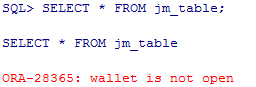
a.创建测试表例如:创建加密表空间 JM_ZSZ_DATA 以及非加密表空间 BJM_ZSZ_DATA。随后分别在两个表空间内创建表 JM_TABLE 以及非加密表 BJM_DATA,语句类似如下。SQL> create table jm_table(col1 number, col2 varchar2(30)) tablespace jm_zsz_data;create table bjm_table(col1 number, col2 varchar2(30)) tablespace bjm_zsz_data;创建后分别插入测试数据。SQL> insert into jm_table values (1,'secret data');insert into bjm_table values (1,'no secret data');b.测试 Oracle wallet 不打开时的读取状态若 Oracle wallet 不打开,则无法读取加密表空间中的表,类似如下结果。
而非加密表读取正常,类似如下结果。c.测试数据文件保存形式通过 string 直接查看数据文件内容,如果非加密则可直接查见数据内容。对于加密数据文件,查询结果如下。 注意:可见非以明文方式保存数据于 TDE 表空间加密的数据文件中。对于非加密数据文件,查询结果如下。
注意:可见正常的数据文件中,以明文形式保存数据。


参考文档:
<wiz_tmp_tag id="wiz-table-range-border" contenteditable="false" style="display: none;">
html,body { font-size: 15px }
body { font-family: Helvetica, "Hiragino Sans GB", "微软雅黑", "Microsoft YaHei UI", SimSun, SimHei, arial, sans-serif; line-height: 1.6; margin: 0; padding: 1.33rem 1rem }
h1,h2,h3,h4,h5,h6 { margin: 1.33rem 0 0.667rem; padding: 0; font-weight: bold }
h1 { font-size: 1.4rem }
h2 { font-size: 1.33rem }
h3 { font-size: 1.2rem }
h4 { font-size: 1.13rem }
h5 { font-size: 1rem }
h6 { font-size: 1rem; color: #777777; margin: 1rem 0 }
div,p,ul,ol,dl,li { margin: 0 }
blockquote,table,pre,code { margin: 8px 0 }
ul,ol { padding-left: 2.13rem }
blockquote { padding: 0 0.8rem }
blockquote>:first-child { margin-top: 0 }
blockquote>:last-child { margin-bottom: 0 }
img { border: 0; max-width: 100%; height: auto !important; margin: 2px 0 }
table { border-collapse: collapse; border: 1px solid #bbbbbb }
td,th { padding: 4px 8px; border-collapse: collapse; border: 1px solid #bbbbbb }
html,body { font-size: 15px }
body { font-family: Arial, Helvetica, "Hiragino Sans GB", 微软雅黑, "Microsoft YaHei UI", SimSun, SimHei, arial, sans-serif; line-height: 1.5; color: ; background-color: ; margin: 0; padding: 1.33rem 1rem }
img { max-width: 100% }
html { height: 100% }
body { min-height: 100% }
a { }
.wiz-img-resize-handle { position: absolute; z-index: 1000; border: 1px solid black; background-color: white }
.wiz-img-resize-handle { width: 5px; height: 5px }
.wiz-img-resize-handle.lt { cursor: nw-resize }
.wiz-img-resize-handle.tm { cursor: n-resize }
.wiz-img-resize-handle.rt { cursor: ne-resize }
.wiz-img-resize-handle.lm { cursor: w-resize }
.wiz-img-resize-handle.rm { cursor: e-resize }
.wiz-img-resize-handle.lb { cursor: sw-resize }
.wiz-img-resize-handle.bm { cursor: s-resize }
.wiz-img-resize-handle.rb { cursor: se-resize }
.wiz-table-body.wiz-table-moving *,.wiz-table-body.wiz-table-moving *::before,.wiz-table-body.wiz-table-moving *::after { cursor: default !important }
td,th { position: relative }
#wiz-table-range-border { display: none; width: 0; height: 0; position: absolute; top: 0; left: 0; z-index: 105 }
#wiz-table-col-line,#wiz-table-row-line { display: none; background-color: #448aff; position: absolute; z-index: 120 }
#wiz-table-col-line { width: 1px; cursor: col-resize }
#wiz-table-row-line { height: 1px; cursor: row-resize }
#wiz-table-range-border_start,#wiz-table-range-border_range { display: none; width: 0; height: 0; position: absolute }
#wiz-table-range-border_start_top,#wiz-table-range-border_range_top { height: 2px; background-color: #448aff; position: absolute; top: 0; left: 0 }
#wiz-table-range-border_range_top { height: 1px }
#wiz-table-range-border_start_right,#wiz-table-range-border_range_right { width: 2px; background-color: #448aff; position: absolute; top: 0 }
#wiz-table-range-border_range_right { width: 1px }
#wiz-table-range-border_start_bottom,#wiz-table-range-border_range_bottom { height: 2px; background-color: #448aff; position: absolute; top: 0 }
#wiz-table-range-border_range_bottom { height: 1px }
#wiz-table-range-border_start_left,#wiz-table-range-border_range_left { width: 2px; background-color: #448aff; position: absolute; top: 0; left: 0 }
#wiz-table-range-border_range_left { width: 1px }
#wiz-table-range-border_start_dot,#wiz-table-range-border_range_dot { width: 5px; height: 5px; border: 2px solid rgb(255, 255, 255); background-color: #448aff; cursor: crosshair; position: absolute; z-index: 110 }
.wiz-table-tools { display: block; background-color: #fff; position: absolute; left: 0px; border: 1px solid #ddd; z-index: 130 }
.wiz-table-tools ul { list-style: none; padding: 0 }
.wiz-table-tools .wiz-table-menu-item { position: relative; float: left; margin: 5px 2px 5px 8px }
.wiz-table-tools .wiz-table-menu-item .wiz-table-menu-button { font-size: 15px; width: 20px; height: 20px; line-height: 20px; cursor: pointer; position: relative }
.wiz-table-tools i.editor-icon { font-size: 15px; color: #455a64 }
.wiz-table-tools .wiz-table-menu-item .wiz-table-menu-button i#wiz-menu-bg-demo { position: absolute; top: 1px; left: 0 }
.wiz-table-tools .wiz-table-menu-sub { position: absolute; display: none; width: 125px; padding: 5px 0; background: #fff; border: 1px solid #E0E0E0; top: 28px; left: -9px }
.wiz-table-tools .wiz-table-menu-sub>div { font-size: 15px }
.wiz-table-tools .wiz-table-menu-item.active .wiz-table-menu-sub { display: block }
.wiz-table-tools .wiz-table-menu-sub::before,.wiz-table-tools .wiz-table-menu-sub::after { position: absolute; content: " "; border-style: solid; border-color: transparent; border-bottom-color: #cccccc; left: 22px; margin-left: -14px; top: -8px; border-width: 0 8px 8px 8px; z-index: 10 }
.wiz-table-tools .wiz-table-menu-sub::after { border-bottom-color: #ffffff; top: -7px }
.wiz-table-tools .wiz-table-menu-sub-item { padding: 4px 12px; font-size: 14px }
.wiz-table-tools .wiz-table-menu-sub-item.split { border-top: 1px solid #E0E0E0 }
.wiz-table-tools .wiz-table-menu-sub-item:hover { background-color: #ececec }
.wiz-table-tools .wiz-table-menu-sub-item.disabled { color: #bbbbbb; cursor: default }
.wiz-table-tools .wiz-table-menu-sub-item.disabled:hover { background-color: transparent }
.wiz-table-tools .wiz-table-menu-item.wiz-table-cell-bg:hover .wiz-table-color-pad { display: block }
.wiz-table-tools .wiz-table-color-pad { display: none; padding: 10px; width: 85px; height: 88px; background-color: #fff; cursor: default }
.wiz-table-tools .wiz-table-color-pad>div { font-size: 15px }
.wiz-table-tools .wiz-table-color-pad .wiz-table-color-pad-item { display: inline-block; width: 15px; height: 15px; margin-right: 9px; position: relative }
.wiz-table-tools .wiz-table-color-pad .wiz-table-color-pad-item i.pad-demo { position: absolute; top: 3px; left: 0 }
.wiz-table-tools .wiz-table-color-pad .wiz-table-color-pad-item .icon-oblique_line { color: #cc0000 }
.wiz-table-tools .wiz-table-color-pad .wiz-table-color-pad-item:last-child { margin-right: 0 }
.wiz-table-tools .wiz-table-color-pad .wiz-table-color-pad-item.active i.editor-icon.icon-box { color: #448aff }
.wiz-table-tools .wiz-table-cell-align { display: none; padding: 10px; width: 85px; height: 65px; background-color: #fff; cursor: default }
.wiz-table-tools .wiz-table-cell-align .wiz-table-cell-align-item { display: inline-block; width: 15px; height: 15px; margin-right: 9px; position: relative }
.wiz-table-tools .wiz-table-cell-align .wiz-table-cell-align-item:last-child { margin-right: 0 }
.wiz-table-tools .wiz-table-cell-align .wiz-table-cell-align-item i.valign { position: absolute; top: 3px; left: 0; color: #d2d2d2 }
.wiz-table-tools .wiz-table-cell-align-item.active i.editor-icon.valign { color: #a1c4ff }
.wiz-table-tools .wiz-table-cell-align-item.active i.editor-icon.icon-box,.wiz-table-tools .wiz-table-cell-align-item.active i.editor-icon.align { color: #448aff }
.wiz-table-tools .wiz-table-color-pad .wiz-table-color-pad-item:last-child,.wiz-table-tools .wiz-table-cell-align .wiz-table-cell-align-item:last-child { margin-right: 0 }
th.wiz-selected-cell-multi,td.wiz-selected-cell-multi { background: rgba(0,102,255,.05) }
th::before,td::before,#wiz-table-col-line::before,#wiz-table-range-border_start_right::before,#wiz-table-range-border_range_right::before { content: " "; position: absolute; top: 0; bottom: 0; right: -5px; width: 9px; cursor: col-resize; background: transparent; z-index: 100 }
th::after,td::after,#wiz-table-row-line::before,#wiz-table-range-border_start_bottom::before,#wiz-table-range-border_range_bottom::before { content: " "; position: absolute; left: 0; right: 0; bottom: -5px; height: 9px; cursor: row-resize; background: transparent; z-index: 100 }
.wiz-table-container { }
.wiz-table-body { position: relative; padding: 0 0 10px }
.wiz-table-body table { margin: 0; outline: none }
td,th { height: 28px; outline: none }
body pre.prettyprint { padding: 0 }
body pre.prettyprint code { white-space: pre }
body pre.prettyprint.linenums { overflow: auto }
body pre.prettyprint.linenums ol.linenums { padding: 10px 10px 10px 40px !important }
Oracle-11g 中使用表空间透明数据加密(TDE)的更多相关文章
- Oracle数据安全解决方案(1)——透明数据加密TDE
Oracle数据安全解决方案(1)——透明数据加密TDE2009年09月23日 22:49:00 华仔爱技术 阅读数:7991原文地址: http://www.oracle.com/technolog ...
- 透明数据加密 (TDE)常见问题解答
透明数据加密 (TDE)常见问题解答问题任何人只要有权访问加密数据就能对其进行解密吗?TDE 会带来哪些开销?哪些加密算法可与 TDE 一同使用?可以使用第三方加密算法代替 TDE 提供的算法吗?可以 ...
- SQLServer · 最佳实践 · 透明数据加密TDE在SQLServer的应用
转:https://yq.aliyun.com/articles/42270 title: SQLServer · 最佳实践 · 透明数据加密TDE在SQLServer的应用 author: 石沫 背 ...
- 盘点 Oracle 11g 中新特性带来的10大性能影响
Oracle的任何一个新版本,总是会带来大量引人瞩目的新特性,但是往往在这些新特性引入之初,首先引起的是一些麻烦,因为对于新技术的不了解.因为对于旧环境的不适应,从Oracle产品到技术服务运维,总是 ...
- oracle 11g中的自动维护任务管理
因为人员紧缺,最近又忙着去搞性能优化的事情,有时候真的是不想再搞这个事情,只是没办法,我当前的绩效几乎取决于这个项目的最终成绩,所以不管是人的事还是事的事,都得去让他顺利推进. 前段时间发生还有几台服 ...
- Oracle 11g中修改默认密码过期天数和锁定次数
Oracle 11g中修改默认密码过期天数和锁定次数 密码过期的原因一般有两种可能: 一.由于Oracle中默认在default概要文件中设置了"PASSWORD_LIFE_TIME=180 ...
- Oracle 11g中的snapshot standby特性
在Oracle 11g中,data guard最吸引人的,除了active data guard的实时查询特性(即可以以只读方式打开物理standby数据库的同时MRP进程能继续做recover),快 ...
- oracle 11g 中 (oracle 10g) crsctl 的 替换命令
oracle 11g 中 (oracle 10g) crsctl 的 替换命令 Deprecated Command Replacement Commands crs_stat ---集群状态 ...
- Oracle 11g 中SQL性能优化新特性之SQL性能分析器(SQLPA)
Oracle11g中,真实应用测试选项(the Real Application Testing Option)提供了一个有用的特点,叫SQL性能分析器(SQL Performance Analyze ...
随机推荐
- Oracle_SQL92_连接查询
Oracle_SQL92_连接查询 笛卡儿积 --笛卡尔积 select * from emp;----14 select * from dept;----4 select * from emp, ...
- 一个php技术栈后端猿的知识储备大纲
<h1 align="center">Easy Tips</h1><p align="center"><a href= ...
- [转载]利用memcached在多台服务器之间共享PHP的session数据
原文地址:利用memcached在多台服务器之间共享PHP的session数据作者:a1049709658 最近我的几篇文章都是是最近项目的一点心得^^ 这个项目一开始就设计的"很大&quo ...
- dedecms后台系统基本参数标题
1,站点设置 2,核心设置 3,附件设置 4,会员设置 6,性能选项 7,其它选项 8,模块设置 在E:\wamp\www\dededln\back\inc\configgroup.txt
- Angular 2 前端 http 传输 model 对象及其外键的问题
个人随笔,记录问题及思路草稿,非文章性质. 对于设备编辑场景,需要显示设备类型(外键), 前端有如下 TypeScript model(此 model 和后端实体 model 通常相对应) ...
- Oracle问题之ORA-01609、ORA-00362
Oracle问题之ORA-01609: 日志 4 是线程 1 的当前日志 - 无法删除成员 Oracle问题之ORA-00362: 要求输入成员以组成组 4 中的有效日志文件
- EL表达式遍历Map集合
<% Map<String,String> map2 = new HashMap(); map2.put("a","hello world") ...
- 2017-06-20 (pwd ls cd)
pwd pwd 显示当前所在的位置 pwd -P 如果是链接文件,显示链接文件所指的位置 ls ls 查询目录中的内容 ls -a 显示所有的文件,包含隐藏的文件 -l 显示详细的信息 ...
- 第一个RESTful API
一个简单的测试 /** * Created by M.C on 2017/9/8. */ var superagent = require('superagent'); var expect = re ...
- OpenCv结构和内容
OpenCv的结构和内容 OpenCv源码组成结构其中包括cv, cvauex, cxcore, highgui, ml这5个模块 CV:图像处理和视觉算法 MLL:统计分类器 HighGui:GUI ...