
ASP.NET Core2.2+Quartz.Net 实现web定时任务
作为一枚后端程序狗,项目实践常遇到定时任务的工作,最容易想到的的思路就是利用Windows计划任务/wndows service程序/Crontab程序等主机方法在主机上部署定时任务程序/脚本。
但是很多时候,若使用的是共享主机或者受控主机,这些主机不允许你私自安装exe程序、Windows服务程序。
码甲会想到在web程序中做定时任务, 目前有两个方向:
①.AspNetCore自带的HostService, 这是一个轻量级的后台服务, 需要搭配timer完成定时任务
②.老牌Quartz.Net组件,支持复杂灵活的Scheduling、支持ADO/RAM Job任务存储、支持集群、支持监听、支持插件。
此处我们的项目使用稍复杂的Quartz.net实现web定时任务。
项目背景
最近需要做一个计数程序:采用redis计数,设定每小时将当日累积数据持久化到关系型数据库sqlite。
①.定义定时任务内容: Job
②.设置触发条件: Trigger
③.将Quartz.Net集成进AspNet Core
头脑风暴
IScheduler类包装了上述背景需要完成的第①②点工作 ,SimpleJobFactory定义了生成指定的Job任务的过程,这个行为是利用反射机制调用无参构造函数构造出的Job实例。下面是源码:
//----------------选自Quartz.Simpl.SimpleJobFactory类-------------
using System;
using Quartz.Logging;
using Quartz.Spi;
using Quartz.Util;
namespace Quartz.Simpl
{
    /// <summary>
    /// The default JobFactory used by Quartz - simply calls
    /// <see cref="ObjectUtils.InstantiateType{T}" /> on the job class.
    /// </summary>
    /// <seealso cref="IJobFactory" />
    /// <seealso cref="PropertySettingJobFactory" />
    /// <author>James House</author>
    /// <author>Marko Lahma (.NET)</author>
    public class SimpleJobFactory : IJobFactory
    {
        private static readonly ILog log = LogProvider.GetLogger(typeof (SimpleJobFactory));

        /// <summary>
        /// Called by the scheduler at the time of the trigger firing, in order to
        /// produce a <see cref="IJob" /> instance on which to call Execute.
        /// </summary>
        /// <remarks>
        /// It should be extremely rare for this method to throw an exception -
        /// basically only the case where there is no way at all to instantiate
        /// and prepare the Job for execution.  When the exception is thrown, the
        /// Scheduler will move all triggers associated with the Job into the
        /// <see cref="TriggerState.Error" /> state, which will require human
        /// intervention (e.g. an application restart after fixing whatever
        /// configuration problem led to the issue with instantiating the Job).
        /// </remarks>
        /// <param name="bundle">The TriggerFiredBundle from which the <see cref="IJobDetail" />
        ///   and other info relating to the trigger firing can be obtained.</param>
        /// <param name="scheduler"></param>
        /// <returns>the newly instantiated Job</returns>
        /// <throws>  SchedulerException if there is a problem instantiating the Job. </throws>
        public virtual IJob NewJob(TriggerFiredBundle bundle, IScheduler scheduler)
        {
            IJobDetail jobDetail = bundle.JobDetail;
            Type jobType = jobDetail.JobType;
            try
            {
                if (log.IsDebugEnabled())
                {
                    log.Debug($"Producing instance of Job '{jobDetail.Key}', class={jobType.FullName}");
                }

                return ObjectUtils.InstantiateType<IJob>(jobType);
            }
            catch (Exception e)
            {
                SchedulerException se = new SchedulerException($"Problem instantiating class '{jobDetail.JobType.FullName}'", e);
                throw se;
            }
        }

        /// <summary>
        /// Allows the job factory to destroy/cleanup the job if needed.
        /// No-op when using SimpleJobFactory.
        /// </summary>
        public virtual void ReturnJob(IJob job)
        {
            var disposable = job as IDisposable;
            disposable?.Dispose();
        }
    }
}

//------------------节选自Quartz.Util.ObjectUtils类-------------------------
 public static T InstantiateType<T>(Type type)
{
     if (type == null)
     {
          throw new ArgumentNullException(nameof(type), "Cannot instantiate null");
     }
     ConstructorInfo ci = type.GetConstructor(Type.EmptyTypes);
     if (ci == null)
     {
          throw new ArgumentException("Cannot instantiate type which has no empty constructor", type.Name);
     }
     ]);
}
很多时候,定义的Job任务依赖了其他组件(Job实例化时多参),此时默认的SimpleJobFactory不能满足实例化要求, 需要考虑将Job任务作为依赖注入组件,加入依赖注入容器。
关键思路:
① IScheduler 开放了JobFactory 属性,便于你控制Job任务的实例化方式;
② AspNet Core的服务架构是以依赖注入为基础的,利用ASPNET Core已有的依赖注入容器IServiceProvider管理Job任务的创建过程。
编码实践
① 定义Job内容:
// -------每小时将redis数据持久化到sqlite, 每日凌晨跳针,持久化昨天全天数据---------------------
public class UsageCounterSyncJob : IJob
{
        private readonly EqidDbContext _context;
        private readonly IDatabase _redisDB1;
        private readonly ILogger _logger;
        public UsageCounterSyncJob(EqidDbContext context, RedisDatabase redisCache, ILoggerFactory loggerFactory)
        {
            _context = context;
            _redisDB1 = redisCache[];
            _logger = loggerFactory.CreateLogger<UsageCounterSyncJob>();
        }
         public async Task Execute(IJobExecutionContext context)
        {
            // 触发时间在凌晨,则同步昨天的计数
            var _day = DateTime.Now.ToString("yyyyMMdd");
            )
                _day = DateTime.Now.AddDays(-).ToString("yyyyMMdd");

            await SyncRedisCounter(_day);
            _logger.LogInformation("[UsageCounterSyncJob] Schedule job executed.");
        }
        ......
 }
②注册Job和Trigger:
namespace EqidManager
{
    using IOCContainer = IServiceProvider;
    // Quartz.Net启动后注册job和trigger
    public class QuartzStartup
    {
        public IScheduler _scheduler { get; set; }

        private readonly ILogger _logger;
        private readonly IJobFactory iocJobfactory;
        public QuartzStartup(IOCContainer IocContainer, ILoggerFactory loggerFactory)
        {
            _logger = loggerFactory.CreateLogger<QuartzStartup>();
            iocJobfactory = new IOCJobFactory(IocContainer);
            var schedulerFactory = new StdSchedulerFactory();
            _scheduler = schedulerFactory.GetScheduler().Result;
            _scheduler.JobFactory = iocJobfactory;
        }

        public void Start()
        {
            _logger.LogInformation("Schedule job load as application start.");
            _scheduler.Start().Wait();

            var UsageCounterSyncJob = JobBuilder.Create<UsageCounterSyncJob>()
               .WithIdentity("UsageCounterSyncJob")
               .Build();

            var UsageCounterSyncJobTrigger = TriggerBuilder.Create()
                .WithIdentity("UsageCounterSyncCron")
                .StartNow()
                // 每隔一小时同步一次
                .WithCronSchedule("0 0 * * * ?")      // Seconds,Minutes,Hours,Day-of-Month,Month,Day-of-Week,Year(optional field)
                .Build();
            _scheduler.ScheduleJob(UsageCounterSyncJob, UsageCounterSyncJobTrigger).Wait();

            _scheduler.TriggerJob(new JobKey("UsageCounterSyncJob"));
        }

        public void Stop()
        {
            if (_scheduler == null)
            {
                return;
            }

            ))
                _scheduler = null;
            else
            {
            }
            _logger.LogCritical("Schedule job upload as application stopped");
        }
    }

    /// <summary>
    /// IOCJobFactory :实现在Timer触发的时候注入生成对应的Job组件
    /// </summary>
    public class IOCJobFactory : IJobFactory
    {
        protected readonly IOCContainer Container;

        public IOCJobFactory(IOCContainer container)
        {
            Container = container;
        }

        //Called by the scheduler at the time of the trigger firing, in order to produce
        //     a Quartz.IJob instance on which to call Execute.
        public IJob NewJob(TriggerFiredBundle bundle, IScheduler scheduler)
        {
            return Container.GetService(bundle.JobDetail.JobType) as IJob;
        }

        // Allows the job factory to destroy/cleanup the job if needed.
        public void ReturnJob(IJob job)
        {
        }
    }
}
③结合AspNet Core 注入组件;绑定Quartz.Net
//-------------------------------截取自Startup文件------------------------
......
services.AddTransient<UsageCounterSyncJob>();      // 这里使用瞬时依赖注入
services.AddSingleton<QuartzStartup>();
......

// 绑定Quartz.Net
public void Configure(IApplicationBuilder app, Microsoft.AspNetCore.Hosting.IApplicationLifetime lifetime, ILoggerFactory loggerFactory)
{
     var quartz = app.ApplicationServices.GetRequiredService<QuartzStartup>();
     lifetime.ApplicationStarted.Register(quartz.Start);
     lifetime.ApplicationStopped.Register(quartz.Stop);
}
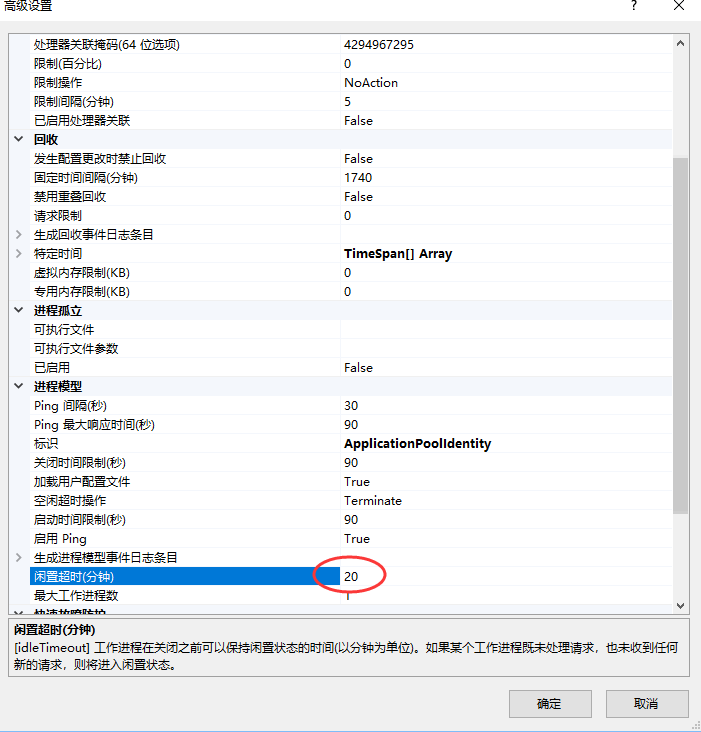
附:IIS 网站低频访问导致工作进程进入闲置状态的 解决办法
IIS上低频web访问会造成工作进程关闭,此时应用程序池回收,Timer等线程资源会被销毁;当工作进程重新运作,Timer可能会重新生成起效, 但我们的设定的定时Job可能没有按需正确执行。
感谢您的认真阅读,如有问题请大胆斧正,如果您觉得本文对你有用,不妨右下角点个 或加关注。
或加关注。
本文版权归作者所有,欢迎转载,但未经作者同意必须保留此段声明,且在文章页面明显位置注明本文的作者及原文链接,否则保留追究法律责任的权利。
ASP.NET Core2.2+Quartz.Net 实现web定时任务的更多相关文章
- ASP.NET Core2基于RabbitMQ对Web前端实现推送功能
在我们很多的Web应用中会遇到需要从后端将指定的数据或消息实时推送到前端,通常的做法是前端写个脚本定时到后端获取,或者借助WebSocket技术实现前后端实时通讯.因定时刷新的方法弊端很多(已不再采用 ...
- 深度理解IIS下部署ASP.NET Core2.1 Web应用拓扑图
原文:深度理解IIS下部署ASP.NET Core2.1 Web应用拓扑图 IIS部署ASP.NET Core2.1 应用拓扑图 我们看到相比Asp.Net, 出现了3个新的组件:ASP.NET Co ...
- 一步一步带你做WebApi迁移ASP.NET Core2.0
随着ASP.NET Core 2.0发布之后,原先运行在Windows IIS中的ASP.NET WebApi站点,就可以跨平台运行在Linux中.我们有必要先说一下ASP.NET Core. ASP ...
- Asp.net Core2.0 缓存 MemoryCache 和 Redis
自从使用Asp.net Core2.0 以来,不停摸索,查阅资料,这方面的资料是真的少,因此,在前人的基础上,摸索出了Asp.net Core2.0 缓存 MemoryCache 和 Redis的用法 ...
- 从ASP.NET Core2.2到3.0你可能会遇到这些问题
趁着假期的时间所以想重新学习下微软的官方文档来巩固下基础知识.我们都知道微软目前已经发布了.NET Core3.0的第三个预览版,同时我家里的电脑也安装了vs2019.So,就用vs2019+.NET ...
- 【1】Asp.Net Core2.2从环境配置到应用建立
作者:Eleven 来源:公众号[软谋net] [前言] .Net Core开源&跨平台,已经肉眼可见将成为.Net平台的未来,在企业招聘需求上已经频频见到,接触到很多公司内部都已经开始尝试C ...
- 【翻译】asp.net core2.0中的token认证
原文地址:https://developer.okta.com/blog/2018/03/23/token-authentication-aspnetcore-complete-guide token ...
- Centos7 编译安装 Nginx Mariadb Asp.net Core2 (实测 笔记 Centos 7.3 + Openssl 1.1.0h + Mariadb 10.3.7 + Nginx 1.14.0 + Asp.net. Core 2 )
环境: 系统硬件:vmware vsphere (CPU:2*4核,内存2G,双网卡) 系统版本:CentOS-7-x86_64-Minimal-1611.iso 安装步骤: 1.准备 1.0 查看硬 ...
- ASP.Net Core2.1中的HttpClientFactory系列一:HttpClient的缺陷
引言: ASP.NET Core2.1 中出现了一个新的 HttpClientFactory 功能, 它有助于解决开发人员在使用 HttpClient 实例从其应用程序中访问外部 web 资源时可能遇 ...
随机推荐
- Ocelot中文文档-负载均衡
Ocelot能通过可用的下游服务对每个ReRoute进行负载平衡. 这意味着您可以扩展您的下游服务,并且Ocelot可以有效地使用它们. 可用的负载均衡器的类型是: LeastConnection - ...
- web端创建地图
1>在首部引入标签 <link rel="stylesheet" href="http://cache.amap.com/lbs/static/main111 ...
- meta 刷新
<meta http-equiv="refresh" content="5;url=地址" /> 5秒后刷新至URL地址
- HTML学习笔记6:列表标签
列表标签 什么是列表标签呢? 以平台区分有什么游戏? 手游 pc游戏 家用机游戏 掌机游戏 以游戏类型区分有什么游戏? RPG ARPG MMORPG ACT FPS 以上两种就是一种列表标签 ...
- 团队项目第二阶段个人进展——Day7
一.昨天工作总结 冲刺第七天,动手完成了一个demo来实现数据的上传与下载 二.遇到的问题 代码逻辑没看太懂 三.今日工作规划 对发布页面的数据进行处理,实现能够请求和响应,并学习如何实现图片的上传与 ...
- 格子刷油漆【动态规划问题】—NYOJ 980
个人博客页:https://www.scriptboy.cn/198.html 出处:蓝桥杯 题目描述: X国的一段古城墙的顶端可以看成 2*N个格子组成的矩形(如下图所示),现需要把这些格子刷上保护 ...
- 基于 HTML5 WebGL 的低碳工业园区监控系统
前言 低碳工业园区的建设与推广是我国推进工业低碳转型的重要举措,低碳工业园区能源与碳排放管控平台是低碳工业园区建设的关键环节.如何对园区内的企业的能源量进行采集.计量.碳排放核算,如何对能源消耗和碳排 ...
- Atlas的优缺点及测试结论
优点 1,实现了读写分离(并通过hint/*master*/可强制走主库,并且加入了权重配置可进行读的负载均衡 2,自身维护了一套连接池,减少了创建连接带来的性能消耗 3,支持DB动态上下线,方便横向 ...
- javascript中的"x != x"
在javascript的运用中,经常遇到判断两个 对象/值 是否相等的情况.有些表明上看着一样,其实他们不一样.有些特殊情况,需要我们辨别. 引用类型 他们都是引用类型,存储的空间将从堆中分配.变量处 ...
- form 表单提交返回值问题
form不比ajax,即使后台返回值后,在页面也不知道怎么去取值判断提交状态.所以前几天结合网上资料整了一个小案例,需要用到ajaxSubmit,即通过ajax来提交表单,好处在于可以在任何情况下进行 ...