
Python中的turtle初探
turtle
Python自带了一个turtle库,就像名字turtle说的那样,你可以创建一个turtle,然后这个turtle可以前进,后退,左转,这个turtle有一条尾巴,能够放下和抬起,当尾巴放下的时候,turtle走过的地方就留下了痕迹,也就是这只画笔的原理。
下面的表格是基本的一些turtle的方法,这里简单列举了一点。
| 命令 | 解释 |
|---|---|
| turtle.Screen() | 返回一个singleton object of a TurtleScreen subclass |
| turtle.forward(distance) | 向当前画笔方向移动distance像素长 |
| turtle.backward(distance) | 向当前画笔相反方向移动distance像素长度 |
| turtle.right(degree) | 顺时针移动degree° |
| turtle.left(degree) | 逆时针移动degree° |
| turtle.pendown() | 移动时绘制图形,缺省时也为绘制 |
| turtle.goto(x,y) | 将画笔移动到坐标为x,y的位置 |
| turtle.penup() | 移动时不绘制图形,提起笔,用于另起一个地方绘制时用 |
| turtle.speed(speed) | 画笔绘制的速度范围[0,10]整数 |
| turtle.circle() | 画圆,半径为正(负),表示圆心在画笔的左边(右边)画圆 |
下面是一个很简单的turtle的例子,我们使用turtle来画一个螺旋的图案,这个函数采用递归的方法,每次递归的画笔减小了5个单位长度,进而形成了一个向内螺旋的图案。
import turtle

my_turtle = turtle.Turtle()

my_win = turtle.Screen()

def draw_spiral(my_turtle, line_len):

    if line_len > 0 :

        my_turtle.forward(line_len)  # turtle前进

        my_turtle.right(90)   # turtle向右转

        draw_spiral(my_turtle, line_len - 5) #turtle继续前进向右转

draw_spiral(my_turtle, 100)

my_win.exitonclick()

画一颗树
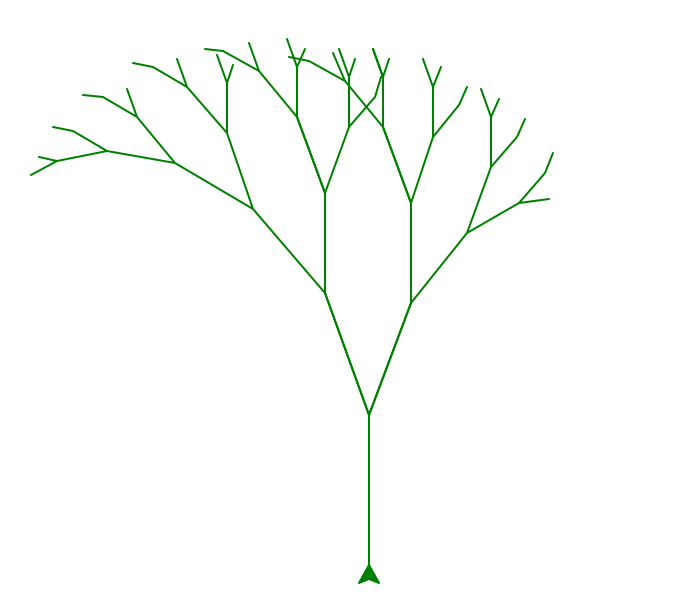
接下来,我们用turtle来画一颗树。过程是这样的:
branch_len为树枝的长度,这里的turtle也是采用递归的方法,在树枝需要分叉的地方建立一颗新的子树,而且是左右两颗子树,右子树的长度比左子树的长度要少5个单位。
import turtle

def tree(branch_len, t):

    if branch_len > 5:

        t.forward(branch_len)

        t.right(20)

        tree(branch_len - 15, t)

        t.left(40)

        tree(branch_len - 10, t)

        t.right(20)

        t.backward(branch_len)

def main():

    t = turtle.Turtle()

    my_win = turtle.Screen()

    t.left(90)

    t.up()

    t.backward(100)

    t.down()

    t.color("green")

    tree(75, t)

    my_win.exitonclick()

main()
谢尔宾斯基三角形
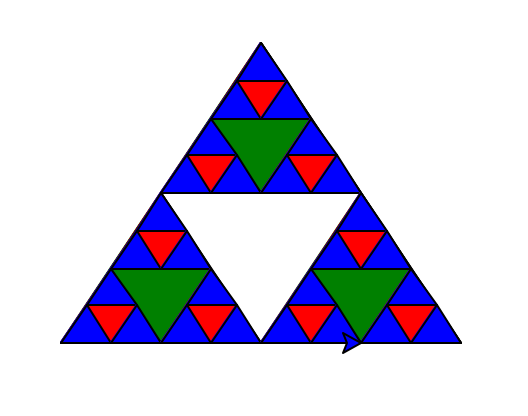
The Sierpinski triangle illustrates a three-way recursive algorithm. The procedure for drawing a Sierpinski triangle by hand is simple. Start with a single large triangle. Divide this large triangle into four new triangles by connecting the midpoint of each side. Ignoring the middle triangle that you just created, apply the same procedure to each of the three corner triangles

import turtle

def draw_triangle(points, color, my_turtle):

    my_turtle.fillcolor(color)

    my_turtle.up()

    my_turtle.goto(points[0][0],points[0][1])

    my_turtle.down()

    my_turtle.begin_fill()

    my_turtle.goto(points[1][0], points[1][1])

    my_turtle.goto(points[2][0], points[2][1])

    my_turtle.goto(points[0][0], points[0][1])

    my_turtle.end_fill()

def get_mid(p1, p2):

    return ((p1[0] + p2[0]) / 2, (p1[1] + p2[1]) / 2)

def sierpinski(points, degree, my_turtle):

    color_map = ['blue', 'red', 'green', 'white', 'yellow',

            'violet', 'orange']

    draw_triangle(points, color_map[degree], my_turtle)

    if degree > 0:

        sierpinski([points[0],

                  get_mid(points[0], points[1]),

                  get_mid(points[0], points[2])],

              degree-1, my_turtle)

        sierpinski([points[1],

                  get_mid(points[0], points[1]),

                  get_mid(points[1], points[2])],

              degree-1, my_turtle)

        sierpinski([points[2],

                  get_mid(points[2], points[1]),

                  get_mid(points[0], points[2])],

              degree-1, my_turtle)

def main():

    my_turtle = turtle.Turtle()

    my_win = turtle.Screen()

    my_points = [[-100, -50], [0, 100], [100, -50]]

    sierpinski(my_points, 3, my_turtle)

    my_win.exitonclick()

main()
- Reference:
Python中的turtle初探的更多相关文章
- python中的turtle库绘制图形
1. 前奏: 在用turtle绘制图形时,需要安装对应python的解释器以及IDE,我安装的是pycharm,在安装完pycharm后,在pycharm安装相应库的模块,绘图可以引入turtle模块 ...
- 闲聊,Python中的turtle
写在前面 其实我也不知道为什么我会写这个,本文涉及信号与传递,Python 正题 近期看到一个3年前的视频,1000个圆一笔画出一个Miku 在观看完源码了以后,我发现这是这调用的是基本的goto,用 ...
- python中关于turtle库的学习笔记
一.基础概念 1.画布:画布就是turtle为我们展开用于绘图区域, 我们可以设置它的大小和初始位置.常用的画布方法有两个:screensize()和setup(). (1)turtle.screen ...
- python中的turtle库(图形绘画库)
turtle绘图的基础知识:1. 画布(canvas) 画布就是turtle为我们展开用于绘图区域,我们可以设置它的大小和初始位置. 设置画布大小 turtle.screensize(canvwidt ...
- 使Python中的turtle模块画图两只小羊
turtle.circle(radius, extent=None, steps=None) 描述: 以给定半径画圆 参数: radius(半径); 半径为正(负),表示圆心在画笔的左边(右边)画圆 ...
- Python中的网络扫描大杀器Scapy初探
Python中的网络扫描大杀器Scapy初探 最近经历了Twisted的打击,这个网络编程实在看不懂,都摸不透它的内在逻辑,看来网络编程不是那么好弄的.还好,看到了scapy,这种网络的大杀器 ...
- 2016/1/2 Python中的多线程(1):线程初探
---恢复内容开始--- 新年第一篇,继续Python. 先来简单介绍线程和进程. 计算机刚开始发展的时候,程序都是从头到尾独占式地使用所有的内存和硬件资源,每个计算机只能同时跑一个程序.后来引进了一 ...
- Python学习之turtle库和蟒蛇绘制程序
Python的函数库 Python语言与C语言Java类似,可以大量使用外部函数库包含在安装包中的函数库:. 比如math, random, turtle等其他函数库,其他函数库用户根据代码需求自行安 ...
- 《python解释器源码剖析》第2章--python中的int对象
2.0 序 在所有的python内建对象中,整数对象是最简单的对象.从对python对象机制的剖析来看,整数对象是一个非常好的切入点.那么下面就开始剖析整数对象的实现机制 2.1 初识PyLongOb ...
随机推荐
- 新型USB病毒BadUSB 即使U盘被格式化也无法根除
这种病毒并不存在于USB设备中的存储文件中,而是根植于USB设备的固件里.这意味着,即使用户对U盘进行全面的格式化清理,仍不能"杀死"它.
- 视频客观质量评价工具:MSU Video Quality Measurement Tool【ssim,psnr】
MSU Video Quality Measurement Tool(msu vqmt)是莫斯科国立大学(Moscow State University)的Graphics and Media Lab ...
- How 5 Natural Language Processing APIs Stack Up
https://www.programmableweb.com/news/how-5-natural-language-processing-apis-stack/analysis/2014/07/2 ...
- Sec site list
Seclist: 英语: http://seclists.org/ http://www.securityfocus.com/ http://www.exploit-db.com/ http ...
- Ocelot中文文档-Qos服务质量
目前Ocelot支持一种QoS功能. 如果您希望在请求向下游服务时使用断路,则可以在ReRoute中进行设置. 这个功能使用了一个名为Polly的.NET库,这个库很棒,在这里可以找到它. 添加如下配 ...
- Mysql研磨之InnoDB行锁模式
事务并发带来的一些问题 (1)更新丢失(LostUpdate):当两个或多个事务选择同一行,然后基于最初选定的值更新该行时,由于每个事务都不知道其他事务的存在,就会发生丢失更新问题最后的更新覆盖了由其 ...
- Rafy 开源贡献中心 - 组织成立,并试运行一月小结
背景 最近两年,工作中虽然大量使用了 Rafy 框架作为各个产品.项目的开发框架.我是 2015 年的年中加入现在这家公司的,由于我个人工作太忙的缘故,一直没怎么编码,Rafy 框架底层的核心成长也比 ...
- Java开源生鲜电商平台-盈利模式详解(源码可下载)
Java开源生鲜电商平台-盈利模式详解(源码可下载) 该平台提供一个联合买家与卖家的一个平台.(类似淘宝购物,这里指的是食材的购买.) 平台有以下的盈利模式:(类似的平台有美菜网,食材网等) 1. 订 ...
- 如何避免 await/async 地狱
原文地址:How to escape async/await hell 译文出自:夜色镇歌的个人博客 async/await 把我们从回调地狱中解救了出来,但是如果滥用就会掉进 async/await ...
- api大全
免费api大全(更新中) API大全 http://www.apidq.com/ (这个碉堡了) 天气接口 气象局接口 完整数据:http://m.weather.com.cn/data/10 ...