
Vue组件-组件的事件
自定义事件
通过prop属性,父组件可以向子组件传递数据,而子组件的自定义事件就是用来将内部的数据报告给父组件的。
<div id="app3">

    <my-component2 v-on:myclick="onClick"></my-component2>

</div>

<script>

  Vue.component('my-component2', {

    template: `<div>

    <button type="button" @click="childClick">点击我触发自定义事件</button>

    </div>`,

    methods: {

      childClick () {

        this.$emit('myclick', '这是我暴露出去的数据', '这是我暴露出去的数据2')

      }

    }

  })

  new Vue({

    el: '#app3',

    methods: {

      onClick () {

        console.log(arguments)

      }

    }

  })

</script>
如上所示,共分为以下步骤:
1.子组件在自己的方法中将自定义事件以及需要发出的数据通过以下代码发送出去
this.$emit('myclick', '这是我暴露出去的数据', '这是我暴露出去的数据2')
第一个参数是自定义事件的名字
后面的参数是依次想要发送出去的数据
2.父组件利用v-on为事件绑定处理器
<my-component2 v-on:myclick="onClick"></my-component2>
这样,在Vue实例的methods方法中就可以调用传进来的参数了
注意: 在使用v-on绑定事件处理方法时,不应该传进任何参数,而是直接写v-on:myclick="onClick",不然,子组件暴露出来的数据就无法获取到了
举例:
Vue.component('button-counter', {

  template: '<button v-on:click="increment">{{counter}}</button>',

  data: function () {

    return {

      counter: 0

    }

  },

  methods: {

    increment: function () {

      this.counter += 1

      this.$emit('increment-event')

    }

  }

})

new Vue({

  el: '#app',

  data: {

    totalCounter: 0

  },

  methods: {

    total_increment: function () {

      this.totalCounter += 1

    }

  }

})
<div id='app'>

      <button>{{ totalCounter }}</button>

      </br>

      <button-counter v-on:increment-event='total_increment'></button-counter>

      <button-counter v-on:increment-event='total_increment'></button-counter>

</div>
下面两个按钮是两个相同的子组件,并和上面那个按钮共同组成了父组件。
当点击任意一个子组件的按钮,使其加1,都会使得父组件+1,最终:父组件的数值 = 子组件的数值之和
点击下方左边button

点击下方右边button


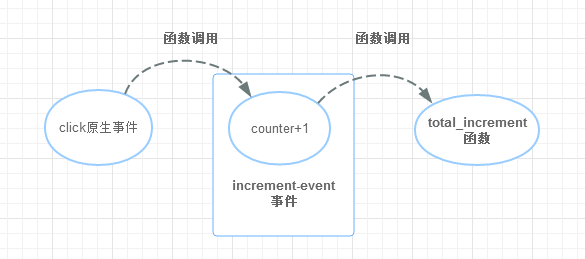
自定义事件的原理
通过$emit(event)触发一个自定义事件
然后通过$on(event,callback) 去执行对应的callback(回调函数)
(两个event是字符串,且必须名称相同)
但$on不能在父组件中监听子组件抛出的事件,所以我们要做到这一点,可以在父组件的模板中使用到子组件的时候,直接用v-on绑定 (和$on作用效果一致) 就像上面那样:
<button-counter v-on:increment-event='total_increment'></button-counter>
这样一来,自定义事件的雏形就变得和原生事件一样了
即使这样,上面的代码可能还是有些难理解,我认为比较重要的是这一段:
increment: function () {

      this.counter += 1

      this.$emit('increment-event')

  }
因为我们对于事件的运用主要是:利用事件和函数绑定,从而在事件触发的时候能执行相印的函数
所以! 对于自定义事件,我们要解决的问题就是,“这个事件在什么时候被触发” 在上面的代码中,触发事件的时间(执行 this.$emit('increment-event')的时间)
就恰恰是执行this.counter += 1 的时候
绑定原生事件
如果想在某个组件的根元素上监听一个原生事件。可以使用 .native 修饰 v-on
<my-component v-on:click.native="doTheThing"></my-component>
探究v-model
v-model可以对表单控件实现数据的双向绑定,它的原理就是利用了绑定属性和事件来实现的。比如input控件。不使用v-model,可以这样实现数据的双向绑定:
<div id="app4">

    <input type="text" v-bind:value="text" v-on:input="changeValue($event.target.value)">

    {{text}}

  </div>

  <script>

      new Vue({

        el: '#app4',

        data: {

          text: '444'

        },

        methods: {

          changeValue (value) {

            this.text = value

          }

        }

      })

  </script>
面的代码同样实现了数据的双向绑定。其本质就是:
把
input的value特性绑定到Vue实例的属性text上,text改变,input中的内容也会改变然后把表单的
input事件处理函数设置为Vue实例的一个方法,这个方法会根据输入参数改变Vue中text`的值相应的,在
input中输入内容时,触发了input事件,把event.target.value传给这个方法,最后就实现了改变绑定的数据的效果。
而v-model就是上面这种方式的语法糖,也就是把上面的写法封装了一下,方便我们使用。
使用自定义事件创建自定义的表单输入组件
理解了v-model的内幕,也就可以把这个效果用在自定义表单组件上了。
来实现一个简单的只能输入hello的表单输入组件。
<div id="app5">

    <my-component3 v-model="hello"></my-component3>

    <div>{{hello}}</div>

</div>

<script>

  Vue.component('my-component3', {

    template: `<input ref="input" type="text" :value="value" @input="checkInput($event.target.value)">`,

    props: ['value'],

    methods: {

      checkInput (value) {

        var hello = 'hello'

        if (!hello.includes(value)) {

          this.$emit('input', hello)

          this.$refs.input.value = hello

        } else {

          this.$emit('input', value)

        }

      }

    }

  })

  new Vue({

    el: '#app5',

    data: {

      hello: ''

    }

  })

</script>
定制组件的v-model
默认情况下,一个组件的 v-model 会使用 value 属性和 input 事件,但是诸如单选框、复选框之类的输入类型可能把 value 属性用作了别的目的。model 选项可以回避这样的冲突:
Vue.component('my-checkbox', {

  model: {

    prop: 'checked',   // 将输入的特性改为checked

    event: 'change'        // 触发的自定义事件类型为change

  },

  props: {

    checked: Boolean,

    // this allows using the `value` prop for a different purpose

    value: String

  }

})
这样设置的话,
<my-checkbox v-model="foo" value="some value"></my-checkbox>
上面的代码就等同于
<my-checkbox :checked="foo" @change="val => { foo = val }" value="some value"></my-checkbox>
实际使用时,与之前不同的地方是:
把子组件中接收外部数据的
prop属性改为checked向父组件发出事件时,事件类型应改为
change
Vue.component('my-component3', {

    template: `<input ref="input" type="text" :value="checked" @input="checkInput($event.target.value)">`,

    props: ['checked'],        // 属性名改变

    model: {

      prop: 'checked',

      event: 'change'

    },

    methods: {

      checkInput (value) {

        var hello = 'hello'

        if (!hello.includes(value)) {

          this.$emit('change', hello)   // 事件类型改变

          this.$refs.input.value = hello

        } else {

          this.$emit('change', value)  // 事件类型改变

        }

      }

    }

  })
、
Vue组件-组件的事件的更多相关文章
- vue如何正确销毁当前组件的scroll事件?
将方法写出来,销毁在beforeDestroy写. mounted(){ window.addEventListener("scroll",this.handleFun), }, ...
- 042——VUE中组件之子组件使用$on与$emit事件触发父组件实现购物车功能
<!DOCTYPE html> <html lang="en"> <head> <meta charset="UTF-8&quo ...
- Vue父组件与子组件传递事件/调用事件
1.Vue父组件向子组件传递事件/调用事件 <div id="app"> <hello list="list" ref="child ...
- Vue组件绑定自定义事件
Vue组件使用v-on绑定自定义事件: 可以分为3步理解: 1.在组件模板中按照正常事件机制绑定事件: template: '<button v-on:click="increment ...
- Vue 兄弟组件通过事件广播传递数据
非父子组件传值 通过事件广播实现非父子组件传值1.新建js,引入并实例化Vue import Vue from 'vue' var VueEvent = new Vue(); export defau ...
- 深入理解Vue父子组件通讯的属性和事件
在html中使用元素,会有一些属性,如class,id,还可以绑定事件,自定义组件也是可以的.当在一个组件中,使用了其他自定义组件时,就会利用子组件的属性和事件来和父组件进行数据交流. 父子组件之间的 ...
- vue -- 父子组件间的事件触发
1.父组件触发子组件事件 Parent.vue <child ref="child"></child> <div @click="fn&qu ...
- vue怎么给自定义组件绑定原生事件
下面主要以4个示例Demo演示(示例代码JS引用的Vue CDN),建议小伙伴直接复制示例代码运行查看, 赶时间的小伙伴可直接往下拉,看示例demo4 注:全局或局部注册的组件称为子组件,其中声明的 ...
- 怎样在 Vue 里面使用自定义事件将子组件的数据传回给父组件?
首先, Vue 里面的组件之间的数据流动是 单向 的, 数据可以从父组件传递给子组件, 但不能从子组件传递给父组件, 因为组件和组件之间是 隔离 的. 就像两个嵌套的 黑盒子 . 能通过 props ...
随机推荐
- stm32f407启动文件分析
; Amount of memory (in bytes) allocated for Stack; Tailor this value to your application needs; < ...
- Java线程常用方法详解
线程的常用方法 1.start() : 线程调用该方法将启动线程,使之从新建状态进入就绪队列排队,一旦轮到它来享用CPU资源时,就可以脱离创建它的线程独立开始自己的生命周期了. 2.run(): Th ...
- NOI1997
T1 竞赛排名 分析:模拟 超级大模拟,太弱了,写个模拟都要2个小时..写的又难看又麻烦..还需努力 var n,i,j,k:longint; t1:real; x,y:..,..] of real; ...
- Javascript-基础1
1,变量: name="alex" #默认是全局变量 var name="eric" #局部变量 2. 写JS代码:---html中写,---临时文件可以写在 ...
- [51nod1325]两棵树的问题
description 题面 solution 点分治+最小割. 点分必选的重心,再在树上dfs判交,转化为最大权闭合子图. 可以做\(k\)棵树的情况. code #include<iostr ...
- BZOJ2337:[HNOI2011]XOR和路径——题解
+++++++++++++++++++++++++++++++++++++++++++ +本文作者:luyouqi233. + +欢迎访问我的博客:http://www.cnblogs.com/luy ...
- JavaScript定义类与对象的一些方法
最近偶然碰到有朋友问我"hoisting"的问题.即在js里所有变量的声明都是置顶的,而赋值则是在之后发生的.可以看看这个例子: 1 var a = 'global'; 2 (fu ...
- noip模拟赛 helloworld
分析:对于第一个点,答案为26^n - 25^n,这个很好想.另外30%的点因为n <= 5,所以可以直接暴力搜索. 数学方法不是很好处理,考虑dp,设f[i][j]为前i位匹配到危险串第j位的 ...
- Apple Tree POJ - 3321 dfs序列构造树状数组(好题)
There is an apple tree outside of kaka's house. Every autumn, a lot of apples will grow in the tree. ...
- 学习tcpIp必备的抓包工具wireshark
wireshark是一个优秀的抓包工具 ip.src=192.168.10.123 发送http的一端 ip.dst=192.168.10.126 接收http的一端 如下图所示: