
android基础知识复习——RelativeLayout布局属性、背景、半透明设置(XML设置)
转自:http://blog.csdn.net/fansongy/article/details/6817968
复习布局与XML,写了一个空的登录界面。XML的注释我写在当行的后面了。程序运行图:
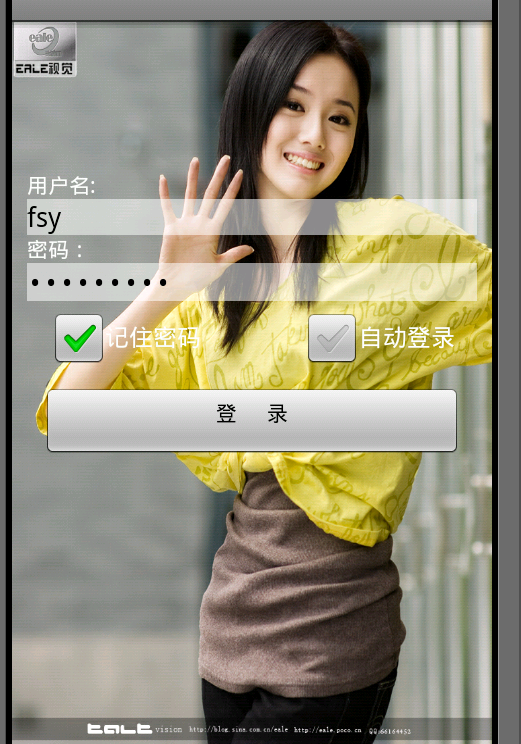
主函数没有改动,不贴了。背景图片名为:background.jpg 。看看main.xml吧。
- <?xml version="1.0" encoding="utf-8"?>
- <LinearLayout xmlns:android="http://schemas.android.com/apk/res/android"
- android:orientation="vertical"
- android:layout_width="fill_parent"
- android:layout_height="fill_parent"
- android:background="@drawable/background" //设置背景
- >
- <LinearLayout android:id="@+id/empty" //占位用的layout
- android:layout_width="fill_parent"
- android:layout_height="wrap_content"
- android:layout_weight ="1"></LinearLayout> //设置占总权重的比例
- <RelativeLayout android:id="@+id/relativeLayout"
- android:layout_width="fill_parent"
- android:layout_height="wrap_content"
- android:layout_weight="2"
- android:padding="10px"> //设置内间距
- /*颜色和不透明度 (alpha) 值以十六进制表示法表示。任何一种颜色的值范围都是 0 到 255(00 到 ff)。对于 alpha,00 表示完全透明,ff 表示完全不透明。表达式顺序是“aabbggrr”,其中“aa=alpha”(00 到 ff);“bb=blue”(00 到 ff);“gg=green”(00 到 ff);“rr=red”(00 到 ff)。例如,如果您希望对某叠加层应用不透明度为 50% 的蓝色,则应指定以下值:7fff0000 */
- <TextView
- android:id="@+id/user"
- android:text="用户名: "
- android:layout_width="fill_parent"
- android:layout_height="wrap_content"
- android:textColor="#ffffffff" />
- <EditText android:id="@+id/username"
- android:layout_width="fill_parent"
- android:layout_height="wrap_content"
- android:layout_below="@id/user" //在id为user的控件之下
- android:background="#88ffffff"/> //设置不透明
- <TextView
- android:id="@+id/key"
- android:layout_width="fill_parent"
- android:layout_height="wrap_content"
- android:text="密码:"
- android:layout_below="@id/username"
- android:textColor="#ffffffff" />
- <EditText android:id="@+id/keyword"
- android:layout_width="fill_parent"
- android:layout_height="wrap_content"
- android:layout_below="@id/key"
- android:background="#88ffffff"
- android:password="true"/>
- <CheckBox android:id="@+id/remember"
- android:layout_height="wrap_content"
- android:layout_width="wrap_content"
- android:text="记住密码"
- android:layout_below="@id/keyword"
- android:layout_alignLeft="@id/keyword"
- android:layout_marginLeft="15px"/> //外间距
- <CheckBox android:id="@+id/autoin"
- android:layout_height="wrap_content"
- android:layout_width="wrap_content"
- android:text="自动登录"
- android:layout_below="@id/keyword"
- android:layout_alignRight="@id/keyword" //与id为keyword的控件右对齐
- android:layout_marginRight="15px"/>
- <Button android:id="@+id/enter"
- android:layout_height="wrap_content"
- android:layout_width="fill_parent"
- android:gravity="center_horizontal" //内部文字位置
- android:text="登 录"
- android:layout_below="@id/autoin"
- android:layout_margin="10px"/>
- </RelativeLayout>
- </LinearLayout>
本篇博客出自 阿修罗道,转载请注明出处:http://blog.csdn.net/fansongy/article/details/6817968
android基础知识复习——RelativeLayout布局属性、背景、半透明设置(XML设置)的更多相关文章
- Android基础知识复习之打开照相机拍照并获取照片
对于我来说,做一件事情: 首先要理清我的思路,我要打开照相机,我能想到的是:在Android中我要打开系统应用,肯定需要一个隐式意图,那就要查询Android照相机的源码,查看并找到意图过滤器的书写方 ...
- 【Xamarin开发 Android 系列 4】 Android 基础知识
原文:[Xamarin开发 Android 系列 4] Android 基础知识 什么是Android? Android一词的本义指“机器人”,同时也是Google于2007年11月5日宣布的基于Li ...
- android:layout_alignleft layout_toleftof区别,详解RelativeLayout布局属性
转载请注明博客地址. 最近看博客看到有关于RelativeLayout布局的解释,有的解释很多是错误的.因此有必要对每一个常见的布局属性进行描述.以下解释全部都是逐行进行测试的. 首先把常用的布局分组 ...
- WPF基础知识、界面布局及控件Binding(转)
WPF是和WinForm对应的,而其核心是数据驱动事件,在开发中显示的是UI界面和逻辑关系相分离的一种开放语言.UI界面是在XAML语言环境下开发人员可以进行一些自主设计的前台界面,逻辑关系还是基于c ...
- WPF基础知识、界面布局及控件Binding
WPF是和WinForm对应的,而其核心是数据驱动事件,在开发中显示的是UI界面和逻辑关系相分离的一种开放语言.UI界面是在XAML语言环境下开发人员可以进行一些自主设计的前台界面,逻辑关系还是基于c ...
- Android基础_3 Activity相对布局
相对布局要比前面讲的线性布局和表格布局要灵活一些,所以平常用得也是比较多的.相对布局控件的位置是与其周围控件的位置相关的,从名字可以看出来,这些位置都是相对的,确定出了其中一个控件的位置就可以确定另一 ...
- Android 如何把一个 RelativeLayout或ImageView背景设为透明
在项目中,需要把RelativeLayout 和 ImageView背景设置为透明,怎么实现呢?这里主要通过代码,请参阅以下关键代码: public ImageView imgDetail; pri ...
- Android基础知识巩固:关于PendingIntent和广播
平时使用广播的场合比较多,但细节的东西,看过了也没有总结,以至于某些场合有小问题,还是要把原理和属性搞清楚才能运用自如. 其实也是自己比较懒,先看别人的blog,有个概念再去官网看英文的能好理解一些. ...
- Android基础知识-1
1.Android的Activity任务栈 在Android的系统中,在APP运行时每个APP都会默认有一个任务栈,任务栈的名称以APP的包名命名.任务栈是一中先进后出的结构,APP中每一个调用的Ac ...
随机推荐
- 浅谈分布式一致性与CAP/BASE/ACID理论
##转载请注明 CAP理论(98年秋提出,99年正式发表): C( Consistency)一致性:在分布式系统中,数据一致更新,所有数据变动都是同步的: A( Availability)可用性:分布 ...
- VPS性能测试方法小结(8)
1.为了能够得到更为准确和详细的有关VPS主机性能测试数据,我们应该多角度.全方位地运行多种VPS性能测试工具来进行检测,同时也要记得排除因本地网络环境而造成的数据结果的错误. 2.VPS主机性能跑分 ...
- 关于IE8版本提示“不支持‘trim’此属性或者方法”的解决办法。转摘雨网络
在js文件的前面加 String.prototype.trim = function () { return Trim(this); }; function LTrim(str) { var i; f ...
- 80端口被System进程占用问题
更新: 有可能占用80端口的服务: 如果安装了IIS,关闭IIS: 如果未开启IIS功能,而安装了诸如Web Matrix的开发程序,则有可能被Web Development Agent Servic ...
- Fel表达式实践
项目背景 订单完成后,会由交易系统推送实时MQ消息给订单清算系统,告诉清算系统此订单交易完成,可以进行给商家结算等后续操作. 财务要求在交易推送订单到清算系统时和订单清算系统接收到订单消息后,需要按照 ...
- Docker概览
Docker.xmind下载
- LeetCode解题报告—— Group Anagrams & Pow(x, n) & Spiral Matrix
1. Group Anagrams Given an array of strings, group anagrams together. For example, given: ["eat ...
- hdu 1065(贪心)
Wooden Sticks Time Limit: 1000MS Memory Limit: 10000K Total Submissions: 20938 Accepted: 8872 De ...
- poj 2104(线段树)
K-th Number Time Limit: 20000MS Memory Limit: 65536K Total Submissions: 45653 Accepted: 15177 Ca ...
- phpqrcode生成带logo的二维码图片
<?php //include_once('lib/QrReader.php'); //$qrcode = new QrReader('201708211144474410.jpg'); //图 ...