
spring注解方式注入bean
用注解的方式注入bean,spring的配置文件也要增加一些约束和导入注解所在的包
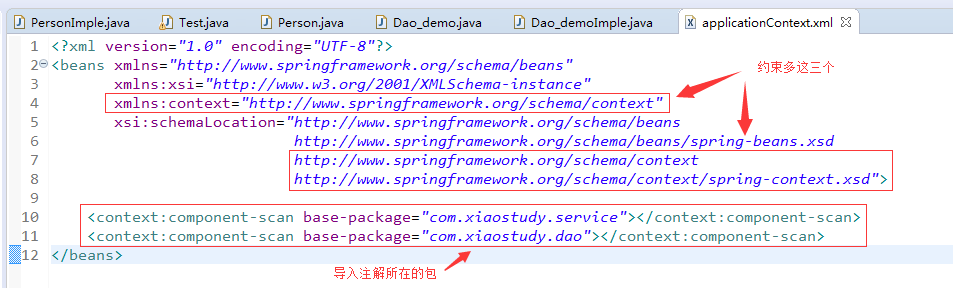
applicationContext.xml
 <?xml version="1.0" encoding="UTF-8"?>

 <beans xmlns="http://www.springframework.org/schema/beans"

        xmlns:xsi="http://www.w3.org/2001/XMLSchema-instance"

        xmlns:context="http://www.springframework.org/schema/context"

        xsi:schemaLocation="http://www.springframework.org/schema/beans

                               http://www.springframework.org/schema/beans/spring-beans.xsd

                               http://www.springframework.org/schema/context

                               http://www.springframework.org/schema/context/spring-context.xsd">

     <context:component-scan base-package="com.xiaostudy.service"></context:component-scan>

     <context:component-scan base-package="com.xiaostudy.dao"></context:component-scan>

 </beans>
用注解注入的bean类PersonImple.java
 package com.xiaostudy.service;

 import javax.annotation.PostConstruct;

 import javax.annotation.PreDestroy;

 import javax.annotation.Resource;

 import org.springframework.beans.factory.annotation.Value;

 import org.springframework.context.annotation.Scope;

 import org.springframework.stereotype.Component;

 /*

  * bean注入

  * 1、@Component("id")

  * 2、WEB:

  *             @Controller("id")    web

  *             @Service("id")        service

  *            @Repository("id")    dao

  */

 @Component("person")

 /*

  * bean作用域

  * @Scope("singleton")        单例(也是默认)

  * @Scope("prototype")        每new一次都是新的对象

  */

 @Scope("prototype")

 public class PersonImple implements Person {

     /*

      * bean参数注入

      * 1、普通参数(也就是说那些基本数据类型)

      *         在参数上面或者在相应的set方法    @Value("值")

      * 2、引用参数

      *         2.1按照类型注入:@Autowired

      *         2.2按照名称注入:@Autowired    @Qualifier("id")

      *         2.3按照名称注入:@Resource

      *

      */

     //@Resource

     private Dao_demoImple dao_demo;

     @Value("xiaostudy")

     private String name;

     public String getName() {

         return name;

     }

     public void setName(String name) {

         this.name = name;

     }

     public Dao_demoImple getDao_demo() {

         return dao_demo;

     }

     @Resource

     public void setDao_demo(Dao_demoImple dao_demo) {

         this.dao_demo = dao_demo;

     }

     /*

      * bean初始化方法注解

      *         @PostConstruct

      */

     @PostConstruct

     public void init() {

         System.out.println("init()>>>>>>");

     }

     /*

      * bean销毁注解

      *         @PreDestroy

      */

     @PreDestroy

     public void destroy() {

         System.out.println("destroy()>>>>>");

     }

 }
Person接口
 package com.xiaostudy.service;

 public interface Person {

 }
Dao_demo接口
 package com.xiaostudy.dao;

 public interface Dao_demo {

 }
Dao_demoImple.java
 package com.xiaostudy.service;

 import org.springframework.beans.factory.annotation.Value;

 import org.springframework.stereotype.Component;

 import com.xiaostudy.dao.Dao_demo;

 @Component("dao_demo")

 public class Dao_demoImple implements Dao_demo {

     private String name;

     public String getName() {

         return name;

     }

     @Value("demo")

     public void setName(String name) {

         this.name = name;

     }

     public void add() {

         System.out.println("add>>>>>>");

     }

 }
测试类Test.java
 package com.xiaostudy.service;

 import org.springframework.context.ApplicationContext;

 import org.springframework.context.support.AbstractApplicationContext;

 import org.springframework.context.support.ClassPathXmlApplicationContext;

 import com.xiaostudy.dao.Dao_demo;

 import com.xiaostudy.service.Person;

 public class Test {

     public static void main(String[] args) {

         ApplicationContext ac = new ClassPathXmlApplicationContext("applicationContext.xml");

         Person person = ac.getBean("person", Person.class);

         System.out.println(person);

         PersonImple pi = (PersonImple)person;

         System.out.println(pi.getName());

         Dao_demoImple dao_demo = pi.getDao_demo();

         System.out.println(dao_demo);

         dao_demo.add();

         System.out.println(dao_demo.getName());

         /*Person person1 = ac.getBean("person", Person.class);

         Person person2 = ac.getBean("person", Person.class);

         System.out.println(person1);

         System.out.println(person2);

         ((AbstractApplicationContext) ac).close();*/

     }

 }
spring注解方式注入bean的更多相关文章
- spring注解方式注入
1.通过Resource注入 1.在属性上注入 1.默认注入 即不指定spring容器里面的名字 匹配规则:先通过属性的名字查找 再通过属性类型与实现类类型匹配查找 当有两个实现类会报错 2.通过指定 ...
- spring 注解方式配置Bean
Spring能够从classpath下自动扫描,侦测和实例化具有特定注解的组件特定组件包括: @Component:基本注解,标示了一个受Spring管理的Bean组件 @Respository:标识 ...
- spring注解方式在一个普通的java类里面注入dao
spring注解方式在一个普通的java类里面注入dao @Repositorypublic class BaseDaoImpl implements BaseDao {这是我的dao如果在servi ...
- Spring中基于注解方式管理bean
操作步骤 第一步:导入相关jar包 spring IoC的基本包 Spring支持注解的Jar包 第二步:创建Spring配置文件,ApplicationContext.xml 引入约束和开启注解扫描 ...
- 跟着刚哥学习Spring框架--通过注解方式配置Bean(四)
组件扫描:Spring能够从classpath下自动扫描,侦测和实例化具有特定注解的组件. 特定组件包括: 1.@Component:基本注解,识别一个受Spring管理的组件 2.@Resposit ...
- spring学习笔记 星球日two - 注解方式配置bean
注解要放在要注解的对象的上方 @Autowired private Category category; <?xml version="1.0" encoding=" ...
- Spring框架学习(6)使用ioc注解方式配置bean
内容源自:使用ioc注解方式配置bean context层 : 上下文环境/容器环境 applicationContext.xml 1 ioc注解功能 注解 简化xml文件配置 如 hibernate ...
- Spring 注解方式 实现 IOC 和 DI
注:以下所有测试案例(最后一个除外)的测试代码都是同一个: package cn.tedu.test; import org.junit.Test; import org.springframewor ...
- EJB通过注解方式注入并使用其他EJB或者服务、配置JBoss数据源
通过注解方式注入并使用其他EJB或者服务 真实项目EJB对象很多,EJB之间也可以互相调用, 在项目HelloWorld下新建接口Other在cn.hqu.ejb3下: public interfac ...
随机推荐
- 160719、Spring + Dubbo + zookeeper (linux) 框架搭建
转载一篇博客,写得不错(至少我参考一下搭建成功了) 转载地址:http://my.oschina.net/wangt10/blog/522799 dubbo简介 节点角色说明: Provider: 暴 ...
- 巨蟒python全栈开发-第9天 初识函数
一.今日主要内容总览(重点) 1.什么是函数? f(x)=x+1 y=x+1 函数是对功能或者动作的封装2.函数的语法和定义 def 函数名(): 函数体 调用:函数名()3.关于函数的返回值 ret ...
- 《挑战程序设计竞赛》2.3 动态规划-进阶 POJ1065 1631 3666 2392 2184(5)
POJ1065: Description There is a pile of n wooden sticks. The length and weight of each stick are kno ...
- Java应用多机器部署定时任务解决方案
Java多机部署下定时任务的处理方案. 本文转自:http://www.cnblogs.com/xunianchong/p/6958548.html 需求: 有两台服务器同时部署了同一套代码, 代码中 ...
- 【opencv安裝】ubuntu16 opencv安装+测试
ubuntu16.04 install opencv2.4 to python2 and c++ 四大主流库比较: 对OpenCV的印象:功能十分的强大,而且支持目前先进的图像处理技术,体系十分完善, ...
- 流畅的python 字典和集合
介绍 dict 类型不但在各种程序里广泛使用,它也是 Python 语言的基石.模块的命名空间.实例的属性和函数的关键字参数中都可以看到字典的身影.跟它有关的内置函数都在 __builtins__._ ...
- django使用celery实现异步操作
需求: django支持的http请求都是同步的,对于需要耗时较长的操作可能会导致阻塞.为此我们需要引入异步处理机制,即收到客户端请求后立即给予响应,具体任务交给另一个进程处理. 使用方法: 1. 安 ...
- mysql 建立表之间关系 练习 1
练习:账号信息表,用户组,主机表,主机组 #用户表 mysql> create table user( id int not null unique auto_increment, userna ...
- Codeforces Round #245 (Div. 1)——Xor-tree
版权声明:本文为博主原创文章,未经博主同意不得转载. https://blog.csdn.net/u012476429/article/details/25607945 题目链接 题意: 给一棵树n个 ...
- openPOWERLINK代码在vs2008下编译
以openPOWERLINK_V1.08为例: 1.在主目录下新建Build目录 2.使用cmake-gui对代码进行配置 3.配置完成后生成工程文件xxx.sln 4.使用vs2008打开上述文件, ...