
[转载] Apache Lucene初探
转载自http://www.cnblogs.com/xing901022/p/3933675.html
讲解之前,先来分享一些资料
首先呢,学习任何一门新的亦或是旧的开源技术,百度其中一二是最简单的办法,先了解其中的大概,思想等等。这里就贡献一个讲解很到位的ppt。已经被我转成了PDF,便于搜藏。
其次,关于第一次编程初探,建议还是查看官方资料。百度到的资料,目前Lucene已经更新到4.9版本,这个版本需要1.7以上的JDK,所以如果还用1.6甚至是1.5的小盆友,请参考低版本,由于我用的1.6,因此在使用Lucene4.0。
这是Lucene4.0的官网文档:http://lucene.apache.org/core/4_0_0/core/overview-summary.html
这里非常佩服Lucene的开元贡献者,可以阅读Lucene in Action,作者最初想要写软件赚钱,最后贡献给了Apache,跑题了。
最后,提醒学习Lucene的小盆友们,这个开源软件的版本更新不慢,版本之间的编程风格亦是不同,所以如果百度到的帖子,可能这段代码,用了4.0或者3.6就会不好使。
比如,以前版本的申请IndexWriter时,是这样的:
IndexWriter indexWriter = new IndexWriter(indexDir,luceneAnalyzer, true );
但是4.0,我们需要配置一个conf,把配置内容放到这个对象中:
    IndexWriterConfig config = new IndexWriterConfig(Version.LUCENE_CURRENT, analyzer);

    IndexWriter iwriter = new IndexWriter(directory, config);
所以,请一定要参考官方文档的编程风格,进行代码的书写。
最后的最后,从官网上面下载下来的文件,已经上传至百度网盘,欢迎下载。

这是其中最常用的五个文件:
第一个,也是最重要的,Lucene-core-4.0.0.jar,其中包括了常用的文档,索引,搜索,存储等相关核心代码。
第二个,Lucene-analyzers-common-4.0.0.jar,这里面包含了各种语言的词法分析器,用于对文件内容进行关键字切分,提取。
第三个,Lucene-highlighter-4.0.0.jar,这个jar包主要用于搜索出的内容高亮显示。
第四个和第五个,Lucene-queryparser-4.0.0.jar,提供了搜索相关的代码,用于各种搜索,比如模糊搜索,范围搜索,等等。
废话说到这里,下面我们简单的讲解一下什么是全文检索。
比如,我们一个文件夹中,或者一个磁盘中有很多的文件,记事本、world、Excel、pdf,我们想根据其中的关键词搜索包含的文件。例如,我们输入Lucene,所有内容含有Lucene的文件就会被检查出来。这就是所谓的全文检索。
因此,很容易的我们想到,应该建立一个关键字与文件的相关映射,盗用ppt中的一张图,很明白的解释了这种映射如何实现。
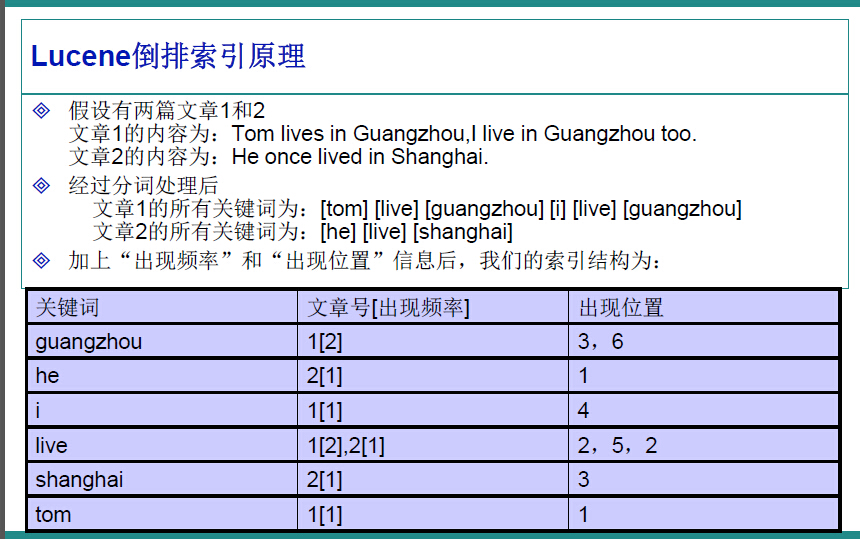
在Lucene中,就是使用这种“倒排索引”的技术,来实现相关映射。
有了这种映射关系,我们就来看看Lucene的架构设计。
下面是Lucene的资料必出现的一张图,但也是其精髓的概括。
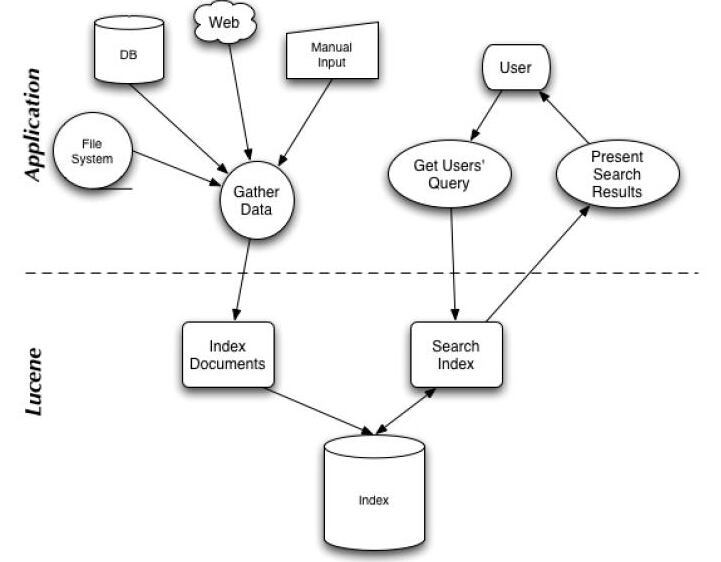
我们可以看到,Lucene的使用主要体现在两个步骤:
1 创建索引,通过IndexWriter对不同的文件进行索引的创建,并将其保存在索引相关文件存储的位置中。
2 通过索引查寻关键字相关文档。
下面针对官网上面给出的一个例子,进行分析:

 1   Analyzer analyzer = new StandardAnalyzer(Version.LUCENE_CURRENT);

 2

 3     // Store the index in memory:

 4     Directory directory = new RAMDirectory();

 5     // To store an index on disk, use this instead:

 6     //Directory directory = FSDirectory.open("/tmp/testindex");

 7     IndexWriterConfig config = new IndexWriterConfig(Version.LUCENE_CURRENT, analyzer);

 8     IndexWriter iwriter = new IndexWriter(directory, config);

 9     Document doc = new Document();

10     String text = "This is the text to be indexed.";

11     doc.add(new Field("fieldname", text, TextField.TYPE_STORED));

12     iwriter.addDocument(doc);

13     iwriter.close();

14

15     // Now search the index:

16     DirectoryReader ireader = DirectoryReader.open(directory);

17     IndexSearcher isearcher = new IndexSearcher(ireader);

18     // Parse a simple query that searches for "text":

19     QueryParser parser = new QueryParser(Version.LUCENE_CURRENT, "fieldname", analyzer);

20     Query query = parser.parse("text");

21     ScoreDoc[] hits = isearcher.search(query, null, 1000).scoreDocs;

22     assertEquals(1, hits.length);

23     // Iterate through the results:

24     for (int i = 0; i < hits.length; i++) {

25       Document hitDoc = isearcher.doc(hits[i].doc);

26       assertEquals("This is the text to be indexed.", hitDoc.get("fieldname"));

27     }

28     ireader.close();

29     directory.close();
索引的创建
首先,我们需要定义一个词法分析器。
比如一句话,“我爱我们的中国!”,如何对他拆分,扣掉停顿词“的”,提取关键字“我”“我们”“中国”等等。这就要借助的词法分析器Analyzer来实现。这里面使用的是标准的词法分析器,如果专门针对汉语,还可以搭配paoding,进行使用。
1 Analyzer analyzer = new StandardAnalyzer(Version.LUCENE_CURRENT);
参数中的Version.LUCENE_CURRENT,代表使用当前的Lucene版本,本文环境中也可以写成Version.LUCENE_40。
第二步,确定索引文件存储的位置,Lucene提供给我们两种方式:
1 本地文件存储
Directory directory = FSDirectory.open("/tmp/testindex");
2 内存存储
Directory directory = new RAMDirectory();
可以根据自己的需要进行设定。
第三步,创建IndexWriter,进行索引文件的写入。
IndexWriterConfig config = new IndexWriterConfig(Version.LUCENE_CURRENT, analyzer);

IndexWriter iwriter = new IndexWriter(directory, config);
这里的IndexWriterConfig,据官方文档介绍,是对indexWriter的配置,其中包含了两个参数,第一个是目前的版本,第二个是词法分析器Analyzer。
第四步,内容提取,进行索引的存储。
Document doc = new Document();

String text = "This is the text to be indexed.";

doc.add(new Field("fieldname", text, TextField.TYPE_STORED));

iwriter.addDocument(doc);

iwriter.close();
第一行,申请了一个document对象,这个类似于数据库中的表。
第二行,是我们即将索引的字符串。
第三行,把字符串存储起来(因为设置了TextField.TYPE_STORED,如果不想存储,可以使用其他参数,详情参考官方文档),并存储“表明”为"fieldname".
第四行,把doc对象加入到索引创建中。
第五行,关闭IndexWriter,提交创建内容。
这就是索引创建的过程。
关键字查询:
第一步,打开存储位置
DirectoryReader ireader = DirectoryReader.open(directory);
第二步,创建搜索器
IndexSearcher isearcher = new IndexSearcher(ireader);
第三步,类似SQL,进行关键字查询
QueryParser parser = new QueryParser(Version.LUCENE_CURRENT, "fieldname", analyzer);

Query query = parser.parse("text");

ScoreDoc[] hits = isearcher.search(query, null, 1000).scoreDocs;

assertEquals(1, hits.length);

for (int i = 0; i < hits.length; i++) {

    Document hitDoc = isearcher.doc(hits[i].doc);

    assertEquals("This is the text to be indexed.",hitDoc.get("fieldname"));

}
这里,我们创建了一个查询器,并设置其词法分析器,以及查询的“表名“为”fieldname“。查询结果会返回一个集合,类似SQL的ResultSet,我们可以提取其中存储的内容。
关于各种不同的查询方式,可以参考官方手册,或者推荐的PPT
第四步,关闭查询器等。
ireader.close();

directory.close();
最后,博猪自己写了个简单的例子,可以对一个文件夹内的内容进行索引的创建,并根据关键字筛选文件,并读取其中的内容。
创建索引:
/**

     * 创建当前文件目录的索引

     * @param path 当前文件目录

     * @return 是否成功

     */

    public static boolean createIndex(String path){

        Date date1 = new Date();

        List<File> fileList = getFileList(path);

        for (File file : fileList) {

            content = "";

            //获取文件后缀

            String type = file.getName().substring(file.getName().lastIndexOf(".")+1);

            if("txt".equalsIgnoreCase(type)){

                content += txt2String(file);

            }else if("doc".equalsIgnoreCase(type)){

                content += doc2String(file);

            }else if("xls".equalsIgnoreCase(type)){

                content += xls2String(file);

            }

            System.out.println("name :"+file.getName());

            System.out.println("path :"+file.getPath());

//            System.out.println("content :"+content);

            System.out.println();

            try{

                analyzer = new StandardAnalyzer(Version.LUCENE_CURRENT);

                directory = FSDirectory.open(new File(INDEX_DIR));

                File indexFile = new File(INDEX_DIR);

                if (!indexFile.exists()) {

                    indexFile.mkdirs();

                }

                IndexWriterConfig config = new IndexWriterConfig(Version.LUCENE_CURRENT, analyzer);

                indexWriter = new IndexWriter(directory, config);

                Document document = new Document();

                document.add(new TextField("filename", file.getName(), Store.YES));

                document.add(new TextField("content", content, Store.YES));

                document.add(new TextField("path", file.getPath(), Store.YES));

                indexWriter.addDocument(document);

                indexWriter.commit();

                closeWriter();

            }catch(Exception e){

                e.printStackTrace();

            }

            content = "";

        }

        Date date2 = new Date();

        System.out.println("创建索引-----耗时:" + (date2.getTime() - date1.getTime()) + "ms\n");

        return true;

    }
进行查询:
/**

     * 查找索引,返回符合条件的文件

     * @param text 查找的字符串

     * @return 符合条件的文件List

     */

    public static void searchIndex(String text){

        Date date1 = new Date();

        try{

            directory = FSDirectory.open(new File(INDEX_DIR));

            analyzer = new StandardAnalyzer(Version.LUCENE_CURRENT);

            DirectoryReader ireader = DirectoryReader.open(directory);

            IndexSearcher isearcher = new IndexSearcher(ireader);

            QueryParser parser = new QueryParser(Version.LUCENE_CURRENT, "content", analyzer);

            Query query = parser.parse(text);

            ScoreDoc[] hits = isearcher.search(query, null, 1000).scoreDocs;

            for (int i = 0; i < hits.length; i++) {

                Document hitDoc = isearcher.doc(hits[i].doc);

                System.out.println("____________________________");

                System.out.println(hitDoc.get("filename"));

                System.out.println(hitDoc.get("content"));

                System.out.println(hitDoc.get("path"));

                System.out.println("____________________________");

            }

            ireader.close();

            directory.close();

        }catch(Exception e){

            e.printStackTrace();

        }

        Date date2 = new Date();

        System.out.println("查看索引-----耗时:" + (date2.getTime() - date1.getTime()) + "ms\n");

    }
全部代码:
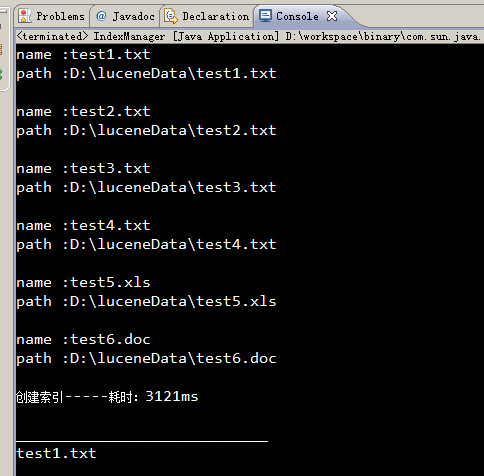
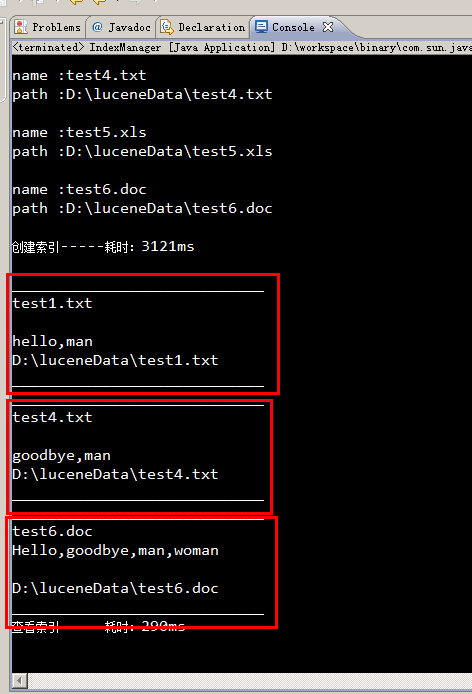
运行结果:
所有包含man关键字的文件,都被筛选出来了。
参考资料
JAVA读取文本大全:http://blog.csdn.net/csh624366188/article/details/6785817
Lucene官方文档:http://lucene.apache.org/core/4_0_0/core/overview-summary.html
[转载] Apache Lucene初探的更多相关文章
- 【手把手教你全文检索】Apache Lucene初探 (zhuan)
http://www.cnblogs.com/xing901022/p/3933675.html *************************************************** ...
- 【手把手教你全文检索】Apache Lucene初探
PS: 苦学一周全文检索,由原来的搜索小白,到初次涉猎,感觉每门技术都博大精深,其中精髓亦是不可一日而语.那小博猪就简单介绍一下这一周的学习历程,仅供各位程序猿们参考,这其中不涉及任何私密话题,因此也 ...
- Apache Lucene初探
讲解之前,先来分享一些资料 首先,学习任何一门新的亦或是旧的开源技术,百度其中一二是最简单的办法,先了解其中的大概,思想等等.这里就贡献一个讲解很到位的ppt 这是Lucene4.0的官网文档:htt ...
- Apache Lucene学习笔记
Hadoop概述 Apache lucene: 全球第一个开源的全文检索引擎工具包 完整的查询引擎和搜索引擎 部分文本分析引擎 开发人员在此基础建立完整的全文检索引擎 以下为转载:http://www ...
- lucene 初探
前言: window文件管理右上角, 有个搜索功能, 可以根据文件名进行搜索. 那如果从文件名上判断不出内容, 我岂不是要一个一个的打开文件, 查看文件的内容, 去判断是否是我要的文件? 几个, 十几 ...
- Apache Lucene(全文检索引擎)—分词器
目录 返回目录:http://www.cnblogs.com/hanyinglong/p/5464604.html 本项目Demo已上传GitHub,欢迎大家fork下载学习:https://gith ...
- Apache Lucene(全文检索引擎)—搜索
目录 返回目录:http://www.cnblogs.com/hanyinglong/p/5464604.html 本项目Demo已上传GitHub,欢迎大家fork下载学习:https://gith ...
- Apache Lucene(全文检索引擎)—创建索引
目录 返回目录:http://www.cnblogs.com/hanyinglong/p/5464604.html 本项目Demo已上传GitHub,欢迎大家fork下载学习:https://gith ...
- Apache Lucene 4.5 发布,Java 搜索引擎
Apache Lucene 4.5 发布了,该版本提供基于磁盘的文档值以及改进了过滤器的缓存.Lucene 4.5 的文档请看这里. Lucene 是apache软件基金会一个开放源代码的全文检索引擎 ...
随机推荐
- Python接口自动化——soap协议传参的类型是ns0类型的要创建工厂方法纪要
1:在Python接口自动化中,对于soap协议的xml的请求我们可以使用Suds Client来实现,其soap协议传参的类型基本上是有2种: 第一种是传参,不需要再创建啥, 第二种就是ns0类型的 ...
- Python系列之模块、和字符串格式化
Python 模块 模块让你能够有逻辑地组织你的Python代码段. 把相关的代码分配到一个 模块里能让你的代码更好用,更易懂. 模块也是Python对象,具有随机的名字属性用来绑定或引用. 模块分为 ...
- DataGrid 如何得到DataGridRow 和DataGridCell 对象
第一行为不可编辑 DataGridRow row = (DataGridRow)dataGrid1.ItemContainerGenerator.ContainerFromIndex(0); ...
- 吐槽CSDN--想钱想疯了--推荐文章里面广告博文去不掉
CSDN广告手段高,广告博文删不掉! 如图所示,我自己的博客文章下面有个相关文章推荐,这是csdn新出的信息流式内容呈现方式,也没什么太大问题.只是,你在里面放广告"羊毛衫,弹力裤" ...
- 【转载】基于vw等viewport视区相对单位的响应式排版和布局
文章转载自 张鑫旭-鑫空间-鑫生活 http://www.zhangxinxu.com/wordpress/ 原文链接:http://www.zhangxinxu.com/wordpress/?p=5 ...
- Java简单工厂模式以及来自lambda的优化
前言 设计模式是软件工程中一些问题的统一解决方案的模型,它的出现是为了解决一些普遍存在的,却不能被语言特性直接解决的问题,随着软件工程的发展,设计模式也会不断的进行更新,本文介绍的是经典设计模式 ...
- 解读python中SocketServer源码
在看SocketServer源码之前,先看一个例子: class Base(object): def __init__(self, name): self.name = name self.Testf ...
- Python连接SQLite数据库
SQLite作为一款轻型数据库,管理工具有很多,比如SQLite Expert Professional,很适合用来存储Python网站,爬虫的相关数据,下面列出基本的增删查改操作 读取操作: con ...
- Node Sass could not find a binding for your current environment 解决办法
具体错误如下: 解决办法: 命令行执行 npm rebuild node-sass 命令(如果不行,则先运行npm install node-sass命令执行再执行 npm rebuild nod ...
- ueditor编辑器插件 chrome中图片上传框延时问题
最近在项目中使用ueditor插件进行文字的在线编辑功能时,发现这个插件的图片上传弹框在chrome浏览器延迟非常的厉害.经过多方搜索,终于解决.现将解决方案记录如下: 1.修改/Ueditor/di ...