
WPF下Itemscontrol分组 样式
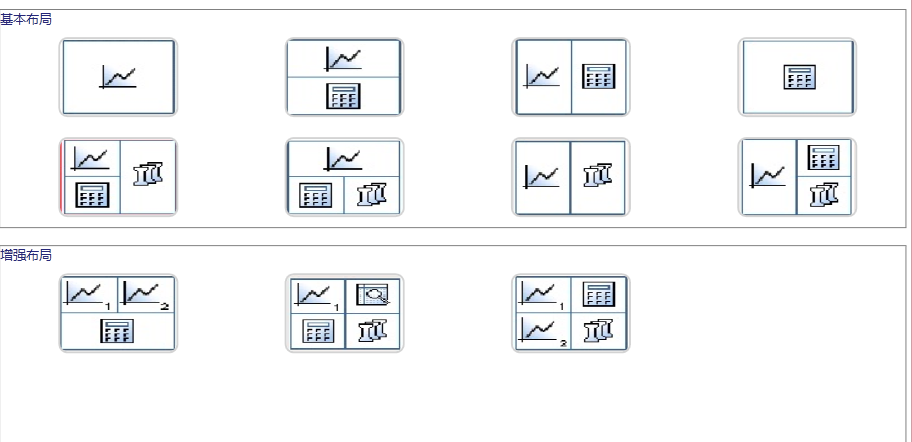
 <ItemsControl   Grid.Row="1" DataContext="{Binding Layouts}" ItemsSource="{Binding }">

            <ItemsControl.GroupStyle>

                <GroupStyle >

                    <GroupStyle.ContainerStyle >

                        <Style TargetType="{x:Type GroupItem}" >

                            <Setter Property="Margin" Value="0,0,0,10"/>

                            <Setter Property="Template" >

                                <Setter.Value >

                                    <ControlTemplate TargetType="{x:Type GroupItem}">

                                        <Border BorderBrush="Gray"  BorderThickness="1" Margin="5,6,5,1">

                                        <StackPanel  >

                                            <ContentPresenter />

                                            <Border >

                                                 <ItemsPresenter />

                                            </Border>

                                        </StackPanel>

                                        </Border>

                                    </ControlTemplate>

                                </Setter.Value>

                            </Setter>

                        </Style>

                    </GroupStyle.ContainerStyle>

                        <GroupStyle.HeaderTemplate >

                        <DataTemplate >

                            <TextBlock Name="txtgroup"  FontSize="13" Foreground="#262679" Text="基本布局"/>

                            <DataTemplate.Triggers >

                                <DataTrigger Binding="{Binding Path=Name}" Value="Increase">

                                    <Setter TargetName="txtgroup" Property="Text" Value="增强布局" />

                                </DataTrigger>

                            </DataTemplate.Triggers>

                        </DataTemplate>

                    </GroupStyle.HeaderTemplate>

                </GroupStyle>

            </ItemsControl.GroupStyle>

            <ItemsControl.ItemTemplate >

                <DataTemplate >

                    <Button  Command="{Binding SelectedStyleCommand}" CommandParameter="{Binding Tag}" Background="{Binding Img}"

                                 Width="120" Height="80" Margin="10,10,0,10">

                            <Button.Template >

                                <ControlTemplate TargetType="{x:Type Button}">

                                <Border Name="bd001" CornerRadius="8" Background="{TemplateBinding Background}"  BorderBrush="LightGray" BorderThickness="2">

                                        <ContentPresenter Content="{TemplateBinding Content}" HorizontalAlignment="Center" VerticalAlignment="Center" />

                                    </Border>

                                    <ControlTemplate.Triggers >

                                        <Trigger Property="IsMouseOver" Value="True">

                                            <Setter Property="Opacity" Value="0.85" TargetName="bd001"/>

                                            <Setter Property="BorderBrush" Value="Red" TargetName="bd001"/>

                                        </Trigger>

                                    </ControlTemplate.Triggers>

                                </ControlTemplate>

                            </Button.Template>

                        </Button>

                </DataTemplate>

            </ItemsControl.ItemTemplate>

            <ItemsControl.ItemsPanel >

                <ItemsPanelTemplate >

                    <UniformGrid Rows="2" Columns="4"/>

                </ItemsPanelTemplate>

            </ItemsControl.ItemsPanel>

            <!--<ItemsControl.ItemContainerStyle >

                <Style TargetType="{x:Type ListBoxItem}">

                    <Setter Property="HorizontalContentAlignment" Value="Stretch" />

                    <Setter Property="IsSelected" Value="{Binding Path=IsSelected, Mode=TwoWay}" />

                    <Style.Triggers>

                        <MultiTrigger>

                            <MultiTrigger.Conditions>

                                <Condition Property="IsSelected" Value="True" />

                                <Condition Property="IsMouseOver" Value="True" />

                            </MultiTrigger.Conditions>

                            <Setter Property="Background" Value="Red"   />

                        </MultiTrigger>

                        <Trigger Property="IsFocused" Value="True">

                            <Setter Property="Background" Value="Green"  />

                        </Trigger>

                    </Style.Triggers>

                </Style>

            </ItemsControl.ItemContainerStyle>-->

        </ItemsControl>
WPF下Itemscontrol分组 样式的更多相关文章
- WPF里ItemsControl的分组实现 --listbox 实现分组
我们在用到ItemsControl时,有时会用到分组,如ListBox,ListView,DataGrid.WPF的ItemsControl可以实现分组,是依托于GroupStyle,以ListBox ...
- WPF里ItemsControl的分组实现
我们在用到ItemsControl时,有时会用到分组,如ListBox,ListView,DataGrid.WPF的ItemsControl可以实现分组,是依托于GroupStyle,以ListBox ...
- WPF ScrollViewer(滚动条) 自定义样式表制作 图文并茂
原文:WPF ScrollViewer(滚动条) 自定义样式表制作 图文并茂 先上效果图 正常样式 拖动时样式 好下面 开始吧 ==================================== ...
- WPF ScrollViewer(滚动条) 自定义样式表制作 (改良+美化)
原文:WPF ScrollViewer(滚动条) 自定义样式表制作 (改良+美化) 注释直接写在代码里了 不太理解意思的 可以先去看看我上一篇 WPF ScrollViewer(滚动条) 自定 ...
- WPF教程十:如何使用Style和Behavior在WPF中规范视觉样式
在使用WPF编写客户端代码时,我们会在VM下解耦业务逻辑,而剩下与功能无关的内容比如动画.视觉效果,布局切换等等在数量和复杂性上都超过了业务代码.而如何更好的简化这些编码,WPF设计人员使用了Styl ...
- WPF下如何使用TTF字体
之前再写代码的时候如果遇到了图标,我都喜欢再资源文件下创建JPG或者PNG来作为图片. 但是随着TTF字体图标的普及,图标类型的的图片越来越多的被放入到TTF中. 这篇也主要是写再WPF下如何使用TT ...
- WPF 中的style 样式
WPF相较于以前学的WinForm,WPF在UI设计与动画方面的炫丽是最吸引我来学习的.在WPF中XMAL代码的引入使得代码的编写能够前后端分离,为获得更好的界面,也使得我们不得不分出一半的时间花在前 ...
- 使用UITableView的分组样式
分组样式顾名思义是对TableView中的数据行进行分组处理,每个分组都有一个header和footer. TableView中header的英文文本是大写的,footer的英文文本是小写的.如下图浅 ...
- WinForm与WPF下跨线程调用控件
Winform下: public delegate void UpadataTextCallBack(string str,TextBox text); public void UpadtaText( ...
随机推荐
- 【u006】海战
Time Limit: 1 second Memory Limit: 128 MB [问题描述] 在峰会期间,武装部队得处于高度戒备.警察将监视每一条大街,军队将保卫建筑物,领空将布满了F-2003飞 ...
- 【社交分享SDK】ShareSDK for Android 2.5.9已经公布
ShareSDK for Android 2.5.9已经公布 版本号:V2.5.9 2015-3-19 1.升级Dropbox对API接口的调用.包含授权.获取用户信息,分享三个接口 2.升级Kak ...
- android studio 2.2 使用cmake编译NDK
Android studio 2.2 已经进入beta版本,新功能添加众多,NDK编程也得到了简化.官方博客介绍.本文介绍如何使用新版android studio调用 c++代码,为了超级通俗易懂,例 ...
- js如何实现动态点击改变单元格颜色?
js如何实现动态点击改变单元格颜色? 一.总结 1.通过table的rows属性,遍历表格所有行,然后通过cells属性,遍历每一行中的单元格. 2.遍历的过程中,动态的为每一个单元格定义单击事件,改 ...
- ie7span标签float换行悬浮
项目中,ie8以上都是好好的,就是ie7的布局有问题,span换行漂浮了 <div style="height:20px"> <span style=" ...
- 【codeforces 604D】Moodular Arithmetic
time limit per test1 second memory limit per test256 megabytes inputstandard input outputstandard ou ...
- SWIFT学习笔记04
1.在实际编译时,Swift 编译器会优化字符串的使用.使实际的复制仅仅发生在绝对必要的情况下,这意味着您将字符串作为值类型的同一时候能够获得极高的性能. 2.for character in &qu ...
- Oracle数据库分页查询的几种实现方法
没有Sql Server有top那么好用,但是Oracle含有隐藏的rownum列可以灵活使用,使实现分页效果,pageSize默认10行 方法一: select * from test where ...
- KVC设置系统自带属性,不管是不是私有的属性
KVC 可以设置系统自带属性,不管是不是私有的属性: 1, 2,
- 【t095】拯救小tim
Time Limit: 1 second Memory Limit: 128 MB [问题描述] 小tim在游乐场,有一天终于逃了出来!但是不小心又被游乐场的工作人员发现了... 所以你的任务是安全地 ...