
微信小程序wx.request接口
微信小程序wx.request接口
wx.request是小程序客户端与服务器端交互的接口
HTTPS 请求
一个微信小程序,只能同时(同时不能大于5个)有5个网络请求
wx.request(OBJECT)
发起网络请求
url

data

header

method

dataType
wx.request({

  url: 'test.php', //仅为示例,并非真实的接口地址

  data: {

     x: '' ,

     y: ''

  },

  header: {

  	'content-type': 'application/json' // 默认值

  },

  success: function(res) {

    console.log(res.data)

  }

})
四种网络请求:
(wx.request)
(wx.uploadFile)
(wx.downloadFile)
(wx.connectSocket)
var request = {

  url: '',

  data: {},

  method: '',

  success: function (res) {

  },

  fail: function () {

  },

  complete: function () {

  }

}
wx.openSetting 来跳转到设置授权界面
/* index.js */

// 若有用户信息存在则继续

Page({

  onLoad () {

    wx.getStorage({

      key: 'userinfo',

      success: (res) => {

        this.setUserinfo(res)

      },

      fail: (res) => {

        api.login().then((res) => {

          this.setUserinfo(res)

        }).catch(e => {

          if (e.errMsg && e.errMsg === 'getUserInfo:fail auth deny') {

            this.setData({

              isauth: false

            })

          }

        })

      }

    })

  },

  toSetting() {

    wx.openSetting({

      success: (res) => {

        this.setData({

          isauth: res.authSetting['scope.userInfo']

        })

        if (res.authSetting['scope.userInfo']) {

          api.login().then((res) => {

            this.setUserinfo(res)

          })

        }

      }

    })

  }

})

// setUserinfo 就是对用户信息做一下处理 不具体展开了

/* index.wxml */

<view class="unauth" wx:if="{{!isauth}}">

   <image class="unauth-img" src="../../images/auth.png"></image>

  <text class="unauth-text">检查到您没打开授权</text>

  <button class="color-button unauth-button" bindtap="toSetting">去设置</button>

</view>

<view class="container" wx:else>

...

</view>
function queryRequest(data){

    wx.request({

        url:"https://example.com/api/",

        data:data,

        header:{

           // "Content-Type":"application/json"

        },

        success:function(res){

            console.log(res.data)

        },

        fail:function(err){

            console.log(err)

        }

    })

}
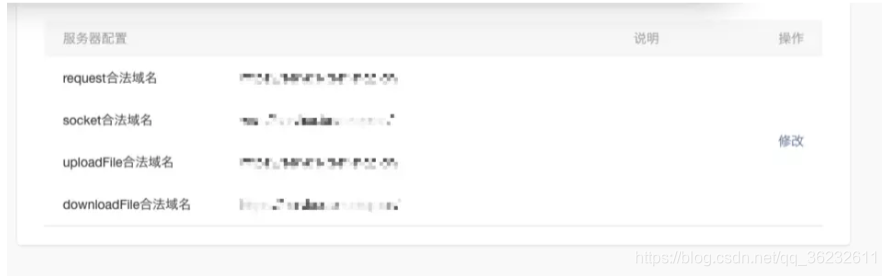
服务器设置:
上传文件
// Content-type为multipart/form-data

function uploadFile(file,data) {

    wx.uploadFile({

        url: 'http://example.com/upload',

        filePath: file,

        name: 'file',

        formData:data,

        success:function(res){

            console.log(res.data)

        },

        fail:function(err){

            console.log(err)

        }

    })

}
下载文件
function downloadFile(url,typ,success){

    wx.downloadFile({

        url:url,

        type:type,

        success:function(res){

            if(success){

                success(res.tempFilePath)

            }

        },

        fail:function(err){

            console.log(err)

        }

    })

}
function svaeFile(tempFile,success){

    wx.saveFile({

        tempFilePath:tempFile,

        success:function(res){

            var svaedFile=res.savedFilePath

            if(success){

                success(svaeFile)

            }

        }

    })

}
微信小程序wx.request接口的更多相关文章
- 监控微信小程序wx.request请求失败
在微信小程序里,与后台服务器交互的主要接口函数是wx.request(),用于发起 HTTPS 网络请求.其重要性不言而喻.然而,却经常遇到请求失败的问题,笔者特意谷歌"wx.request ...
- 坑:微信小程序wx.request和wx.uploadFile中传参数的区别
微信小程序中通过组件<form>提交表单的时候,在js中通过e.detail.value得到所提交表单的json格式数据.一般提交表单我们都是通过wx.request请求,提交表单数据,通 ...
- 微信小程序 wx.request
onLoad: function () { var that = this console.log('https://free-api.heweather.com/s6/weather?locatio ...
- 微信小程序wx.request请求用POST后台得不到传递数据
微信小程序的wx.request请求,method设为POST并向后台传递数据,但从后台返回的信息来看后台并没有获得传递的数据 wx.request({ url: 'url' ...
- 微信小程序wx.request请求服务器json数据并渲染到页面
[原文出自]: https://blog.csdn.net/weixin_39927850/article/details/79766259 微信小程序的数据总不能写死吧,肯定是要结合数据库来做数据更 ...
- 微信小程序- wx.request请求不到数据
小程序官方文档手册 https://mp.weixin.qq.com/debug/wxadoc/dev/ 小程序开发问答社区 http://www.henkuai.com/forum.php wx.r ...
- 微信小程序wx.request的简单封装
前言 之前写小程序,每次请求后台时都直接调用原生的API,wx.request,每次都要写url,data,回调函数等,正好前段时间,小程序项目需要添加新内容,趁此机会,做一个封装的请求工具,比较简单 ...
- 微信小程序wx.request POST获取不到数据解决办法
get //发起请求 wx.request({ url: 'http://www.xiaochengxu.com/home/index/curd', //仅为示例,并非真实的接口地 ...
- 微信小程序 wx.request POST请求------中文乱码问题
问题: 一个简单的表单,提交后台返回数据“提交成功”. 以为没问题了,但是没过多久后台小哥就问为啥那么多乱码,找了很久原因,发现在提交的时候就已经乱码了. 嗯,前端问题,然后测试GET/POST方法. ...
随机推荐
- 服务监控-zabbix监控指标
1.cpu unitzation 监控cpu的整体状态. 使用Zabbix查看CPU利用率,会有下面几个值: CPU idle time:空闲的cpu时间比[简称id] CPU user time:用 ...
- MySQL联接查询算法(NLJ、BNL、BKA、HashJoin)
一.联接过程介绍 为了后面一些测试案例,我们事先创建了两张表,表数据如下: 1 2 3 4 CREATE TABLE t1 (m1 int, n1 char(1)); CREATE TABLE t ...
- weblogic安装升级配置
本次操作是主要围绕如何搭建weblogic服务器升级weblogic软件及配置服务,总共有三大步骤,可划分为六个小步骤: 选取已有环境,准备weblogic压缩包,java包等 准备操作系统环境用户目 ...
- 关于微信小程序切换获取不到元素的问题
1.由于公司要实现微信小程序的自动化,所以开始学习python + appium 实现微信小程序自动化.在学习过程中遇到在切换webview后获取不到页面元素的问题,导致无法继续.今天在网上看到一篇关 ...
- bp代码
#电池老化率测定的神经网络模型 import tensorflow as tf import numpy as np import matplotlib.pyplot as plt import pa ...
- Git的安装和使用
在CentOS 6.x/7.x上安装git及最新版 方式一.yum安装 # yum install git 通过yum方式安装,版本比较旧,CentOS6.5上安装好是1.7.1版.如果想安装最新版或 ...
- Python Day 12
阅读目录: 内容回顾 函数默认值的细节 三元表达式 列表与字典推导式 函数对象 名称空间 函数嵌套的定义 作用域 ##内容回顾 # 字符串的比较 -- 按照从左往右比较每一个字符,通过字符对应的asc ...
- 用python turtle画玫瑰
1.turtle 库 2.画玫瑰的代码: import turtle turtle.penup() turtle.left() turtle.fd() turtle.pendown() turtle. ...
- Django自定义过滤器及标签
一.自定义过滤器 1.自定义过滤器文件存放位置 在APP应用下创建名为templatetags(该文件夹名固定)的文件包(包含__init__.py文件) 注意APP必须在setting中注册 即在s ...
- 基于继承的 MethodInterceptor 动态代理(换种写法)
net.sf.cglib.proxy.Enhancer Generates dynamic subclasses to enable method interception. This class s ...