
LSTM时间序列预测及网络层搭建
一、LSTM预测未来一年某航空公司的客运流量
给你一个数据集,只有一列数据,这是一个关于时间序列的数据,从这个时间序列中预测未来一年某航空公司的客运流量。数据形式:

二、实战
1)数据下载
你可以google passenger.csv文件,即可找到对应的项目数据,如果没有找到,这里提供数据的下载链接:https://pan.baidu.com/s/1a7h5ZknDyT0azW9mv5st7w 提取码:u5h3
2)jupyter notebook
桌面新建airline文件夹,passenger.csv移动进去,按住shift+右键,选择在此处新建命令窗口,输入jupyter notebook,新建名为airline_predict的脚本
3)查看数据:
import pandas as pd

df = pd.read_csv('passenger.csv', header=None)

df.columns = ['time', 'passengers']

df.head(12)
结果如下:我们发现数据以年为单位,记录了每一年中每一月份的乘客量

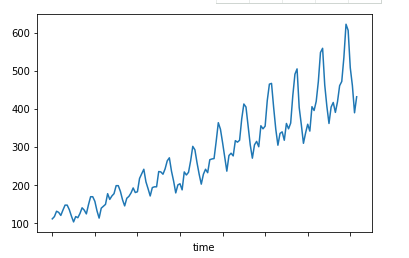
我们来做出趋势图,看看客运量是如何变化的:
df = df.set_index('time')#将第一列设置为行索引

df.head(12)

import matplotlib.pyplot as plt

df['passengers'].plot()

plt.show()
结果如下:从图上看出,客运量还是逐年增加的

4)处理数据,划分训练集和测试集
import pandas as pd

import numpy as np

from sklearn.preprocessing import MinMaxScaler

class Airline_Predict:

    def __init__(self, filename, sequence_length=10, split=0.8):

        self.filename = filename

        self.sequence_length = sequence_length

        self.split = split

    def load_data(self):

        df = pd.read_csv(self.filename, sep=',', usecols=[1], header=None)

        data_all = np.array(df).astype('float')

        print(data_all.shape)#(144, 1)

        #数据归一化

        MMS = MinMaxScaler()

        data_all = MMS.fit_transform(data_all)

        print(data_all.shape)

        #构造输入lstm的3D数据:(133, 11, 1)

        #其中特征是10个,第11个是数值标签

        data = []

        for i in range( len(data_all) - self.sequence_length - 1 ):

            data.append( data_all[ i: i+self.sequence_length+1 ] )

        #global reshaped_data

        reshaped_data = np.array(data).astype('float64')

        print(reshaped_data.shape)#(133, 11, 1)

        #打乱第一维数据

        np.random.shuffle(reshaped_data)

        #对133组数据处理,每组11个数据,前10个作为特征,第11个是数值标签:(133, 10,1)

        x = reshaped_data[:, :-1]

        print('samples shape:', x.shape, '\n')#(133, 10, 1)

        y = reshaped_data[:, -1]

        print('labels shape:', y.shape, '\n')#(133, 1)

        #构建训练集

        split_boundary = int(reshaped_data.shape[0] * self.split)

        train_x = x[:split_boundary]

        print('train_x shape:', train_x.shape)

        #构建测试集

        test_x = x[ split_boundary: ]

        print('test_x shape:', test_x.shape)

        #训练集标签

        train_y = y[ : split_boundary ]

        print('train_y shape', train_y.shape)

        #测试集标签

        test_y = y[ split_boundary: ]

        print('test_y shape', test_y.shape)

        return train_x, train_y, test_x, test_y, MMS

filename = 'passenger.csv'

AirLine = Airline_Predict(filename)

train_x, train_y, test_x, test_y, MMS = AirLine.load_data()
5)训练模型
#coding=gbk

import pandas as pd

import numpy as np

from sklearn.preprocessing import MinMaxScaler

import warnings

warnings.filterwarnings('ignore')

from keras.models import Sequential

from keras.layers import LSTM, Dense, Activation

import matplotlib.pyplot as plt

class Airline_Predict:

    def __init__(self, filename, sequence_length=10, split=0.8):

        self.filename = filename

        self.sequence_length = sequence_length

        self.split = split

    def load_data(self):

        df = pd.read_csv(self.filename, sep=',', usecols=[1], header=None)

        data_all = np.array(df).astype('float')

        print(data_all.shape)#(144, 1)

        #数据归一化

        MMS = MinMaxScaler()

        data_all = MMS.fit_transform(data_all)

        print(data_all.shape)

        #构造输入lstm的3D数据:(133, 11, 1)

        #其中特征是10个,第11个是数值标签

        data = []

        for i in range( len(data_all) - self.sequence_length - 1 ):

            data.append( data_all[ i: i+self.sequence_length+1 ] )

        #global reshaped_data

        reshaped_data = np.array(data).astype('float64')

        print(reshaped_data.shape)#(133, 11, 1)

        #打乱第一维数据

        np.random.shuffle(reshaped_data)

        #对133组数据处理,每组11个数据,前10个作为特征,第11个是数值标签:(133, 10,1)

        x = reshaped_data[:, :-1]

        print('samples shape:', x.shape, '\n')#(133, 10, 1)

        y = reshaped_data[:, -1]

        print('labels shape:', y.shape, '\n')#(133, 1)

        #构建训练集

        split_boundary = int(reshaped_data.shape[0] * self.split)

        train_x = x[:split_boundary]

        print('train_x shape:', train_x.shape)

        #构建测试集

        test_x = x[ split_boundary: ]

        print('test_x shape:', test_x.shape)

        #训练集标签

        train_y = y[ : split_boundary ]

        print('train_y shape', train_y.shape)

        #测试集标签

        test_y = y[ split_boundary: ]

        print('test_y shape', test_y.shape)

        return train_x, train_y, test_x, test_y, MMS

    def build_model(self):

        #LSTM函数的input_dim参数是输入的train_x的最后一个维度

        #train_x的维度为(n_samples, time_sequence_steps, input_dim)

        #在keras 的官方文档中,说了LSTM是整个Recurrent层实现的一个具体类,它需要的输入数据维度是:

        #形如(samples,timesteps,input_dim)的3D张量

        #而这个time_sequence_steps就是我们采用的时间窗口,即把一个时间序列当成一条长链,我们固定一个一定长度的窗口对这个长链进行采用

        #这里使用了两个LSTM进行叠加,第二个LSTM的第一个参数指的是输入的维度,这和第一个LSTM的输出维度并不一样,这也是LSTM比较随意的地方

        #最后一层采用了线性层

        model = Sequential()

        model.add( LSTM( input_dim=1, output_dim=50, return_sequences=True ) )

        print( "model layers:",model.layers )

        model.add( LSTM(100, return_sequences=False) )

        model.add( Dense( output_dim=1 ) )

        model.add( Activation('linear') )

        model.compile( loss='mse', optimizer='rmsprop' )

        return model

    def train_model(self, train_x, train_y, test_x, test_y):

        model = self.build_model()

        try:

            model.fit( train_x, train_y, batch_size=512, nb_epoch=100, validation_split=0.1 )

            predict = model.predict(test_x)

            #print(predict.size)

            predict = np.reshape( predict, (predict.size, ) )#变成向量

            test_y = np.reshape( test_y, (test_y.size, ) )

        except KeyboardInterrupt:

            print('predict:',predict)

            print('test_y',test_y)

        print('After predict:\n',predict)

        print('The right test_y:\n',test_y)

        try:

            fig1 = plt.figure(1)

            plt.plot(predict, 'r')

            plt.plot(test_y, 'g-')

            plt.title('This pic is drawed using Standard Data')

            plt.legend(['predict', 'true'])

        except Exception as e:

            print(e)

        return predict, test_y

filename = 'passenger.csv'

AirLine = Airline_Predict(filename)

train_x, train_y, test_x, test_y, MMS = AirLine.load_data()

predict_y, test_y = AirLine.train_model(train_x, train_y, test_x, test_y)

#对标注化后的数据还原

predict_y = MMS.inverse_transform( [ [i] for i in predict_y ] )

test_y = MMS.inverse_transform( [ [i] for i in test_y ] )

fig2 = plt.figure(2)

plt.plot(predict_y, 'g:', label='prediction')

plt.plot(test_y, 'r-', label='True')

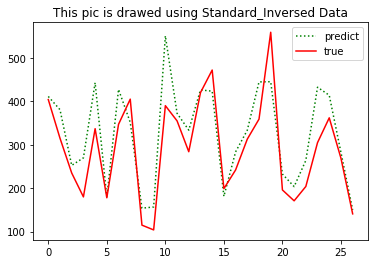
plt.title('This pic is drawed using Standard_Inversed Data')

plt.legend(['predict', 'true'])

plt.show()

print('predict:',np.reshape(predict_y, (predict_y.size,)) )

print('True:',np.reshape(test_y, (test_y.size,)))

三、代码结构

LSTM时间序列预测及网络层搭建的更多相关文章
- (数据科学学习手札40)tensorflow实现LSTM时间序列预测
一.简介 上一篇中我们较为详细地铺垫了关于RNN及其变种LSTM的一些基本知识,也提到了LSTM在时间序列预测上优越的性能,本篇就将对如何利用tensorflow,在实际时间序列预测任务中搭建模型来完 ...
- Kesci: Keras 实现 LSTM——时间序列预测
博主之前参与的一个科研项目是用 LSTM 结合 Attention 机制依据作物生长期内气象环境因素预测作物产量.本篇博客将介绍如何用 keras 深度学习的框架搭建 LSTM 模型对时间序列做预测. ...
- Pytorch循环神经网络LSTM时间序列预测风速
#时间序列预测分析就是利用过去一段时间内某事件时间的特征来预测未来一段时间内该事件的特征.这是一类相对比较复杂的预测建模问题,和回归分析模型的预测不同,时间序列模型是依赖于事件发生的先后顺序的,同样大 ...
- keras-anomaly-detection 代码分析——本质上就是SAE、LSTM时间序列预测
keras-anomaly-detection Anomaly detection implemented in Keras The source codes of the recurrent, co ...
- LSTM时间序列预测学习
一.文件准备工作 下载好的例程序 二.开始运行 1.在程序所在目录中(chapter_15)打开终端 输入下面的指令运行 python train_lstm.py 此时出现了报错提示没有安装mat ...
- Python中利用LSTM模型进行时间序列预测分析
时间序列模型 时间序列预测分析就是利用过去一段时间内某事件时间的特征来预测未来一段时间内该事件的特征.这是一类相对比较复杂的预测建模问题,和回归分析模型的预测不同,时间序列模型是依赖于事件发生的先后顺 ...
- 时间序列深度学习:状态 LSTM 模型预测太阳黑子
目录 时间序列深度学习:状态 LSTM 模型预测太阳黑子 教程概览 商业应用 长短期记忆(LSTM)模型 太阳黑子数据集 构建 LSTM 模型预测太阳黑子 1 若干相关包 2 数据 3 探索性数据分析 ...
- 使用tensorflow的lstm网络进行时间序列预测
https://blog.csdn.net/flying_sfeng/article/details/78852816 版权声明:本文为博主原创文章,未经博主允许不得转载. https://blog. ...
- 基于 Keras 用 LSTM 网络做时间序列预测
目录 基于 Keras 用 LSTM 网络做时间序列预测 问题描述 长短记忆网络 LSTM 网络回归 LSTM 网络回归结合窗口法 基于时间步的 LSTM 网络回归 在批量训练之间保持 LSTM 的记 ...
随机推荐
- MySQL字段属性NUll的注意点
MySQL字段属性应该尽量设置为NOT NULL 除非你有一个很特别的原因去使用 NULL 值,你应该总是让你的字段保持 NOT NULL.这看起来好像有点争议,请往下看. 空值("&quo ...
- Jquery实现检测用户输入用户名和密码不能为空
要求 1.用户名和密码为空点击登录时提示相应的提示 2.获取用户名输入框时,错误提示清除 思路 1.创建1个input-text标签和1个input-password标签,1个input-botton ...
- WebAPI和WebService的区别
WebAPI和WebService的区别 WebAPI用的是http协议,WebService用的是soap协议 WebAPI无状态,相对WebService更轻量级.WebAPI支持如get,pos ...
- 基准对象object中的基础类型----元组 (五)
object有如下子类: CLASSES object basestring str unicode buffer bytearray classmethod complex dict enumera ...
- ConnectionAbortedError: [WinError 10053] 您的主机中的软件中止了一个已建立的连接
socket服务端在接收socket客户端时抛出异常 ConnectionAbortedError: [WinError 10053] 您的主机中的软件中止了一个已建立的连接. socket服务端代码 ...
- 爬虫_中国天气网_文字天气预报(xpath)
import requests from lxml import etree headers = 'Mozilla/5.0 (Windows NT 10.0; WOW64) AppleWebKit/5 ...
- 「AtCoder Grand018B」Sports Festival(暴力)
题目链接B - Sports Festival 题意 n(1~300)个人m(1~300)个活动,\(A_{ij}\)表示i第j喜欢的活动,每个人选择在举办的活动里最喜欢的,因此可以通过选择一些活动来 ...
- Linux 遍历目录下面所有文件,将目录名、文件名转为小写
当你从 Windows 服务器换到 Linux 服务器的时候,以前的上传目录的目录名.文件名会遇到大小写的问题.在 Windows 环境下面没有文件区分大小写的概念,而 Linux 却有严格的文件名大 ...
- Nginx log日志参数详解
$args #请求中的参数值$query_string #同 $args$arg_NAME #GET请求中NAME的值$is_args #如果请求中有参数,值为"?",否则为空字符 ...
- LOJ#6282. 数列分块入门 6
一个动态的插入过程,还需要带有查询操作. 我可以把区间先分块,然后每个块块用vector来维护它的插入和查询操作,但是如果我现在这个块里的vector太大了,我可能的操作会变的太大,所以这时候我需要把 ...