
TopShelf 自动配置Service测试
在开发中经常会遇到后台定时处理数据和任务的情况,处理这些事情大概有以下几种方案:
1.使用数据库的job功能。优点是在数据库中可以完成的就在数据库中完成,配置等基础设施数据库都提供,简单快捷。缺点是如果业务复杂,写SQL的存储过程也就越复杂,不便后期的维护。
2.自己开发程序处理。优点是灵活处理各种业务需求。但缺点是需要自己去配置Service服务或者自己完成类似Service固定处理的功能,额外增加了很多开发和维护的工作。
综合下来2中解决问题的方案各有利弊,在开发中应该根据实际情况来决定选取何种方案,有时也需要2中方案结合。
针对第2中方案,开源框架TopShelf可以最大程度的解决其弊端,所以在接下来的场景中会尝试使用这一框架。
参考文章:https://www.cnblogs.com/yanglang/p/7199913.html
1.TopShelf的安装,也就dll的引用
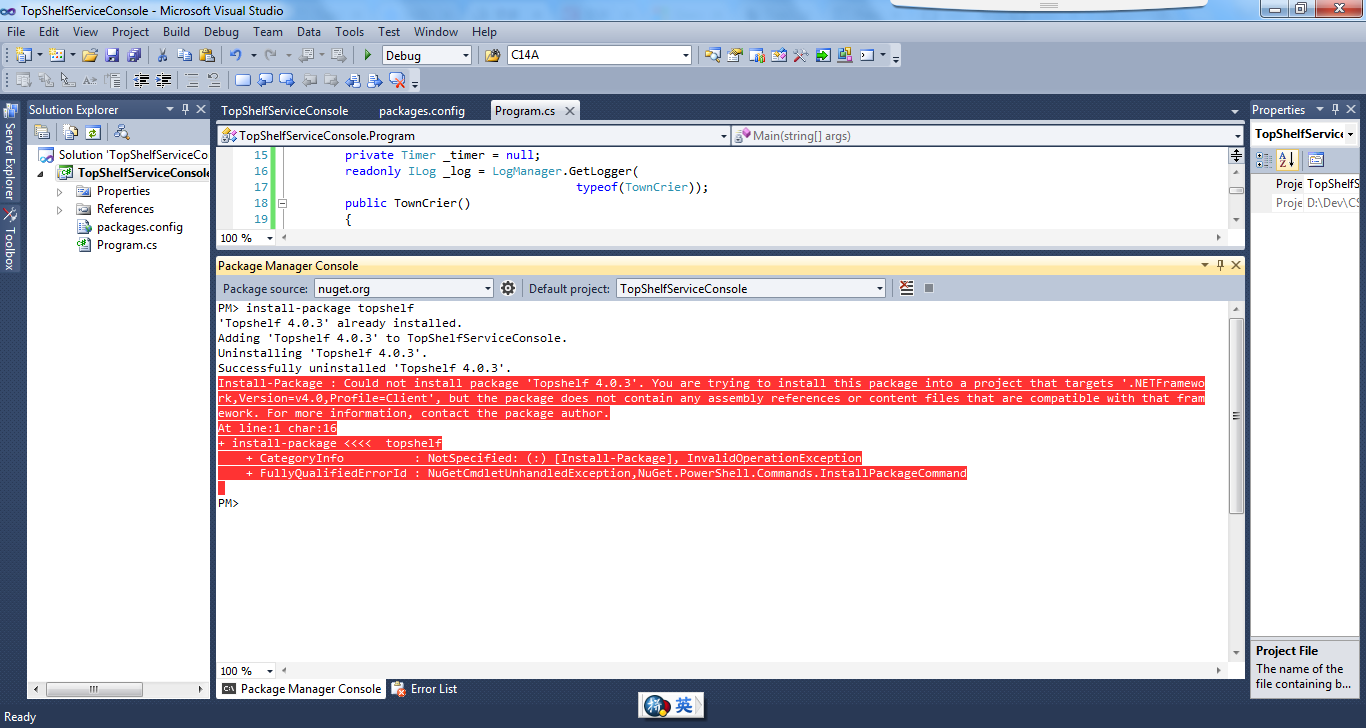
在这里折腾了几个小时,问题的原因是VS2010版本只能支持到.netFramework 4.0,而Topshelf 4.0.3版本以上的代码使用了.netFramework 4.5.2版本,这样是无法安装的。只能使用至少VS2013才可以。而VS这个IDE是要收费的,尤其是正规公司,所以有必要考虑Python语言的应用了。
下图是在VS2013下的情况:
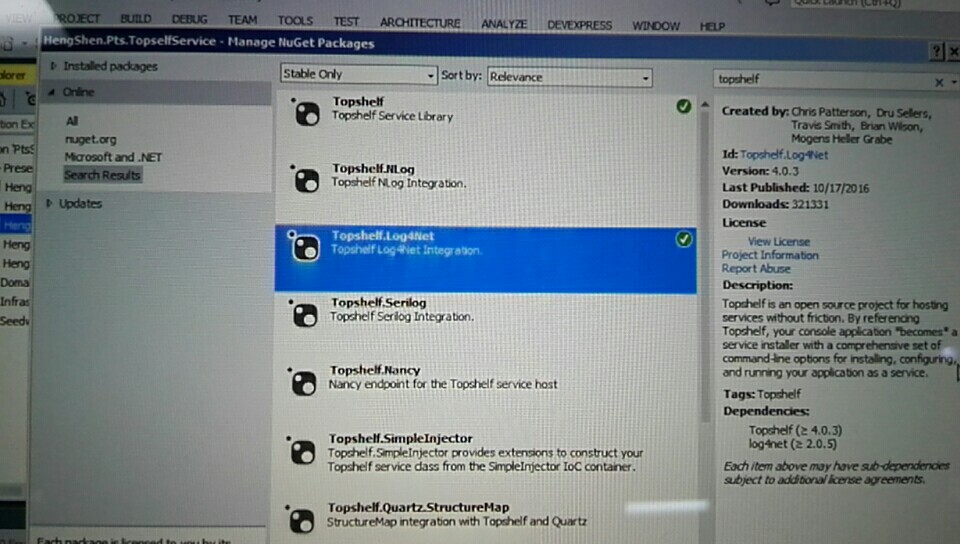
2.TopShelf.Log4Net日志的安装,也就dll的引用
同上。
3.Demo案例使用
public class TownCrier

{

    readonly Timer _timer;

    public TownCrier()

    {

        _timer = new Timer(1000) {AutoReset = true};

        _timer.Elapsed += (sender, eventArgs) => Console.WriteLine("It is {0} and all is well", DateTime.Now);

    }

    public void Start() { _timer.Start(); }

    public void Stop() { _timer.Stop(); }

}

public class Program

{

    public static void Main()

    {

        var rc = HostFactory.Run(x =>                                   //1

        {

            x.Service<TownCrier>(s =>                                   //2

            {

               s.ConstructUsing(name=> new TownCrier());                //3

               s.WhenStarted(tc => tc.Start());                         //4

               s.WhenStopped(tc => tc.Stop());                          //5

            });

            x.RunAsLocalSystem();                                       //6

            x.SetDescription("Sample Topshelf Host");                   //7

            x.SetDisplayName("Stuff");                                  //8

            x.SetServiceName("Stuff");                                  //9

        });                                                             //10

        var exitCode = (int) Convert.ChangeType(rc, rc.GetTypeCode());  //11

        Environment.ExitCode = exitCode;

    }

}
- Here we are setting up the host using the HostFactory.Run the runner. We open up a new lambda where the ‘x’ in this case exposes all of the host level configuration. Using this approach the command arguments are extracted from environment variables. We also capture the return code of the service - which we return on line 11.
- Here we are telling Topshelf that there is a service of type ‘TownCrier”. The lambda that gets opened here is exposing the service configuration options through the ‘s’ parameter.
- This tells Topshelf how to build an instance of the service. Currently we are just going to ‘new it up’ but we could just as easily pull it from an IoC container with some code that would look something like ‘container.GetInstance<TownCrier>()’
- How does Topshelf start the service
- How does Topshelf stop the service
- Here we are setting up the ‘run as’ and have selected the ‘local system’. We can also set up from the command line Interactively with a win from type prompt and we can also just pass in some username/password as string arguments
- Here we are setting up the description for the winservice to be use in the windows service monitor
- Here we are setting up the display name for the winservice to be use in the windows service monitor
- Here we are setting up the service name for the winservice to be use in the windows service monitor
- Now that the lambda has closed, the configuration will be executed and the host will start running.
- Finally, we convert and return the service exit code.
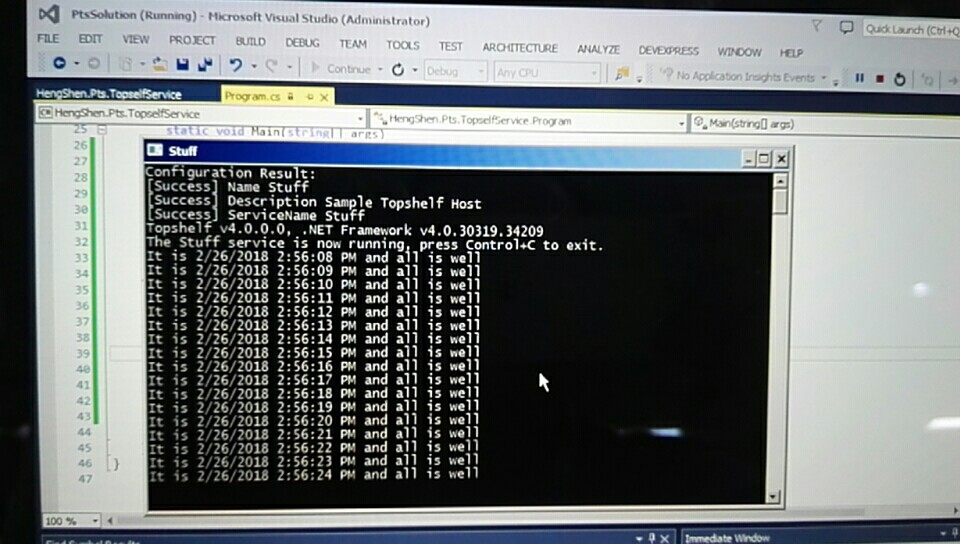
4.调试运行效果
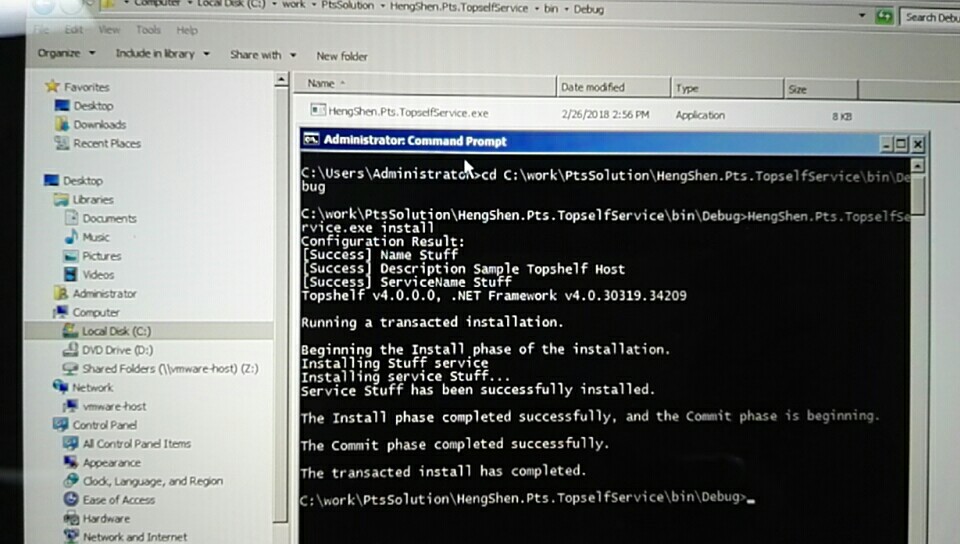
5.配置安装为windows service服务
1.cd 到应用程序的debug目录下
2. **.exe install
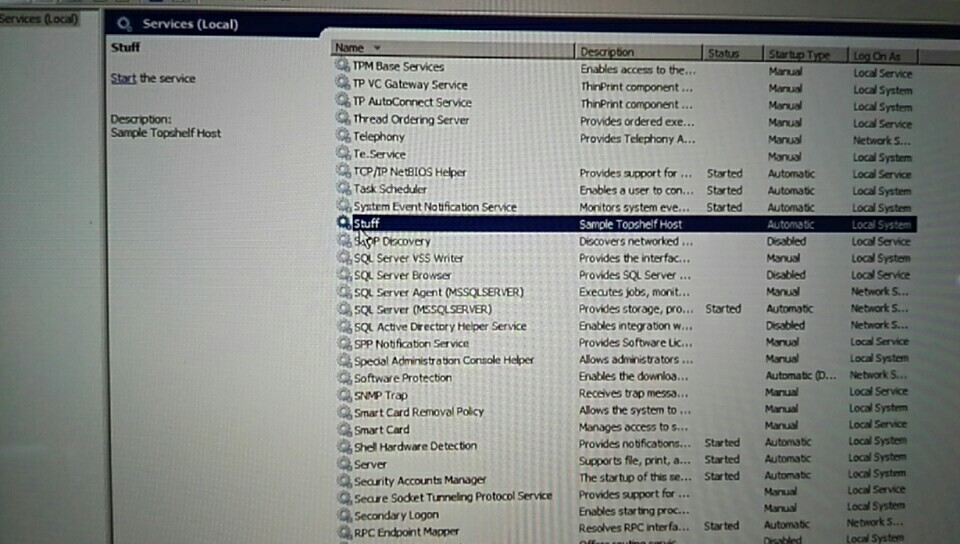
3.启动服务
**.exe start
4.卸载服务
**.exe uninstall
5.停止服务
**.exe stop
TopShelf 自动配置Service测试的更多相关文章
- ApplicationContextRunner如何简化自动配置测试
1. 概览 众所周知,自动配置是Spring Boot的关键功能之一, 但测试自动配置可能会很棘手. 在以下部分中,我们将展示ApplicationContextRunner如何简化自动配置测试. 2 ...
- 在 Linux 中自动配置 IPv6 地址
在 Linux 中自动配置 IPv6 地址 在本文中,我们将学习如何为 ULA 自动配置 IP 地址. 何时使用唯一本地地址 唯一本地地址unique local addresses(ULA)使用 f ...
- Loadrunner 脚本开发-利用Loadrunner生成Web service测试脚本
脚本开发-利用Loadrunner生成Web service测试脚本 1.选择协议--Web Service,如下图 2.导入服务 入口1:点击Manage Services ->弹出窗中选择“ ...
- spring boot 系列之六:深入理解spring boot的自动配置
我们知道,spring boot自动配置功能可以根据不同情况来决定spring配置应该用哪个,不应该用哪个,举个例子: Spring的JdbcTemplate是不是在Classpath里面?如果是,并 ...
- SpringBoot自动配置的实现原理
之前一直在用SpringBoot框架,一直感觉SpringBoot框架自动配置的功能很强大,但是并没有明白它是怎么实现自动配置的,现在有空研究了一下,大概明白了SpringBoot框架是怎么实现自动配 ...
- Nginx 通过 certbot 为网站自动配置 SSL 证书并续期
一.背景知识 1.1.http 和 https 是什么? 简单来说,http 是一个传输网页内容的协议,比如你看到的 http 开头的网站 http://www.163.com ,其网页上的文字.图片 ...
- Spring boot运行原理-自定义自动配置类
在前面SpringBoot的文章中介绍了SpringBoot的基本配置,今天我们将给大家讲一讲SpringBoot的运行原理,然后根据原理我们自定义一个starter pom. 本章对于后续继续学习S ...
- SpringBoot自定义starter及自动配置
SpringBoot的核心就是自动配置,而支持自动配置的是一个个starter项目.除了官方已有的starter,用户自己也可以根据规则自定义自己的starter项目. 自定义starter条件 自动 ...
- spring自定义自动配置注解
我们知道springboot自动配置@EnableAutoConfiguration是通过@Import(AutoConfigurationImportSelector.class)来把自动配置组件加 ...
随机推荐
- Python:BeautifulSoup移除某些不需要的属性
很久之前,我看到一个问题,大概是: 他爬了一段html,他获取下了所需的部分(img标签部分),但是不想保留img标签的某些属性, 比如 <img width="147" h ...
- Javascript 高级程序设计--总结【二】
********************** Chapter 6 ********************** 属性: 数据属性: Configurable: 能否通过delete 删除属性,默认 ...
- json数据 二级联动
<head> <link href="static/bootstrap-3.3.5-dist/css/bootstrap.css" rel="style ...
- https证书概念
https://studygolang.com/articles/10776 http://www.360doc.com/content/15/0520/10/21412_471902987.shtm ...
- Stanford机器学习---第十一讲.异常检测
之前一直在看Standford公开课machine learning中Andrew老师的视频讲解https://class.coursera.org/ml/class/index 同时配合csdn知名 ...
- oracle启动的三个阶段
startup nomount 时,数据库状态为 started; alter database mount 时, 状态为 mounted; alter database open 时,状态为 ope ...
- dell r420 H310/H810阵列配置教程及常见问题
进入H310/H810阵列卡BIOS界面 阵列卡管理快捷键 如何创建RAID0和RAID1和RAID5 阵列修复篇 Foreign(外来)状态的硬盘应如何处理 1.进入H310/H810阵列卡BIOS ...
- IDEA 编译 Jmeter 5.0(二次开发)
windows10 操作系统,jdk1.8,Intellij IDEA 2018,jmeter5.0 1.下载 http://jmeter.apache.org/download_jmeter.cgi ...
- 解决eclipse启动慢
每次启动eclipse时都要等待半分钟左右,对于追求效率的程序员来说,等待每一秒都是一种折磨,出于高效开发的精神,这个问题必须解决掉.方案如下: ①在工具栏中的help中找到about eclipse ...
- Python读取PE文件(exe/dll)中的时间戳
代码原文地址: https://www.snip2code.com/Snippet/144008/Read-the-PE-Timestamp-from-a-Windows-Exe https://gi ...