
struts2配置文件struts.xml的简介
本文在于总结,深入研究有别人写的很好了,也没必要再去写,将在本文后面附上他们的文章地址:
一、struts2的执行过程:
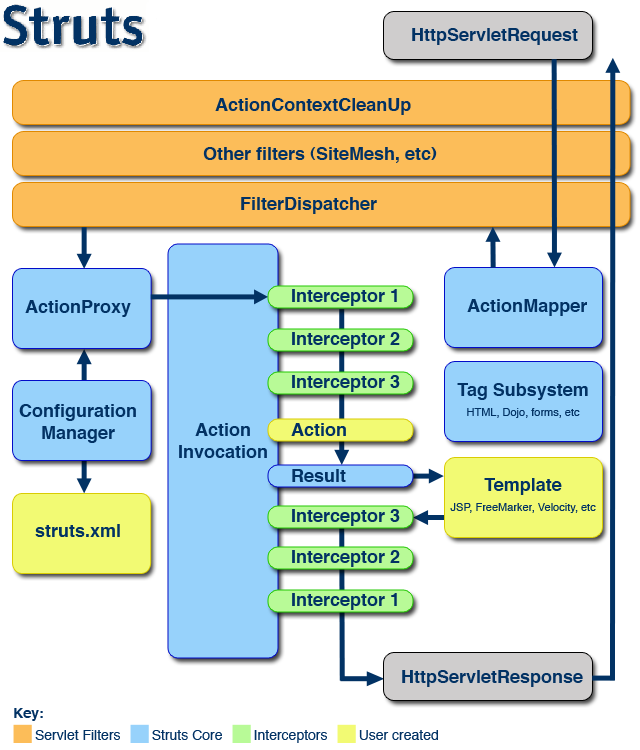
二、struts2的配置文件struts.xml
下面是其三大部分include、constant、package的配置说明,骨架这样,做的时候参考API就行了:
<?xml version="1.0" encoding="UTF-8" ?>

<!DOCTYPE struts PUBLIC "-//Apache Software Foundation//DTD Struts Configuration 2.1//EN" "http://struts.apache.org/dtds/struts-2.1.dtd">

<struts>

    <!-- 一、include -->

    <!-- 用途:用于引入外部子文件,将其内容插入本文件。-->

    <!-- 假设有子文件struts-login.xml,内容如下:

    <?xml version="1.0" encoding="UTF-8"?>

    <!DOCTYPE struts PUBLIC "-//Apache Software Foundation//DTD Struts Configuration 2.0//EN"

        "http://struts.apache.org/dtds/struts-2.0.dtd">

    <struts>

        <package name="LoginActions" extends="struts-default">

            <action name="login" class="actions.LoginAction">

                <result name="success">index.jsp</result>

            </action>

        </package>

    </struts>

    -->

    <include file="struts-login.xml"/>

    <!-- 二、constant -->

    <!-- 用途:所有在struts.properties文件中定义的属性,都可以配置在struts.xml文件中。-->

    <constant name="struts.devMode" value="true"/>

    <!-- 三、package -->

    <!-- 用途:管理interceptor、action、exception配置信息的。-->

    <package name="SQLActions">

        <!-- 3.1 interceptor -->

        <!-- 用途:管理interceptor配置信息的。-->

        <!-- 对应的就有<default-interceptor-ref name="defaultStack"/>-->

        <interceptors>

             <!-- 过滤器 -->

             <interceptor name="security" class="com.company.security.SecurityInterceptor"/>

             <!-- 过滤器栈,执行顺序按先后 -->

             <interceptor-stack name="secureStack">

                <interceptor-ref name="security"/>

                <!-- struts2默认过滤器,定义在struts.jar包中的struts-default.xml -->

                <interceptor-ref name="defaultStack"/>

             </interceptor-stack>

        </interceptors>

        <!-- 3.2 action -->

        <!-- 用途:管理action配置信息的。-->

        <!-- 对应就有默认的action<default-action-ref name="UnderConstruction"/>-->

           <!-- 定义处理请求URL为login.action的Action -->

        <action name="userLogin" class="org.qiujy.web.struts2.action.LoginAction">

            <!-- 定义初始化参数-->

            <param name="actionName">LoginInput</param>

            <!-- 定义处理结果,对应就有全局结果 <global-results>  -->

            <!-- result type表示接下来做什么,默认是dispatcher -->

            <result name="success" type="dispatcher">/success.jsp</result>

            <result name="error">/error.jsp</result>

            <!-- 定义异常处理,对应就有全局异常处理 <global-exception>  -->

            <exception-mapping exception="java.IO.Exception" result="error"/>

            <!-- interceptor的执行代码包裹着action的执行代码,执顺序详细见下面参考文章地址-->

            <interceptor-ref name="securityStack"/>

        </action>

    </package>

</struts>
三、参考文章
Struts2 API官网:http://struts.apache.org/release/2.2.x/docs/core-developers-guide.html
struts2 struts.xml的详细解析1:http://www.cnblogs.com/fmricky/archive/2010/05/20/1740479.html
struts2 struts.xml详细解析2:http://blog.csdn.net/zz_mm/article/details/5460397
struts2 拦截器的执行顺序:http://takeme.iteye.com/blog/1651498
struts2配置文件struts.xml的简介的更多相关文章
- struts2总结三:struts2配置文件struts.xml的简单总结
一.struts中的常量constant的配置. 在struts2中同一个常量的配置有三种方式,第一种在struts.xml中,第二种在struts.properties中配置,第三种在web.xml ...
- Struts2配置文件struts.xml的编辑自动提示代码功能
第一步:复制struts.xml头部地址 第二步:Window --->Preferences 第三步:XML--->XML Catalog--->Add 第四步:在Key中粘贴复制 ...
- struts2配置文件(struts.xml)中相关属性的设置
<?xml version="1.0" encoding="UTF-8" ?><!DOCTYPE struts PUBLIC "-/ ...
- struts2之配置文件struts.xml详解
struts配置文件 struts.xml配置参数详解 struts.xml中很大一部分配置默认配置就好了 但是有些还是需要做了解 以便于理解 和修改 <?xml version=" ...
- JavaWeb_(Struts2框架)struts.xml核心配置、动态方法调用、结果集的处理
此系列博文基于同一个项目已上传至github 传送门 JavaWeb_(Struts2框架)Struts创建Action的三种方式 传送门 JavaWeb_(Struts2框架)struts.xml核 ...
- 【学习笔记】Struts2之配置文件struts.xml
在默认情况下,Struts2只自动加载类加载路径下的struts.xml.default-struts.xml和struts-plugin.xml三类文件.但是随着应用规模的增大,系统中Action数 ...
- struts2:struts.xml配置文件详解
1. 几个重要的元素 1.1 package元素 package元素用来配置包.在Struts2框架中,包是一个独立的单位,通过name属性来唯一标识包.还可以通过extends属性让一个包继承另一个 ...
- struts2中struts.xml配置文件详解【未整理】
1. 深入Struts2的配置文件 本部分主要介绍struts.xml的常用配置. 1.1. 包配置: Struts2框架中核心组件就是Action.拦截器等,Struts2框架使用包来管 ...
- Struts2更改配置文件struts.xml默认路径
struts2配置文件默认存放路径在/WEB-INF/classes目录下,即将struts.xml放在src的目录下. 但是为了协作开发与方便管理,我们有时需要把struts.xml放到其他位置 s ...
随机推荐
- opencv + numpy for python
OpenCV的全称是:Open Source Computer Vision Library.OpenCV是一个基于(开源)发行的跨平台计算机视觉库,可以运行在Linux.Windows和Mac OS ...
- 十二、享元(Flyweight)模式--结构模式(Structural Pattern)
Flyweight在拳击比赛中指最轻量级,即"蝇量级",有些作者翻译为"羽量级".这里使用"享元 模式"更能反映模式的用意. 享元模式以共享 ...
- CSS发光边框文本框效果
7,166 次阅读 ‹ NSH Blog 网页设计 CSS发光边框文本框效果 或许你看过Safari浏览器下,任何输入框都会有一个发光的蓝色边框,这不单纯只是蓝色边框而已,其实包含了许多CSS3技巧知 ...
- hdu1556 Color the ball
#include <iostream> #include <cstdio> #include <cstring> #include <algorithm> ...
- 【温故而知新】Tcp/Ip协议——总览
Tcp/Ip协议 一.概念 “三网”:即电信网络.有线电视网络和计算机网络 标准(Standards) 描述了协议的规定,设定了最简的性能集. 协议(Protocol) 网络设备用于交换信息的系列规则 ...
- photoswipe
allowUserZoom: 允许用户双击放大/移动方式查看图片. 默认值 = trueautoStartSlideshow: 当PhotoSwipe激活后,自动播放幻灯片. 默认值 = falsea ...
- Sql中的Exists和in
最近学习数据库的分页算法,提到第一种 SELECT TOP 页大小 *FROM table1WHERE id NOT IN ( SELECT TOP 页大小*(页数 ...
- jsp include 乱码问题的解决
jsp include 乱码问题的解决 博客分类: Java JSPWeb浏览器IESpring jsp include 乱码问题的解决 jsp include 的文件有时候会出现乱码,经过测试发现 ...
- MySQL基础之 path环境变量的作用 (科普)
在谈mysql配置环境变量之前,先谈一下windows环境变量的作用,有时候在windows cmd窗口运行命令时,经常会出现“XXX不是内部或外部命令的提示” 原因是系统没有找到执行相应命令的文件( ...
- [Tree]Count Complete Tree Nodes
Total Accepted: 22338 Total Submissions: 97234 Difficulty: Medium Given a complete binary tree, coun ...