
使Web Api 支持跨域资源共享(CORS)
Reference:http://www.asp.net/web-api/overview/security/enabling-cross-origin-requests-in-web-api
Implementation:
1、创建两个项目,WebApi、WebApp,分别是MVC4 Empty、MVC4 Basic项目。
2、在WebApi项目中,添加一个Controller,template选择为Empty API controller
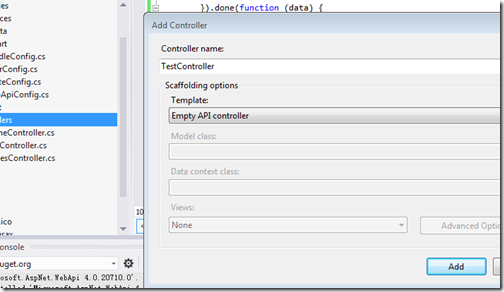
其代码为:
using System.Net.Http;

using System.Web.Http;

namespace WebService.Controllers

{

    public class TestController : ApiController

    {

        public HttpResponseMessage Get()

        {

            return new HttpResponseMessage()

            {

                Content = new StringContent("GET: Test message")

            };

        }

        public HttpResponseMessage Post()

        {

            return new HttpResponseMessage()

            {

                Content = new StringContent("POST: Test message")

            };

        }

        public HttpResponseMessage Put()

        {

            return new HttpResponseMessage()

            {

                Content = new StringContent("PUT: Test message")

            };

        }

    }

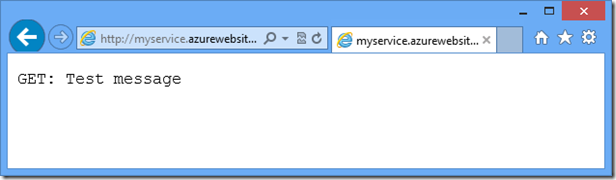
}3、运行WebApi项目,到http://localhost/目录,确保项目正常,如果项目正常,显示为:
4、给WebApp项目添加HomeController,以及Index视图,并给视图添加下面的代码:
<div>

    <select id="method">

        <option value="get">GET</option>

        <option value="post">POST</option>

        <option value="put">PUT</option>

    </select>

    <input type="button" value="Try it" onclick="sendRequest()" />

    <span id='value1'>(Result)</span>

</div>

@section scripts {

<script>

    var serviceUrl = 'http://myservice.azurewebsites.net/api/test'; // Replace with your URI.

    function sendRequest() {

        var method = $('#method').val();

        $.ajax({

            type: method,

            url: serviceUrl

        }).done(function (data) {

            $('#value1').text(data);

        }).error(function (jqXHR, textStatus, errorThrown) {

            $('#value1').text(jqXHR.responseText || textStatus);

        });

    }

</script>

}
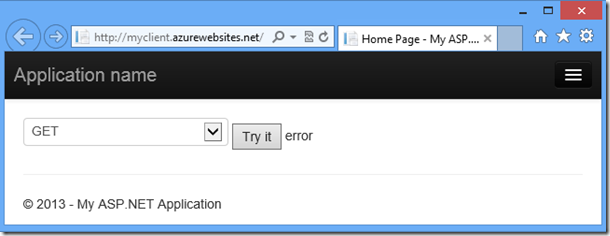
5、这个时候我们右键WebApp项目——deBug——start new instance,然后点击try按钮,显示的会是Error,因为此时我们的WebApi项目并不支持跨域资源共享如图:
6、这时我们的准备就做好了,现在我们正式开始Implementation,在Nuget的console(打开方式:在VS中,View-other windows-packges manager console)中执行以下命令:
Install-Package Microsoft.AspNet.WebApi.Cors -pre -project WebService(api项目名)7、在App_Start WebApiConfig中添加如下代码(原来的DefaultApi直接注释掉就行了):
        public static void Register(HttpConfiguration config)

        {

            // New code

            config.EnableCors();

            config.Routes.MapHttpRoute(

                name: "DefaultApi",

                routeTemplate: "api/{controller}/{id}",

                defaults: new { id = RouteParameter.Optional }

            );

        }
8、在TestController上添加一个特性EnableCors,如下:
namespace WebService.Controllers

{

    [EnableCors(origins: "http://myclient.azurewebsites.net", headers: "*", methods: "*")]

    public class TestController : ApiController

    {

        // Controller methods not shown...

    }

}
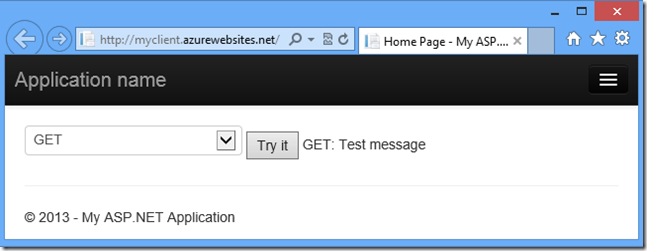
9、这个时候我们就已经在WebApi中实现了CORS,你可以用步骤五种的方式,进行测试,得到的结果如下:
Possible ERROR:
在我们从Nuget安装了CORS以后可能会出现以下错误
The type initializer for 'System.Web.Http.GlobalConfiguration' threw an exception
在以下连接中可以找到解决方法:
http://stackoverflow.com/questions/19091195/the-type-initializer-for-system-web-http-globalconfiguration-threw-an-exceptio 在nuget中执行此命令可以解决此错误:Install-Package Microsoft.AspNet.WebApi -IncludePrerelease
使Web Api 支持跨域资源共享(CORS)的更多相关文章
- 跨域资源共享CORS与JSONP
同源策略限制: 同源策略(Same origin policy)是一种约定,它是浏览器最核心也最基本的安全功能,如果没有同源策略,攻击者可以通过JavaScript获取你的邮件以及其他敏感信息,比如说 ...
- 跨域资源共享(CORS)问题解决方案
CORS:Cross-Origin Resource Sharing(跨域资源共享) CORS被浏览器支持的版本情况如下:Chrome 3+.IE 8+.Firefox 3.5+.Opera 12+. ...
- VUE SpringCloud 跨域资源共享 CORS 详解
VUE SpringCloud 跨域资源共享 CORS 详解 作者: 张艳涛 日期: 2020年7月28日 本篇文章主要参考:阮一峰的网络日志 » 首页 » 档案 --跨域资源共享 CORS 详解 ...
- 网络编程-跨域资源共享 CORS
目录 1.什么是同源策略? 2.跨域资源共享 CORS 3.预检请求 4.CORS相关字段 5.Golang实现跨域 6.参考资料 1.什么是同源策略? 如果两个 URL 的 protocol.por ...
- 在Angular.js中的H5页面调用Web api时跨域问题处理
/// <summary> /// 被请求时 /// 在Angular.js中的H5页面调用Web api时跨域问题处理 /// </summary> /// <para ...
- 跨域解决方案 - 跨域资源共享cors
目录 1. cors 介绍 2. 原理 3. cors 解决跨域 4. 自定义HTTP 头部字段解决跨域 5. 代码演示 5. 参考链接 1. cors 介绍 cors 说的是一个机制,其实相当于一个 ...
- 跨域资源共享 CORS 详解(转)
add by zhj: 公司在一个web产品上,做前后端分离,前后端提供独立的服务,使用不同的域名,通过http进行交互,在 前端,会涉及到跨域访问的问题,前端使用了CORS,后端同时需要做相应修改, ...
- Web API 解决跨域问题
一.跨域问题的由来 同源策略:出于安全考虑,浏览器会限制脚本中发起的跨站请求,浏览器要求JavaScript或Cookie只能访问同域下的内容. 正是由于这个原因,我们不同项目之间的调用就会被浏览器阻 ...
- 跨域资源共享 CORS
CORS是一个W3C标准,全称是"跨域资源共享"(Cross-origin resource sharing). 它允许浏览器向跨源服务器,发出XMLHttpRequest请求,从 ...
随机推荐
- Protel对话窗字体显示不完全问题解决办法(PCB)
点击protel99左上角的大箭头,点击preferences ,在对话框中把use client system fonts for all dialogs 复选框去掉,就可以了.
- 跨平台生成GUID/UUID
#ifndef XGUID_H#define XGUID_H #include <string>#include <stdio.h>#ifdef WIN32#include & ...
- china-pub
#!/usr/bin/env python #coding:utf-8import urllib2,re,sys,os,types ...
- Eclipse 编码区-保护色-快捷大全
Eclipse快捷键大全 Eclipse编码区-保护色-快捷设置 1.设置路径: windows-preferences-general-editors-text Editors-ba ...
- cocos2dx的runAction: 反复运行,多个动作连接运行,多个动作同一时候运行的实现
cocos2dx的 runAction,假设某个动作重复运行用cc.RepeatForever:create, 多个动作连接运行用cc.Sequence:create,多个动作同一时候运行用cc.Sp ...
- 如何快速方便的输出向量vector容器中不重复的内容
在vector容器中,存入的内容难免会出现重复,那么如何快速输出或提前非重复的那些数据呢,即重复的数据只输出一次,直观的方法是每次输出都要通过循环比较是否已经输出过,这种方法还是比较费时的,可以利用u ...
- 随机生成A~Z的字母CharDemo
- 怎样让jQuery和其它js库共存
怎样让jQuery和其它js库共存 有时候需要同时使用jQuery和其它javascript,比如在joomla中默认的是motools,但很多人还是希 望能够使用jQuery,如果直接调用的话,由于 ...
- windows下apache+wsgi+web.py环境搭建
首先安装好wsgi模块并启用:1.下载地址:我本机是python2.7 http://code.google.com/p/modwsgi/downloads/detail?name=mod_wsgi- ...
- UVALive 6467 Strahler Order 拓扑排序
这题是今天下午BNU SUMMER TRAINING的C题 是队友给的解题思路,用拓扑排序然后就可以了 最后是3A 其中两次RE竟然是因为: scanf("%d",mm); ORZ ...