
[备查]使用 SPQuery 查询 "Person or Group" 字段
Querying the “Person or Group” field using SPQuery (Update)
One of the weak points of Sharepoint 2007 is documentation. If you want to query a “Person or Group” field, the documentation on MSDN is a bit sparse.
Here is how to query a person:
<where>

  <eq>

    <fieldref name="PersonFieldName"/>

    <value type="User">User Display Name</value>

  </eq>

</where>
Replace PersonFieldName with the internal Name of the Field.
The two important things here: Value Type is “User”, and the String to search for is the Display Name. So if you have a user called “John Doe” whose login is “mydomain\jdoe”, you have to search for “John Doe”, not for “mydomain\jdoe”.
There is an obvious drawback to this: What if you have two users called John Doe?
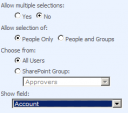 I was quite disappointed that the Person field does not store the LoginName by default and can therefore not be queried for it.
There are two workarounds. The first one: Go to the properties of the field in the list, and at the bottom you can change “Show Field” to “Account”.
This has the advantage that you can use the “domain\username” Syntax now. The drawback: The field looks bad in the list as it does now show the Login, not the Display Name with the neat presence status.
The second workaround: Use the undocumented LookupId property and search for the numeric ID:
<where>

  <eq>

    <fieldref name="PersonFieldName" LookupId="TRUE"/>

    <value type="int">UserID</value>

  </eq>

</where>
The UserID is not the “domain\username”, but the numeric internal ID (SPUser.ID). As I use this in a workflow, I can easily access this through workflowProperties.OriginatorUser.ID, which is good enough for me.
Update: The second code example was incorrect, I fixed it now.
[备查]使用 SPQuery 查询 "Person or Group" 字段的更多相关文章
- SQL查询每个表的字段数量
--SQL查询每个表的字段数量select b.[name], count(*) As AllCount,ISNULL(ISNULL(sum(case when isnullable=0 then 1 ...
- [转]SQL数据库查询到的汉字字段是乱码
使用英文版SQL数据库查询到的汉字字段是乱码的解决方案 2007-12-04 14:55:45 标签:函数 SQL 数据库 乱码 排序规则 原创作品,允许转载,转载时请务必以超链接形式标明文章 原始出 ...
- Mysql 单表查询-排序-分页-group by初识
Mysql 单表查询-排序-分页-group by初识 对于select 来说, 分组聚合(((group by; aggregation), 排序 (order by** ), 分页查询 (limi ...
- MongoDB查询操作限制返回字段的方法
这篇文章主要介绍了MongoDB查询操作限制返回字段的方法,需要的朋友可以参考下 映射(projection )声明用来限制所有查询匹配文档的返回字段.projection以文档的形式列举结果集中 ...
- linq查询结果转换为指定字段类型的list集合
转换查询结果为ProductId字段的类型的list集合 (from s in _db.Mobile_TeamAction || s.ActionStatus == select new { s.Pr ...
- Java 通过JDBC查询数据库表结构(字段名称,类型,长度等)
Java 通过JDBC查询数据库表结构(字段名称,类型,长度等) 发布者:唛唛家的豆子 时间:2012-11-20 17:54:02 Java 通过JDBC查询数据库表结构(字段名称,类型,长 ...
- mysql查询order by 指定字段排序
当MySQL查询时排序的字段不是数字时而是汉字的时候也可以用when then 来指定排序. 列如yewu_check表的status 字段不是0,1,2而是汉字待办,已办,退回.可以如下写法: S ...
- Oracle数据库里面查询字符串类型的字段不为空和为空的SQL语句:
一:查询字符串类型的字段的值不为空的SQL: select * from TB_CMS_FLGTINFO_A t where (t.fsta is not null and t.fsta <&g ...
- Qt+QGIS二次开发:自定义类实现查询矢量数据的属性字段值(图查属性)
在GIS领域,有两种重要的查询操作,图查属性和属性查图. 本文主要介绍如何在QGIS中通过从QgsMapToolIdentify中派生自定义类实现查询矢量数据的属性字段值(图查属性). 重点参考资料: ...
随机推荐
- Web应用之LAMP源码环境部署
一.LAMP环境的介绍 1.LAMP环境的重要性 思索许久,最终还是决定写一篇详细的LAMP的源码编译安装的实验文档,一来是为了给自己一个交代,把技术进行系统的归纳,将技术以极致的形式呈现出来,做为一 ...
- 从is(":checked")说起
*此文所用jQuery版本应大于1.6.1 如何判断一个单选(复选)框是否选中. 对于刚接触jQuery的人,第一反应必然是. <input id="checkbox1" ...
- Lesson 24 It could be worse
Text I entered the hotel manager's office and sat down. I had just lost £50 and I felt very upset. ' ...
- JAVA通信系列二:mina入门总结
一.学习资料 Mina入门实例(一) http://www.cnblogs.com/juepei/p/3939119.html Mina入门教程(二)----Spring4 集成Mina http:/ ...
- 我设计的ASP.NET笔试题,你会多少呢
本笔试题考查范围包括面向对象基础.HTML.CSS.JS.EF.jQuery.SQL.编码思想.算法等范围. 第1题:接口和抽象类有何区别? 第2题:静态方法和实例方法有何区别? 第3题:什么是多态? ...
- 使用boilerplate模版创建解决方案
返回总目录<一步一步使用ABP框架搭建正式项目系列教程> 话不多说,让我们开始干吧!对于还没有接触ABP框架或者接触时间还不是很长的小伙伴来说,我建议还是使用官方建议的做法,那就是到ABP ...
- 创建一个Phone实体,完成多页面的电话簿项目
添加实体 在类库CORE中添加: [Table("PbPhones")] public class Phone : CreationAuditedEntity<long> ...
- WCF学习之旅—HTTP双工模式(二十)
WCF学习之旅—请求与答复模式和单向模式(十九) 四.HTTP双工模式 双工模式建立在上文所实现的两种模式的基础之上,实现客户端与服务端相互调用:前面介绍的两种方法只是在客户端调用服务端的方法,然后服 ...
- 创建 Monitor 并测试 - 每天5分钟玩转 OpenStack(124)
前面我们创建了 Pool,VIP 并添加了 Member.今天将创建 Monitor,然后测试 LBaaS 是否能够正常工作. 创建 Monitor LBaaS 可以创建 monitor,用于监控 P ...
- 谈谈iOS Animation
零.前言 这里没有太多的代码细节,只是探索iOS动画的基本概念,以及其抽象模型,数学基础等.我们学习一个知识的时候一般有两个部分,抽象部分和形象部分,抽象好比语言的语法,是规则,形象好比具体的句子,可 ...