
d3.js在vue项目中的安装及案例
1. 安装:
npm i d3 --save
2. 引入:main.js
import * as d3 from "d3";

Vue.prototype.$d3 = d3;

window.d3 = d3;   //暂时设置为全局变量
3. demo代码: demo源码参考地址
<template>

    <div style="width: 100%;height: 100%;">

        <svg version="1.1" xmlns="http://www.w3.org/2000/svg" xmlns:xlink="http://www.w3.org/1999/xlink" xml:space="preserve"

         width="960" height="500"> </svg>

    </div>

</template>

<script>

    export default {

        mounted() {

            var svg = d3.select("svg"),

                width = +svg.attr("width"),

                height = +svg.attr("height"),

                color = d3.scaleOrdinal(d3.schemeCategory10);

            var a = {

                    id: "a"

                },

                b = {

                    id: "b"

                },

                c = {

                    id: "c"

                },

                nodes = [a, b, c],

                links = [];

            var simulation = d3.forceSimulation(nodes)

                .force("charge", d3.forceManyBody().strength(-1000))

                .force("link", d3.forceLink(links).distance(200))

                .force("x", d3.forceX())

                .force("y", d3.forceY())

                .alphaTarget(1)

                .on("tick", ticked);

            var g = svg.append("g").attr("transform", "translate(" + width / 2 + "," + height / 2 + ")"),

                link = g.append("g").attr("stroke", "#000").attr("stroke-width", 1.5).selectAll(".link"),

                node = g.append("g").attr("stroke", "#fff").attr("stroke-width", 1.5).selectAll(".node");

            restart();

            d3.timeout(function() {

                links.push({

                    source: a,

                    target: b

                }); // Add a-b.

                links.push({

                    source: b,

                    target: c

                }); // Add b-c.

                links.push({

                    source: c,

                    target: a

                }); // Add c-a.

                restart();

            }, 1000);

            d3.interval(function() {

                nodes.pop(); // Remove c.

                links.pop(); // Remove c-a.

                links.pop(); // Remove b-c.

                restart();

            }, 2000, d3.now());

            d3.interval(function() {

                nodes.push(c); // Re-add c.

                links.push({

                    source: b,

                    target: c

                }); // Re-add b-c.

                links.push({

                    source: c,

                    target: a

                }); // Re-add c-a.

                restart();

            }, 2000, d3.now() + 1000);

            function restart() {

                // Apply the general update pattern to the nodes.

                node = node.data(nodes, function(d) {

                    return d.id;

                });

                node.exit().transition()

                    .attr("r", 0)

                    .remove();

                node = node.enter().append("circle")

                    .attr("fill", function(d) {

                        return color(d.id);

                    })

                    .call(function(node) {

                        node.transition().attr("r", 8);

                    })

                    .merge(node);

                // Apply the general update pattern to the links.

                link = link.data(links, function(d) {

                    return d.source.id + "-" + d.target.id;

                });

                // Keep the exiting links connected to the moving remaining nodes.

                link.exit().transition()

                    .attr("stroke-opacity", 0)

                    .attrTween("x1", function(d) {

                        return function() {

                            return d.source.x;

                        };

                    })

                    .attrTween("x2", function(d) {

                        return function() {

                            return d.target.x;

                        };

                    })

                    .attrTween("y1", function(d) {

                        return function() {

                            return d.source.y;

                        };

                    })

                    .attrTween("y2", function(d) {

                        return function() {

                            return d.target.y;

                        };

                    })

                    .remove();

                link = link.enter().append("line")

                    .call(function(link) {

                        link.transition().attr("stroke-opacity", 1);

                    })

                    .merge(link);

                // Update and restart the simulation.

                simulation.nodes(nodes);

                simulation.force("link").links(links);

                simulation.alpha(1).restart();

            }

            function ticked() {

                node.attr("cx", function(d) {

                        return d.x;

                    })

                    .attr("cy", function(d) {

                        return d.y;

                    })

                link.attr("x1", function(d) {

                        return d.source.x;

                    })

                    .attr("y1", function(d) {

                        return d.source.y;

                    })

                    .attr("x2", function(d) {

                        return d.target.x;

                    })

                    .attr("y2", function(d) {

                        return d.target.y;

                    });

            }

        },

    }

</script>
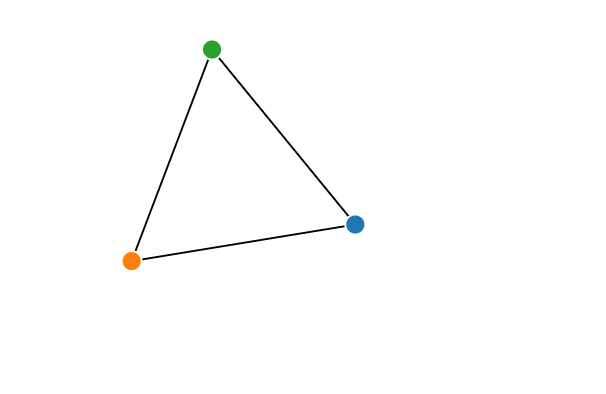
4. demo效果图
d3.js在vue项目中的安装及案例的更多相关文章
- cytoscape.js在vue项目中的安装及案例
1. 安装: npm i cytoscape --save 2. 引入:main.js import cytoscape from 'cytoscape'; Vue.prototype.$cytosc ...
- vue项目中npm安装sass,less,stylus
用vue-cli脚手架搭建出来的,默认是用标准css的.如果你想用sass,less,stylus就需要自己手动安装一下了. 进入项目文件夹,然后安装(这里以stylus为例)stylus和stylu ...
- 【bcrypt】vue项目中bcrypt安装报错
[报错] 报错时安装方法: npm install bcrypt [解决方法] npm install bcryptjs 用 bcryptjs 替换 bcrypt 即可.
- 在vue项目中的axios使用配置记录
默认vue项目中已经安装axios,基于element-ui开发,主要记录配置的相关. axiosConfig.js import Vue from 'vue' import axios from ' ...
- 在vue项目中使用canvas-nest.js,报parameter 1 is not of type 'Element'
canvas-nest.js是一款轻量的网页特效,如图: github地址:https://github.com/hustcc/canvas-nest.js 在普通的html项目中,只要将<sc ...
- vue 项目中安装npm--save-dev 和 --save 命令
在vue项目中我们常用npm install 安装模块或插件 有两种命令把他们写入到 package.json 文件里面去 例如安装axios 安装到开发环境npm axios --save-dev ...
- vue 项目中实用的小技巧
# 在Vue 项目中引入Bootstrap 有时在vue项目中会根据需求引入Bootstrap,而Bootstrap又是依赖于jQuery的,在使用npm按照时,可能会出现一系列的错误 1.安装jQu ...
- 如何在VUE项目中添加ESLint
如何在VUE项目中添加ESLint 1. 首先在项目的根目录下 新建 .eslintrc.js文件,其配置规则可以如下:(自己小整理了一份),所有的代码如下: // https://eslint.or ...
- 浅谈 Axios 在 Vue 项目中的使用
介绍 Axios 是一个基于 promise 的 HTTP 库,可以用在浏览器和 node.js 中. 特性 它主要有如下特性: 浏览器端发起XMLHttpRequests请求 Node端发起http ...
随机推荐
- idea下启动tomcat时,打印的日志中文乱码
idea2018.2+tomcat8+java8+win10 异常:将编码方式全都修改为UTF-8后,且tomcat的VM启动参数中配置了:-Dfile.encoding=UTF-8.导致控制台日志打 ...
- 1.The Necessity of a Broad Education 全面教育的必要性
1.The Necessity of a Broad Education 全面教育的必要性 (1) According to a survey,which was based on the respo ...
- 删除一直处于deleting状态的数据卷
一.场景 有一个volume数据卷hzb-1G-xxxxxx创建在nc8的ceph节点上,并且该数据卷的但是有一天nc8节点坏掉了.当我们删除hzb-1G-xxxxxx的时候,就会一直处于deleti ...
- 关于SQL表字段值缺失的处理办法
在计算收益率时候, 收益率 = 收益 / 成本 一.如果成本为0,NULL,此时无法计算收益率: 方法: 1.将成本为0的数据 运算 (case when cost =0 or cost is n ...
- div配景图片全div显示
<div class="face-boy" style="width:86px;height:92px;background: url('/${userProfil ...
- idea创建maven项目报错,Error initializing: org.codehaus.plexus.velocity.DefaultVelocityComponent@56da52a7 java.lang.NoClassDefFoundError: org/apache/commons/lang/StringUtils
学着使用idea,想创建个maven项目,但是出师不利,立马报错,贼尴尬,错误信息如下: D:\Develop\JDK\bin\java.exe -Dmaven.multiModuleProjectD ...
- css3动画特效集合
<!DOCTYPE html> <html> <head> <title></title> <meta charset="u ...
- 2.1.4synchronized方法与锁对象
为了证明线程锁的是对象 测试 package com.cky.bean; /** * Created by chenkaiyang on 2017/12/4. */ public class MyOb ...
- VS2008 + QGIS1.7.1试验
今天试验了一下.结果算是成功了吧.显示Generate done,生成了.但是提示了一个“SVN version不明确”的错误提示,应该无大碍吧.但是打开Build成的.sln也没看出有啥不妥. 用C ...
- JQuery设置和去除disabled属性 与 display显示隐藏
//两种方法设置disabled属性 $('#areaSelect').attr("disabled",true); $('#areaSelect').attr("dis ...