
mysql+thinkphp +amcharts 完成图表统计功能
思路:从mysql数据库查询数据,经过thinkphp 后端控制器做逻辑处理,返回给前端,前端调用Amcharts 插件
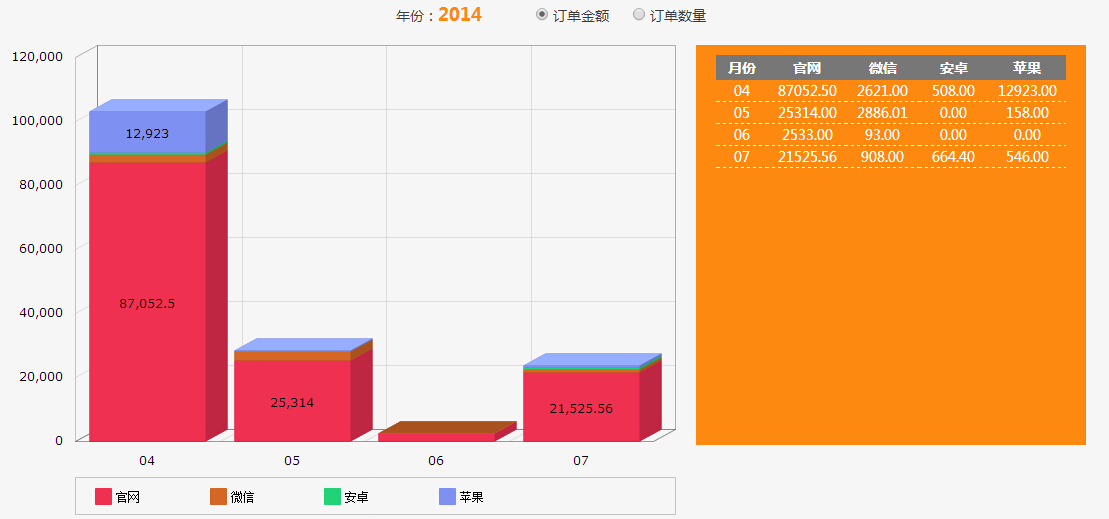
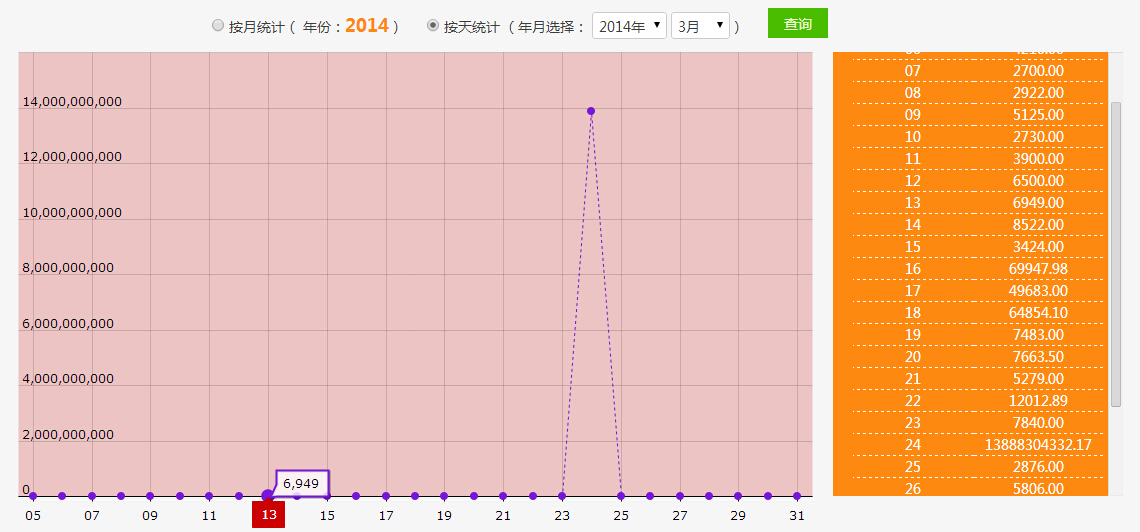
1.数据查询:
public function order($time='',$radio=1){

        if($time== ''){

            $time = Date("Y");

        }

        $bt = $time."-01-01 00:00:00";

        $et = (string)((int)$time+1)."-01-01 00:00:00";

        $sql='';

        if($radio==1){

            $sql="SELECT right(tt.month,2) as month, IFNULL( we.web, 0 ) as web, IFNULL( wx.weixin, 0 ) as weixin, IFNULL( ad.andriod, 0 ) as andriod , IFNULL( ip.iphone, 0 ) as iphone

            FROM (

            (

            SELECT DATE_FORMAT(  `AddTime` ,  '%Y-%m' ) AS

            MONTH FROM  `order`

            WHERE State = 2

            AND AddTime >= '$bt'

            AND AddTime < '$et'

            GROUP BY MONTH

            ) AS tt

            LEFT JOIN (

            SELECT DATE_FORMAT(  `AddTime` ,  '%Y-%m' ) AS

            MONTH , SUM(  `PayMoney` ) AS web

            FROM  `order`

            WHERE  `OrderSource` =1

            AND State = 2

            AND AddTime >= '$bt'

            AND AddTime < '$et'

            GROUP BY MONTH

            ) AS we ON tt.month = we.month

            LEFT JOIN (

            SELECT DATE_FORMAT(  `AddTime` ,  '%Y-%m' ) AS

            MONTH , SUM(  `PayMoney` ) AS weixin

            FROM  `order`

            WHERE  `OrderSource` =2

            AND State = 2

            AND AddTime >= '$bt'

            AND AddTime < '$et'

            GROUP BY MONTH

            ) AS wx ON tt.month = wx.month

            LEFT JOIN (

            SELECT DATE_FORMAT(  `AddTime` ,  '%Y-%m' ) AS

            MONTH , SUM(  `PayMoney` ) AS andriod

            FROM  `order`

            WHERE  `OrderSource` =3

            AND State = 2

            AND AddTime >= '$bt'

            AND AddTime < '$et'

            GROUP BY MONTH

            ) AS ad ON tt.month = ad.month

            LEFT JOIN (

            SELECT DATE_FORMAT(  `AddTime` ,  '%Y-%m' ) AS

            MONTH , SUM(  `PayMoney` ) AS iphone

            FROM  `order`

            WHERE  `OrderSource` =4

            AND State = 2

            AND AddTime >= '$bt'

            AND AddTime < '$et'

            GROUP BY MONTH

            ) AS ip ON tt.month = ip.month

            )";

        }else{

            $sql="SELECT right(tt.month,2) as month, IFNULL( we.web, 0 ) as web, IFNULL( wx.weixin, 0 ) as weixin, IFNULL( ad.andriod, 0 ) as andriod, IFNULL( ip.iphone, 0 ) as iphone

            FROM (

            (

            SELECT DATE_FORMAT(  `AddTime` ,  '%Y-%m' ) AS

            MONTH FROM  `order`

            WHERE State = 2

            AND AddTime >= '$bt'

            AND AddTime < '$et'

            GROUP BY MONTH

            ) AS tt

            LEFT JOIN (

            SELECT DATE_FORMAT(  `AddTime` ,  '%Y-%m' ) AS

            MONTH , count(  `id` ) AS web

            FROM  `order`

            WHERE  `OrderSource` =1

            AND State = 2

            AND AddTime >= '$bt'

            AND AddTime < '$et'

            GROUP BY MONTH

            ) AS we ON tt.month = we.month

            LEFT JOIN (

            SELECT DATE_FORMAT(  `AddTime` ,  '%Y-%m' ) AS

            MONTH , count(  `id` ) AS weixin

            FROM  `order`

            WHERE  `OrderSource` =2

            AND State = 2

            AND AddTime >= '$bt'

            AND AddTime < '$et'

            GROUP BY MONTH

            ) AS wx ON tt.month = wx.month

            LEFT JOIN (

            SELECT DATE_FORMAT(  `AddTime` ,  '%Y-%m' ) AS

            MONTH , count(  `id` ) AS andriod

            FROM  `order`

            WHERE  `OrderSource` =3

            AND State = 2

            AND AddTime >= '$bt'

            AND AddTime < '$et'

            GROUP BY MONTH

            ) AS ad ON tt.month = ad.month

            LEFT JOIN (

            SELECT DATE_FORMAT(  `AddTime` ,  '%Y-%m' ) AS

            MONTH , count(  `id` ) AS iphone

            FROM  `order`

            WHERE  `OrderSource` =4

            AND State = 2

            AND AddTime >= '$bt'

            AND AddTime < '$et'

            GROUP BY MONTH

            ) AS ip ON tt.month = ip.month

            )";

        }

        $m = new Model();//实例化对象模型

        //echo $sql;

        $o = $m->query($sql);

        //dump(json_encode($o));

        $this-> o = json_encode($o);

        $this-> ol = $o;

        $this-> time = $time;

        $this-> radio = $radio;

        $this-> timearr = $temp;

        $this ->display('order');

        }

    public function recharge($time='',$radio=1,$year=NULL,$month=NULL){

        $this->meta_title = '充值信息统计';

        $sql= '';

        if($radio==1){//按月统计

            if($time== ''){

            $time = Date("Y");

            }

            $bt = $time."-01-01 00:00:00";

            $et = (string)((int)$time+1)."-01-01 00:00:00";

            $sql="SELECT right(tt.month,2) as month, IFNULL( we.usum, 0 ) as usum

            FROM (

            (

            SELECT DATE_FORMAT(  `AddTime` ,  '%Y-%m' ) AS

            MONTH FROM  `recharge`

            WHERE PayType in(0,1)

            AND AddTime >= '$bt'

            AND AddTime < '$et'

            GROUP BY MONTH

            ) AS tt

            LEFT JOIN (

            SELECT DATE_FORMAT(  `AddTime` ,  '%Y-%m' ) AS

            MONTH , sum(  `Money` ) AS usum

            FROM  `recharge`

            WHERE PayType in(0,1)

            AND AddTime >= '$bt'

            AND AddTime < '$et'

            GROUP BY MONTH

            ) AS we ON tt.month = we.month

            )";

            $this-> showname = '月';

        }else{//按天统计

            if(!$year){

                $year = Date("Y");

            }

            $time = Date("Y");

            if(!$month){

                $month = Date("m");

            }

            $bt = $year.'-'.$month."-01 00:00:00";

            $et = date('Y-m-d H:i:s',strtotime('+1 month',strtotime($bt)));

             $sql="SELECT right(tt.month,2) as month, IFNULL( we.usum, 0 ) as usum

            FROM (

            (

            SELECT DATE_FORMAT(  `AddTime` ,  '%Y-%m-%d' ) AS

            MONTH FROM  `recharge`

            WHERE PayType in(0,1)

            AND AddTime >= '$bt'

            AND AddTime < '$et'

            GROUP BY MONTH

            ) AS tt

            LEFT JOIN (

            SELECT DATE_FORMAT(  `AddTime` ,  '%Y-%m-%d' ) AS

            MONTH , sum(  `Money` ) AS usum

            FROM  `recharge`

            WHERE PayType in(0,1)

            AND AddTime >= '$bt'

            AND AddTime < '$et'

            GROUP BY MONTH

            ) AS we ON tt.month = we.month

            )";

            $this-> showname = '天';

        }

        $m = new Model();//实例化对象模型

        //echo $sql;

        $o = $m->query($sql);

        //dump($o);

        $this-> o = json_encode($o);

        $this-> ol = $o;

        $this-> time = $time;

        $this-> radio = $radio;

        $this-> year = $year;

        $this-> month = $month;

        $this ->display('recharge');

    }
用到分组查询,sql 函数 有
A. right(tt.month,2) as month
B. IFNULL( we.usum, 0 ) as usum
C. count( `id` ) AS unum
D. sum( `Money` ) AS usum
E. SELECT DATE_FORMAT( `AddTime` , '%Y-%m' ) AS
MONTH FROM `table`
WHERE XXXXX
GROUP BY MONTH(分组group by 直接用select 后面的month即可)
'%Y-%m' 是时间格式,DATE_FORMAT 用于时间格式为“2012-01-01 00:01:22”的这种形式。
F. SELECT FROM_UNIXTIME( `AddTime` , '%Y-%m-%d') AS
MONTH , count( `id` ) AS unum
FROM `table`
WHERE XXXXX
GROUP BY MONTH
FROM_UNIXTIME 用于时间戳格式。
分组的思想是先查询出有哪些组,然后在查询出符合的数据,然后用left join 来组合。
2. 前端数据整合
A. 数据格式
给前端的数据格式为JSON:
var chartData = [
{
"month": "01",
"web": 2.5,
"weixin": 2.5,
"andriod": 2.1,
"iphone": 1.3
},
{
"month": "02",
"web": 2.6,
"weixin": 2.7,
"andriod": 2.2,
"iphone": 1.3
},
{
"month": "03",
"web": 2.5,
"weixin": 2.5,
"andriod": 2.1,
"iphone": 1.3
},
{
"month": "04",
"web": 2.6,
"weixin": 2.7,
"andriod": 2.2,
"iphone": 1.3
},
{
"month": "05",
"web": 2.8,
"weixin": 2.9,
"andriod": 2.4,
"iphone": 1.3
},
{
"month": "06",
"web": 2.8,
"weixin": 2.9,
"andriod": 2.4,
"iphone": 1.3
},
{
"month": "07",
"web": 2.5,
"weixin": 2.5,
"andriod": 2.1,
"iphone": 1.3
},
{
"month": "08",
"web": 2.6,
"weixin": 2.7,
"andriod": 2.2,
"iphone": 1.3
},
{
"month": "09",
"web": 2.8,
"weixin": 2.9,
"andriod": 2.4,
"iphone": 1.3
},
{
"month": "10",
"web": 2.8,
"weixin": 2.9,
"andriod": 2.4,
"iphone": 1.3
},
{
"month": "11",
"web": 2.8,
"weixin": 2.9,
"andriod": 2.4,
"iphone": 1.3
},
{
"month": "12",
"web": 2.8,
"weixin": 2.9,
"andriod": 2.4,
"iphone": 1.3
}
];
thinkphp 查询出来的数据时数组,用json_encode 转换成JSON 数组
$o = $m->query($sql);
$this-> o = json_encode($o);
$this-> ol = $o;
B. html 代码(要画图的层)
<div id="chartdiv" style="width: 700px; height: 500px;float:left"></div>
C. 画图
柱状图:
var chart;

            var chartData = <?=$o?>;

                        AmCharts.ready(function () {

                // SERIAL CHART

                chart = new AmCharts.AmSerialChart();

                chart.dataProvider = chartData;

                chart.categoryField = "month";

                chart.plotAreaBorderAlpha = 0.2;

                // AXES

                // category

                var categoryAxis = chart.categoryAxis;

                categoryAxis.gridAlpha = 0.1;

                categoryAxis.axisAlpha = 0;

                categoryAxis.gridPosition = "start";

                // value

                var valueAxis = new AmCharts.ValueAxis();

                valueAxis.stackType = "regular";

                valueAxis.gridAlpha = 0.1;

                valueAxis.axisAlpha = 0;

                chart.addValueAxis(valueAxis);

                // GRAPHS

                // first graph

                var graph = new AmCharts.AmGraph();

                graph.title = "官网";

                graph.labelText = "[[value]]";

                graph.valueField = "web";

                graph.type = "column";

                graph.lineAlpha = 0;

                graph.fillAlphas = 1;

                graph.lineColor = "#ef3051";

                graph.balloonText = "<span style='color:#555555;'>[[category]]</span><br><span style='font-size:14px'>[[title]]:<b>[[value]]</b></span>";

                chart.addGraph(graph);

                // second graph

                graph = new AmCharts.AmGraph();

                graph.title = "微信";

                graph.labelText = "[[value]]";

                graph.valueField = "weixin";

                graph.type = "column";

                graph.lineAlpha = 0;

                graph.fillAlphas = 1;

                graph.lineColor = "#d46724";

                graph.balloonText = "<span style='color:#555555;'>[[category]]</span><br><span style='font-size:14px'>[[title]]:<b>[[value]]</b></span>";

                chart.addGraph(graph);

                // third graph

                graph = new AmCharts.AmGraph();

                graph.title = "安卓";

                graph.labelText = "[[value]]";

                graph.valueField = "andriod";

                graph.type = "column";

                //graph.newStack = true; // this line starts new stack

                graph.lineAlpha = 0;

                graph.fillAlphas = 1;

                graph.lineColor = "#21d277";

                graph.balloonText = "<span style='color:#555555;'>[[category]]</span><br><span style='font-size:14px'>[[title]]:<b>[[value]]</b></span>";

                chart.addGraph(graph);

                // fourth graph

                graph = new AmCharts.AmGraph();

                graph.title = "苹果";

                graph.labelText = "[[value]]";

                graph.valueField = "iphone";

                graph.type = "column";

                graph.lineAlpha = 0;

                graph.fillAlphas = 1;

                graph.lineColor = "#7e90f2";

                graph.balloonText = "<span style='color:#555555;'>[[category]]</span><br><span style='font-size:14px'>[[title]]:<b>[[value]]</b></span>";

                chart.addGraph(graph);

                // LEGEND

                var legend = new AmCharts.AmLegend();

                legend.borderAlpha = 0.2;

                legend.horizontalGap = 10;

                chart.addLegend(legend);

                chart.depth3D = 25;

                chart.angle = 30;

                // WRITE

                chart.write("chartdiv");

            });

            // this method sets chart 2D/3D

            function setDepth() {

                if (document.getElementById("rb1").checked) {

                    chart.depth3D = 0;

                    chart.angle = 0;

                } else {

                    chart.depth3D = 25;

                    chart.angle = 30;

                }

                chart.validateNow();

            }
折线图:
    var chart;

    var chartData = <?=$o?>;

AmCharts.ready(function () {

           // SERIAL CHART

    chart = new AmCharts.AmSerialChart();

    chart.pathToImages = "__IMG__/amcharts/images/";

    chart.marginLeft = 20;

    chart.marginRight = 20;

    chart.marginTop = 20;

    chart.dataProvider = chartData;

    chart.categoryField = "month";

    // AXES

    // category

    var categoryAxis = chart.categoryAxis;

    categoryAxis.parseDates = false; // as our data is date-based, we set parseDates to true

    categoryAxis.minPeriod = "MM"; // our data is daily, so we set minPeriod to DD

    // value axis

    var valueAxis = new AmCharts.ValueAxis();

    valueAxis.inside = true;

    valueAxis.tickLength = 0;

    valueAxis.axisAlpha = 0;

    //valueAxis.minimum = 0;

    //valueAxis.maximum = 100000000;

    chart.addValueAxis(valueAxis);

    // GRAPH

    var graph = new AmCharts.AmGraph();

    graph.dashLength = 3;

    graph.lineColor = "#7717D7";

    graph.valueField = "usum";

    graph.dashLength = 3;

    graph.bullet = "round";

    chart.addGraph(graph);

    // CURSOR

    var chartCursor = new AmCharts.ChartCursor();

    chartCursor.cursorAlpha = 0;

    chart.addChartCursor(chartCursor);

    // GUIDES are used to create horizontal range fills

    var guide = new AmCharts.Guide();

    guide.value = 0;

    guide.toValue = 1000000000000;

    guide.fillColor = "#CC0000";

    guide.fillAlpha = 0.2;

    guide.lineAlpha = 0;

    valueAxis.addGuide(guide);

    // WRITE

    chart.write("chartdiv");

});

    // this method sets chart 2D/3D

    function setDepth() {

        if (document.getElementById("rb1").checked) {

            chart.depth3D = 0;

            chart.angle = 0;

        } else {

            chart.depth3D = 25;

            chart.angle = 30;

        }

        chart.validateNow();

    }
amcharts 插件要用到的文件:
amcharts.js amcharts图片文件夹(如下)

mysql+thinkphp +amcharts 完成图表统计功能的更多相关文章
- 若依项目整合eCharts实现图表统计功能
eCharts是一款强大的图表统计工具,具体介绍可查看其官网 http://echarts.baidu.com/echarts2/index.html 下面记录一下如何在若依项目中使用eCharts. ...
- Mysql的with rollup分组统计功能(5.1以上版本)
RollUp是上卷功能,类似于数据挖掘中的上卷操作. ROLLUp的功能和Order by功能是互斥的. mysql> SELECT year, SUM(profit) FROM sales G ...
- mtools 是由MongoDB 官方工程师实现的一套工具集,可以很快速的日志查询分析、统计功能,此外还支持本地集群部署管理.
mtools 是由MongoDB 官方工程师实现的一套工具集,可以很快速的日志查询分析.统计功能,此外还支持本地集群部署管理 https://www.cnblogs.com/littleatp/p/9 ...
- 通过百度echarts实现数据图表展示功能
现在我们在工作中,在开发中都会或多或少的用到图表统计数据显示给用户.通过图表可以很直观的,直接的将数据呈现出来.这里我就介绍说一下利用百度开源的echarts图表技术实现的具体功能. 1.对于不太理解 ...
- 世界上最好的语言搭建短链接及统计功能(附API代码)
前言 在这个营销的时代,短链接和二维码是企业进行营销中非常重要的工具,不仅仅是缩短了链接,而且还可以通过扩展获得更多的数据,诸如点击数.下载量.来源以及时间等等. 网上搜寻了一下比较有名有U.NU和0 ...
- Springboot项目配置druid数据库连接池,并监控统计功能
pom.xml配置依赖 <!-- https://mvnrepository.com/artifact/com.alibaba/druid --> <dependency> & ...
- MySQL 8.0有什么新功能
https://mysqlserverteam.com/whats-new-in-mysql-8-0-generally-available/ 我们自豪地宣布MySQL 8.0的一般可用性. 现在下载 ...
- go语言实战教程之 后台管理页面统计功能开发(1)
本节内容我们将学习开发实现后台管理平台页面统计功能开发的功能接口,本章节内容将涉及到多种请求路由的方式. 功能介绍 后台管理平台不仅是功能管理平台,同时还是数据管理平台.从数据管理平台角度来说,在管理 ...
- 使用SignalR ASP.NET Core来简单实现一个后台实时推送数据给Echarts展示图表的功能
什么是 SignalR ASP.NET Core ASP.NET Core SignalR 是一种开放源代码库,可简化将实时 web 功能添加到应用程序的功能. 实时 web 功能使服务器端代码可以立 ...
随机推荐
- string实现
#include<iostream> using namespace std; class String{ friend ostream& operator<&l ...
- 2019计蒜之道初赛3 D. 阿里巴巴协助征战SARS(困难)(大数取余+欧拉降幂)
阿里巴巴协助征战SARS(困难) 33.29% 1000ms 262144K 目前,SARS 病毒的研究在世界范围内进行,经科学家研究发现,该病毒及其变种的 DNA 的一条单链中,胞嘧啶.腺嘧啶均 ...
- iOS内购流程二(添加产品、沙盒账号以及上架流程)
注意:使用了IAP的App必须先配置好协议.税务和银行业务 一.创建一个App应用 1.登录iTunes Store,点击我的App 2.新建一个App(如果App已经创建,直接点击App进入就行了) ...
- CentOS6下用yum升级系统内核版本至最新
首先当你决定升级内核时,要想清楚为什么升级内核,因为升级内核会带来很多麻烦.所以这种事情能避免就避免 导入 Public Key rpm --import https://www.elrepo.org ...
- VS中运行后控制台窗口一闪就没了
使用VS2010后,用Ctrl+F5运行程序,结果控制台窗口一闪就没了,也没有出现”press any key to continue…” 或者“请按任意键继续”. 出现这种原因,主要是建立工程时选用 ...
- LOL数值分析
http://blog.sina.com.cn/s/blog_704133cb01018hud.html 为了从理论层面提高自己打<英雄联盟>的水平,再加上自己也有这方面的兴趣,所以我最近 ...
- cogs 1901. [国家集训队2011]数颜色
Cogs 1901. [国家集训队2011]数颜色 ★★★ 输入文件:nt2011_color.in 输出文件:nt2011_color.out 简单对比时间限制:0.6 s 内存限制 ...
- Spring包的依赖关系以及提供下载
https://www.jianshu.com/p/5b0c96975164 这篇简书叙述的很完整 一下是个人整和的炸包,里面有很全面的Spring包, 还有一些其他包,都是官网下载 emmmm... ...
- Junit使用总结
对Junit的使用总结,后期会更新! 1.做自动单元测试用的,在方法前面加一个@Test(准备 一个测试用例),这是必须要加上的. 判定是成功还是失败. 最后是加一个断点,Assert.assertE ...
- ios Realm的使用 本地数据存储
引入需要的文件 pod 'RealmSwift' pod 'Realm' 然后在命令行使用 (首先应该cd到项目的根目录)输入 pod install 等待下载就行了(这个下载有点费劲,其他的插件包下 ...