
Mybatis学习系列(一)入门简介
MyBatis简介
Mybatis是Apache的一个Java开源项目,是一个支持动态Sql语句的持久层框架。Mybatis可以将Sql语句配置在XML文件中,避免将Sql语句硬编码在Java类中。与JDBC相比:
- Mybatis通过参数映射方式,可以将参数灵活的配置在SQL语句中的配置文件中,避免在Java类中配置参数(JDBC)
- Mybatis通过输出映射机制,将结果集的检索自动映射成相应的Java对象,避免对结果集手工检索(JDBC)
- Mybatis可以通过Xml配置文件对数据库连接进行管理。
MyBatis整体架构及运行流程
Mybatis整体构造由 数据源配置文件、Sql映射文件、会话工厂、会话、执行器和底层封装对象组成。
1.数据源配置文件
通过配置的方式将数据库的配置信息从应用程序中独立出来,由独立的模块管理和配置。Mybatis的数据源配置文件包含数据库驱动、数据库连接地址、用户名密码、事务管理等,还可以配置连接池的连接数、空闲时间等。
一个SqlMapConfig.xml基本的配置信息如下:
<configuration>

    <!-- 加载数据库属性文件 -->

    <properties resource="db.properties"></properties>

    <environments default="development">

        <environment id="development">

            <!--使用JDBC实务管理-->

            <transactionManager type="JDBC"></transactionManager>

            <!--连接池 -->

            <dataSource type="POOLED">

                <property name="driver" value="${jdbc.driver}"></property>

                <property name="url" value="${jdbc.url}"></property>

                <property name="username" value="${jdbc.username}" />

                <property name="password" value="${jdbc.password}" />

            </dataSource>

        </environment>

    </environments>

</configuration>
2.Sql映射文件
Mybatis中所有数据库的操作都会基于该映射文件和配置的sql语句,在这个配置文件中可以配置任何类型的sql语句。框架会根据配置文件中的参数配置,完成对sql语句以及输入输出参数的映射配置。
Mapper.xml配置文件大致如下:
<!DOCTYPE mapper

    PUBLIC "-//mybatis.org//DTD Mapper 3.0//EN"

    "http://mybatis.org/dtd/mybatis-3-mapper.dtd">

<mapper namespace="com.sl.dao.ProductDao">

    <!-- 根据id查询product表

        resultType:返回值类型,一条数据库记录也就对应实体类的一个对象

        parameterType:参数类型,也就是查询条件的类型

     -->

    <select id="selectProductById" resultType="com.sl.po.Product" parameterType="int">

     <!-- 这里和普通的sql 查询语句差不多,对于只有一个参数,后面的 #{id}表示占位符,里面不一定要写id,写啥都可以,但是不要空着,如果有多个参数则必须写pojo类里面的属性 -->

        select * from products where id = #{id}

    </select>

</mapper>
3.会话工厂与会话
Mybatis中会话工厂SqlSessionFactory类可以通过加载资源文件,读取数据源配置SqlMapConfig.xml信息,从而产生一种可以与数据库交互的会话实例SqlSession,会话实例SqlSession根据Mapper.xml文件中配置的sql,对数据库进行操作。
4.运行流程
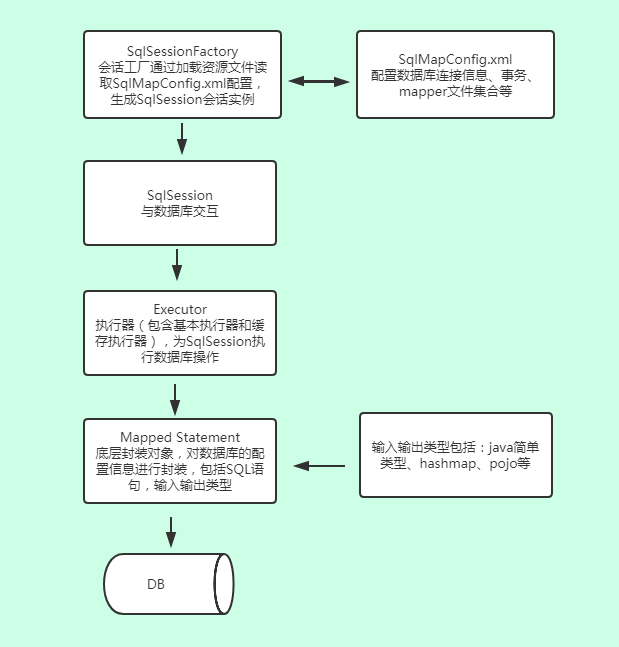
会话工厂SqlSessionFactory通过加载资源文件获取SqlMapConfig.xml配置文件信息,然后生成可以与数据库交互的会话实例SqlSession。会话实例可以根据Mapper配置文件中的Sql配置去执行相应的增删改查操作。在SqlSession会话实例内部,通过执行器Executor对数据库进行操作,Executor依靠封装对象Mappered Statement,它分装了从mapper.xml文件中读取的信息(sql语句,参数,结果集类型)。Mybatis通过执行器与Mappered Statement的结合实现与数据库的交互。
执行流程图:
测试工程搭建
1. 新建maven工程
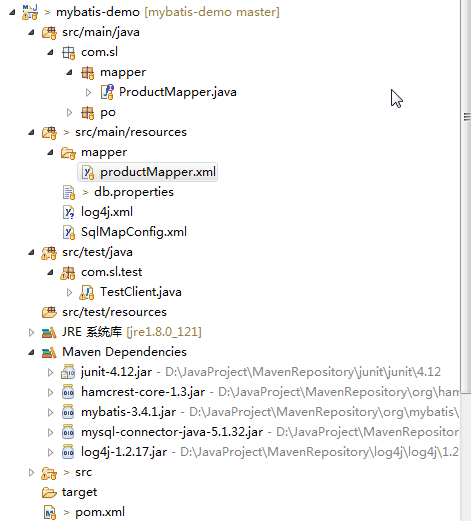
2. 添加依赖pom.xml
<project xmlns="http://maven.apache.org/POM/4.0.0" xmlns:xsi="http://www.w3.org/2001/XMLSchema-instance"

    xsi:schemaLocation="http://maven.apache.org/POM/4.0.0 http://maven.apache.org/xsd/maven-4.0.0.xsd">

    <modelVersion>4.0.0</modelVersion>

    <groupId>com.sl</groupId>

    <artifactId>mybatis-demo</artifactId>

    <version>0.0.1-SNAPSHOT</version>

    <properties>

        <junit.version>4.12</junit.version>

        <mybatis.version>3.4.1</mybatis.version>

        <mysql.version>5.1.32</mysql.version>

        <log4j.version>1.2.17</log4j.version>

    </properties>

    <dependencies>

        <!-- 单元测试 -->

        <dependency>

            <groupId>junit</groupId>

            <artifactId>junit</artifactId>

            <version>${junit.version}</version>

            <!-- <scope>test</scope> -->

        </dependency>

        <!-- Mybatis -->

        <dependency>

            <groupId>org.mybatis</groupId>

            <artifactId>mybatis</artifactId>

            <version>${mybatis.version}</version>

        </dependency>

        <!-- mysql -->

        <dependency>

            <groupId>mysql</groupId>

            <artifactId>mysql-connector-java</artifactId>

            <version>${mysql.version}</version>

        </dependency>

        <!-- 日志处理 -->

        <dependency>

            <groupId>log4j</groupId>

            <artifactId>log4j</artifactId>

            <version>${log4j.version}</version>

        </dependency>

    </dependencies>

</project>
3.编写数据源配置文件SqlMapConfig.xml
<?xml version="1.0" encoding="UTF-8"?>

<!DOCTYPE configuration PUBLIC "-//mybatis.org//DTD Config 3.0//EN" "http://mybatis.org/dtd/mybatis-3-config.dtd">

<configuration>

<!-- 加载配置文件 -->

    <properties resource="db.properties"></properties>

    <environments default="development">

        <!-- id属性必须和上面的defaut一致 -->

        <environment id="development">

            <transactionManager type="JDBC"></transactionManager>

            <!--dataSource 元素使用标准的 JDBC 数据源接口来配置 JDBC 连接对象源 -->

            <dataSource type="POOLED">

                <property name="driver" value="${jdbc.driver}"></property>

                <property name="url" value="${jdbc.url}"></property>

                <property name="username" value="${jdbc.username}" />

                <property name="password" value="${jdbc.password}" />

            </dataSource>

        </environment>

    </environments>

     <!—申明mapper文件 -->

        <mappers>

        <!-- xml实现    注册productMapper.xml文件 -->

        <mapper resource="mapper/productMapper.xml"></mapper>

    </mappers>

</configuration>
4.编写SQL映射配置文件productMapper.xml
<?xml version="1.0" encoding="UTF-8"?>

<!DOCTYPE mapper

    PUBLIC "-//mybatis.org//DTD Mapper 3.0//EN"

    "http://mybatis.org/dtd/mybatis-3-mapper.dtd">

<mapper namespace="com.sl.mapper.ProductMapper">

    <select id="selectAllProduct" resultType="com.sl.po.Product">

        select * from products

    </select>

</mapper>
5.编写测试代码TestClient.java
//使用productMapper.xml配置文件

public class TestClient {

    //定义会话SqlSession

    SqlSession session =null;

    @Before

    public void init() throws IOException {

        //定义mabatis全局配置文件

        String resource = "SqlMapConfig.xml";

        //加载mybatis全局配置文件

        //InputStream inputStream = TestClient.class.getClassLoader().getResourceAsStream(resource);

        InputStream inputStream = Resources.getResourceAsStream(resource);

        SqlSessionFactoryBuilder builder = new SqlSessionFactoryBuilder();

        SqlSessionFactory factory = builder.build(inputStream);

        //根据sqlSessionFactory产生会话sqlsession

        session = factory.openSession();

    }

    //查询所有user表所有数据

    @Test

    public void testSelectAllUser() {

        String statement = "com.sl.mapper.ProductMapper.selectAllProduct";

        List<Product> listProduct =session.selectList(statement);

        for(Product product:listProduct)

        {

            System.out.println(product);

        }

        //关闭会话

        session.close();

    }

}
public class Product {

    private int Id;

    private String Name;

    private String Description;

    private BigDecimal UnitPrice;

    private String ImageUrl;

    private Boolean IsNew;

    public int getId() {

        return Id;

    }

    public void setId(int id) {

        this.Id = id;

    }

    public String getName() {

        return Name;

    }

    public void setName(String name) {

        this.Name = name;

    }

    public String getDescription() {

        return Description;

    }

    public void setDescription(String description) {

        this.Description = description;

    }

    public BigDecimal getUnitPrice() {

        return UnitPrice;

    }

    public void setUnitPrice(BigDecimal unitprice) {

        this.UnitPrice = unitprice;

    }

    public String getImageUrl() {

        return Name;

    }

    public void setImageUrl(String imageurl) {

        this.ImageUrl = imageurl;

    }

    public boolean getIsNew() {

        return IsNew;

    }

    public void setIsNew(boolean isnew) {

        this.IsNew = isnew;

    }

    @Override

    public String toString() {

        return "Product [id=" + Id + ", Name=" + Name + ", Description=" + Description

                + ", UnitPrice=" + UnitPrice + ", ImageUrl=" + ImageUrl + ", IsNew=" + IsNew+ "]";

    }

}
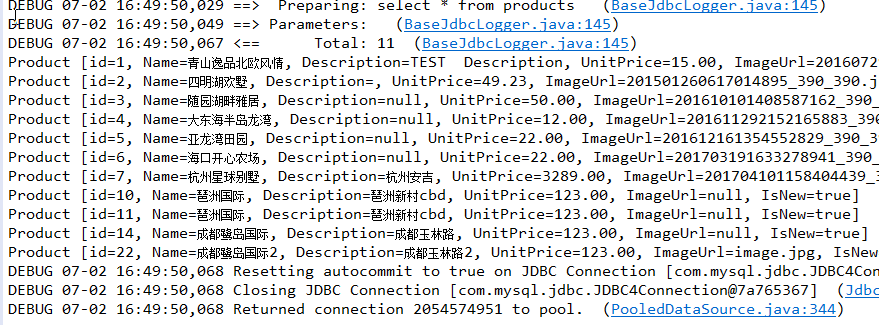
6.运行测试用例
Mybatis学习系列(一)入门简介的更多相关文章
- MyBatis学习系列三——结合Spring
目录 MyBatis学习系列一之环境搭建 MyBatis学习系列二——增删改查 MyBatis学习系列三——结合Spring MyBatis在项目中应用一般都要结合Spring,这一章主要把MyBat ...
- MyBatis学习系列二——增删改查
目录 MyBatis学习系列一之环境搭建 MyBatis学习系列二——增删改查 MyBatis学习系列三——结合Spring 数据库的经典操作:增删改查. 在这一章我们主要说明一下简单的查询和增删改, ...
- MyBatis学习系列一之环境搭建
目录 MyBatis学习系列一之环境搭建 MyBatis学习系列二——增删改查 MyBatis学习系列三——结合Spring 学习一个新的知识,首先做一个简单的例子使用一下,然后再逐步深入.MyBat ...
- SpringBoot学习笔记(一)入门简介
一.SpringBoot 入门简介 整体讲解内容概况: 1.1 简介 简化Spring应用开发的一个框架: 整个Spring技术栈的一个大整合: J2EE开发的一站式解决方案. Spring Boot ...
- MyBatis学习(一)简介及入门案例
1.什么是MyBatis? MyBatis是一个支持普通SQL查询,存储过程,和高级映射的优秀持久层框架.MyBatis去掉了几乎所有的JDBC代码和参数的手工设置以及对结果集的检索封装.MyBati ...
- mybatis学习系列一(mybatis简介/使用)
1mybatis简介(1) 1.1工具:jbbc,jdbctemplate 功能简单,sql语句编写在java代码里面,硬编码高耦合的方式 1.2 框架:整体解决方案 1.2.1 Hibernate: ...
- Spring学习系列(一) Spring简介
Spring简介 之前一直想写点东西,可一直没有开始实施,各种原因都有,最大原因可能还是自己太懒了,嘿嘿.最近在看Spring in action这本书,为了能让自己坚持下去把书看完,这次决定同步的在 ...
- mybatis学习系列一
1引入dtd约束(6) Mybatis git地址:https://github.com/mybatis/mybatis-3/wiki/Maven 指导手册:http://www.mybatis.or ...
- MongoDB学习系列(1)--入门介绍
MongoDB是一款为Web应用程序设计的面向文档结构的数据库系统. MongoDB贡献者是10gen公司.地址:http://www.10gen.com 1.MongoDB主要特性: 1.1文档数据 ...
随机推荐
- 洛谷P1709 [USACO5.5]隐藏口令Hidden Password(最小表示法)
题目描述 有时候程序员有很奇怪的方法来隐藏他们的口令.Binny会选择一个字符串S(由N个小写字母组成,5<=N<=5,000,000),然后他把S顺时针绕成一个圈,每次取一个做开头字母并 ...
- 【赛事总结】◇赛时·8◇ AGC-027
[赛时·8]AGC-027 日常AGC坑……还好能涨Rating +传送门+ ◇ 简单总结 感觉像打多校赛一样,应该多关注一下排名……考试的时候为了避免影响心态,管都没有管排名,就在那里死坑B题.最后 ...
- mysql修改登录密码三种方式
一.用SET PASSWORD命令 首先登录MySQL,使用mysql自带的那个客户端连接上mysql. 格式:mysql> set password for 用户名@localhost = ...
- oracle的事务隔离级别和读一致性
oracle提供了三个隔离级别: 1.读提交 ,简而言之只能读取语句开始执行前提交的数据 2.串行,这个好理解,就是事务串行运行,避免经典的三个场景-脏读.不可重复读.幻读. 3.只读,oracle已 ...
- sqlachemy详解
实习期老大让我学Python...学了很久了好吗,不过确实对其中的一些原理性的东西还不够深入. 比如今天要说的sqlachemy,结合网上做些总结吧 ORM 全称 Object Relational ...
- Zabbix源码安装部署
zabbix源码部署安装 参考文档:https://www.zabbix.com/documentation/4.0/manual/installation/install https://www ...
- python更新mysql数据
>>>cur.execute("update users set username=%s where id=2",("mypython")) ...
- 2019年第十届蓝桥杯C/C++程序设计本科B组省赛 E迷宫
试题 E: 迷宫 本题总分: 分 [问题描述] 下图给出了一个迷宫的平面图,其中标记为 的为障碍,标记为 的为可 以通行的地方. 迷宫的入口为左上角,出口为右下角,在迷宫中,只能从一个位置走到这 个它 ...
- 局域网访问不到linux下的tomcat
问题描述: CentOS安装完成Tomcat后,访问本地:http://localhost:8080/正确.但局域网内无法访问,而且服务器可ping通 经查原因为防火墙开启: [root@localh ...
- 20145202马超《网络对抗》Exp4 恶意代码分析
20145202马超<网络对抗>Exp4 恶意代码分析 1.实验后回答问题 (1)总结一下监控一个系统通常需要监控什么.用什么来监控. 虽然这次试验的软件很好用,我承认,但是他拖慢了电脑的 ...