
Accessing Report Server using Report Server Web Service - Microsoft SQL Server 2008R2
Today I am going to write about how to access SQL Server Report Server through Report Server Web service. You can access all the full functionality of the report server through this Report Server Web service. The Report Server Web service is an XML Web service with a SOAP API. It uses SOAP over HTTP and acts as a communications interface between client programs and the report server.
- ReportService2010
- The ReportService2010 endpoint contains methods for managing objects in a Report Server in either native or SharePoint integrated mode. The WSDL for this endpoint is accessed through http://server/reportserver/ReportService2010.asmx?wsdl.
- ReportExecution2005
- The ReportExecution2005 endpoint allows developers to programmatically process and render reports in a Report Server. The WSDL for this endpoint is accessed through http://server/reportserver/ReportExecution2005.asmx?wsdl.
Now, I will move into how to access Report Server using Report Server Web Service. I have created sample web site and in the Default.aspx page I have put a single button. First what I would do is, I will add a Service Reference to Report Server Web Service and the endpoint I am going to use is ReportService2010.
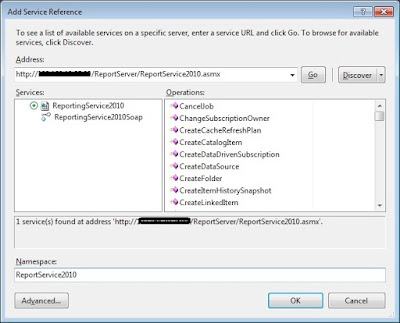
I will right click on my Web Site Project and will click on Add Service Reference.
 |
| Add Service Reference |
In here, I have put http://server/reportserver/ReportService2010.asmx as address, I did not add ?wsdl to the end of the address, because both are valid formats.
Now if you observe the Web.config file, you will see that following part is added.
<system.serviceModel>

  <bindings>

    <basicHttpBinding>

      <binding name="ReportingService2010Soap" closeTimeout="00:01:00" openTimeout="00:01:00" receiveTimeout="00:10:00" sendTimeout="00:01:00" allowCookies="false" bypassProxyOnLocal="false" hostNameComparisonMode="StrongWildcard" maxBufferSize="65536" maxBufferPoolSize="524288" maxReceivedMessageSize="65536" messageEncoding="Text" textEncoding="utf-8" transferMode="Buffered" useDefaultWebProxy="true">

        <readerQuotas maxDepth="32" maxStringContentLength="8192" maxArrayLength="16384" maxBytesPerRead="4096" maxNameTableCharCount="16384"/>

        <security mode="None">

          <transport clientCredentialType="None" proxyCredentialType="None" realm=""/>

          <message clientCredentialType="UserName" algorithmSuite="Default"/>

        </security>

      </binding>

    </basicHttpBinding>

  </bindings>

  <client>

    <endpoint address="http://server/ReportServer/ReportService2010.asmx" binding="basicHttpBinding" bindingConfiguration="ReportingService2010Soap" contract="ReportService2010.ReportingService2010Soap" name="ReportingService2010Soap"/>

  </client>

</system.serviceModel>
Now in my button click event I am writing following code.
using System.Net;

using ReportService2010;

protected void btnListChildren_Click(object sender, EventArgs e)

{

    NetworkCredential clientCredentials = new NetworkCredential("username", "password", "domain");

    ReportService2010.ReportingService2010SoapClient client = new ReportService2010.ReportingService2010SoapClient();

    client.ClientCredentials.Windows.AllowedImpersonationLevel = System.Security.Principal.TokenImpersonationLevel.Impersonation;

    client.ClientCredentials.Windows.ClientCredential = clientCredentials;

    client.Open();

    TrustedUserHeader t = new TrustedUserHeader();

    CatalogItem[] items;

    // I need to list of children of a specified folder.

    ServerInfoHeader oServerInfoHeader = client.ListChildren(t, "/", true, out items);

    foreach (var item in items)

    {

        // I can access any properties of item

    }

}
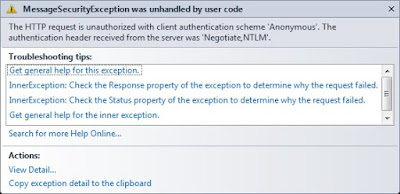 |
| Request is unauthorized. |
<security mode="TransportCredentialOnly">

  <transport clientCredentialType="Ntlm" proxyCredentialType="None" realm=""/>

  <message clientCredentialType="UserName" algorithmSuite="Default"/>

</security>
That's all. Now when I run the Web Site I can get the list of children in the parent folder through the Report Server Web Service. Through this Web Service we can access all the full functionality of the report server. Isn't it great.
Happy Coding.
Regards,
Jaliya
Accessing Report Server using Report Server Web Service - Microsoft SQL Server 2008R2的更多相关文章
- P6 Professional Installation and Configuration Guide (Microsoft SQL Server Database) 16 R1
P6 Professional Installation and Configuration Guide (Microsoft SQL Server Database) 16 R1 May ...
- Microsoft SQL Server Version List(SQL Server 版本)
原帖地址 What version of SQL Server do I have? This unofficial build chart lists all of the known Servic ...
- 从 Microsoft SQL Server 迁移到 Oracle
来源于:http://www.oracle.com/technetwork/cn/database/migration/sqlserver-095136-zhs.html Oracle SQL Dev ...
- Zabbix template for Microsoft SQL Server总结
Zabbix template for Microsoft SQL Server介绍 这里介绍Zabbix下监控Microsoft SQL Server数据库非常好用的一个模板,模板名为&qu ...
- 未能加载包“Microsoft SQL Server Data Tools”
直接在vs2013里的App_Data目录创建数据库,在服务器资源管理器中查看时报错: 未能加载包“Microsoft SQL Server Data Tools” 英文: The 'Microsof ...
- Microsoft SQL Server JDBC 驱动程序支持矩阵
本页包含 Microsoft SQL Server JDBC 驱动程序的支持矩阵和支持生命周期策略. Microsoft JDBC 驱动程序支持生命周期矩阵和策略 Microsoft 支持生命周期 ( ...
- [转]Microsoft SQL SERVER 2008 R2 REPORT SERVICE 匿名登录
本文转自:https://www.cnblogs.com/Zouzhe/p/5736070.html SQL SERVER 2008 R2 是微软目前最新的数据库版本,在之前的SQL SERVER 2 ...
- Microsoft SQL SERVER 2008 R2 REPORT SERVICE 匿名登录
SQL SERVER 2008 R2 是微软目前最新的数据库版本,在之前的SQL SERVER 2005中,我们可以通过修改IIS对应的SSRS站点及SSRS的配置文件,将SSRS配置成匿名登录的方式 ...
- Python接口测试实战5(下) - RESTful、Web Service及Mock Server
如有任何学习问题,可以添加作者微信:lockingfree 课程目录 Python接口测试实战1(上)- 接口测试理论 Python接口测试实战1(下)- 接口测试工具的使用 Python接口测试实战 ...
随机推荐
- locust===注意事项
1.安装包在:微盘 2.运行命令是:locust -f load_test.py --host=https://www.baidu.com 3.本地打开的是:http://localhost:8089 ...
- k8s的Health Check(健康检查)
强大的自愈能力是 Kubernetes 这类容器编排引擎的一个重要特性.自愈的默认实现方式是自动重启发生故障的容器.除此之外,用户还可以利用 Liveness 和 Readiness 探测机制设置更精 ...
- Django基本操作
Django官网下载页面 安装(安装最新LTS版): pip3 install django==1.11.9 创建一个django项目: 下面的命令创建了一个名为"s8"的Djan ...
- Windows终端屏幕显示库Public Domain Curses(PDCurses)使用
由于Windows没有可用的ncurses库,所以就用PDCurses代替 先放链接 https://sourceforge.net/projects/pdcurses/,下载最新版本 但是我不会编译 ...
- 【转】C#获取当前程序运行路径的方法集合
//获取当前进程的完整路径,包含文件名(进程名).string str = this.GetType().Assembly.Location;result: X:\xxx\xxx\xxx.exe (. ...
- WEB前端工程师整理的原生JavaScript经典百例
一.原生JavaScript实现字符串长度截取 二.原生JavaScript获取域名主机 三.原生JavaScript转义html标签 四.原生JavaScript时间日期格式替换 Date.prot ...
- 【转】Python模块subprocess
subprocess 早期的Python版本中,我们主要是通过os.system().os.popen().read()等函数.commands模块来执行命令行指令的,从Python 2.4开始官方文 ...
- codeforces 869A The Artful Expedient【暴力枚举/亦或性质】
A. time limit per test 1 second memory limit per test 256 megabytes input standard input output stan ...
- NOIP2018提高组模拟题(五)
字符串(string) Description 小林与亮亮正在做一个游戏.小林随意地写出一个字符串,字符串只由大写 字母组成,然后指定一个非负整数 m,亮亮可以进行至多 m 次操作,每次操作 为交换相 ...
- JMeter之分布式部署
转自:http://www.cnblogs.com/yangxia-test/p/4016277.html Jmeter 是Java 应用,对于CPU和内存的消耗比较大,因此,当需要模拟数以千计的并发 ...