
Struts2 Convention插件的使用(1)
刚刚查阅官方文档(convention-plugin.html)并学习了Struts2的Convention插件,文章这里只作为一个笔记,建议大家去看官方文档比较清晰和全面。
需要在项目添加这些包
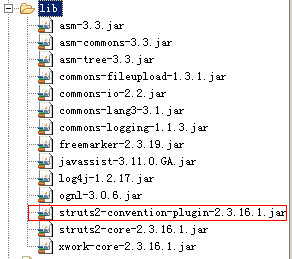
convention先找package,其中如果package包含action这个单词,就会将这个包作为根路径,即namespace="/"
然后找类,如果一个类的类名称是Action结尾,或者继承了ActionSupport类,那么会将该类作为action类,对应的url为
例如:
com.example.actions.MainAction -> /main
com.example.actions.products.Display -> /products/display
com.example.struts.company.details.ShowCompanyDetailsAction -> /company/details/show-company-details
jsp文件要放到/WEB-INF/content/文件夹下
/WEB-INF/content/main.jsp
/WEB-INF/content/display.jsp
/WEB-INF/content/company/details/show-company-details.jsp
下面来一个例子:
struts.xml:
<?xml version="1.0" encoding="UTF-8" ?>

<!DOCTYPE struts PUBLIC

    "-//Apache Software Foundation//DTD Struts Configuration 2.3//EN"

    "http://struts.apache.org/dtds/struts-2.3.dtd">

<struts>

    <constant name="struts.i18n.encoding" value="UTF-8" />

    <!-- 当struts的配置文件修改后,系统是否自动重新加载该文件,默认值为false(生产环境下使用),开发阶段最好打开 -->

    <constant name="struts.configuration.xml.reload" value="true" />

    <!-- 开发模式下使用,这样可以打印出更详细的错误信息 -->

    <constant name="struts.devMode" value="true" />

</struts>
web.xml
<?xml version="1.0" encoding="UTF-8"?>

<web-app version="2.4" xmlns="http://java.sun.com/xml/ns/j2ee" xmlns:xsi="http://www.w3.org/2001/XMLSchema-instance" xsi:schemaLocation="http://java.sun.com/xml/ns/j2ee http://java.sun.com/xml/ns/j2ee/web-app_2_4.xsd">

    <display-name>Struts Blank</display-name>

    <filter>

        <filter-name>struts2</filter-name>

        <filter-class>org.apache.struts2.dispatcher.ng.filter.StrutsPrepareAndExecuteFilter</filter-class>

    </filter>

    <filter-mapping>

        <filter-name>struts2</filter-name>

        <url-pattern>/*</url-pattern>

    </filter-mapping>

    <welcome-file-list>

        <welcome-file>index.html</welcome-file>

    </welcome-file-list>

</web-app>
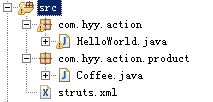
包结构如下:
HelloWorld.java
package com.hyy.action;

import com.opensymphony.xwork2.ActionSupport;

public class HelloWorld extends ActionSupport{

    private String message;

    public String execute() {

        message = "hyy";

        return SUCCESS;

    }

    public String getMessage() {

        return message;

    }

}
/WEB-INF/content/hello-world.jsp
<%@ page language="java" contentType="text/html; charset=UTF-8"

    pageEncoding="UTF-8"%>

<!DOCTYPE html PUBLIC "-//W3C//DTD HTML 4.01 Transitional//EN" "http://www.w3.org/TR/html4/loose.dtd">

<html>

<head>

<meta http-equiv="Content-Type" content="text/html; charset=UTF-8">

<title>Insert title here</title>

</head>

<body>

你好,世界, ${message}

</body>

</html>
在地址栏输入:http://localhost:8080/项目名/hello-world
即可到达HelloWorld.java这个action,返回的视图就是hello-world.jsp
Struts2 Convention插件的使用(1)的更多相关文章
- Struts2 Convention插件的使用(4)使用@Action注解返回json数据
package com.hyy.action; import java.util.HashMap; import java.util.Map; import org.apache.struts2.co ...
- struts2 Convention插件零配置,使用注解开发
从struts21开始,struts2不再推荐使用codebehind作为零配置插件,而是改用Convention插件来支持零配置.与以前相比较,Convention插件更彻底. 使用Conventi ...
- struts2 Convention插件好处及使用
现在JAVA开发都流行SSH.而很大部分公司也使用了struts2进行开发..因为struts2提供了很多插件和标签方便使用..在之前开发过程中总发现使用了struts2会出现很多相应的配合文件.如果 ...
- struts2 convention插件
1.struts2自2.1以后推荐使用Convention Plugin支持struts零配置支持(引入jar:struts2-convention-plugin-2.x.x.jar)①convent ...
- Struts2 Convention插件的使用(3)方法前的@Action注解
package com.hyy.action; import org.apache.struts2.convention.annotation.Action; import com.opensymph ...
- Struts2 convention插件试用+ Spring+Hibernate SSH整合
第一步,引入struts2-convention-plugin-2.2.1.jar 然后,改动配置文件. 我是在struts.properties文件里改动的: struts.objectFactor ...
- Struts2 Convention插件的使用
转自:http://chenjumin.iteye.com/blog/668389 1.常量说明 struts.convention.result.path="/WEB-INF/conten ...
- Struts2 Convention插件的使用(2)return视图以及jsp的关系
package com.hyy.action; import com.opensymphony.xwork2.ActionSupport; public class HelloWorld extend ...
- struts2基于Convention插件的约定映射使用
一.首先说明一点:所谓的基于Convention插件的约定优于配置的使用,并不是严格意义上的零配置,struts.xml文件并不能完全舍弃. 获得Convention插件功能,所必需的jar包有:|a ...
随机推荐
- net-snmp的安装
安装环境是ubuntu 14. 方法1:apt-get install net-snmp (非root用户需要sudo 提升权限) 方法2:自定义安装选择不同的版本去编译. 1:先去下载所需要的ta ...
- HTML5七大优势“逼宫”APP
HTML5颠覆了PC互联网的格局,优化了移动互联网的体验,接下来几年,HTML5将颠覆原生App世界. 跨平台: 在多屏年代,开发者的痛苦指数非常高,人人都期盼HTML5能扮演救星.多套代码.不同技术 ...
- win7 系统如何设置快速启动栏
a.在任务栏上右键 -> 工具栏 -> 新建工具栏 -> 跳出选择文件夹对话框,在文件夹里面(光标山洞处)输入这个路径,然后按回车: %userprofile%\AppData\Ro ...
- Implementation Documentation[转]
原文地址:http://prasanna-adf.blogspot.tw/2009/04/implementation-documentation.html Following are the lis ...
- Javascript Date Format
// 对Date的扩展,将 Date 转化为指定格式的String // 月(M).日(d).小时(h).分(m).秒(s).季度(q) 可以用 1-2 个占位符, // 年(y)可以用 1-4 个占 ...
- 软件工程实践小队Scrum Meeting
例会记录 时间:2013年10月20日星期日 Part 1 会议要点: 1. 小组讨论PM.Dev.Test的各自特点: 2. 小组讨论我们的项目网上教学问答系统的相关问题: 3.确定小组成员在第一轮 ...
- 新装Centos常见问题及解决方案
1.可以ping通,但无法通过ssh连接虚拟机的解决方案 虚拟机上装了一个 Linux 玩玩, 但在启动 Linux 后,在 Windows 中通过 Xshell 以 SSH 方式连接到 Linux ...
- android 开发 解码gif图片,获取每帧bitmap
环境:android 4.3 (注意对于android4.4版本解码出来不正确,除了第一帧正确外,其余的都是显示不同的地方) 通用版本见: android 开发对gif解码(适配android 4 ...
- The finnacial statements,taxes and cash flow
This chapter-2 we learn about the the financial statements(财务报表),taxes and cash flow.We must pay par ...
- c++ ip地址的操作 c版
http://blog.csdn.net/cpp_funs/article/details/6988154 1.htonl ()和ntohl( ) u_long PASCAL FAR ntohl (u ...