
【Azure 服务总线】Azure Service Bus中私信(DLQ - Dead Letter Queue)如何快速清理
在博文ServiceBus 队列中死信(DLQ - Dead Letter Queue)问题一文中,介绍了服务总线产生私信的原因及可以通过代码的方式来清楚私信队列中的消息,避免长期占用空间(因为私信中的消息不会自动清理)

当前,我们也可以从Azure门户中查看到当前DLQ的数量,所占空间及进入DLQ的原因
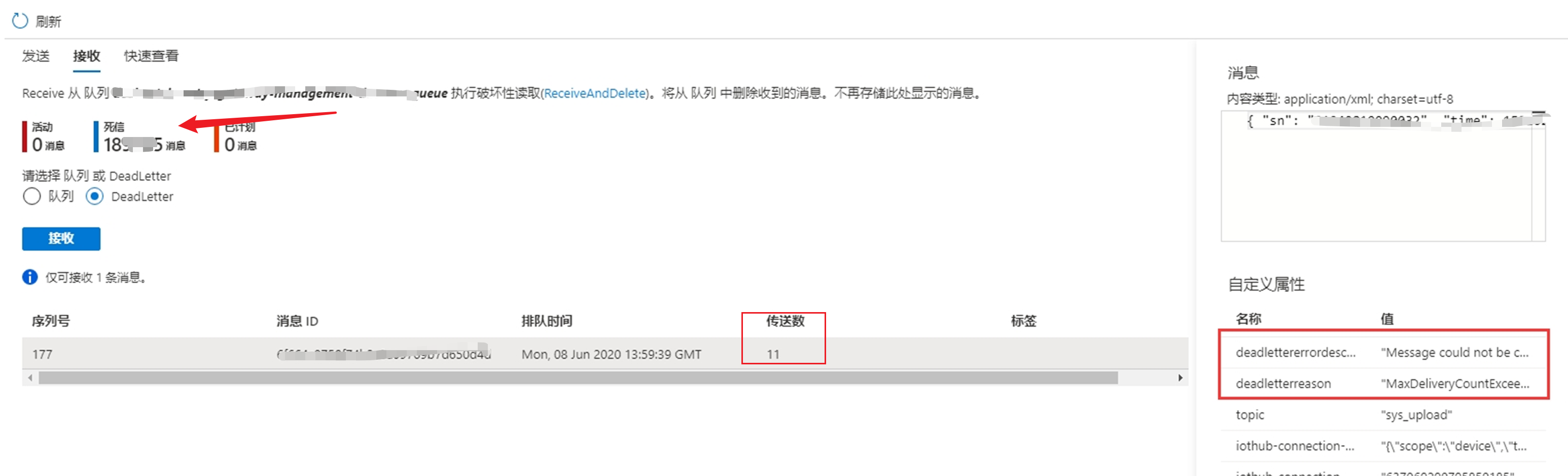
问题描述
在使用Azure Service Bus过程中,随着时间的累积,当死信中存积了大量的消息时,如何快速的清理掉这些消息呢?
解决办法
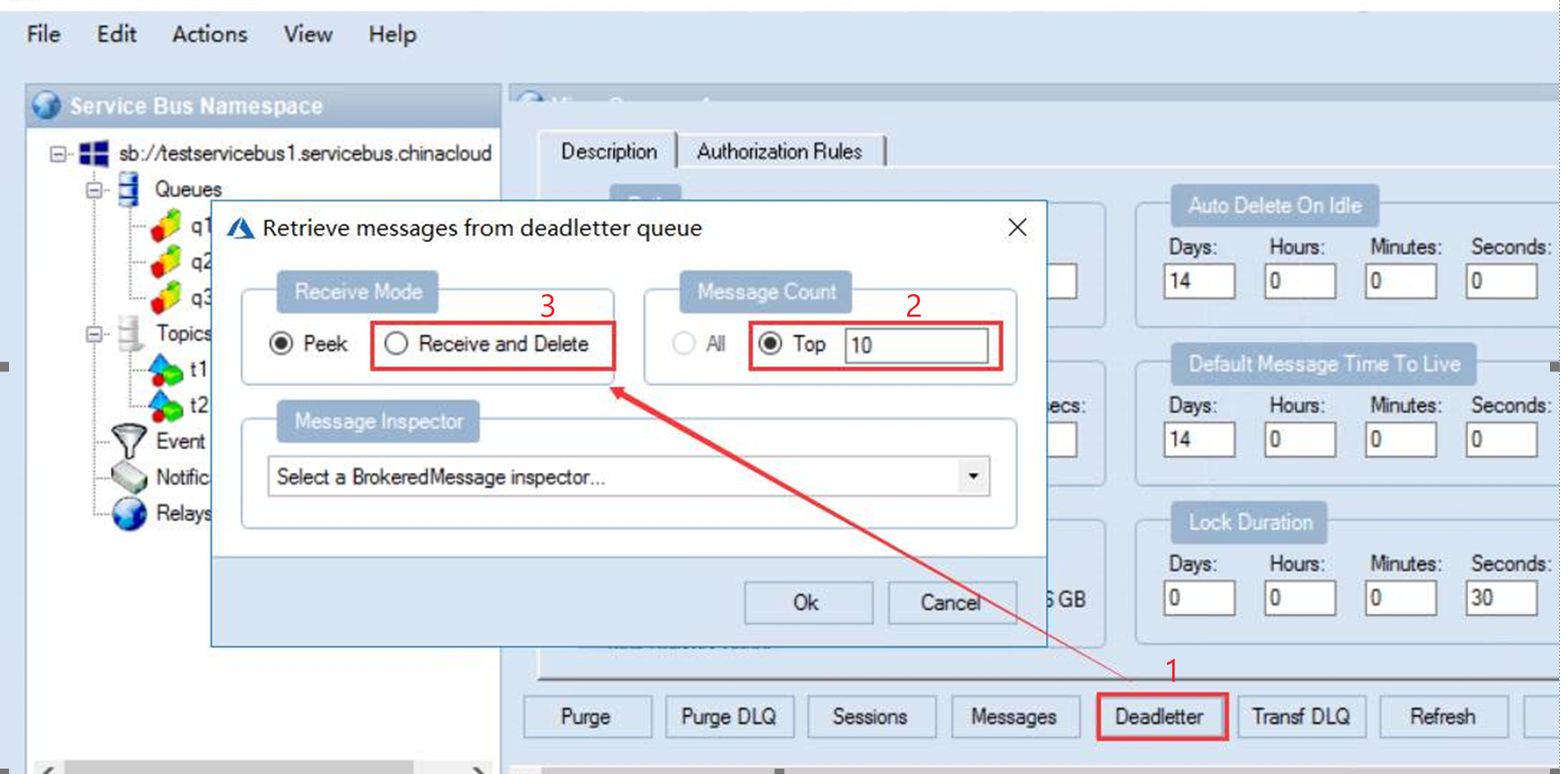
使用Azure官方提供的工具 Service Bus Explorer。 连接到当前的Service Bus,通过选择Receive and Delete操作来获取并从Service Bus服务端中删除消息。
1) 下载Service Bus Explorer,解压文件后,双击ServiceBusExplorer.exe
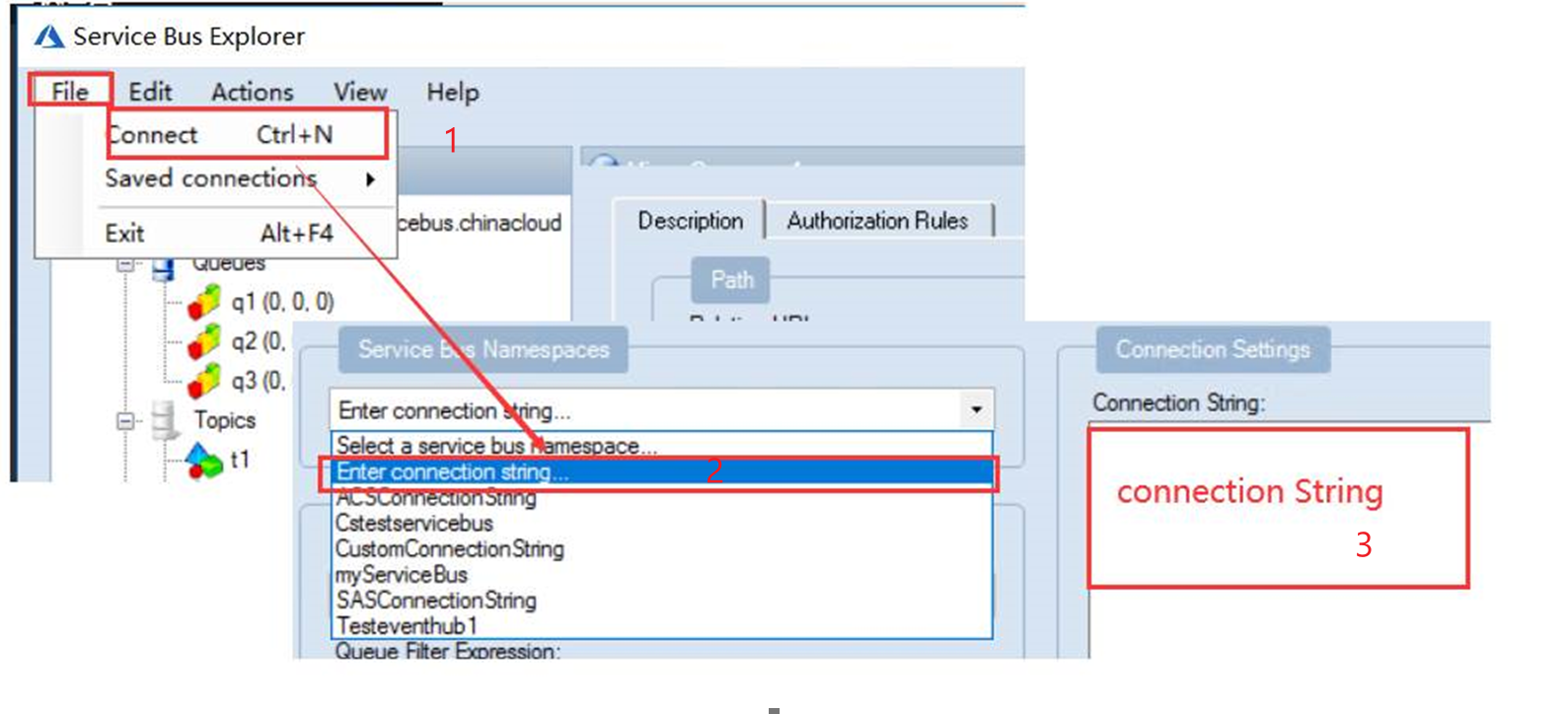
2) 连接到Service Bus中并查看死信消息
3) Receive and Delete: 数据获取消息的数量,然后再Receive Mode中选择Receive and Delete
附录:另一种方式是通过代码来处理死信消息
如需要通过程序的方式获取死信队列中的消息,获取消息的方式和正常队列一样,把queueName变为死信队列的路径,通过QueueClient.FormatDeadLetterPath(queueName)方式获取
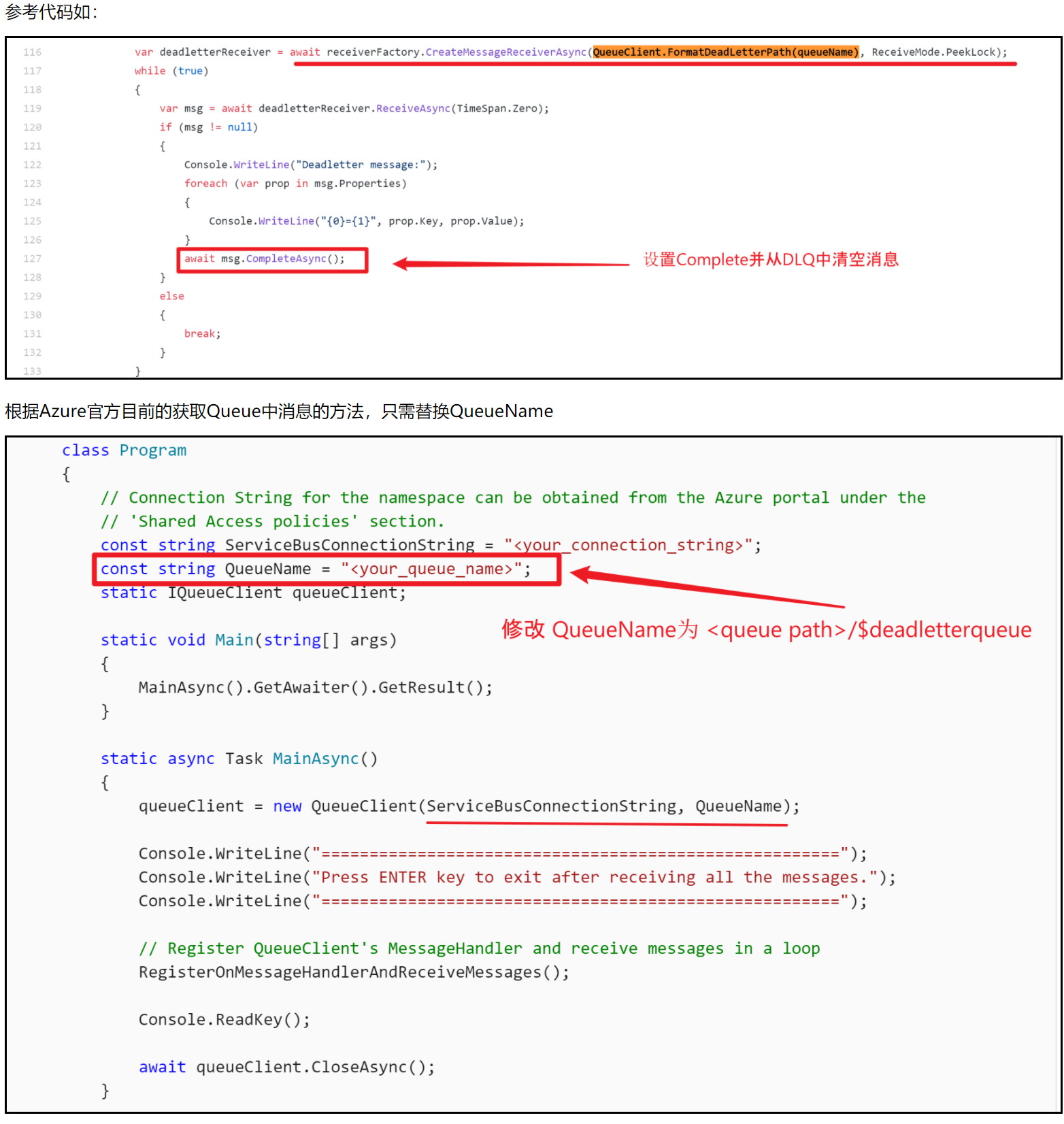
附上.NET伪代码:
    static string queueName = "<QUEUE NAME>/$deadletterqueue";

    static async Task ReceiveMessagesAsync()

    {

        await using (ServiceBusClient client = new ServiceBusClient(connectionString))

        {

            // create a processor that we can use to process the messages

            ServiceBusProcessor processor = client.CreateProcessor(queueName, new ServiceBusProcessorOptions());

            // add handler to process messages

            processor.ProcessMessageAsync += MessageHandler;

            // add handler to process any errors

            processor.ProcessErrorAsync += ErrorHandler;

            // start processing

            await processor.StartProcessingAsync();

            Console.WriteLine("Wait for a minute and then press any key to end the processing");

            Console.ReadKey();

            // stop processing

            Console.WriteLine("\nStopping the receiver...");

            await processor.StopProcessingAsync();

            Console.WriteLine("Stopped receiving messages");

        }

    }
参考资料
从队列接收消息: https://docs.azure.cn/zh-cn/service-bus-messaging/service-bus-dotnet-get-started-with-queues#receive-messages-from-a-queue
Azure Service Bus 死信队列产生的原因: https://www.cnblogs.com/lulight/p/13652828.html
Azure Service Bus Explorer: https://github.com/paolosalvatori/ServiceBusExplorer/releases
【Azure 服务总线】Azure Service Bus中私信(DLQ - Dead Letter Queue)如何快速清理的更多相关文章
- 【服务总线 Azure Service Bus】ServiceBus 队列中死信(DLQ - Dead Letter Queue)问题
Azure Service Bus 死信队列产生的原因 服务总线中有几个活动会导致从消息引擎本身将消息推送到 DLQ. 如 超过 MaxDeliveryCount 超过 TimeToLive 处理订阅 ...
- 企业服务总线Enterprise service bus介绍
企业服务总线(Enterprise service bus). 以往企业已经实现了很多服务, 构成了面向服务的架构,也就是我们常说的SOA. 服务的参与双方都必须建立1对1 的联系,让我们回顾一下SO ...
- 【转载】企业服务总线Enterprise service bus介绍
企业服务总线(Enterprise service bus). 以往企业已经实现了很多服务, 构成了面向服务的架构,也就是我们常说的SOA. 服务的参与双方都必须建立1对1 的联系,让我们回顾一下SO ...
- 【Azure 服务总线】详解Azure Service Bus SDK中接收消息时设置的maxConcurrentCalls,prefetchCount参数
(Azure Service Bus服务总线的两大类消息处理方式: 队列Queue和主题Topic) 问题描述 使用Service Bus作为企业消息代理,当有大量的数据堆积再Queue或Topic中 ...
- Azure Service Bus 中的身份验证方式 Shared Access Signature
var appInsights=window.appInsights||function(config){ function r(config){t[config]=function(){var i= ...
- Windows Azure 服务总线和物联网
机器到机器 (M2M) 计算正迅速成为一种技术,所有开发人员和架构师需要拥抱. 许多研究表明一个未来世界的数百亿美元的设备 (在地球上的每一个人的出现).MSDN杂志有2篇文章讨论Azure服务总线和 ...
- 【服务总线 Azure Service Bus】Service Bus在使用预提取(prefetching)后出现Microsoft.Azure.ServiceBus.MessageLockLostException异常问题
问题描述 Service Bus接收端的日志中出现大量的MessageLockLostException异常.完整的错误消息为: Microsoft.Azure.ServiceBus.MessageL ...
- 利用Service bus中的queue中转消息
有需求就有对策就有市场. 由于公司global的policy,导致对公司外发邮件的service必须要绑定到固定的ip地址,所以别的程序需要调用发邮件程序时,问题就来了,如何在azure上跨servi ...
- Oracle Service Bus中的线程
jib以前在给客户讲产品的时候经常提到Oracle Service Bus服务总线适合于短连接,高频率的交易,而不适合那些大报文,然后花费很长的调用时间的应用,前一阵在给客户培训完企业服务总线后,又对 ...
随机推荐
- hdu4710 Balls Rearrangement(数学公式+取模)
Balls Rearrangement Time Limit: 6000/3000 MS (Java/Others) Memory Limit: 32768/32768 K (Java/Othe ...
- hdu1217 Arbitrage
Problem Description Arbitrage is the use of discrepancies in currency exchange rates to transform on ...
- Codeforces Round #673 (Div. 2) B. Two Arrays (贪心)
题意:给你一组数\(a\)和一个数\(T\),将这组数分为两组\(c\)和\(d\),定义\(f(x)\)为数组\(x\)中任意两个不同元素的和为\(T\)的个数,问为了使\(min(f(c)+f(d ...
- JavaScript——二
样式: 实验二. querySelectorAll()里面如果填id名称就直接写,如果要确定某个属性的值,就要用到[ ]来具体选择,其中写多个以空格隔开就表达第一个声明下的第二个标签内部的某个属性 这 ...
- python代理池的构建2——代理ip是否可用的处理和检查
上一篇博客地址:python代理池的构建1--代理IP类的构建,以及配置文件.日志文件.requests请求头 一.代理ip是否可用的处理(httpbin_validator.py) #-*-codi ...
- 【原创】k8s之job和Cronjob
1.失败任务 apiVersion: batch/v1 kind: Job metadata: name: bad spec: template: metadata: name: bad spec: ...
- CODE_TEST-- gtest
gtest 提供了一套优秀的 C++ 单元测试解决方案,简单易用,功能完善,非常适合在项目中使用以保证代码质量. https://blog.csdn.net/jcjc918/article/detai ...
- 二进制安装kubernetes(二) kube-apiserver组件安装
根据架构图,我们的apiserver部署在hdss7-21和hdss7-22上: 首先在hdss7-200上申请证书并拷贝到21和22上: 创建证书文件: # cd /opt/certs # vi c ...
- C# 数据类型(3)
动态类型 dynamic types 动态类型是后来引进的,他其实是一个static type,但是不像其他的静态类型,编译器不会检查你到底是啥类型(也不会检查你能不能去call某个'method') ...
- go modules——HelloWorld示例
go modules--HelloWorld示例 go modules 存在的意义是方便代码的共享(虽然这会使自己开发过程中有一些小小的麻烦) 开发第一步,创建一个github仓库,然后克隆到本地 首 ...