
狂神说SpringBoot11:Thymeleaf模板引擎
狂神说SpringBoot系列连载课程,通俗易懂,基于SpringBoot2.2.5版本,欢迎各位狂粉转发关注学习。
微信公众号:狂神说(首发) Bilibili:狂神说Java(视频)
未经作者授权,禁止转载
Thymeleaf
模板引擎
前端交给我们的页面,是html页面。如果是我们以前开发,我们需要把他们转成jsp页面,jsp好处就是当我们查出一些数据转发到JSP页面以后,我们可以用jsp轻松实现数据的显示,及交互等。
jsp支持非常强大的功能,包括能写Java代码,但是呢,我们现在的这种情况,SpringBoot这个项目首先是以jar的方式,不是war,像第二,我们用的还是嵌入式的Tomcat,所以呢,他现在默认是不支持jsp的。
那不支持jsp,如果我们直接用纯静态页面的方式,那给我们开发会带来非常大的麻烦,那怎么办呢?
SpringBoot推荐你可以来使用模板引擎:
模板引擎,我们其实大家听到很多,其实jsp就是一个模板引擎,还有用的比较多的freemarker,包括SpringBoot给我们推荐的Thymeleaf,模板引擎有非常多,但再多的模板引擎,他们的思想都是一样的,什么样一个思想呢我们来看一下这张图:
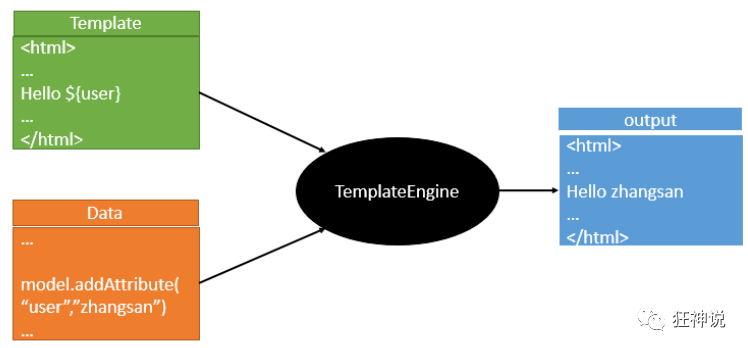
模板引擎的作用就是我们来写一个页面模板,比如有些值呢,是动态的,我们写一些表达式。而这些值,从哪来呢,就是我们在后台封装一些数据。然后把这个模板和这个数据交给我们模板引擎,模板引擎按照我们这个数据帮你把这表达式解析、填充到我们指定的位置,然后把这个数据最终生成一个我们想要的内容给我们写出去,这就是我们这个模板引擎,不管是jsp还是其他模板引擎,都是这个思想。只不过呢,就是说不同模板引擎之间,他们可能这个语法有点不一样。其他的我就不介绍了,我主要来介绍一下SpringBoot给我们推荐的Thymeleaf模板引擎,这模板引擎呢,是一个高级语言的模板引擎,他的这个语法更简单。而且呢,功能更强大。
我们呢,就来看一下这个模板引擎,那既然要看这个模板引擎。首先,我们来看SpringBoot里边怎么用。
引入Thymeleaf
怎么引入呢,对于springboot来说,什么事情不都是一个start的事情嘛,我们去在项目中引入一下。给大家三个网址:
Thymeleaf 官网:https://www.thymeleaf.org/
Thymeleaf 在Github 的主页:https://github.com/thymeleaf/thymeleaf
Spring官方文档:找到我们对应的版本
https://docs.spring.io/spring-boot/docs/2.2.5.RELEASE/reference/htmlsingle/#using-boot-starter
找到对应的pom依赖:可以适当点进源码看下本来的包!
<!--thymeleaf-->

<dependency>

    <groupId>org.springframework.boot</groupId>

    <artifactId>spring-boot-starter-thymeleaf</artifactId>

</dependency>
Maven会自动下载jar包,我们可以去看下下载的东西;

Thymeleaf分析
前面呢,我们已经引入了Thymeleaf,那这个要怎么使用呢?
我们首先得按照SpringBoot的自动配置原理看一下我们这个Thymeleaf的自动配置规则,在按照那个规则,我们进行使用。
我们去找一下Thymeleaf的自动配置类:ThymeleafProperties
@ConfigurationProperties(

    prefix = "spring.thymeleaf"

)

public class ThymeleafProperties {

    private static final Charset DEFAULT_ENCODING;

    public static final String DEFAULT_PREFIX = "classpath:/templates/";

    public static final String DEFAULT_SUFFIX = ".html";

    private boolean checkTemplate = true;

    private boolean checkTemplateLocation = true;

    private String prefix = "classpath:/templates/";

    private String suffix = ".html";

    private String mode = "HTML";

    private Charset encoding;

}
我们可以在其中看到默认的前缀和后缀!
我们只需要把我们的html页面放在类路径下的templates下,thymeleaf就可以帮我们自动渲染了。
使用thymeleaf什么都不需要配置,只需要将他放在指定的文件夹下即可!
测试
1、编写一个TestController
@Controller

public class TestController {

    @RequestMapping("/t1")

    public String test1(){

        //classpath:/templates/test.html

        return "test";

    }

}
2、编写一个测试页面 test.html 放在 templates 目录下
<!DOCTYPE html>

<html lang="en">

<head>

    <meta charset="UTF-8">

    <title>Title</title>

</head>

<body>

<h1>测试页面</h1>

</body>

</html>
3、启动项目请求测试
Thymeleaf 语法学习
要学习语法,还是参考官网文档最为准确,我们找到对应的版本看一下;
Thymeleaf 官网:https://www.thymeleaf.org/ , 简单看一下官网!我们去下载Thymeleaf的官方文档!
我们做个最简单的练习 :我们需要查出一些数据,在页面中展示
1、修改测试请求,增加数据传输;
@RequestMapping("/t1")

public String test1(Model model){

    //存入数据

    model.addAttribute("msg","Hello,Thymeleaf");

    //classpath:/templates/test.html

    return "test";

}
2、我们要使用thymeleaf,需要在html文件中导入命名空间的约束,方便提示。
我们可以去官方文档的#3中看一下命名空间拿来过来:
xmlns:th="http://www.thymeleaf.org"
3、我们去编写下前端页面
<!DOCTYPE html>

<html lang="en" xmlns:th="http://www.thymeleaf.org">

<head>

    <meta charset="UTF-8">

    <title>狂神说</title>

</head>

<body>

<h1>测试页面</h1>

<!--th:text就是将div中的内容设置为它指定的值,和之前学习的Vue一样-->

<div th:text="${msg}"></div>

</body>

</html>
4、启动测试!
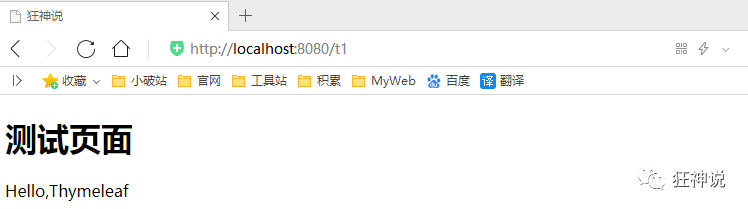
OK,入门搞定,我们来认真研习一下Thymeleaf的使用语法!
1、我们可以使用任意的 th:attr 来替换Html中原生属性的值!

2、我们能写哪些表达式呢?
Simple expressions:(表达式语法)

Variable Expressions: ${...}:获取变量值;OGNL;

    1)、获取对象的属性、调用方法

    2)、使用内置的基本对象:#18

         #ctx : the context object.

         #vars: the context variables.

         #locale : the context locale.

         #request : (only in Web Contexts) the HttpServletRequest object.

         #response : (only in Web Contexts) the HttpServletResponse object.

         #session : (only in Web Contexts) the HttpSession object.

         #servletContext : (only in Web Contexts) the ServletContext object.

    3)、内置的一些工具对象:

      #execInfo : information about the template being processed.

      #uris : methods for escaping parts of URLs/URIs

      #conversions : methods for executing the configured conversion service (if any).

      #dates : methods for java.util.Date objects: formatting, component extraction, etc.

      #calendars : analogous to #dates , but for java.util.Calendar objects.

      #numbers : methods for formatting numeric objects.

      #strings : methods for String objects: contains, startsWith, prepending/appending, etc.

      #objects : methods for objects in general.

      #bools : methods for boolean evaluation.

      #arrays : methods for arrays.

      #lists : methods for lists.

      #sets : methods for sets.

      #maps : methods for maps.

      #aggregates : methods for creating aggregates on arrays or collections.

==================================================================================

  Selection Variable Expressions: *{...}:选择表达式:和${}在功能上是一样;

  Message Expressions: #{...}:获取国际化内容

  Link URL Expressions: @{...}:定义URL;

  Fragment Expressions: ~{...}:片段引用表达式

Literals(字面量)

      Text literals: 'one text' , 'Another one!' ,…

      Number literals: 0 , 34 , 3.0 , 12.3 ,…

      Boolean literals: true , false

      Null literal: null

      Literal tokens: one , sometext , main ,…

Text operations:(文本操作)

    String concatenation: +

    Literal substitutions: |The name is ${name}|

Arithmetic operations:(数学运算)

    Binary operators: + , - , * , / , %

    Minus sign (unary operator): -

Boolean operations:(布尔运算)

    Binary operators: and , or

    Boolean negation (unary operator): ! , not

Comparisons and equality:(比较运算)

    Comparators: > , < , >= , <= ( gt , lt , ge , le )

    Equality operators: == , != ( eq , ne )

Conditional operators:条件运算(三元运算符)

    If-then: (if) ? (then)

    If-then-else: (if) ? (then) : (else)

    Default: (value) ?: (defaultvalue)

Special tokens:

    No-Operation: _
练习测试
1、 我们编写一个Controller,放一些数据
@RequestMapping("/t2")

public String test2(Map<String,Object> map){

    //存入数据

    map.put("msg","<h1>Hello</h1>");

    map.put("users", Arrays.asList("qinjiang","kuangshen"));

    //classpath:/templates/test.html

    return "test";

}
2、测试页面取出数据
<!DOCTYPE html>

<html lang="en" xmlns:th="http://www.thymeleaf.org">

<head>

    <meta charset="UTF-8">

    <title>狂神说</title>

</head>

<body>

<h1>测试页面</h1>

<div th:text="${msg}"></div>

<!--不转义-->

<div th:utext="${msg}"></div>

<!--遍历数据-->

<!--th:each每次遍历都会生成当前这个标签:官网#9-->

<h4 th:each="user :${users}" th:text="${user}"></h4>

<h4>

    <!--行内写法:官网#12-->

    <span th:each="user:${users}">[[${user}]]</span>

</h4>

</body>

</html>
3、启动项目测试!
我们看完语法,很多样式,我们即使现在学习了,也会忘记,所以我们在学习过程中,需要使用什么,根据官方文档来查询,才是最重要的,要熟练使用官方文档!
一定要关注分享支持一下哦~

狂神说SpringBoot11:Thymeleaf模板引擎的更多相关文章
- (二)SpringBoot基础篇- 静态资源的访问及Thymeleaf模板引擎的使用
一.描述 在应用系统开发的过程中,不可避免的需要使用静态资源(浏览器看的懂,他可以有变量,例:HTML页面,css样式文件,文本,属性文件,图片等): 并且SpringBoot内置了Thymeleaf ...
- 【Springboot】Springboot整合Thymeleaf模板引擎
Thymeleaf Thymeleaf是跟Velocity.FreeMarker类似的模板引擎,它可以完全替代JSP,相较与其他的模板引擎,它主要有以下几个特点: 1. Thymeleaf在有网络和无 ...
- 三、thymeleaf模板引擎构建前台html, 后台使用 ModelAndView 和 Model 模型
项目源码:https://github.com/y369q369/springBoot.git -> thymeleaf 私聊QQ: 1486866853 1.pom.xml中 ...
- SpringBoot使用thymeleaf模板引擎
(1).添加pom依赖 <dependency> <groupId>org.springframework.boot</groupId> <artifactI ...
- Spring Boot 2.0 整合Thymeleaf 模板引擎
本节将和大家一起实战Spring Boot 2.0 和thymeleaf 模板引擎 1. 创建项目 2. 使用Spring Initlizr 快速创建Spring Boot 应用程序 3. 填写项目配 ...
- Thymeleaf模板引擎的初步使用
在springboot中,推荐使用的模板引擎是Thymeleaf模板引擎,它提供了完美的Spring MVC的支持.下面就简单的介绍一下Thymeleaf模板引擎的使用. 在controller层中, ...
- spring boot: thymeleaf模板引擎使用
spring boot: thymeleaf模板引擎使用 在pom.xml加入thymeleaf模板依赖 <!-- 添加thymeleaf的依赖 --> <dependency> ...
- SpringBoot入门篇--使用Thymeleaf模板引擎进行页面的渲染
在做WEB开发的时候,我们不可避免的就是在前端页面之间进行跳转,中间进行数据的查询等等操作.我们在使用SpringBoot之前包括我在内其实大部分都是用的是JSP页面,可以说使用的已经很熟悉.但是我们 ...
- (二)SpringBoot2.0基础篇- 静态资源的访问及Thymeleaf模板引擎的使用
一.描述 在应用系统开发的过程中,不可避免的需要使用静态资源(浏览器看的懂,他可以有变量,例:HTML页面,css样式文件,文本,属性文件,图片等): 并且SpringBoot内置了Thymeleaf ...
随机推荐
- 一文搞懂Java引用拷贝、深拷贝、浅拷贝
刷题.面试中,我们可能会遇到将一个对象的属性赋值到另一个对象的情况,这种情况就叫做拷贝.拷贝与Java内存结构息息相关,搞懂Java深浅拷贝是很必要的! 在对象的拷贝中,很多初学者可能搞不清到底是拷贝 ...
- java13编程基础之数组深入
大纲一维数组概述数组是相同类型数据的有序集合.数组描述的是相同类型的若干个数据,按照一定的先后次序排列组合而成.其中,每一个数据称作一个元素,每个元素可以通过一个索引(下标)来访问它们. 这些按序排列 ...
- 线程安全问题synchronized锁
1.线程安全问题的原因 因为 Java 中对静态变量的自增,自减并不是原子操作,要彻底理解,必须从字节码来进行分析 例如对于 i++ 而言(i 为静态变量),实际会产生如下的 JVM 字节码指令: ...
- 最实用的visual studio插件,值得收藏!
1.ReSharper(VS必装,代码重构.代码修正功能) ReSharper 是一个JetBrains公司出品的著名的代码生成工具.其能帮助Microsoft Visual Studio成为一个更佳 ...
- 软件“美不美”,UI测试一下就知道
摘要:软件测试的最高层次需求是:UI测试,也就是这个软件"长得好不好看". 为了让读者更好地理解测试,我们从最基础的概念开始介绍.以一个软件的"轮回"为例,下图 ...
- Spring 抽象的缓存包 spring-cache
项目实战 用户信息查询接口中,使用@Cacheable注解 绑定相关信息接口中,使用@CachePut更新用户信息到缓存 更新用户信息接口中,使用@CacheEvict删除缓存信息 使用步骤 添加依 ...
- 安卓mbn文件丢失,无法搜索移动信号,工程模式mbn乱改,不用QPST烧录怎样恢复?超简单!
没有root,工程模式乱改mbn配置选项,导致mbn配置丢失,无法搜索移动网络. 重启若干次改配置都无效,清空网络设置无效,恢复出厂无效,recovery三清无效, 不太想拆机root麻烦,QPST配 ...
- chatsRoom Design Report
基于TCP实现聊天室 主要使用四个类 ChatClient类 使用BufferedReader 得到输入流,使用OutputStream得到输出流 实现读取服务器广播的消息和发送消息到 ...
- Mac安装homebrew,postman,charles
Homebrew是一款Mac OS平台下的软件包管理工具,拥有安装.卸载.更新.查看.搜索等很多实用的功能.简单的一条指令,就可以实现包管理,而不用你关心各种依赖和文件路径的情况,十分方便快捷. 1. ...
- Lambda表达式你会用吗?
函数式编程 在正式学习Lambda之前,我们先来了解一下什么是函数式编程 我们先看看什么是函数.函数是一种最基本的任务,一个大型程序就是一个顶层函数调用若干底层函数,这些被调用的函数又可以调用其他函数 ...