
POJ1573——Robot Motion
Robot Motion
Description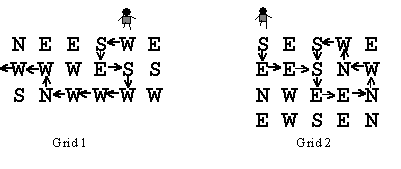
A robot has been programmed to follow the instructions in its path. Instructions for the next direction the robot is to move are laid down in a grid. The possible instructions are
N north (up the page)
S south (down the page)
E east (to the right on the page)
W west (to the left on the page)
For example, suppose the robot starts on the north (top) side of Grid 1 and starts south (down). The path the robot follows is shown. The robot goes through 10 instructions in the grid before leaving the grid.
Compare what happens in Grid 2: the robot goes through 3 instructions only once, and then starts a loop through 8 instructions, and never exits.
You are to write a program that determines how long it takes a robot to get out of the grid or how the robot loops around.
Input
There will be one or more grids for robots to navigate. The data for each is in the following form. On the first line are three integers separated by blanks: the number of rows in the grid, the number of columns in the grid, and the number of the column in which the robot enters from the north. The possible entry columns are numbered starting with one at the left. Then come the rows of the direction instructions. Each grid will have at least one and at most 10 rows and columns of instructions. The lines of instructions contain only the characters N, S, E, or W with no blanks. The end of input is indicated by a row containing 0 0 0.
Output
For each grid in the input there is one line of output. Either the robot follows a certain number of instructions and exits the grid on any one the four sides or else the robot follows the instructions on a certain number of locations once, and then the instructions on some number of locations repeatedly. The sample input below corresponds to the two grids above and illustrates the two forms of output. The word "step" is always immediately followed by "(s)" whether or not the number before it is 1.
Sample Input
3 6 5
NEESWE
WWWESS
SNWWWW
4 5 1
SESWE
EESNW
NWEEN
EWSEN
0 0 0
Sample Output
10 step(s) to exit
3 step(s) before a loop of 8 step(s)
题目大意:看图+样例基本就懂了。
解题思路:模拟
Code:
 #include<string>

 #include<iostream>

 #include<cstdio>

 #include<cstring>

 using namespace std;

 int a,b,first,px,py,date1,date2;

 struct Point

 {

     char dir;

     int vis,step;

 } P[];

 int move(int cnt)

 {

     int tmp=(py-)*a+px;

     if (P[tmp].dir=='N') py--;

     if (P[tmp].dir=='E') px++;

     if (P[tmp].dir=='S') py++;

     if (P[tmp].dir=='W') px--;

     if (px>=a+||px<=||py>=b+||py<=)

         return ;

     tmp=(py-)*a+px;

     if (P[tmp].vis)

     {

         date1=P[tmp].step-;

         date2=cnt-date1-;

         return -;

     }

     else P[tmp].vis=,P[tmp].step=cnt;

     return ;

 }

 int main()

 {

     while (cin>>b>>a>>first)

     {

         int k=;

         if (!a&&!b&&!first) break;

         for (int i=; i<=b; i++)

             for (int j=; j<=a; j++)

             {

                 cin>>P[k].dir;

                 P[k++].vis=;

             }

         px=first,py=;

         P[first].step=,P[first].vis=;

         int cnt=,ok;

         while ()

         {

             ok=move(cnt);

             if (ok) break;

             cnt++;

         }

         if (ok==) printf("%d step(s) to exit\n",cnt-);

         else printf("%d step(s) before a loop of %d step(s)\n",date1,date2);

     }

     return ;

 }
POJ1573——Robot Motion的更多相关文章
- poj1573 Robot Motion
Robot Motion Time Limit: 1000MS Memory Limit: 10000K Total Submissions: 12507 Accepted: 6070 Des ...
- POJ-1573 Robot Motion模拟
题目链接: https://vjudge.net/problem/POJ-1573 题目大意: 有一个N*M的区域,机器人从第一行的第几列进入,该区域全部由'N' , 'S' , 'W' , 'E' ...
- poj1573 Robot Motion(DFS)
题目链接 http://poj.org/problem?id=1573 题意 一个机器人在给定的迷宫中行走,在迷宫中的特定位置只能按照特定的方向行走,有两种情况:①机器人按照方向序列走出迷宫,这时输出 ...
- POJ1573(Robot Motion)--简单模拟+简单dfs
题目在这里 题意 : 问你按照图中所给的提示走,多少步能走出来??? 其实只要根据这个提示走下去就行了.模拟每一步就OK,因为下一步的操作和上一步一样,所以简单dfs.如果出现loop状态,只要记忆每 ...
- POJ1573 Robot Motion(模拟)
题目链接. 分析: 很简单的一道题, #include <iostream> #include <cstring> #include <cstdio> #inclu ...
- 【POJ - 1573】Robot Motion
-->Robot Motion 直接中文 Descriptions: 样例1 样例2 有一个N*M的区域,机器人从第一行的第几列进入,该区域全部由'N' , 'S' , 'W' , 'E' ,走 ...
- Robot Motion(imitate)
Robot Motion Time Limit: 1000MS Memory Limit: 10000K Total Submissions: 11065 Accepted: 5378 Des ...
- 模拟 POJ 1573 Robot Motion
题目地址:http://poj.org/problem?id=1573 /* 题意:给定地图和起始位置,robot(上下左右)一步一步去走,问走出地图的步数 如果是死循环,输出走进死循环之前的步数和死 ...
- POJ 1573 Robot Motion(BFS)
Robot Motion Time Limit: 1000MS Memory Limit: 10000K Total Submissions: 12856 Accepted: 6240 Des ...
随机推荐
- bzoj3389:[Usaco2004 Dec]Cleaning Shifts安排值班
思路:可以贪心,也可以最短路. 贪心写法:因为在保证合法的前提下,我们选择的区间一定要右端点尽量靠后才行,于是我们每次就选择一个合法的并且右端点最靠后的区间就好了(如果没有合法的输出-1即可).时间复 ...
- pthread 实现生产者消费者问题
经典的生产者消费者问题,在这里用信号量和互斥量来实现生产和消费者模型 #include<cstdlib> #include<cstdio> #include<unis ...
- Transact-SQL 存储过程(c#调用执行)
1. Microsoft SQL Server Management Studio 中创建 存储过程 1.1 借助模板资源管理器中的Stored Procedure模板进行修改创建 1.2 直接新建查 ...
- checkBox控件的CheckedChanged与CheckedStateChanged区别
Checked属性为bool类型,CheckState属性为枚举类型(CheckState.Checked.CheckState.Unchecked和CheckState.Indeterminate) ...
- 如何在PowerDesigner将PDM导出生成WORD文档或者html文件
a) 使用PowerDesigner打开pdm文件 b) 点击Report Temlates 制作模板 点击PowerDesigner菜单栏“Report” -> ...
- [译]GC专家系列2:Java 垃圾回收的监控
原文链接:http://www.cubrid.org/blog/dev-platform/how-to-monitor-java-garbage-collection/ 这是"成为GC专家系 ...
- 关于python多线程编程中join()和setDaemon()的一点儿探究
关于python多线程编程中join()和setDaemon()的用法,这两天我看网上的资料看得头晕脑涨也没看懂,干脆就做一个实验来看看吧. 首先是编写实验的基础代码,创建一个名为MyThread的 ...
- vs2010配备boost编程环境
vs2010配备boost编程环境 vs2010配置boost编程环境 第一步:下载boost,我下载的方法是从http://www.boost.org/上找最新的下载.名字叫boost_1_53_0 ...
- (转)《深入理解java虚拟机》学习笔记1——Java内存结构
java虚拟机规范规定的java虚拟机内存其实就是java虚拟机运行时数据区,其架构如下: 其中方法区和堆是由所有线程共享的数据区. Java虚拟机栈,本地方法栈和程序计数器是线程隔离的数据区. (1 ...
- oracle 多条执行语句同时执行
oracle 多条执行语句同时执行:begin 语名一;语句二; end; 注意 如果写在C#里千万不要用@的方法然后语句里有回车 例: string strSql = "begin upd ...