
在centos7上安装elasticSearch
因为elasticsearch是用java编写的,所以需要先安装JDK;
jdk1.8的安装:安装指导
elasticsearch的下载和安装
一、下载elasticSearch
1、下载地址: http://www.elastic.co/cn/downloads (本篇下载 elasticsearch 5.6.6)

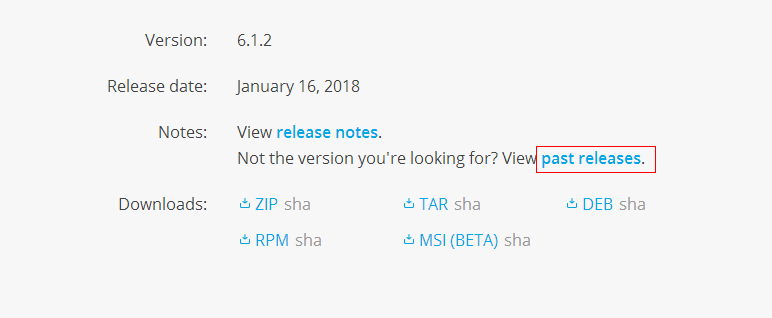
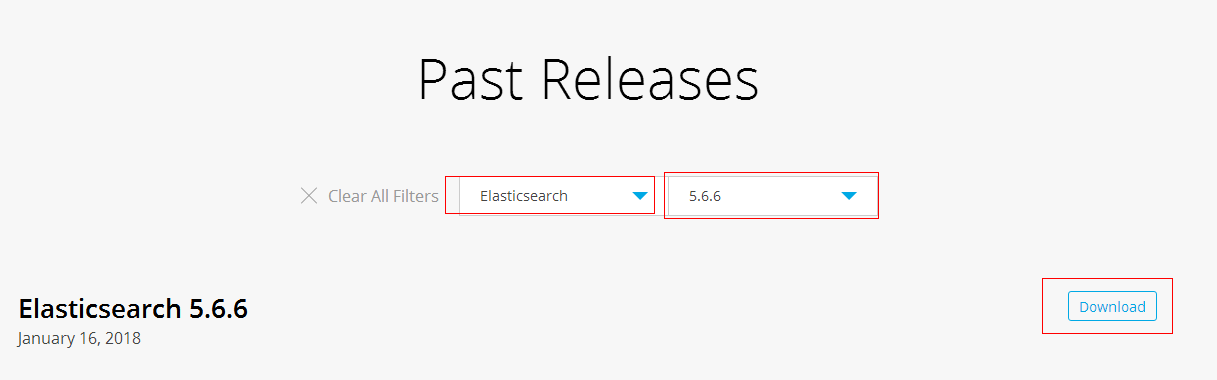
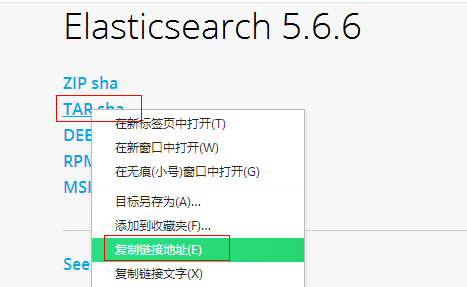
2、使用 wget 命令下载
wget https://artifacts.elastic.co/downloads/elasticsearch/elasticsearch-5.6.6.tar.gz
二、安装elasticsearch
1、解压elasticsearch到 /usr/local 目录下
tar -zxvf elasticsearch-5.6..tar.gz -C /usr/local/
2、进入到解压的elasticsearch包目录下:cd /usr/local/elasticsearch-5.6.6/
3、启动 ./bin/elasticsearch -d #参数 -d 指的是后台运行

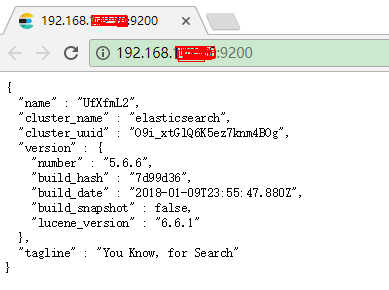
4、使用 curl http://localhost:9200/ 查看是否运行,如果返回如下信息则标示运行正常:
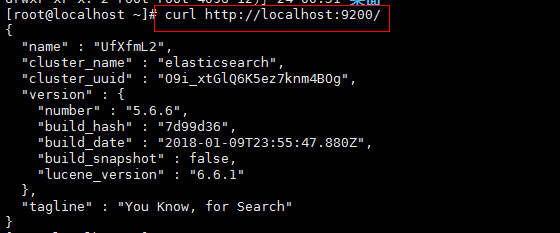
5、elasticsearch默认restful-api的端口是9200 不支持Ip地址,只能在本机用http://localhost:9200来访问。如果需要改变,需要修改配置文件。
默认情况下 Elasticsearch 的 RESTful 服务只有本机才能访问,也就是说无法从主机访问虚拟机中的服务。
可以修改 /etc/elasticsearch/config/elasticsearch.yml 文件,将注释的 network.host 和 http.port 放开,并配置正确的IP;
cd /usr/local/elasticsearch-5.6.

vim config/elasticsearch.yml
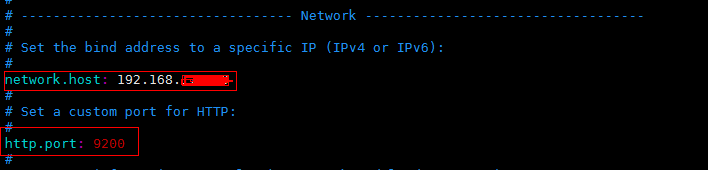
6、先将Elasticsearch 关闭,然后启动;
关闭方法:输入命令: ps -ef | grep elasticsearch ,找到进程,然后kill掉就行了;
启动方法:输入命令:su elastic , 然后输入 ./bin/elasticserach -d
7、在谷歌浏览器中打开:http://{server_IP}:9200/
三、问题
1、问题一:启动elasticsearch报错如下:Java HotSpot(TM) 64-Bit Server VM warning: INFO: os::commit_memory(0x0000000085330000, 2060255232, 0) failed; error='Cannot allocate memory' (errno=12)

解决方法:
由于elasticsearch5.0默认分配jvm空间大小为2g,修改jvm空间分配: vim config/jvm.options
-Xms2g

-Xmx2g
修改为
-Xms512m

-Xmx512m
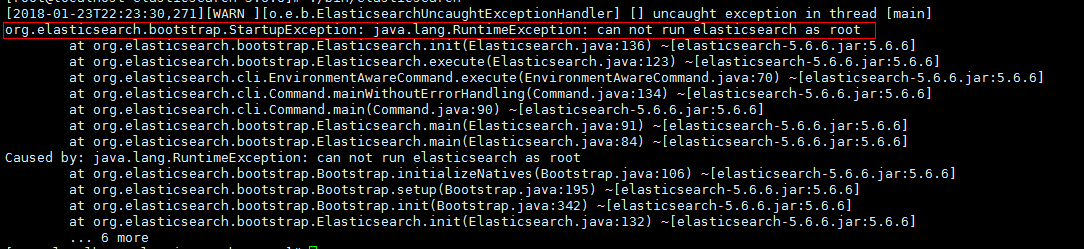
2、问题二:启动elasticsearch报错如下:org.elasticsearch.bootstrap.StartupException: java.lang.RuntimeException: can not run elasticsearch as root
解决方法:
原因是elasticsearch默认是不支持用root用户来启动的,需要添加专门的用户。
cd /usr/local

useradd elastic

chown -R elastic:elastic elasticsearch-5.6./

su elastic

./elasticsearch-5.6./bin/elasticsearch -d
3、问题三:启动报错如下
ERROR: [3] bootstrap checks failed
[1]: max file descriptors [4096] for elasticsearch process is too low, increase to at least [65536]
[2]: max number of threads [1775] for user [elastic] is too low, increase to at least [2048]
[3]: max virtual memory areas vm.max_map_count [65530] is too low, increase to at least [262144]
解决方法:
(1)[1]: max file descriptors [4096] for elasticsearch process is too low, increase to at least [65536]
[2]: max number of threads [1775] for user [elastic] is too low, increase to at least [2048]
先切换到root账户下面,使用 vi /etc/security/limits.conf ,增加如下内容
elastic soft nofile

elastic hard nofile

elastic soft nproc

elastic hard nproc
(2)[3]: max virtual memory areas vm.max_map_count [65530] is too low, increase to at least [262144]
使用 vim /etc/sysctl.conf ,增加如下的内容
vm.max_map_count=
输入:sysctl -p ,如下所示

(3)重新启动elasticsearch,
su elastic

cd /usr/local/elasticsearch-5.6.

./bin/elasticsearch -d
在centos7上安装elasticSearch的更多相关文章
- 在centos7上安装Jenkins
在centos7上安装Jenkins 安装 添加yum repos,然后安装 sudo wget -O /etc/yum.repos.d/jenkins.repo http://pkg.jenkins ...
- 在Windows上安装Elasticsearch 5.0
在windows上安装Elasticsearch Elasticsearch可以使用.zip软件包安装在Windows上. elasticsearch-service.bat命令,它将设置Elasti ...
- 在 CentOS7 上安装 zookeeper-3.4.9 服务
在 CentOS7 上安装 zookeeper-3.4.9 服务 1.创建 /usr/local/services/zookeeper 文件夹: mkdir -p /usr/local/service ...
- 在 CentOS7 上安装 MongoDB
在 CentOS7 上安装 MongoDB 1 通过 SecureCRT 连接至 CentOS7 服务器: 2 进入到 /usr/local/ 目录: cd /usr/local 3 在当前目录下创建 ...
- 在 CentOS7 上安装 MySQL5.7
在 CentOS7 上安装 MySQL5.7 1 通过 SecureCRT 连接到阿里云 CentOS7 服务器: 2 进入到目录 /usr/local/ 中: cd /usr/local/ 3 创建 ...
- 在 CentOS7 上安装 Tomcat9
在 CentOS7 上安装 Tomcat9 1 通过 SecureCRT 连接到阿里云 CentOS7 服务器: 2 进入到目录 /usr/local/ 中: cd /usr/local/ 3 创建目 ...
- 在CentOS7上安装JDK1.8
在CentOS7上安装JDK1.8 1 通过 SecureCRT 连接到阿里云 CentOS7 服务器: 2 进入到目录 /usr/local/ 中: cd /usr/local/ 3 创建目录 to ...
- 在Centos7上安装漏洞扫描软件Nessus
本文摘要:简单叙述了在Centos7上安装Nessus扫描器的过程 Nessus 是目前全世界最多人使用的系统漏洞扫描与分析软件,Nessus的用户界面是基于Web界面来访问Nessus漏洞扫描器 ...
- 如何在centos7上安装源码包
在我们使用linux的过程中,有很多程序是通过红帽官网给的系统中安装的,但是一般来说,系统更新的速度比较慢,如果这个时候我们又想用最新版的该怎么办呢?总不能一直等系统升级吧╮(╯﹏╰)╭所以,我们可以 ...
随机推荐
- spring 中AOP的基本知识点
首先AOP就是一个动态代理,主要运用在事务控制,日志记录,安全控制等方面 1.连接点(Joinpoint):一个连接点 总是 代表一个方法的执行. 2.切入点(Pointcut):匹配连接点的 表达式 ...
- /src/struts.xml
<?xml version="1.0" encoding="UTF-8" ?> <!DOCTYPE struts PUBLIC ...
- Linux命令_1
文件和目录命令 从P19开始的笔记 目标 查看目录内容 ls 切换目录 cd 创建和删除操作 touch mkdir rm 拷贝和移动文件 cp mv 查看文件内容 cat more grep 其他 ...
- ss源码学习--事件处理
为了方便区分,以下分别使用local,server,remote代表ss客户端,ss服务端,以及ss客户端请求访问的远程主机. 在shadowsocks中,无论对于local还是server,都需要建 ...
- V4 V7 V13支持包的区别(转)
三者均为支持包,可以让低版本系统使用高版本特性,支持最小版本有差异 V4支持1.6以上 V7支持2.1以上 V13支持3.2以上 V7依赖V4 转自:
- 常用的jquerymobil 站点
http://www.jqmapi.com/api1.2/ Jquery Mobile 中文API站 https://codiqa.com/demo jquerymobil UI编辑器 https ...
- WAS 常见报错
1) An error occurred while deleting the server. ADMG0011E: An unexpected exception occurred com.ibm. ...
- oracle 中从某天到某天一天一次执行某个函数
DECLAREv_days INTEGER;v_start VARCHAR2(10);v_end VARCHAR2(10);v_3 INTEGER;v_enddays date;begin v_sta ...
- django的优缺点(非原创)
Django 大包大揽,用它来快速开发一些 Web 应用是不错的.如果你顺着 Django 的设计哲学来,你会觉得 Django 很好用,越用越顺手:相反,你如果不能融入或接受 Django 的设计哲 ...
- 从零开始写bootloader(2)
下图是设置内核启动参数的存放图示,由于bootloader启动内核时,需要给内核传输一些启动参数,但是由于当bootloader把内核 启动之后,程序就跳转到内核中执行了,再也不会回到bootload ...