
Mini projects #7 ---- Spaceship
课程全名:An Introduction to Interactive Programming in Python,来自 Rice University
授课教授:Joe Warren, Scott Rixner, John Greiner, Stephen Wong
工具:http://www.codeskulptor.org/, simplegui 模块
最后两周就要结束了~~~
第七周:
先上图,这周完成Spaceship游戏的一部分。
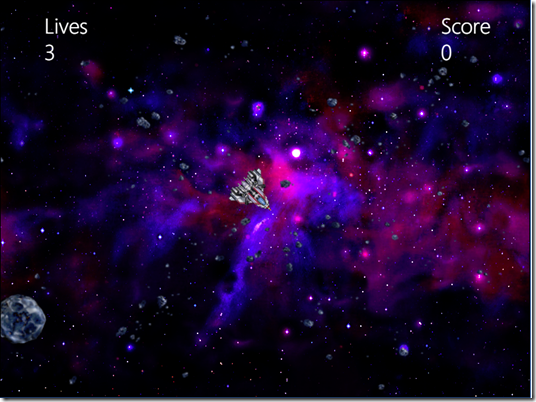
在这图里面有什么?飞船,陨石,子弹,背景图….
用OO的对象来看,他们都对应一幅图像,那么抽象一个类ImageInfo来操作这些图像信息,它包括图像的center(中心位置),size(图像大小),radius(半径),lifespan(时间周期),animated(动画)。可能有些属性比较陌生,有些针对到具体的对象才有用。
class ImageInfo:

    def __init__(self, center, size, radius = 0, lifespan = None, animated = False):

        self.center = center

        self.size = size

        self.radius = radius

        if lifespan:

            self.lifespan = lifespan

        else:

            self.lifespan = float('inf')

        self.animated = animated

    def get_center(self):

        return self.center

    def get_size(self):

        return self.size

    def get_radius(self):

        return self.radius

    def get_lifespan(self):

        return self.lifespan

    def get_animated(self):

        return self.animated
有了图像的表示,那么我们还需要飞船,用Ship来表示
Ship有什么属性和方法呢?
pos:位置
vel:加速度
thrust:冲刺状态
angle:飞船旋转的角度
angle_vel:飞船旋转角速度
image:飞船图像
image_cener:飞船图像的中心位置
image_size:飞船图像的大小
image_radius:飞船半径?(这周作业没用到,不知道干嘛的)
飞船的方法:
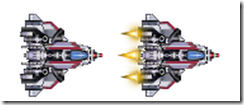
draw(canvas): 绘制飞船,要求绘制根据是否在冲刺状态,绘制图像不同。所给的飞船image是tiled图像,所以绘制时候计算一下偏移就好
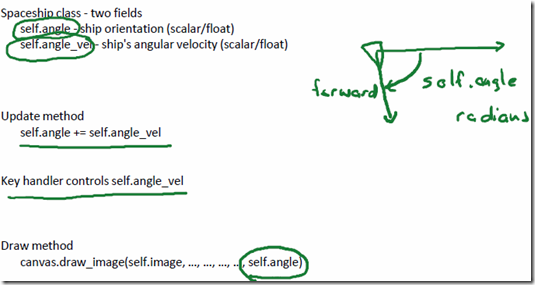
update():更新当前飞船位置以及角度。基本所有涉及到简单数学计算的公式,课上以及相关ppt都给出来,都比较简单,直接拿来用。对于角度的更新和Pong那周一样,用左右按键按下增加旋转角速度,放开减少旋转角速度,每次更新的时候就只用把飞船的角度加上旋转角速度。
飞船的位置更新同理,使用位置加上加速度,但是要考虑飞出边界,所以对WIDTH和HEIGHT分别取模。
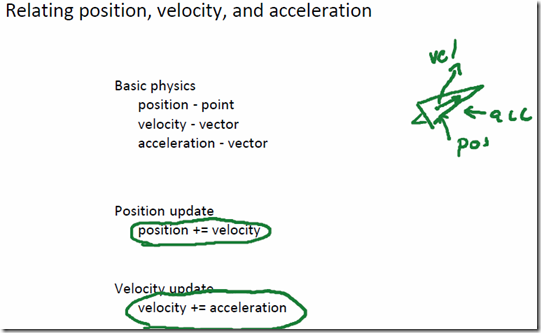
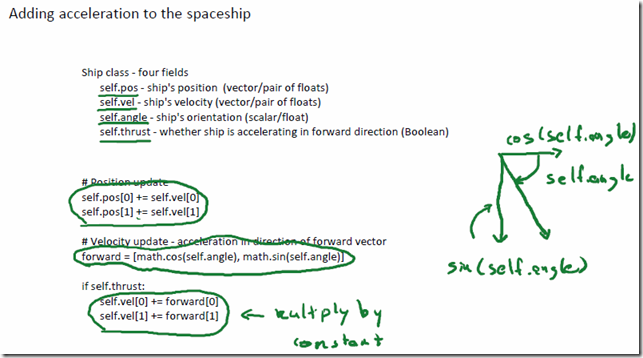
这边与Pong不同的是加速度的计算,Pong只有上下方向,但这里飞船可以旋转指向各个方向,所以加速度修改飞船向着它转角的方向,原理还是一样,把转角方向向水平和垂直方向做投影乘以常量,然后加到原有的加速度上。
最后剩下的一个问题就是,外太空有<阻力>,所以飞船会不断减速直到速度为0,那么不断按照一定的比例缩小飞船的加速度,直到加速度为0,飞船的位置就不更新了。
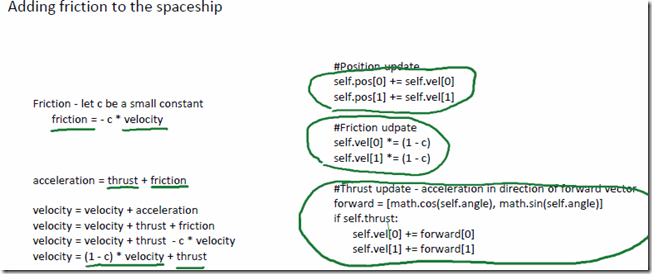
update()的代码如下:
def update(self):

    self.angle += self.angle_vel

    self.pos[0] = (self.pos[0] + self.vel[0]) % WIDTH

    self.pos[1] = (self.pos[1] + self.vel[1]) % HEIGHT

    c = 0.05

    self.vel[0] *= (1 - c)

    self.vel[1] *= (1 - c)

    forward = angle_to_vector(self.angle)

    if self.thrust:

        self.vel[0] += forward[0] * 1.2

        self.vel[1] += forward[1] * 1.2
change_angle_vel(ori, key_state):根据按键是left或者right和按键当前状态是按下或者松开,来改变飞船的旋转角速度
set_thruster(thruster_state):根据up按键来改变飞船的冲刺状态,并且播放和暂停响应的声音效果
shoot(): 飞船发子弹,初始化子弹,它的位置在飞船的炮孔位置,然后子弹的加速度等于,飞船的加速度,加上飞船角度在水平垂直分量的常量倍,这与飞船的加速思路一样的,子弹的角度和旋转角速度设置成0就好。
飞船处理完了,剩下的就是陨石和子弹,给的template中用sprite来抽象表示他们。

基本的属性和飞船差不多,pos, vel, angle, angle_vel, image, image_center, image_size, radius,多了lifespan, animated, age还有sound
主要方法:
draw(canvas): 直接根据image的信息进行绘制
update(canvas): 更新角度和位置,与飞船类似。超出边界要取模
其他的部分就是frame的draw事件模板里已经写好,key_up,key_down事件,上面也都提到处理方法。
这周的任务也就这样完工了。
完整的代码如下:
# program template for Spaceship

import simplegui

import math

import random

# globals for user interface

WIDTH = 800

HEIGHT = 600

score = 0

lives = 3

time = 0.5

class ImageInfo:

    def __init__(self, center, size, radius = 0, lifespan = None, animated = False):

        self.center = center

        self.size = size

        self.radius = radius

        if lifespan:

            self.lifespan = lifespan

        else:

            self.lifespan = float('inf')

        self.animated = animated

    def get_center(self):

        return self.center

    def get_size(self):

        return self.size

    def get_radius(self):

        return self.radius

    def get_lifespan(self):

        return self.lifespan

    def get_animated(self):

        return self.animated

# art assets created by Kim Lathrop, may be freely re-used in non-commercial projects, please credit Kim

# debris images - debris1_brown.png, debris2_brown.png, debris3_brown.png, debris4_brown.png

#                 debris1_blue.png, debris2_blue.png, debris3_blue.png, debris4_blue.png, debris_blend.png

debris_info = ImageInfo([320, 240], [640, 480])

debris_image = simplegui.load_image("http://commondatastorage.googleapis.com/codeskulptor-assets/lathrop/debris2_blue.png")

# nebula images - nebula_brown.png, nebula_blue.png

nebula_info = ImageInfo([400, 300], [800, 600])

nebula_image = simplegui.load_image("http://commondatastorage.googleapis.com/codeskulptor-assets/lathrop/nebula_blue.f2014.png")

# splash image

splash_info = ImageInfo([200, 150], [400, 300])

splash_image = simplegui.load_image("http://commondatastorage.googleapis.com/codeskulptor-assets/lathrop/splash.png")

# ship image

ship_info = ImageInfo([45, 45], [90, 90], 35)

ship_image = simplegui.load_image("http://commondatastorage.googleapis.com/codeskulptor-assets/lathrop/double_ship.png")

# missile image - shot1.png, shot2.png, shot3.png

missile_info = ImageInfo([5,5], [10, 10], 3, 50)

missile_image = simplegui.load_image("http://commondatastorage.googleapis.com/codeskulptor-assets/lathrop/shot2.png")

# asteroid images - asteroid_blue.png, asteroid_brown.png, asteroid_blend.png

asteroid_info = ImageInfo([45, 45], [90, 90], 40)

asteroid_image = simplegui.load_image("http://commondatastorage.googleapis.com/codeskulptor-assets/lathrop/asteroid_blue.png")

# animated explosion - explosion_orange.png, explosion_blue.png, explosion_blue2.png, explosion_alpha.png

explosion_info = ImageInfo([64, 64], [128, 128], 17, 24, True)

explosion_image = simplegui.load_image("http://commondatastorage.googleapis.com/codeskulptor-assets/lathrop/explosion_alpha.png")

# sound assets purchased from sounddogs.com, please do not redistribute

soundtrack = simplegui.load_sound("http://commondatastorage.googleapis.com/codeskulptor-assets/sounddogs/soundtrack.mp3")

missile_sound = simplegui.load_sound("http://commondatastorage.googleapis.com/codeskulptor-assets/sounddogs/missile.mp3")

missile_sound.set_volume(.5)

ship_thrust_sound = simplegui.load_sound("http://commondatastorage.googleapis.com/codeskulptor-assets/sounddogs/thrust.mp3")

explosion_sound = simplegui.load_sound("http://commondatastorage.googleapis.com/codeskulptor-assets/sounddogs/explosion.mp3")

# helper functions to handle transformations

def angle_to_vector(ang):

    return [math.cos(ang), math.sin(ang)]

def dist(p,q):

    return math.sqrt((p[0] - q[0]) ** 2+(p[1] - q[1]) ** 2)

# Ship class

class Ship:

    def __init__(self, pos, vel, angle, image, info):

        self.pos = [pos[0],pos[1]]

        self.vel = [vel[0],vel[1]]

        self.thrust = False

        self.angle = angle

        self.angle_vel = 0

        self.image = image

        self.image_center = info.get_center()

        self.image_size = info.get_size()

        self.radius = info.get_radius()

    def draw(self,canvas):

        if self.thrust:

            center = (self.image_center[0]+self.image_size[0], self.image_center[1])

            canvas.draw_image(self.image, center, self.image_size, self.pos, self.image_size, self.angle)

        else:

            canvas.draw_image(self.image, self.image_center, self.image_size, self.pos, self.image_size, self.angle)

    def update(self):

        self.angle += self.angle_vel

        self.pos[0] = (self.pos[0] + self.vel[0]) % WIDTH

        self.pos[1] = (self.pos[1] + self.vel[1]) % HEIGHT

        c = 0.05

        self.vel[0] *= (1 - c)

        self.vel[1] *= (1 - c)

        forward = angle_to_vector(self.angle)

        if self.thrust:

            self.vel[0] += forward[0] * 1.2

            self.vel[1] += forward[1] * 1.2

    def change_angle_vel(self, ori, key_state):

        if ((ori == "right" and key_state == "keyup") or

            (ori == "left" and key_state == "keydown")):

            self.angle_vel -= 0.1

        elif ((ori == "right" and key_state == "keydown") or

            (ori == "left" and key_state == "keyup")):

            self.angle_vel += 0.1

    def set_thruster(self, thruster_state):

        self.thrust = thruster_state

        if self.thrust:

            ship_thrust_sound.rewind()

            ship_thrust_sound.play()

        else:

            ship_thrust_sound.rewind()

    def shoot(self):

        global a_missile

        offset = self.image_size[0] / 2.0

        forward = angle_to_vector(self.angle)

        pos = [self.pos[0] + offset * forward[0], self.pos[1] + offset * forward[1]]

        vel = [self.vel[0] + 4 * forward[0], self.vel[1] + 4 * forward[1]]

        ang = 0

        ang_vel = 0

        a_missile = Sprite(pos, vel, ang, ang_vel, missile_image, missile_info, missile_sound)

# Sprite class

class Sprite:

    def __init__(self, pos, vel, ang, ang_vel, image, info, sound = None):

        self.pos = [pos[0],pos[1]]

        self.vel = [vel[0],vel[1]]

        self.angle = ang

        self.angle_vel = ang_vel

        self.image = image

        self.image_center = info.get_center()

        self.image_size = info.get_size()

        self.radius = info.get_radius()

        self.lifespan = info.get_lifespan()

        self.animated = info.get_animated()

        self.age = 0

        if sound:

            sound.rewind()

            sound.play()

    def draw(self, canvas):

        canvas.draw_image(self.image, self.image_center, self.image_size, self.pos, self.image_size, self.angle)

    def update(self):

        self.angle += self.angle_vel

        self.pos[0] = (self.pos[0] + self.vel[0]) % WIDTH

        self.pos[1] = (self.pos[1] + self.vel[1]) % HEIGHT

def draw(canvas):

    global time

    # animiate background

    time += 1

    wtime = (time / 4) % WIDTH

    center = debris_info.get_center()

    size = debris_info.get_size()

    canvas.draw_image(nebula_image, nebula_info.get_center(), nebula_info.get_size(), [WIDTH / 2, HEIGHT / 2], [WIDTH, HEIGHT])

    canvas.draw_image(debris_image, center, size, (wtime - WIDTH / 2, HEIGHT / 2), (WIDTH, HEIGHT))

    canvas.draw_image(debris_image, center, size, (wtime + WIDTH / 2, HEIGHT / 2), (WIDTH, HEIGHT))

    # draw ship and sprites

    my_ship.draw(canvas)

    a_rock.draw(canvas)

    a_missile.draw(canvas)

    # update ship and sprites

    my_ship.update()

    a_rock.update()

    a_missile.update()

    # draw lives

    canvas.draw_text("Lives", [WIDTH / 12, HEIGHT / 12], 30, "White")

    canvas.draw_text(str(lives), [WIDTH / 12, HEIGHT / 12 + 40], 30, "White")

    # draw score

    canvas.draw_text("Score", [10 * WIDTH / 12, HEIGHT/12], 30, "White")

    canvas.draw_text(str(score), [10 * WIDTH /12, HEIGHT/12 + 40], 30, "White")

# timer handler that spawns a rock

def rock_spawner():

    global a_rock

    pos = [random.randint(0, WIDTH-1), random.randint(0, HEIGHT-1)]

    vel = [random.randrange(1, 5, 1)*random.choice([1, -1]), random.randrange(1, 5, 1)*random.choice([1, -1])]

    ang = 0

    ang_vel = random.randrange(5, 10, 1) / 100.0 * random.choice([1, -1])

    a_rock = Sprite(pos, vel, ang, ang_vel, asteroid_image, asteroid_info)

def key_up(key):

    if simplegui.KEY_MAP['left'] == key:

        my_ship.change_angle_vel("left", "keyup")

    elif simplegui.KEY_MAP['right'] == key:

        my_ship.change_angle_vel("right", "keyup")

    elif simplegui.KEY_MAP['up'] == key:

        my_ship.set_thruster(False)

def key_down(key):

    if simplegui.KEY_MAP['left'] == key:

        my_ship.change_angle_vel("left", "keydown")

    elif simplegui.KEY_MAP['right'] == key:

        my_ship.change_angle_vel("right", "keydown")

    elif simplegui.KEY_MAP['up'] == key:

        my_ship.set_thruster(True)

    elif simplegui.KEY_MAP['space'] == key:

        my_ship.shoot()

# initialize frame

frame = simplegui.create_frame("Asteroids", WIDTH, HEIGHT)

# initialize ship and two sprites

my_ship = Ship([WIDTH / 2, HEIGHT / 2], [0, 0], 0, ship_image, ship_info)

a_rock = Sprite([WIDTH / 3, HEIGHT / 3], [1, 1], 0, 0, asteroid_image, asteroid_info)

a_missile = Sprite([2 * WIDTH / 3, 2 * HEIGHT / 3], [-1, 1], 0, 0, missile_image, missile_info, missile_sound)

# register handlers

frame.set_draw_handler(draw)

frame.set_keydown_handler(key_down)

frame.set_keyup_handler(key_up)

timer = simplegui.create_timer(1000.0, rock_spawner)

# get things rolling

timer.start()

frame.start()
期待着最后一周,游戏完整的代码。就要完成Coursera的一门这么有意思的课,课程难度很小,乐趣十足。
Mini projects #7 ---- Spaceship的更多相关文章
- Mini projects #8–RiceRocks
课程全名:An Introduction to Interactive Programming in Python,来自 Rice University 授课教授:Joe Warren, Scott ...
- Mini projects #6 ---- Blackjack
课程全名:An Introduction to Interactive Programming in Python,来自 Rice University 授课教授:Joe Warren, Scott ...
- Mini projects #3 ---- Stopwatch: The Game
课程全名:An Introduction to Interactive Programming in Python,来自 Rice University 授课教授:Joe Warren, Scott ...
- Mini projects #5 ---- Memory
课程全名:An Introduction to Interactive Programming in Python,来自 Rice University 授课教授:Joe Warren, Scott ...
- Mini projects #4 ---- Pong
课程全名:An Introduction to Interactive Programming in Python,来自 Rice University 授课教授:Joe Warren, Scott ...
- A Complete List of .NET Open Source Developer Projects
http://scottge.net/2015/07/08/a-complete-list-of-net-open-source-developer-projects/?utm_source=tuic ...
- Building Xcode iOS projects and creating *.ipa file from the command line
For our development process of iOS applications, we are using Jenkins set up on the Mac Mini Server, ...
- All the Apache Streaming Projects: An Exploratory Guide
The speed at which data is generated, consumed, processed, and analyzed is increasing at an unbeliev ...
- Golang优秀开源项目汇总, 10大流行Go语言开源项目, golang 开源项目全集(golang/go/wiki/Projects), GitHub上优秀的Go开源项目
Golang优秀开源项目汇总(持续更新...)我把这个汇总放在github上了, 后面更新也会在github上更新. https://github.com/hackstoic/golang-open- ...
随机推荐
- 为什么C#中应该用Try-Catch?
[为什么C#中应该用Try-Catch?] http://blog.csdn.net/dier4836/article/details/7292897
- 什么是SCADA Viewer
SCADA Viewer 什么是SCADA Viewer SCADA Viewer是一个基于Web的软件框架(基于Web的HMI/SCADA/M2M工业和楼宇自动化,支持Modbus,BACnet,O ...
- 不谈业务运维的IT主管早晚被淘汰 这里是10条干货
大数网 吴玉征 先说个真实的故事. 前一段时间,有一家知名的国际连锁咖啡公司的自助交易系统(支付宝.微信.ApplePAY)特别慢,工作人员也不知道为什么.由于他们刚上了业务运维,支持这套系统的云智慧 ...
- js对象使用格式
var initEvent = { list:['editor'], editor:function () { var obj = $("[dataType = 'text']") ...
- 第一次到IT公司上班!
今日是自个的首次正式到IT公司进行作业,感触也是别有一番兴趣!如今就让自个回味下第一天的作业经历吧! 我上班的公司叫西安西科软件技术有限公司,第一天上班的缘故,早上起得很早,差不多六点半还没到就起床洗 ...
- C/C++入门---运算符
1, 运算符的优先级 C语言的运算符共有15个优先级,各运算符及其优先级和结合律如下: 运算符 结合律 ()[]-> 从左到右 !~++ -- +(正号) -(负号) *(指针取址符) (typ ...
- sublime text3的安装与汉化
sublime text3 3126 64位的下载地址: https://download.sublimetext.com/Sublime%20Text%20Build%203126%20x64%20 ...
- ZT 螨虫知识2
病情分析:过敏是治不好的,只能做到避免接触.指导意见:螨虫的话就不要跟狗多接触,狗的寄生虫很多,还有草地,尤其是狗经常去的地方,草地就是螨虫的传播介质.你是过敏性体质除了被免过敏性源外,还要增强体质, ...
- 压缩文本、字节或者文件的压缩辅助类-GZipHelper
下面为大家介绍一.NET下辅助公共类GZipHelper,该工具类主要作用是对文本.字符.文件等进行压缩与解压.该类主要使用命名空间:System.IO.Compression下的GZipStream ...
- android BluetoothLE 多个 setCharacteristicNotification writeCharacteristic 失效
如果在搜索完服务后,执行多个 setCharacteristicNotification 或 writeCharacteristic 操作,某些操作可能会无效.需要在中间等待一些时间,真是一个大坑! ...