
GridLayout自定义数字键盘(两个EditText)
功能说明:
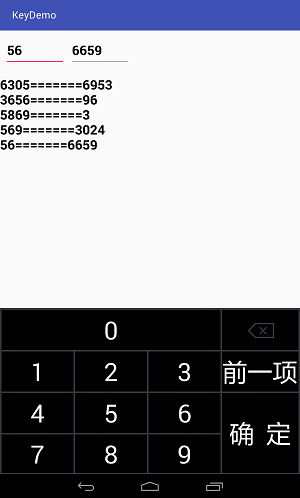
适用于两个EditText输入框,并控制输入字符的长度,点击键盘中的"确定"按钮完成输入,点击"前一项"光标跳到前一个EditText
运行效果图如下:
布局文件
 <?xml version="1.0" encoding="utf-8"?>

 <LinearLayout xmlns:android="http://schemas.android.com/apk/res/android"

     xmlns:tools="http://schemas.android.com/tools"

     android:layout_width="match_parent"

     android:layout_height="match_parent"

     android:orientation="vertical"

     android:focusable="true"

     android:focusableInTouchMode="true">

     <LinearLayout

         android:layout_marginTop="10dp"

         android:layout_width="match_parent"

         android:layout_height="60dp">

         <EditText

             android:id="@+id/edt1"

             android:maxLength="4"

             android:textSize="20sp"

             android:textColor="#000000"

             android:textStyle="bold"

             android:layout_marginLeft="10dp"

             android:selectAllOnFocus="true"

             android:focusableInTouchMode="true"

             android:layout_width="120dp"

             android:layout_height="match_parent" />

         <EditText

             android:textSize="20sp"

             android:textColor="#000000"

             android:textStyle="bold"

             android:id="@+id/edt2"

             android:maxLength="4"

             android:selectAllOnFocus="true"

             android:layout_marginLeft="10dp"

             android:layout_width="120dp"

             android:layout_height="match_parent" />

     </LinearLayout>

     <TextView

         android:textSize="20sp"

         android:textColor="#000000"

         android:textStyle="bold"

         android:layout_marginTop="20dp"

         android:id="@+id/tv"

         android:layout_width="match_parent"

         android:layout_height="400dp" />

     <include

         android:layout_marginTop="65dp"

         android:layout_width="match_parent"

         android:layout_height="wrap_content"

         android:layout_alignParentBottom="true"

         layout="@layout/gridlayout"/>

 </LinearLayout>
<?xml version="1.0" encoding="utf-8"?>

<GridLayout xmlns:android="http://schemas.android.com/apk/res/android"

    android:layout_width="match_parent"

    android:layout_height="match_parent"

    android:background="#34373e">

    <Button

        android:layout_marginTop="4dp"

        android:layout_marginLeft="3dp"

        android:id="@+id/txt0"

        android:layout_width="350dp"

        android:layout_height="80dp"

        android:layout_column="0"

        android:layout_columnSpan="3"

        android:layout_gravity="fill_horizontal"

        android:layout_row="1"

        android:background="#000000"

        android:textColor="#FFFFFF"

        android:textSize="50dp"

        android:text="0" />

    <ImageButton

        android:layout_marginTop="4dp"

        android:layout_marginLeft="3dp"

        android:layout_marginRight="5dp"

        android:id="@+id/delete"

        android:layout_width="153dp"

        android:layout_height="80dp"

        android:background="#000000"

        android:textColor="#FFFFFF"

        android:layout_column="3"

        android:layout_gravity="fill_horizontal"

        android:layout_row="1"

        android:src="@drawable/delete" />

    <Button

        android:layout_marginTop="3dp"

        android:layout_marginLeft="3dp"

        android:id="@+id/txt1"

        android:layout_width="144dp"

        android:layout_height="80dp"

        android:layout_column="0"

        android:layout_row="2"

        android:background="#000000"

        android:textColor="#FFFFFF"

        android:textSize="50dp"

        android:text="1" />

    <Button

        android:layout_marginTop="3dp"

        android:layout_marginLeft="3dp"

        android:id="@+id/txt2"

        android:layout_width="144dp"

        android:layout_height="80dp"

        android:layout_column="1"

        android:layout_row="2"

        android:background="#000000"

        android:textColor="#FFFFFF"

        android:textSize="50dp"

        android:text="2" />

    <Button

        android:layout_marginTop="3dp"

        android:layout_marginLeft="3dp"

        android:id="@+id/txt3"

        android:layout_width="144dp"

        android:layout_height="80dp"

        android:layout_column="2"

        android:layout_row="2"

        android:background="#000000"

        android:textColor="#FFFFFF"

        android:textSize="50dp"

        android:text="3" />

    <Button

        android:layout_marginTop="3dp"

        android:layout_marginLeft="3dp"

        android:layout_marginRight="5dp"

        android:id="@+id/next"

        android:layout_width="123dp"

        android:layout_height="80dp"

        android:layout_column="3"

        android:layout_gravity="fill_horizontal"

        android:layout_row="2"

        android:textSize="50dp"

        android:text="前一项"

        android:background="#000000"

        android:textColor="#FFFFFF" />

    <Button

        android:layout_marginTop="3dp"

        android:layout_marginLeft="3dp"

        android:id="@+id/txt4"

        android:layout_width="144dp"

        android:layout_height="80dp"

        android:layout_column="0"

        android:layout_row="3"

        android:background="#000000"

        android:textColor="#FFFFFF"

        android:textSize="50dp"

        android:text="4" />

    <Button

        android:layout_marginTop="3dp"

        android:layout_marginLeft="3dp"

        android:id="@+id/txt5"

        android:layout_width="144dp"

        android:layout_height="80dp"

        android:layout_column="1"

        android:layout_row="3"

        android:background="#000000"

        android:textColor="#FFFFFF"

        android:textSize="50dp"

        android:text="5" />

    <Button

        android:layout_marginTop="3dp"

        android:layout_marginLeft="3dp"

        android:id="@+id/txt6"

        android:layout_width="144dp"

        android:layout_height="80dp"

        android:layout_column="2"

        android:layout_row="3"

        android:background="#000000"

        android:textColor="#FFFFFF"

        android:textSize="50dp"

        android:text="6" />

    <Button

        android:layout_marginLeft="3dp"

        android:layout_marginTop="3dp"

        android:layout_marginRight="5dp"

        android:layout_marginBottom="3dp"

        android:id="@+id/sure"

        android:layout_width="153dp"

        android:layout_height="160dp"

        android:layout_columnSpan="2"

        android:layout_rowSpan="2"

        android:background="#000000"

        android:textColor="#FFFFFF"

        android:textSize="50dp"

        android:text="确  定" />

    <Button

        android:layout_marginTop="3dp"

        android:layout_marginLeft="3dp"

        android:layout_marginBottom="3dp"

        android:id="@+id/txt7"

        android:layout_width="144dp"

        android:layout_height="77dp"

        android:layout_column="0"

        android:layout_row="4"

        android:background="#000000"

        android:textColor="#FFFFFF"

        android:textSize="50dp"

        android:text="7" />

    <Button

        android:layout_marginTop="3dp"

        android:layout_marginLeft="3dp"

        android:layout_marginBottom="3dp"

        android:id="@+id/txt8"

        android:layout_width="144dp"

        android:layout_height="77dp"

        android:layout_column="1"

        android:layout_row="4"

        android:background="#000000"

        android:textColor="#FFFFFF"

        android:textSize="50dp"

        android:text="8" />

    <Button

        android:layout_marginTop="3dp"

        android:layout_marginLeft="3dp"

        android:id="@+id/txt9"

        android:layout_width="144dp"

        android:layout_height="77dp"

        android:layout_column="2"

        android:layout_row="4"

        android:background="#000000"

        android:textColor="#FFFFFF"

        android:textSize="50dp"

        android:layout_marginBottom="3dp"

        android:text="9" />

</GridLayout>
Java代码:
public class MainActivity extends AppCompatActivity {

    private EditText edt1,edt2;

    private String str1="",str2="",string="";

    private TextView textView;

    private int[] btidNum = { R.id.txt0, R.id.txt1, R.id.txt2, R.id.txt3,

            R.id.txt4, R.id.txt5, R.id.txt6, R.id.txt7, R.id.txt8, R.id.txt9};

    private Button[] buttons = new Button[btidNum.length];

    boolean flag=true;

    //控制第一个EditText中输入数据的长度

    TextWatcher tw = new TextWatcher() {

        //@Override

        public void beforeTextChanged(CharSequence s, int start, int count, int after) {

        }

        //@Override

        public void onTextChanged(CharSequence s, int start, int before, int count) {

        }

        //@Override

        public void afterTextChanged(Editable s) {

            if (s.toString().length() == 4) {

                if (edt1.isFocused()) {

                    edt1.clearFocus();

                    edt2.requestFocus();

//                    edt2.setText("1");

//                    edt2.setSelection(1);    //   设置光标的位置

                    string="";

                    flag=false; //第二个

                }

                else if(edt2.isFocusable()){

                    edt2.clearFocus();

                    edt1.requestFocus();

                    string="";

                    flag=true;//第一个

                }

            }

        }

    };

    @Override

    protected void onCreate(Bundle savedInstanceState) {

        super.onCreate(savedInstanceState);

        setContentView(R.layout.activity_main);

        edt1=(EditText)findViewById(R.id.edt1);

        edt1.addTextChangedListener(tw);

        edt2=(EditText)findViewById(R.id.edt2);

        edt2.addTextChangedListener(tw);

        textView=(TextView)findViewById(R.id.tv);

        edt1.requestFocus();

        GetNumber get = new GetNumber();

        for (int i = 0; i < btidNum.length; i++) {

            buttons[i] = (Button) findViewById(btidNum[i]);

            buttons[i].setOnClickListener(get);

        }

        ImageButton delete=(ImageButton)findViewById(R.id.delete);

        Button next=(Button)findViewById(R.id.next);

        Button sure=(Button)findViewById(R.id.sure);

        delete.setOnClickListener(new View.OnClickListener() {

            @Override

            public void onClick(View view) {

                if(str1.length()>0&&flag==true){

                    str1=str1.substring(0,str1.length()-1);

                    edt1.setText(str1);

                    edt1.setSelection(str1.length());

                    string=edt1.getText().toString();

                }else if(str2.length()>0&&flag==false){

                    str2=str2.substring(0,str2.length()-1);

                    edt2.setText(str2);

                    edt2.setSelection(str2.length());

                    string=edt2.getText().toString();

                }

            }

        });

        next.setOnClickListener(new View.OnClickListener() {

            @Override

            public void onClick(View view) {

                if(edt2.isFocusable()){

                    edt2.clearFocus();

                    edt1.requestFocus();

                    string="";

                    flag=true;

                }

            }

        });

        sure.setOnClickListener(new View.OnClickListener() {

            @Override

            public void onClick(View view) {

                str1=edt1.getText().toString().trim();

                str2=edt2.getText().toString().trim();

                textView.append(str1+"======="+str2+"\n");

            }

        });

    }

    // 给 EditText赋值

    class GetNumber implements View.OnClickListener {

        @Override

        public void onClick(View v) {

            String txt = ((Button) v).getText().toString();

            string=string+txt;

            if(flag==true){

                str1=string;

                edt1.setText(str1);

                edt1.setSelection(str1.length());

            }else if(flag==false){

                str2=string;

                edt2.setText(str2);

                edt2.setSelection(str2.length());

            }

        }

    }

}
如需屏蔽系统键盘,请借鉴上一篇
GridLayout自定义数字键盘(两个EditText)的更多相关文章
- ios自定义数字键盘
因为项目又一个提现的功能,textfiled文本框输入需要弹出数字键盘,首先想到的就是设置textfiled的keyboardType为numberPad,此时你会看到如下的效果: 但是很遗憾这样 ...
- html5自定义数字键盘
原理:使用div模拟输入框,避免手机原生键盘弹出,键盘使用div模拟,点击事件使用js控制,光标闪烁使用css模拟,具体代码如下: <!doctype html> <html lan ...
- h5仿微信、支付宝数字键盘|微信支付键盘|支付宝付款键盘
html5仿微信支付数字键盘|仿支付宝键盘|h5仿微信密码输入键盘|自定义数字键盘 很早之前由于项目需求,就有开发过一个h5仿微信支付键盘,这几天就把之前的数字键盘模块独立出来,重新整理开发成demo ...
- iOS数字键盘自定义按键
UIKeyboardTypeNumberPad 数字键盘自定义按键 最近做一个搜索用户的功能,这里使用了UISearchBar.由于搜索的方式只有手机号码,所以这里的键盘要限制为数字输入,可以这么做: ...
- 前端angularJS利用directive实现移动端自定义软键盘的方法
最近公司项目的需求上要求我们iPad项目上一些需要输入数字的地方用我们自定义的软键盘而不是移动端设备自带的键盘,刚接到需求有点懵,因为之前没有做过,后来理了一下思路发现这东西也就那样.先看一下实现之后 ...
- Android自定义安全键盘
在银行APP里经常要自定义键盘,例如实现下面这样的效果 首先在xml文件里定义键盘 <Keyboard xmlns:android="http://schemas.andr ...
- android开发(45) 自定义软键盘(输入法)
概述 在项目开发中遇到一个需求,”只要数字键盘的输入,仅仅有大写字母的输入,某些输入法总是会提示更新,弹出广告等“,使得我们需要自定义输入. 关联到的知识 KeyboardView 一个视图 ...
- 一个数字键盘引发的血案——移动端H5输入框、光标、数字键盘全假套件实现
https://juejin.im/post/5a44c5eef265da432d2868f6 为啥要写假键盘? 还是输入框.光标全假的假键盘? 手机自带的不用非得写个假的,吃饱没事干吧? 装逼?炫技 ...
- Excel 2007中自定义数字格式前要了解的准则
要在Excel 2007中创建自定义数字格式,首先应了解自定义数字格式的准则,并从选择某一内置数字格式开始.然后,可以更改该格式的任意代码部分,从而创建自己的自定义数字格式. 数字格式最多可包含四个代 ...
随机推荐
- SVN show log failed
Q: SVN 不能显示日志 能正常update, commit,但是show log的时候报错 A:可能原因是服务器权限配置问题 修改配置文件svnserve.conf 和 authz, 修改前请先备 ...
- spring mvc1
DispatcherServlet是前端控制器设计模式的实现,提供Spring Web MVC的集中访问点,而且负责职责的分派,而且与Spring IoC容器无缝集成,从而可以获得Spring的所有好 ...
- java简单的二分法排序
二分法排序的思路:数据元素要按顺序排列,对于给定值 x,从序列的中间位置开始比较,如果当前位置值等于 x,则查找成功:若 x 小于当前位置值,则在数列的前半段中查找:若 x 大于当前位置值则在数列的后 ...
- c++ 类的静态变量
类的静态变量作为类的一部分,但不由类的创建产生,类的销毁而消失.静态变量和全局变量一样,会在main函数结束后销毁. 类可以对静态变量的值进行改变 #pragma once class ctest { ...
- java学习第12天
今天主要是看下正则表达式,其实在编译原理中就接触过.正则表达式就是符合一定规则的字符串. A:字符 x 字符 x.举例:'a'表示字符a \\ 反斜线字符. \n 新行(换行)符 ('\u000A') ...
- 常见HTTP状态码(200、301、302、500等)
HTTP状态码,它是用以表示网页服务器HTTP响应状态的3位数字代码.状态码的第一个数字代表了响应的五种状态之一. 1XX系列:指定客户端应相应的某些动作,代表请求已被接受,需要继续处理.由于 HTT ...
- ZXingObjC 64位 集成到自己的项目中(xcode 6.4)
参考 http://www.cocoachina.com/bbs/read.php?tid-280058-page-1.html 楼主发的DEMO中 ZXingObjC 支持64位 但是是以项目形 ...
- adb常用命令
adb命令的主要用途 1. 运行android设备的shell(命令行). 2.管理模拟器或android设备的映射端口. 3. 安装和卸载应用程序. 4.计算机和android设备之间的上传 ...
- 【转】ELK(ElasticSearch, Logstash, Kibana)搭建实时日志分析平台
[转自]https://my.oschina.net/itblog/blog/547250 摘要: 前段时间研究的Log4j+Kafka中,有人建议把Kafka收集到的日志存放于ES(ElasticS ...
- 敏捷软件开发 VS. 传统软件工程
敏捷软件开发 VS. 传统软件工程 软件工程这一术语1968年被提出,之后美国软件工程专家巴利·玻姆对十多年间研究软件工程的专家学者们提出的一些准则与信条,于1983年对提出软件工程的七条基本定理,将 ...