
Entity Framework Code-First(10.2):Entity Mappings
Entity Mappings using Fluent API:
Here, we will learn how to configure an entity using Fluent API.
We will use the following Student and Standard domain classes of the school application.
public class Student

{

    public Student()

    {

    }

    public int StudentID { get; set; }

    public string StudentName { get; set; }

    public DateTime? DateOfBirth { get; set; }

    public byte[]  Photo { get; set; }

    public decimal Height { get; set; }

    public float Weight { get; set; }

    public Standard Standard { get; set; }

}

public class Standard

{

    public Standard()

    {

    }

    public int StandardId { get; set; }

    public string StandardName { get; set; }

    public ICollection<Student> Students { get; set; }

 }
Configure Default Schema:
First, let's configure a default schema for the tables in the database. However, you can change the schema while creating the individual tables. The following example sets the default Admin schema.
public class SchoolContext: DbContext

{

    public SchoolDBContext(): base()

    {

    }

    public DbSet<Student> Students { get; set; }

    public DbSet<Standard> Standards { get; set; }

    protected override void OnModelCreating(DbModelBuilder modelBuilder)

    {

        //Configure default schema

        modelBuilder.HasDefaultSchema("Admin");

    }

}
Map Entity to Table:
Code-First will create the database tables with the name of DbSet properties in the context class - Students and Standards in this case. You can override this convention and can give a different table name than the DbSet properties, as shown below.
namespace CodeFirst_FluentAPI_Tutorials

{

    public class SchoolContext: DbContext

    {

        public SchoolDBContext(): base()

        {

        }

        public DbSet<Student> Students { get; set; }

        public DbSet<Standard> Standards { get; set; }

        protected override void OnModelCreating(DbModelBuilder modelBuilder)

        {

                //Configure default schema

            modelBuilder.HasDefaultSchema("Admin");

            //Map entity to table

            modelBuilder.Entity<Student>().ToTable("StudentInfo");

            modelBuilder.Entity<Standard>().ToTable("StandardInfo","dbo");

        }

    }

}
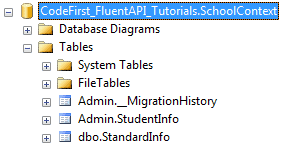
As you can see in the above example, we start with the Entity<TEntity>() method. Most of the time, you have to start with the Entity<TEntity>() method to configure it using Fluent API. We have used ToTable() method to map Student entity to StudentInfo and Standard entity to StandardInfo table. Notice that StudentInfo is in Admin schema and StandardInfo table is in dbo schema because we have specified dbo schema for StandardInfo table.
Map Entity to Multiple Table:
The following example shows how to map Student entity to multiple tables in the database.
namespace CodeFirst_FluentAPI_Tutorials

{

    public class SchoolContext: DbContext

    {

        public SchoolDBContext(): base()

        {

        }

        public DbSet<Student> Students { get; set; }

        public DbSet<Standard> Standards { get; set; }

        protected override void OnModelCreating(DbModelBuilder modelBuilder)

        {

            modelBuilder.Entity<Student>().Map(m =>

            {

                m.Properties(p => new { p.StudentId, p.StudentName});

                m.ToTable("StudentInfo");

            }).Map(m => {

                m.Properties(p => new { p.StudentId, p.Height, p.Weight, p.Photo, p.DateOfBirth});

                m.ToTable("StudentInfoDetail");

            });

            modelBuilder.Entity<Standard>().ToTable("StandardInfo");

        }

    }

}
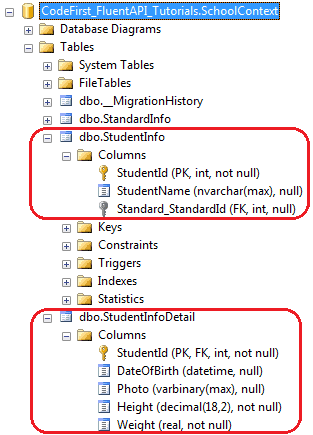
As you can see in the above example, we mapped some properties of Student entity to StudentInfo table and other properties to StudentInfoDetail table using Map() method. Thus, Student entity will split into two tables, as shown below.
Map method need the delegate method as a parameter. You can pass Action delegate or lambda expression in Map method, as shown below.
using System.Data.Entity.ModelConfiguration.Configuration;

namespace CodeFirst_FluentAPI_Tutorials

{

    public class SchoolContext: DbContext

    {

        public SchoolDBContext(): base()

        {

        }

        public DbSet<Student> Students { get; set; }

        public DbSet<Standard> Standards { get; set; }

        protected override void OnModelCreating(DbModelBuilder modelBuilder)

        {

            modelBuilder.Entity<Student>().Map(delegate(EntityMappingConfiguration<Student> studentConfig)

            {

                studentConfig.Properties(p => new { p.StudentId, p.StudentName });

                studentConfig.ToTable("StudentInfo");

            });

            Action<EntityMappingConfiguration<Student>> studentMapping = m =>

            {

                m.Properties(p => new { p.StudentId, p.Height, p.Weight, p.Photo, p.DateOfBirth });

                m.ToTable("StudentInfoDetail");

            };

            modelBuilder.Entity<Student>().Map(studentMapping);

            modelBuilder.Entity<Standard>().ToTable("StandardInfo");

        }

    }

}
Entity Framework Code-First(10.2):Entity Mappings的更多相关文章
- Entity Framework Code-First(10.3):Property Mappings
Property Mappings using Fluent API: Here, we will learn how to configure properties of an entity cla ...
- Entity Framework Code first(转载)
一.Entity Framework Code first(代码优先)使用过程 1.1Entity Framework 代码优先简介 不得不提Entity Framework Code First这个 ...
- ASP.NET MVC深入浅出系列(持续更新) ORM系列之Entity FrameWork详解(持续更新) 第十六节:语法总结(3)(C#6.0和C#7.0新语法) 第三节:深度剖析各类数据结构(Array、List、Queue、Stack)及线程安全问题和yeild关键字 各种通讯连接方式 设计模式篇 第十二节: 总结Quartz.Net几种部署模式(IIS、Exe、服务部署【借
ASP.NET MVC深入浅出系列(持续更新) 一. ASP.NET体系 从事.Net开发以来,最先接触的Web开发框架是Asp.Net WebForm,该框架高度封装,为了隐藏Http的无状态模 ...
- Entity Framework Code First (三)Data Annotations
Entity Framework Code First 利用一种被称为约定(Conventions)优于配置(Configuration)的编程模式允许你使用自己的 domain classes 来表 ...
- Entity Framework Code First (二)Custom Conventions
---------------------------------------------------------------------------------------------------- ...
- Entity Framework Code First (一)Conventions
Entity Framework 简言之就是一个ORM(Object-Relational Mapper)框架. Code First 使得你能够通过C#的类来描述一个模型,模型如何被发现/检测就是通 ...
- Entity Framework Code First (七)空间数据类型 Spatial Data Types
声明:本文针对 EF5+, Visual Studio 2012+ 空间数据类型(Spatial Data Types)是在 EF5 中引入的,空间数据类型表现有两种: Geography (地理学上 ...
- Entity Framework Code First (四)Fluent API - 配置属性/类型
上篇博文说过当我们定义的类不能遵循约定(Conventions)的时候,Code First 提供了两种方式来配置你的类:DataAnnotations 和 Fluent API, 本文将关注 Flu ...
- Entity Framework Code First (八)迁移 Migrations
创建初始模型和数据库 在开始使用迁移(Migrations)之前,我们需要一个 Project 和一个 Code First Model, 对于本文将使用典型的 Blog 和 Post 模型 创建一个 ...
随机推荐
- 【leetcode刷题笔记】Letter Combinations of a Phone Number
Given a digit string, return all possible letter combinations that the number could represent. A map ...
- [GUI] QT事件与X11的关系
做了一段时间linux下与QT事件相关的工作,经常会遇到X11,总是苦于无法完全理解其与linux以及QT事件之间的关系,所以用两篇文章来简单总结下linux中的图形管理和QT事件与X11的关系. & ...
- 监控MySQL的脚本
#!/bin/bash res=`netstat -lntup | grep | awk -F '[ :]+' '{print $5}'` " ];then echo "Mysql ...
- 常用CSS设置
主要内容: 一.容器类 二.文本类 三.特效类 一.容器类 1.background-image:url('img/02.gif'); 设置背景图(可以是动态图) 2.background-col ...
- RabbitMQ高级应用
高级应用一: 手动模式和自动应答模式 1. 了确保消息不会丢失,RabbitMQ支持消息应答.消费者发送一个消息应答,告诉RabbitMQ这个消息已经接收并且处理完毕了.RabbitMQ就可以删除它了 ...
- Storm bolt重复消费问题解决
最近碰到一个storm的坑, 两个bolt都需要从kafkaSpout中获取数据进行各自的业务处理, bolt1的处理是幂等的, bolt2的处理是非幂等的, 上线后发现非幂等的bolt处理总是会处理 ...
- Linux - xshell上传文件报错乱码
xshell上传文件报错乱码,解决方法 rz -be 回车 下载sz filename
- JAVA NIO之浅谈内存映射文件原理与DirectMemory
JAVA类库中的NIO包相对于IO 包来说有一个新功能是内存映射文件,日常编程中并不是经常用到,但是在处理大文件时是比较理想的提高效率的手段.本文我主要想结合操作系统中(OS)相关方面的知识介绍一下原 ...
- 分享知识-快乐自己:运行(wordcount)案例
运行 wordcount 案例: 一):大数据(hadoop)初始化环境搭建 二):大数据(hadoop)环境搭建 三):运行wordcount案例 四):揭秘HDFS 五):揭秘MapReduce ...
- flex 和bison的安装和使用
1.在ubutu上安装 yacc的命令: sudo apt-get install flex bison flex:词法分析器 flex是一个词法分析器.用来将一个.l文件生成一个.c程序文件.即生成 ...