
终于成功仿了一次Kalman滤波器
终于成功仿了一次Kalman滤波器
 % KALMANF - updates a system state vector estimate based upon an% observation, using a discrete Kalman filter.%% Version 1.0, June 30, 2004%% This tutorial function was written by Michael C. Kleder% (Comments are appreciated at: public@kleder.com)%% INTRODUCTION%% Many people have heard of Kalman filtering, but regard the topic% as mysterious. While it's true that deriving the Kalman filter and% proving mathematically that it is "optimal" under a variety of% circumstances can be rather intense, applying the filter to% a basic linear system is actually very easy. This Matlab file is% intended to demonstrate that.%% An excellent paper on Kalman filtering at the introductory level,% without detailing the mathematical underpinnings, is:% "An Introduction to the Kalman Filter"% Greg Welch and Gary Bishop, University of North Carolina% http://www.cs.unc.edu/~welch/kalman/kalmanIntro.html%% PURPOSE:%% The purpose of each iteration of a Kalman filter is to update% the estimate of the state vector of a system (and the covariance% of that vector) based upon the information in a new observation.% The version of the Kalman filter in this function assumes that% observations occur at fixed discrete time intervals. Also, this% function assumes a linear system, meaning that the time evolution% of the state vector can be calculated by means of a state transition% matrix.%% USAGE:%% s = kalmanf(s)%% "s" is a "system" struct containing various fields used as input% and output. The state estimate "x" and its covariance "P" are% updated by the function. The other fields describe the mechanics% of the system and are left unchanged. A calling routine may change% these other fields as needed if state dynamics are time-dependent;% otherwise, they should be left alone after initial values are set.% The exceptions are the observation vectro "z" and the input control% (or forcing function) "u." If there is an input function, then% "u" should be set to some nonzero value by the calling routine.%% SYSTEM DYNAMICS:%% The system evolves according to the following difference equations,% where quantities are further defined below:%% x = Ax + Bu + w meaning the state vector x evolves during one time% step by premultiplying by the "state transition% matrix" A. There is optionally (if nonzero) an input% vector u which affects the state linearly, and this% linear effect on the state is represented by% premultiplying by the "input matrix" B. There is also% gaussian process noise w.% z = Hx + v meaning the observation vector z is a linear function% of the state vector, and this linear relationship is% represented by premultiplication by "observation% matrix" H. There is also gaussian measurement% noise v.% where w ~ N(0,Q) meaning w is gaussian noise with covariance Q% v ~ N(0,R) meaning v is gaussian noise with covariance R%% VECTOR VARIABLES:%% s.x = state vector estimate. In the input struct, this is the% "a priori" state estimate (prior to the addition of the% information from the new observation). In the output struct,% this is the "a posteriori" state estimate (after the new% measurement information is included).% s.z = observation vector% s.u = input control vector, optional (defaults to zero).%% MATRIX VARIABLES:%% s.A = state transition matrix (defaults to identity).% s.P = covariance of the state vector estimate. In the input struct,% this is "a priori," and in the output it is "a posteriori."% (required unless autoinitializing as described below).% s.B = input matrix, optional (defaults to zero).% s.Q = process noise covariance (defaults to zero).% s.R = measurement noise covariance (required).% s.H = observation matrix (defaults to identity).%% NORMAL OPERATION:%% (1) define all state definition fields: A,B,H,Q,R% (2) define intial state estimate: x,P% (3) obtain observation and control vectors: z,u% (4) call the filter to obtain updated state estimate: x,P% (5) return to step (3) and repeat%% INITIALIZATION:%% If an initial state estimate is unavailable, it can be obtained% from the first observation as follows, provided that there are the% same number of observable variables as state variables. This "auto-% intitialization" is done automatically if s.x is absent or NaN.%%x = inv(H)*z%P = inv(H)*R*inv(H')%% This is mathematically equivalent to setting the initial state estimate% covariance to infinity.%% SCALAR EXAMPLE (Automobile Voltimeter):%% % Define the system as a constant of 12 volts:function Tclear ss.x = 12;s.A = 1;% % Define a process noise (stdev) of 2 volts as the car operates:s.Q = 2^2; % variance, hence stdev^2% Define the voltimeter to measure the voltage itself:s.H = 1;% % Define a measurement error (stdev) of 2 volts:s.R = 2^2; % variance, hence stdev^2%Do not define any system input (control) functions:s.B = 0;s.u = 0;% % Do not specify an initial state:s.x = nan;s.P = nan;% % Generate random voltages and watch the filter operate.tru=[]; % truth voltagefor t=1:20 tru(end+1) = randn*2+12; s(end).z = tru(end) + randn*2; % create a measurement s(end+1)=kalmanf(s(end)); % perform a Kalman filter iteration % end % figure % hold on % grid on % % plot measurement data: hz=plot([s(1:end-1).z],'r');hold on % % plot a-posteriori state estimates: hk=plot([s(2:end).x],'b-');hold on ht=plot(tru,'g-');hold on legend('observations','Kalman output','true voltage',0) title('Automobile Voltimeter Example') % hold offend function s = kalmanf(s)% set defaults for absent fields:if ~isfield(s,'x'); s.x=nan*z; endif ~isfield(s,'P'); s.P=nan; endif ~isfield(s,'z'); error('Observation vector missing'); endif ~isfield(s,'u'); s.u=0; endif ~isfield(s,'A'); s.A=eye(length(x)); endif ~isfield(s,'B'); s.B=0; endif ~isfield(s,'Q'); s.Q=zeros(length(x)); endif ~isfield(s,'R'); error('Observation covariance missing'); endif ~isfield(s,'H'); s.H=eye(length(x)); endif isnan(s.x) % initialize state estimate from first observation if diff(size(s.H)) error('Observation matrix must be square and invertible for state autointialization.'); end s.x = inv(s.H)*s.z; s.P = inv(s.H)*s.R*inv(s.H'); else % This is the code which implements the discrete Kalman filter: % Prediction for state vector and covariance: s.x = s.A*s.x + s.B*s.u; s.P = s.A * s.P * s.A' + s.Q; % Compute Kalman gain factor: K = s.P*s.H'*inv(s.H*s.P*s.H'+s.R); % Correction based on observation: s.x = s.x + K*(s.z-s.H*s.x); s.P = s.P - K*s.H*s.P; % Note that the desired result, which is an improved estimate % of the sytem state vector x and its covariance P, was obtained % in only five lines of code, once the system was defined. (That's % how simple the discrete Kalman filter is to use.) Later, % we'll discuss how to deal with nonlinear systems. end
后来不过瘾,自己写了一个,没想到稍微改了一改竟然成功了,效果还不错
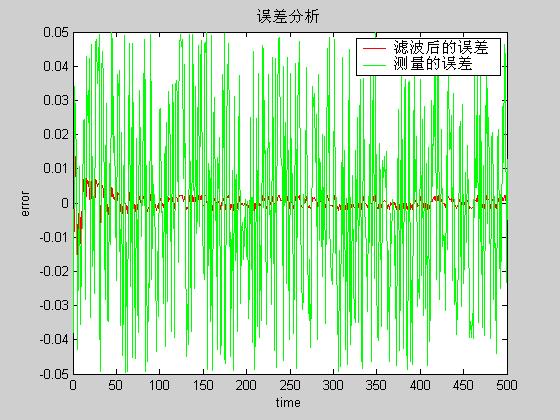
% 状态% xk=A•xk-1+B•uk+wk% zk=H•xk+vk,% p(w) ~ N(0,Q)% p(v) ~ N(0,R),% 预测% x'k=A•xk+B•uk% P'k=A•P(k-1)*AT + Q% 修正% Kk=P'k•HT•(H•P'k•HT+R)-1% xk=x'k+Kk•(zk-H•x'k)% Pk=(I-Kk•H)•P'k%要注意的是:必须把系统状态和kalman滤波器内部预测的状态分开function TestA=[1 0.1;0 1];B=0;Xp=rand(2,1)*0.1; X=[0 0]';H=[1 0];Q=eye(2)*1e-5;R=eye(1)*0.1; P=eye(2);% P'(k)angle=[];angle_m=[];angle_real=[];for i=1:500 angle_real=[angle_real X(1)]; %实际角度 [Xp,P]=Predict(A,Xp,P,Q); X=A*X+rand(2,1)*1e-5; z_m=H*X+rand(1,1)*0.1-0.05; angle_m=[angle_m z_m(1)]; %测量的角度 [Xp,P]=Correct(P,H,R,X,z_m); angle=[angle Xp(1)]; %预测的角度 endt=1:500;plot(t,angle,'r',t,angle_m,'g',t,angle_real,'b')legend('预测值','测量值','实际值')figureplot(t,angle-angle_real,'r',t,angle_m-angle_real,'g')legend('滤波后的误差','测量的误差')title('误差分析')xlabel('time');ylabel('error');function [Xk,Pk]=Predict(A,Xk,Pk_1,Q)Xk=A*Xk;Pk=A*Pk_1*A'+Q;function [Xk,Pk]=Correct(Pk,H,R,Xk,zk)Kk=Pk * H' * inv(H * Pk * H' + R);Xk=Xk+ Kk*(zk-H*Xk);Pk=(eye(size(Pk,1)) - Kk*H)*Pk;这是状态图

这是误差分析
终于成功仿了一次Kalman滤波器的更多相关文章
- Kalman滤波器从原理到实现
Kalman滤波器的历史渊源 We are like dwarfs on the shoulders of giants, by whose grace we see farther than the ...
- Kalman滤波器原理和实现
Kalman滤波器原理和实现 kalman filter Kalman滤波器的直观理解[1] 假设我们要测量一个房间下一刻钟的温度.据经验判断,房间内的温度不可能短时大幅度变化,也就是说可以依经验认为 ...
- Redhat 5.7 安装 glibc debuginfo ,终于成功。
1) yum --enablerepo rhel-debuginfo install glibc-debuginfo 安装完之后,yum list 可以看出debuginfo 是 build 123, ...
- jvisualvm连接远程应用终于成功,附踩大坑记录!!(二:jmx方式)
一.问题概述 参考前一篇: jvisualvm连接远程应用终于成功,附踩大坑记录!!(一:jstatd方式) 这篇主要讲讲jmx方式. 二.启动前设置jmx参数 我这边拿tomcat举例,其余java ...
- jvisualvm连接远程应用终于成功,附踩大坑记录!!(一:jstatd方式)
一.问题概述 连接远程java应用除了jstatd方式,还有jmx方式.不必拘泥于一种,一种不行可以果断尝试另一种,兴许就行了. 姊妹篇在这: jvisualvm连接远程应用终于成功,附踩大坑记录!! ...
- 运动目标跟踪中kalman滤波器的使用
目标跟踪的kalman滤波器介绍 Kalman滤波器是通过前一状态预测当前状态,并使用当前观测状态进行校正,从而保证输出状态平稳变化,可有效抵抗观测误差.因此在运动目标跟踪中也被广泛使用.在视频处理的 ...
- 【计算机视觉】基于Kalman滤波器的进行物体的跟踪
预估器 我们希望能够最大限度地使用測量结果来预计移动物体的运动. 所以,多个測量的累积能够让我们检測出不受噪声影响的部分观測轨迹. 一个关键的附加要素即此移动物体运动的模型. 有了这个模型,我们不仅能 ...
- android studio1.3安装终于成功
本人机器是win7 32位旗舰版,4G内存.以前使用eclipse adt bundle开发Android程序感觉非常方便,但随着google对andriod studio支持力度加大,转向studi ...
- 折腾了好久的macos+apache+php+phpmyadmin 终于成功了!
由于最近需要布置mantis用来进行bug追踪,在此记录其过程. 由于PHP apache环境在Mac OS上是自带的,所以不需要另处下安装包,只需要简单配置一下即可. 首先打开终端输入命令: sud ...
随机推荐
- draw call 的优化
用一张贴图,renderstate都设置成一致,多个draw合并成一个
- nodeJs 初探 ~
今天晚上,开始时间了一下nodejs,跟着 Node入门 一步步的往下走.对node开发也有了初步的了解. 期间没有碰到什么问题,只有在最后的时候,碰到了几个问题.在这里记录一下: 1 . cross ...
- int型整数的数值范围
假设int型用两个字节表示对于有符号的整数,用补码表示的话,最高位是符号位,后面15位用来表示数据.1.正数,表示的范围为0000 0000 0000 0001-0111 1111 1111 1111 ...
- Unity动态加载和内存管理(三合一)
原址:http://game.ceeger.com/forum/read.php?tid=4394#info 最近一直在和这些内容纠缠,把心得和大家共享一下: Unity里有两种动态加载机制:一是Re ...
- 教你如何利用xml格式的sitemap文件做好SEO
教你如何利用xml格式的sitemap文件做好SEO 浏览: | 更新:-- : 一般的网站中都有网站地图文件,它有HTML格式与XML格式,网站地图可以帮助搜索引擎抓取.帮助用户找到自己所需要的内容 ...
- VS2012 win7 修改TFS登陆账号
1.修改登陆账号: 在网上搜了好多,都没有找到解决方法,自己琢磨了一会找到了修改登陆TFS(Team Foundation Server)(团队资源管理器)的账号,和大家分享一下吧. 点击“开始”-- ...
- IDEA开发spark本地运行
1.建立spakTesk项目,建立scala对象Test 2.Tesk对象的代码如下 package sparkTest /** * Created by jiahong on 15-8-2. */ ...
- appserv安装
Appserv 官网: http://www.appservnetwork.com/ 安装好后,输入http://localhost:8082/验证是否装成功,成功后如下图
- http://blog.sina.com.cn/s/blog_5b9b4abe01017638.html
http://blog.sina.com.cn/s/blog_5b9b4abe01017638.html
- C#程序大打开
打开一个已经存在的工程: 1.用vs打开(.sln)解决方案的文件.(若提示VS提示版本不一致,可用方法二) 2.删除(.sln)的文件.打开项目(.csproj) 文件或 (.vbproj) 文件, ...