
unity5, custom PBS shader
unity5中引入了基于物理着色(PBS)的Standard shader。由于这种着色器通过调节参数和贴图可逼真模拟各种硬质表面,所以不必再像unity4时代那样需要对各种质感材质单独编写着色器,而且能得到更好的效果(参考:http://docs.unity3d.com/Manual/shader-StandardShader.html)。这种“万能着色器”仿佛给人一种不再需要自己编写着色器的假象,但做游戏跟做虚拟现实不一样,除了真实性,还要追求趣味性和艺术夸张。所以老古语不过时:没有使用自定义着色器的游戏,不是好游戏。
但自己实现PBS是很困难的,如果我们想既继承Standard shader的PBS特性又加入自己的定制效果,最好我们的自定义shader能在Standard shader的基础上进行编写,即实现自定义PBS着色器(custom PBS shader)。
由于是新东西,资料不全,google了一整天也没能找到现成方法,unity官方文档中对此完全没有作说明(在surface shader自定义光照模型 部分只给了不带PBS的例子),unity论坛里有多个帖子问到类似问题,但都没有满意解答。最后在下面两个连接里找到了一点儿线索:
http://forum.unity3d.com/threads/for-those-in-u5-beta-is-pbr-really-that-good.283867/page-3#post-1886525
http://blogs.unity3d.com/2014/10/29/physically-based-shading-in-unity-5-a-primer/ (文章下面 MIG 的提问)
此线索是:“
from the release notes for beta 12:
- Shaders: Surface shaders can use physically based shading now; the same as Standard shader uses.
- Use "Standard" lighting function, and "SurfaceOutputStandard" output structure.
- Do an #include "UnityPBSLighting.cginc" in your shader to get it.
- Default options require shader model 3.0, so add a "#pragma target 3.0" too.
”
然后又结合了UnityPBSLighting.cginc中的源代码(注1),当然,只是从UnityPBSLighting.cginc中拷贝一些代码出来(而不是修改它),最后终于把custom PBS shader试验成功了。
注1:UnityPBSLighting.cginc这个文件在哪儿?有三个途径获得:
(1),在 http://docs.unity3d.com/Manual/SL-SurfaceShaderLighting.html 中写道:“file inside Unity ({unity install path}/Data/CGIncludes/ on Windows, /Applications/Unity/Unity.app/Contents/CGIncludes/ on Mac)”,需要注意的是"/Applications/Unity/Unity.app/Contents/CGIncludes/"这个路径是在Unity.app的“包内容”里,所以这就是为什么在Mac上虽然UnityPBSLighting.cginc已经随unity一起安装了,但确不能通过文件搜素找到。
(2),通过网址http://docs.unity3d.com/Manual/StandardShaderMakeYourOwn.html进入在线的"Make your own"页面下载builtin_shaders的最新版本(也包括历史版本)。因为我的unity是最新的,所以通过此途径下载到的最新版的builtin_shaders与途径(1)中的是一致的,但如果你的unity不是最新的,一定要根据你的unity版本号下载相应版本的builtin_shaders,否则你拷贝其中的代码用到自定义shader中可能报错。
(3),在浏览器地址栏输入file:///Applications/Unity/Unity.app/Contents/Documentation/en/Manual/StandardShaderMakeYourOwn.html进入离线的"Make your own"页面(从地址上你可以看出这个页面实际上保存在你的电脑中),下载builtin_shaders,但要注意,通过这个离线文档下载的builtin_shaders可能不是最新的,我今天就被此坑了一回,通过此途径下载的UnityPBSLighting.cginc文件中的代码拷贝到自定义shader中报错,搞了半天没找到原因,直到我又通过途径(1)重新获得UnityPBSLighting.cginc。。。
综上,途径(1)是最好的。
下图第一个球用的是Standard shader,第二个球用的是“将法线当作颜色值”的自定义shader(不带PBS),第三个球是今天的试验成果:在Standard shader的PBS基础上添加了“将法线当作颜色值”效果的杂交shader。
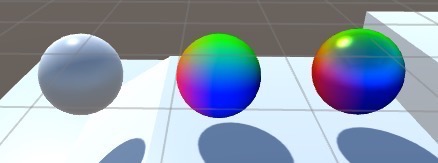
第一个球的shader用的是unity(version 5.0.1f1 Personal)里新建shader时生成的默认shader:
Shader "Custom/NewShader" {
Properties {
_Color ("Color", Color) = (1,1,1,1)
_MainTex ("Albedo (RGB)", 2D) = "white" {}
_Glossiness ("Smoothness", Range(0,1)) = 0.5
_Metallic ("Metallic", Range(0,1)) = 0.0
}
SubShader {
Tags { "RenderType"="Opaque" }
LOD 200
CGPROGRAM
// Physically based Standard lighting model, and enable shadows on all light types
#pragma surface surf Standard fullforwardshadows
// Use shader model 3.0 target, to get nicer looking lighting
#pragma target 3.0
sampler2D _MainTex;
struct Input {
float2 uv_MainTex;
};
half _Glossiness;
half _Metallic;
fixed4 _Color;
void surf (Input IN, inout SurfaceOutputStandard o) {
// Albedo comes from a texture tinted by color
fixed4 c = tex2D (_MainTex, IN.uv_MainTex) * _Color;
o.Albedo = c.rgb;
// Metallic and smoothness come from slider variables
o.Metallic = _Metallic;
o.Smoothness = _Glossiness;
o.Alpha = c.a;
}
ENDCG
}
FallBack "Diffuse"
}
在此基础上参照UnityPBSLighting.cginc中的源代码将光照模型以自定义光照模型的形式暴露出来,得到下面等价shader:
(这里需要注意的是,一般自定义光照模型只要实现一个 Lightning+自定义光照模型名称 的函数即可,但是对于PBS shader来说,要实现自定义光照模型还要多写一个 Lightning+自定义光照模型名称_GI 的函数。)
Shader "Custom/customPBS" {
Properties {
_Color ("Color", Color) = (1,1,1,1)
_MainTex ("Albedo (RGB)", 2D) = "white" {}
_Glossiness ("Smoothness", Range(0,1)) = 0.5
_Metallic ("Metallic", Range(0,1)) = 0.0
}
SubShader {
Tags { "RenderType"="Opaque" "MyReplaceTag"="Other"}
LOD 200
CGPROGRAM
// Physically based Standard lighting model, and enable shadows on all light types
#pragma surface surf MyCustomStandard fullforwardshadows
// Use shader model 3.0 target, to get nicer looking lighting
#pragma target 3.0
#include "UnityPBSLighting.cginc"
inline void LightingMyCustomStandard_GI (
SurfaceOutputStandard s,
UnityGIInput data,
inout UnityGI gi)
{
gi = UnityGlobalIllumination (data, s.Occlusion, s.Smoothness, s.Normal);
}
inline half4 LightingMyCustomStandard (SurfaceOutputStandard s, half3 viewDir, UnityGI gi)
{
s.Normal = normalize(s.Normal);
half oneMinusReflectivity;
half3 specColor;
s.Albedo = DiffuseAndSpecularFromMetallic (s.Albedo, s.Metallic, /*out*/ specColor, /*out*/ oneMinusReflectivity);
// shader relies on pre-multiply alpha-blend (_SrcBlend = One, _DstBlend = OneMinusSrcAlpha)
// this is necessary to handle transparency in physically correct way - only diffuse component gets affected by alpha
half outputAlpha;
s.Albedo = PreMultiplyAlpha (s.Albedo, s.Alpha, oneMinusReflectivity, /*out*/ outputAlpha);
half4 c = UNITY_BRDF_PBS (s.Albedo, specColor, oneMinusReflectivity, s.Smoothness, s.Normal, viewDir, gi.light, gi.indirect);
c.rgb += UNITY_BRDF_GI (s.Albedo, specColor, oneMinusReflectivity, s.Smoothness, s.Normal, viewDir, s.Occlusion, gi);
c.a = outputAlpha;
return c;
}
sampler2D _MainTex;
struct Input {
float2 uv_MainTex;
};
half _Glossiness;
half _Metallic;
fixed4 _Color;
void surf (Input IN, inout SurfaceOutputStandard o) {
// Albedo comes from a texture tinted by color
fixed4 c = tex2D (_MainTex, IN.uv_MainTex) * _Color;
o.Albedo = c.rgb;
// Metallic and smoothness come from slider variables
o.Metallic = _Metallic;
o.Smoothness = _Glossiness;
o.Alpha = c.a;
}
ENDCG
}
FallBack "Diffuse"
}
上面shader和默认shader效果完全一样,但是由于暴露出来光照模型(即上面的LightingMyCustomStandard函数),便使得我们可以在光照模型层次上对其进行修改,实现出自己的变种shader效果。
例如下面shader,就是在LightingMyCustomStandard中插入一行代码,实现前面图中第三个球的效果:
Shader "Custom/customPBSAndShowNormalAsColor" {
Properties {
_Color ("Color", Color) = (1,1,1,1)
_MainTex ("Albedo (RGB)", 2D) = "white" {}
_Glossiness ("Smoothness", Range(0,1)) = 0.5
_Metallic ("Metallic", Range(0,1)) = 0.0
}
SubShader {
Tags { "RenderType"="Opaque" }
LOD 200
CGPROGRAM
// Physically based Standard lighting model, and enable shadows on all light types
#pragma surface surf MyCustomStandard fullforwardshadows
// Use shader model 3.0 target, to get nicer looking lighting
#pragma target 3.0
#include "UnityPBSLighting.cginc"
inline void LightingMyCustomStandard_GI (
SurfaceOutputStandard s,
UnityGIInput data,
inout UnityGI gi)
{
gi = UnityGlobalIllumination (data, s.Occlusion, s.Smoothness, s.Normal);
}
inline half4 LightingMyCustomStandard (SurfaceOutputStandard s, half3 viewDir, UnityGI gi)
{
s.Normal = normalize(s.Normal);
half oneMinusReflectivity;
half3 specColor;
s.Albedo = DiffuseAndSpecularFromMetallic (s.Albedo, s.Metallic, /*out*/ specColor, /*out*/ oneMinusReflectivity);
// shader relies on pre-multiply alpha-blend (_SrcBlend = One, _DstBlend = OneMinusSrcAlpha)
// this is necessary to handle transparency in physically correct way - only diffuse component gets affected by alpha
half outputAlpha;
s.Albedo = PreMultiplyAlpha (s.Albedo, s.Alpha, oneMinusReflectivity, /*out*/ outputAlpha);
half4 c = UNITY_BRDF_PBS (s.Albedo, specColor, oneMinusReflectivity, s.Smoothness, s.Normal, viewDir, gi.light, gi.indirect);
c.rgb += UNITY_BRDF_GI (s.Albedo, specColor, oneMinusReflectivity, s.Smoothness, s.Normal, viewDir, s.Occlusion, gi);
c.a = outputAlpha;
c.rgb*=s.Normal *1.5;//added by wantnon
return c;
}
sampler2D _MainTex;
struct Input {
float2 uv_MainTex;
};
half _Glossiness;
half _Metallic;
fixed4 _Color;
void surf (Input IN, inout SurfaceOutputStandard o) {
// Albedo comes from a texture tinted by color
fixed4 c = tex2D (_MainTex, IN.uv_MainTex) * _Color;
o.Albedo = c.rgb;
// Metallic and smoothness come from slider variables
o.Metallic = _Metallic;
o.Smoothness = _Glossiness;
o.Alpha = c.a;
}
ENDCG
}
FallBack "Diffuse"
}
当然,如果不需要在光照模型的层次上对unity自带的PBS shader进行定制,是没有必要这么麻烦的。
比如就拿上面这个customPBS+ShowNormalAsColor来说,其实没必要深入到光照模型层次上去实现,下面shader就可以实现基本相同的效果:
(其中蓝字是在前面Custom/NewShader基础上新增的语句)
Shader "Custom/NewShaderAndShowNormalAsColor" {
Properties {
_Color ("Color", Color) = (1,1,1,1)
_MainTex ("Albedo (RGB)", 2D) = "white" {}
_Glossiness ("Smoothness", Range(0,1)) = 0.5
_Metallic ("Metallic", Range(0,1)) = 0.0
}
SubShader {
Tags { "RenderType"="Opaque" }
LOD 200
CGPROGRAM
// Physically based Standard lighting model, and enable shadows on all light types
#pragma surface surf Standard fullforwardshadows
// Use shader model 3.0 target, to get nicer looking lighting
#pragma target 3.0
sampler2D _MainTex;
struct Input {
float2 uv_MainTex;
float3 worldNormal;//ref: http://wiki.unity3d.com/index.php?title=Shader_Code
};
half _Glossiness;
half _Metallic;
fixed4 _Color;
void surf (Input IN, inout SurfaceOutputStandard o) {
// Albedo comes from a texture tinted by color
fixed4 c = tex2D (_MainTex, IN.uv_MainTex) * _Color;
c.rgb*=IN.worldNormal;
o.Albedo = c.rgb;
// Metallic and smoothness come from slider variables
o.Metallic = _Metallic;
o.Smoothness = _Glossiness;
o.Alpha = c.a;
}
ENDCG
}
FallBack "Diffuse"
}
unity5, custom PBS shader的更多相关文章
- Unity5 GI与PBS渲染从用法到着色代码
http://www.cnblogs.com/zhouxin/p/5168632.html 本文主要介绍Untiy5以后的GI,PBS,以及光源探头,反射探头的用法以及在着色器代码中如何发挥作用,GI ...
- Physically Based Shader Development for Unity 2017 Develop Custom Lighting Systems (Claudia Doppioslash 著)
http://www.doppioslash.com/ https://github.com/Apress/physically-based-shader-dev-for-unity-2017 Par ...
- Unity5中新的Shader体系简析
一.Unity5中新的Shader体系简析 Unity5和之前的书写模式有了一定的改变.Unity5时代的Shader Reference官方文档也进一步地变得丰满. 主要需要了解到的是,在原来的Un ...
- Unity3D着色器Shader编程入门(一)
自学Unity3D也有大半年了,对Shader一直不敢入坑,最近看了些资料,以及通过自己的实践,对Shader还是有一点了解了,分享下仅作入门参考. 因Shader是对图像图像渲染的,学习前可以去了解 ...
- Fixed Function Shader
Fixed function shader(固定管线着色器) Shader "Custom/Text01" { //shader名称 ...
- 原创跑酷小游戏《Cube Duck Run》 - - 方块鸭快跑
自从unity5出来才开始关注unity,业余时间尝试做了个小游戏: <方块鸭快跑> (Cube Duck Run) 像素风,3d视角,色彩明快,有无尽和关卡两种模式. 应用连接: goo ...
- unity,荧光效果(bloom)实现过程
两个月前,刚接触unity的时候费了半天劲儿做了个荧光效果(见:http://www.cnblogs.com/wantnon/p/4430749.html),今天终于抽空整理了一下,把过程写下来. 荧 ...
- Viking Village维京村落demo中的粒子距离消隐
Custom/DistanceFade shader 粒子雾似乎可以使用.尝试给面片套用该效果,但由于有顶点变形,效果不太好,要做些改动
- WikiBooks/Cg Programming
https://en.wikibooks.org/wiki/Cg_Programming Basics Minimal Shader(about shaders, materials, and gam ...
随机推荐
- java web过滤器实际应用(解决中文乱码 html标签转义功能 敏感字符过滤功能)
转载地址:http://www.cnblogs.com/xdp-gacl/p/3952405.html 在filter中可以得到代表用户请求和响应的request.response对象,因此在编程中可 ...
- Endv 博客简介
Endv 博客简介 此博客收集了 C++.Android.C#.java.php 等优秀的开源项目, 同时也对 Windows.Linux.CentOS 等系列操作系统的开发环境.办公环境的配置写了一 ...
- 运维-JVM监控之内存泄漏
转载:https://blog.csdn.net/zdx_csdn/article/details/71214219 jmap -heap pid查看进程堆内存使用情况,包括使用的GC算法.堆配置参数 ...
- 打通Fedora19的ssh服务
Fedora19的SSH服务是默认关闭的,安装后我们需要打通它. 首先,编辑/etc/ssh/sshd_config,把下面黑体字部分打开注释,如下: # $OpenBSD: sshd_c ...
- jsAnim简单使用教程
引入jsAnim.js 定义动画元素 元素需要有position:relative;或者position:absolute;属性 添加js <!DOCTYPE HTML> <html ...
- Appium Python 三:Desired capabilities
简介 Desired capabilities 是一些键值对的集合.python里面就采用字典的方式. 客户端将这些键值对发给服务端,告诉服务端我们想要怎么测试.比如,我们可以把 platformNa ...
- fiddler自动保存请求报文
先来看一张自动保存的请求片段 重点来了,下面是实现的js代码 操作步骤 Fiddler菜单 >> Rules >> Customize Rules 如果提示没有下载Fidd ...
- jquery插件开发通用框架
2017-07-24 更新:增加单例模式. jquery插件开发框架代码: /* * 插件编写说明: * 1.插件命名:jquery.[插件名].js,如jquery.plugin.js * 2.对象 ...
- 对UserDict的研究
# -*- coding: utf-8 -*- #python 27 #xiaodeng #对UserDict的研究 class UserDict(): def __init__(self, dict ...
- ant入门程序
一. ant简单介绍 Ant是apache的一个核心项目, 它的作用是项目自己主动化构建, 由于它内置了Javac.Java.创建文件夹.拷贝文件等功能, 直接执行build.xml文件就能够编译我们 ...