
systemctl status ssh.service 服务重启出现报错
Case:
ubuntu在从Ubuntu 16.04 LTS 升级到18.04 的时候,执行 do-release-upgrade -d 后,发现ssh无法登陆服务器,
Solution:
1、通过ssh -v root@77.75.154.11,发现如下报错:
OpenSSH_7.2p2 Ubuntu-4ubuntu2.4, OpenSSL 1.0.2g 1 Mar 2016
debug1: Reading configuration data /etc/ssh/ssh_config
debug1: /etc/ssh/ssh_config line 19: Applying options for *
debug1: Connecting to 77.75.154.11 [77.75.154.11] port 22.
debug1: connect to address 77.75.154.11 port 22: Connection refused
ssh: connect to host 77.75.154.11 port 22: Connection refused
2、通过登陆console 去查看ssh.service服务是否有问题。
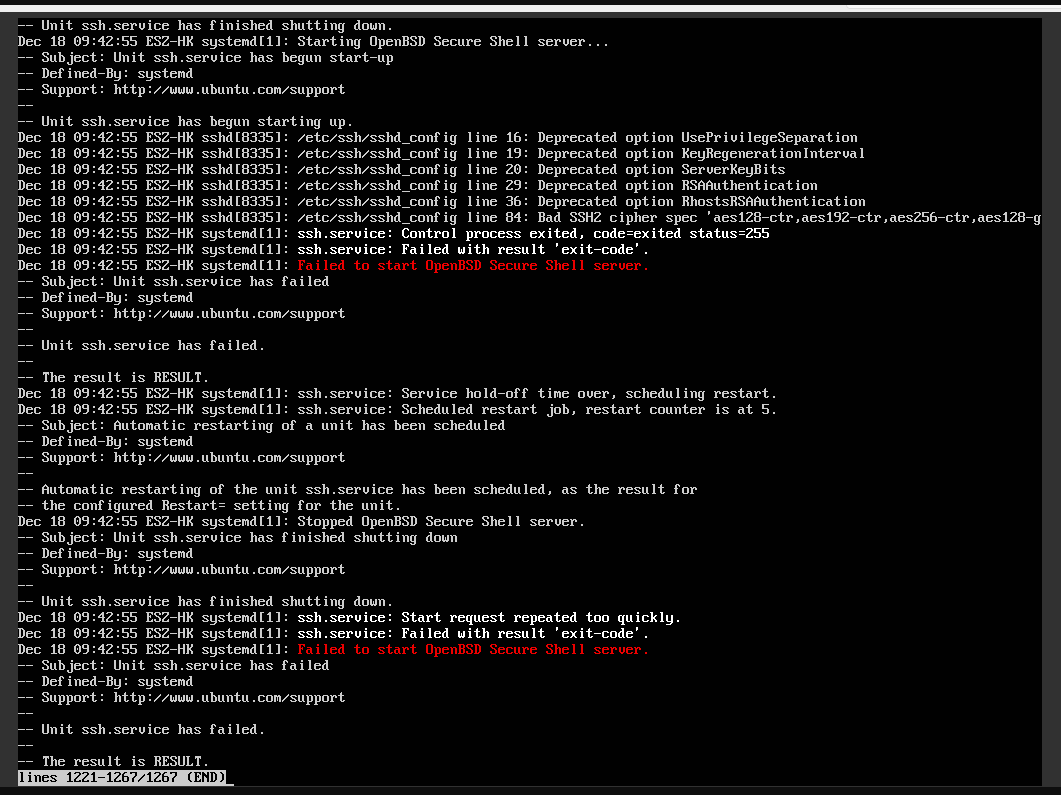
3、查看sshd_config配置文件(/etc/ssh/sshd_config)是否配置错误
A: /usr/sbin/sshd -T

B: /usr/sbin/sshd -ddd
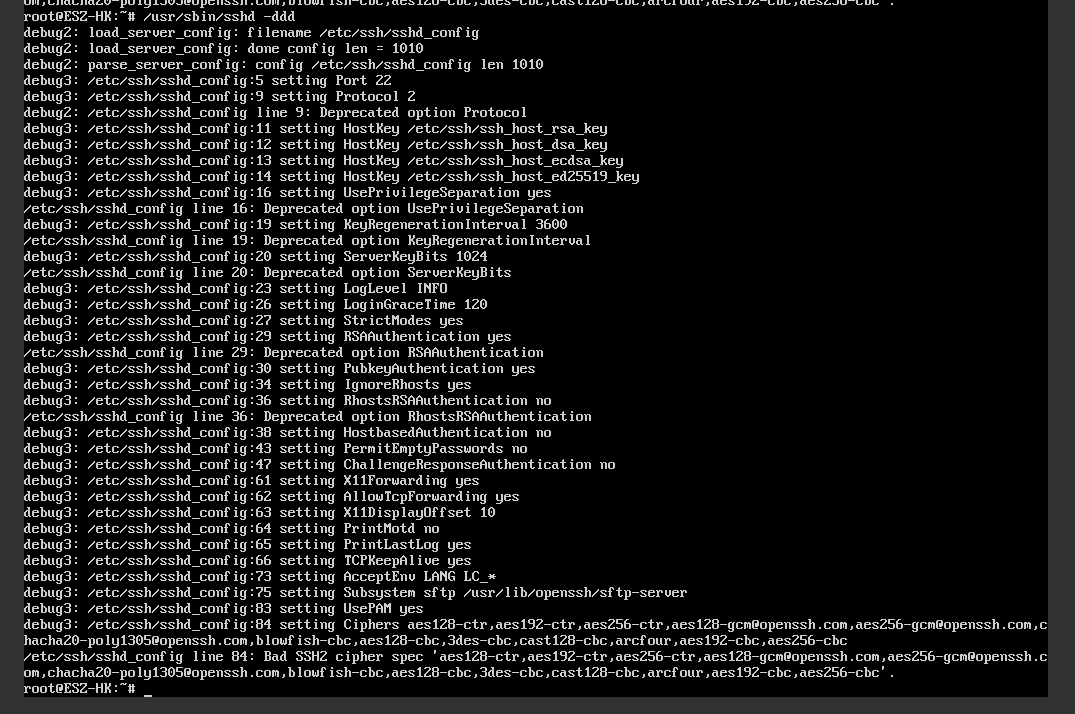
4、可以发现可能是
/etc/ssh/sshd_config 里面Ciphers配置文件有问题,故需要检查相关的Ciphers是否支持并正确被配置。通过以下命令检查:
使用 "sshd -t -o Ciphers=..." 命令一个个测试来找到有问题的cipher。
或者可以尝试下面这段代码(将您文件的84行中的所有cipher复制到echo命令中)进行批量测试:
for c in $(echo 'aes128-ctr,aes192-ctr,...' | sed -e "s/,/ /g");

  sshd -t -o Ciphers=$c

done
5、发现确实有不支持的Ciphers配置,把 blowfish-cbc开始的ciphers 直接都删除,保留如下:

直接删除,然后重启 systemctl status ssh.service
ssh.service服务正常启动。
至此以上ssh登陆问题解决!
systemctl status ssh.service 服务重启出现报错的更多相关文章
- Job for ssh.service failed because the control process exited with error code. See "systemctl status ssh.service" and "journalctl -xe" for details.
1.按照提示 systemctl status ssh.service 查看报错原因 sshd -t 2.结果 /etc/ssh/sshd_config line 34: missing argume ...
- docker 报错: Job for docker.service failed because the control process exited with error code. See "systemctl status docker.service" and "journalctl -xe" for details.
centos 启动docker服务报错: Job for docker.service failed because the control process exited with error cod ...
- nginx启动报错:Job for nginx.service failed. See 'systemctl status nginx.service' and 'journalctl -xn' fo
一.背景 这个错误在重启nginx或者启动nginx的时候,经常会出现.我之前也一直认为出现这个错误是因为有程序占用了nginx的进程.但是知其然不知其所以然.每次报错都有点懵逼,所以这边一步步排查错 ...
- 启动Nginx服务失败:Job for nginx.service failed because the control process exited with error code. See "systemctl status nginx.service" and "journalctl -xe" for details.
首次接触nginx,安装完使用命令 service nignx restart 后,出现这个错误,并按照提示给出的命令查看错误详情 systemctl status nginx.service ...
- kali linux重启网卡失败:Job for networking.service failed because the control process exited with error code. See "systemctl status networking.service" and "journalctl -xe" for details. 问题排查
linux菜鸡的时候,总是为了配置网络而烦恼,重启网卡的原因有很多,我这次是因为配置了固定IP[使用第三方工具连接]所以需要重启网卡,出现 Job for networking.service fai ...
- 配置svn,httpd启动报错 Job for httpd.service failed because the control process exited with error code. See "systemctl status httpd.service" and "journalctl -xe" for details.
查看httpd的状态,发现80端口被占用,因为我的nginx的80端口. systemctl status httpd.service 解决: 把Apache的端口该成别的端口 vi /etc/ht ...
- Linux 重启网卡失败 Job for network.service failed because the control process exited with error code. See "systemctl status network.service" and "journalctl -xe" for details.
linux下重启网卡使用命令 : service network restart 时报错: [root@slave01 hadoop]# service network restart Startin ...
- docker离线安装 启动报错Job for docker.service failed because the control process exited with error code. See "systemctl status docker.service" and "journalctl -xe" for details.
安装报错的提示:systemctl status docker.service 好吧,原来是缺少库文件.验证一下想法吧,yum -y install libseccomp 成功后,再启动docker发 ...
- Job for apache2.service failed because the control process exited with error code. See "systemctl status apache2.service" and "journalctl -xe" for details.
环境:Ubuntu 16.04.1 + Django 1.11.15 + Apache 2.4.18 + python 3.5 此篇文章内容提到的第几步,对照以下链接中的步骤 百度云的ubuntu1 ...
随机推荐
- 关于前端惰性加载(jquery_lazyload)的使用和原理分析
1.前言 有时我们会有这样的需求,当网页有很多张图片的时候,我们不希望一次性就把图片加载完,而是希望当浏览器滑动到指定位置的时候再加载,这样可以节省带宽,它也能帮助减轻服务器负载.那么这种需求就需要利 ...
- 1192. [HNOI2006]鬼谷子的钱袋【进制】
Description 鬼谷子非常聪明,正因为这样,他非常繁忙,经常有各诸侯车的特派员前来向他咨询时政.有一天,他在咸阳游历的时候,朋友告诉他在咸阳最大的拍卖行(聚宝商行)将要举行一场拍卖会,其中有一 ...
- 20145203盖泽双 《Java程序设计》第8周学习总结
20145203盖泽双 <Java程序设计>第8周学习总结 教材学习内容总结 1.java.util.logging包提供了日志功能相关类与接口,使用日志的起点是logger类,Logge ...
- [转]SVN服务器搭建和使用(一)
Location是指VisualSVN Server的安装目录,Repositorys是指定你的版本库目录.Server Port指定一个端口,Use secure connection勾山表示使用安 ...
- zabbix 主动模式和被动模式配置文件对比
1.主动模式: 在web上看zabbix available 是红色 [root@python ~]# egrep -v '^#|^$' /etc/zabbix/zabbix_agentd.conf ...
- SSL证书更换(具体路径可参考iRedMail.tips文件)及邮件服务器架构
由于Google的chrome不认可赛门铁克的证书,因此要更换新证书 0.8.6版本 0.9.4版本 - /etc/pk ...
- win10安装OpenSSL及简单的使用
学习IdentityServer过程中需要使用OpenSSL,OpenSSL是什么东西?百度百科的解释:在计算机网络上,OpenSSL是一个开放源代码的软件库包,应用程序可以使用这个包来进行安全通信, ...
- SSM整合思路
引自网友: https://zhuanlan.zhihu.com/p/23917781
- JavaWeb基础—dbutils的简单入门
简明入门教程,参考:https://www.cnblogs.com/CQY1183344265/p/5854418.html 进行此章节之前,介绍一个JdbcUtils的再次的简单封装 (例如后面需要 ...
- Open-Xml SDK使用介绍
Office Open XML 简称为 ooxml ,是Microsoft 在 Office 2007 之后推行的标准格式,用在 Excel, Word, PPT 等文件.已确定为国际标准. Open ...