
Mybatis数据连接池的配置---增删改查(以及遇见的问题)
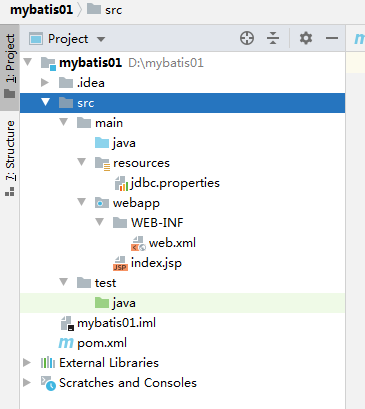
1.首先创建项目和各个文件,如图所示:
2.配置相关数据库连接
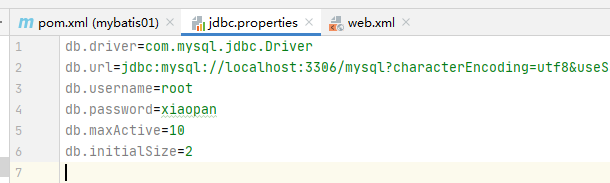
在jdbc.properties中加入
1 db.driver=com.mysql.jdbc.Driver

2 db.url=jdbc:mysql://localhost:3306/mysql?characterEncoding=utf8&useSSL=false&serverTimezone=Asia/Shanghai&rewriteBatchedStatements=true

3 db.username=root

4 db.password=xiaopan

5 db.maxActive=10

6 db.initialSize=2
注意,用户名和密码,还有数据库名换成你自己的。
3.创建MybaticConfig数据库配置类。
package com.config;

import com.alibaba.druid.pool.DruidDataSource;

import org.apache.ibatis.session.SqlSessionFactory;

import org.mybatis.spring.SqlSessionFactoryBean;

import org.mybatis.spring.annotation.MapperScan;

import org.springframework.beans.factory.annotation.Value;

import org.springframework.context.annotation.Bean;

import org.springframework.context.annotation.Configuration;

import org.springframework.context.annotation.PropertySource;

import javax.sql.DataSource;

@MapperScan(basePackages = "com.mapper")//自动查找mapper接口,并且创建接口实例

@Configuration

@PropertySource("classpath:jdbc.properties")

public class MybatisConfig {

@Value("${db.driver}") String driver;

    @Value("${db.url}") String url;

    @Value("${db.username}") String username;

    @Value("${db.password}") String password;

    @Value("${db.maxActive}") int maxActive;

    @Value("${db.initialSize}") int initialSize;

    /*

    数据库连接的配置信息

     */

    @Bean

    public DataSource dataSource(){

        DruidDataSource dataSource = new DruidDataSource();

        dataSource.setDriverClassName(driver);

        dataSource.setUrl(url);

        dataSource.setUsername(username);

        dataSource.setPassword(password);

        dataSource.setMaxActive(maxActive);

        dataSource.setInitialSize(initialSize);

        return dataSource;

    }

    /*

    mybatis的核心功能的工厂,需要将数据连接池datasource注入给它。

     */

    @Bean

    public SqlSessionFactory sqlSessionFactory(DataSource dataSource) throws Exception {

        SqlSessionFactoryBean bean = new SqlSessionFactoryBean();

        bean.setDataSource(dataSource);//注入

        return bean.getObject();

    }

}
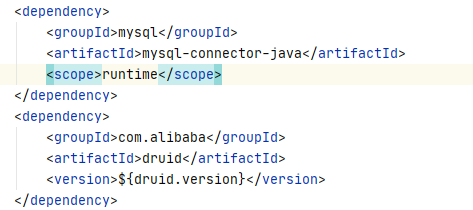
!!!发现此处连接数据库mysql太复杂了,我们直接导入一个Druid依赖,自动导入数据源(配置信息)以及mysql的连接驱动包
然后在配置文件(application.yml)中写入数据
# mysql

spring:

  profiles:

    active: dev  #激活application-dev.yml文件

  datasource:

    type: com.alibaba.druid.pool.DruidDataSource

    driverClassName: com.mysql.jdbc.Driver

  jackson:

    time-zone: GMT+8

    date-format: yyyy-MM-dd HH:mm:ss

  # 模板实时刷新

  thymeleaf:

    cache: false

    prefix:

      classpath: /templates

  servlet:

    multipart:

      location: images/

  resources:

    static-locations: classpath:static/,file:${spring.servlet.multipart.location}
application-dev.yml配置文件
spring:

  datasource:

    driver-class-name: com.mysql.cj.jdbc.Driver

    url: jdbc:mysql://127.0.0.1:3306/animal?serverTimezone=GMT%2B8&useUnicode=true&characterEncoding=utf-8

    username: root

    password: xiaopan

    #连接池的配置信息

    initialSize: 10

    minIdle: 10

    maxActive: 100

    maxWait: 60000

    timeBetweenEvictionRunsMillis: 300000

    minEvictableIdleTimeMillis: 3600000

    validationQuery: SELECT 1 FROM DUAL

    testWhileIdle: true

    testOnBorrow: false

    testOnReturn: false

    poolPreparedStatements: true

    maxPoolPreparedStatementPerConnectionSize: 20
4.进行数据库连接测试
--创建一个测试类TestCase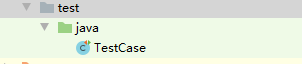
--在测试类中写入以下代码
import com.config.MybatisConfig;

import org.junit.After;

import org.junit.Before;

import org.junit.Test;

import org.springframework.context.annotation.AnnotationConfigApplicationContext;

import javax.sql.DataSource;

import java.sql.Connection;

import java.sql.ResultSet;

import java.sql.Statement;

public class TestCase {

    AnnotationConfigApplicationContext ctx;

    @Before

    public void init(){

        ctx= new AnnotationConfigApplicationContext(MybatisConfig.class);

    }

    @After

    public void destroy(){

        ctx.close();

    }

    @Test

    public void testDataSource(){

        DataSource ds = ctx.getBean("dataSource",DataSource.class);

        String sql = "select 'hello world'";

        try(Connection conn = ds.getConnection()){

            Statement s = conn.createStatement();

            ResultSet rs = s.executeQuery(sql);

            while(rs.next()){

                System.out.println(rs.getString(1));

            }

        }catch (Exception e){

            e.printStackTrace();

        }

    }

}
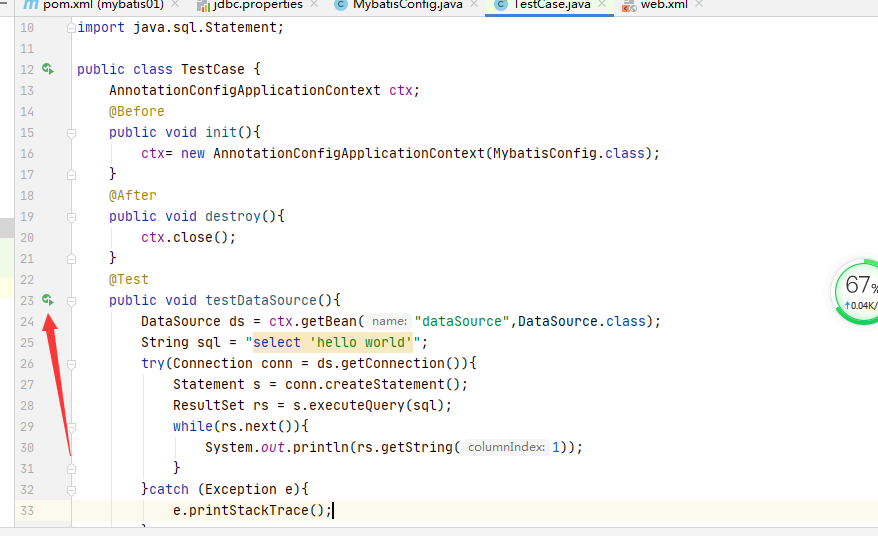
点击测试,出现对应的hello world在控制台中。
5.创建mybatis映射文件
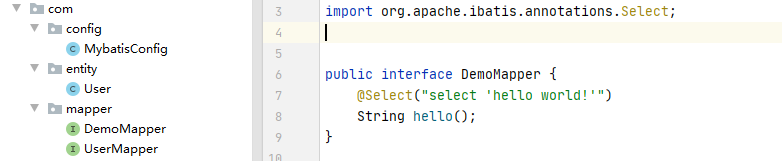
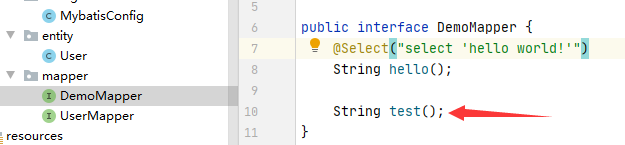
---首先声明数据库访问接口DemoMapper
package com.mapper;

import org.apache.ibatis.annotations.Select;

public interface DemoMapper {

    @Select("select 'hello world!'")

    String hello();

}
6.测试类中测试@select注解,Mybatis能否正确处理sql语句。
  @Test

    public void testHelloWorld() {

        DemoMapper mapper = ctx.getBean("demoMapper", DemoMapper.class);

        String str = mapper.hello();

        System.out.println(str);

    }
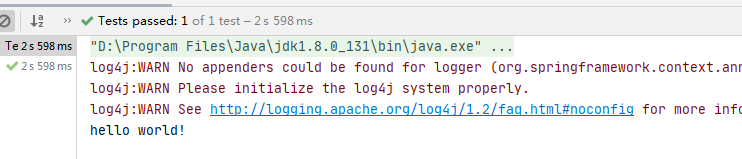
可以看到控制台中正确输出了 Mybatis接口中hello()方法-- hello world!
--------------------------------------------------------------------------------此处Mybatis已经可以正确应用 --------------------------------------------------------------------------------------------------------
现在我们用数据库来操刀
1.创建数据库的信息。
 /*创建数据库和表*/

 create database tedu_ums

use tedu_ums;

CREATE table t_user(

    id int auto_increment comment '用户id',

    username varchar(20) UNIQUE not null COMMENT '用户名',

    pwd varchar(20) not null COMMENT '密码',

    age int COMMENT '年龄',

    phone varchar(20) COMMENT '手机号码',

    email varchar(20) COMMENT '电子邮箱',

    PRIMARY key(id),

    )DEFAULT CHARSET=UTF8;

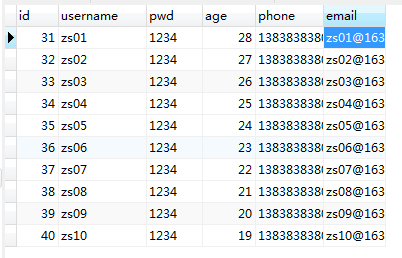
/*向数据库插入数据*/

 insert into t_user(username,pwd,phone,age,email)

        values("zs01",'1234','13838383800',28,'zs01@163.com'),

        ("zs02",'1234','13838383801',27,'zs02@163.com'),

        ("zs03",'1234','13838383802',26,'zs03@163.com'),

        ("zs04",'1234','13838383803',25,'zs04@163.com'),

        ("zs05",'1234','13838383804',24,'zs05@163.com'),

        ("zs06",'1234','13838383805',23,'zs06@163.com'),

        ("zs07",'1234','13838383806',22,'zs07@163.com'),

        ("zs08",'1234','13838383807',21,'zs08@163.com'),

      ("zs09",'1234','13838383808',20,'zs09@163.com'),

        ("zs10",'1234','13838383809',19,'zs10@163.com')
2.创建 entity实体类 去和数据库中的 属性 对应。
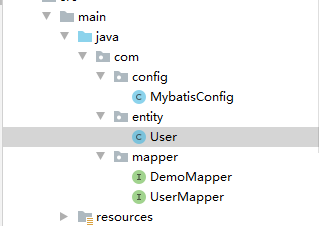
User实体类代码:
package com.entity;

/*

实体类

 */

public class User {

    private Integer id;

    private String username;

    private String pwd;

    private Integer age;

    private String phone;

    private String email;

    @Override

    public String toString() {

        return "User{" +

                "id=" + id +

                ", username='" + username + '\'' +

                ", pwd='" + pwd + '\'' +

                ", age=" + age +

                ", phone='" + phone + '\'' +

                ", email='" + email + '\'' +

                '}';

    }

    public User() {

    }

    public User(Integer id, String username, String pwd, Integer age, String phone, String email) {

        this.id = id;

        this.username = username;

        this.pwd = pwd;

        this.age = age;

        this.phone = phone;

        this.email = email;

    }

    public Integer getId() {

        return id;

    }

    public void setId(Integer id) {

        this.id = id;

    }

    public String getUsername() {

        return username;

    }

    public void setUsername(String username) {

        this.username = username;

    }

    public String getPwd() {

        return pwd;

    }

    public void setPwd(String pwd) {

        this.pwd = pwd;

    }

    public Integer getAge() {

        return age;

    }

    public void setAge(Integer age) {

        this.age = age;

    }

    public String getPhone() {

        return phone;

    }

    public void setPhone(String phone) {

        this.phone = phone;

    }

    public String getEmail() {

        return email;

    }

    public void setEmail(String email) {

        this.email = email;

    }

}
3.创建Mybatis接口层--UserMapper类(!!!此处有注意事项!!!)
package com.mapper;

import com.entity.User;

import org.apache.ibatis.annotations.*;

import java.util.List;

public interface UserMapper {

    /*注意事项一:在Mybatis中使用sql语句的时候,如果参数超过了一个,需要用到@Param(value="phone")注解进行声明参数,

     不然编译生成的class文件是没有对应的这个参数的

     */

    //注意事项二:不建议用*去查询数据库,此处虽然可以select *

    @Select("select id,username,pwd,age,phone,email from t_user where id=#{id}")

    User findUserById(Integer id);

    @Select("select id,username,pwd,age,phone,email from t_user ")

    List<User> findAllUser();

    /*

    增加数据

     */

    @Insert("insert into t_user(id,username,pwd,age,phone,email) "

            +"values(#{id},#{username},#{pwd},#{age},#{phone},#{email})")

//    @Options(useGeneratedKeys = true,keyProperty = "id")//设置id不自增。

    Integer insert(User user);

    /*

    更改方式1

     */

    @Update("update t_user set username=#{username},pwd=#{pwd},age=#{age},"+

            "phone=#{phone},email=#{email} where  id=#{id}")

    int updateUser(User user);

    /*

    更改方式2 (参数超过了一个使用)

     */

    @Update("update t_user set phone=#{phone},email=#{email} where id=#{id}")

    int updateUser1(@Param(value="phone") String phone, @Param(value="email") String email, @Param(value="id") int id);

    /*

    数据库删除(注意事项三:删除语句中的from不能去掉)

     */

    @Delete("delete from t_user where id=#{id}")

    int deleteUser(Integer id);

}
4.测试类的方法
import com.config.MybatisConfig;

import com.entity.User;

import com.mapper.DemoMapper;

import com.mapper.UserMapper;

import org.apache.ibatis.session.SqlSessionFactory;

import org.junit.After;

import org.junit.Before;

import org.junit.Test;

import org.springframework.context.annotation.AnnotationConfigApplicationContext;

import javax.sql.DataSource;

import java.sql.Connection;

import java.sql.ResultSet;

import java.sql.Statement;

import java.util.List;

public class TestCase {

    AnnotationConfigApplicationContext ctx;

    @Before

    public void init() {

        ctx = new AnnotationConfigApplicationContext(MybatisConfig.class);

    }

    @After

    public void destroy() {

        ctx.close();

    }

    @Test

    public void testDataSource() {

        DataSource ds = ctx.getBean("dataSource", DataSource.class);

        String sql = "select 'hello world'";

        try (Connection conn = ds.getConnection()) {

            Statement s = conn.createStatement();

            ResultSet rs = s.executeQuery(sql);

            while (rs.next()) {

                System.out.println(rs.getString(1));

            }

        } catch (Exception e) {

            e.printStackTrace();

        }

    }

    @Test

    public void testSqlSessionFactory() {

        SqlSessionFactory factory = ctx.getBean("sqlSessionFactory", SqlSessionFactory.class);

        System.out.println(factory);

    }

    @Test

    public void testHelloWorld() {

        DemoMapper mapper = ctx.getBean("demoMapper", DemoMapper.class);

        String str = mapper.hello();

        System.out.println(str);

    }

    /*

    数据库查找:根据id查找

     */

    @Test

    public void testFindUserById() {

        UserMapper userMapper = ctx.getBean("userMapper", UserMapper.class);

        User user = userMapper.findUserById(31);

        System.out.println(user);

    }

    /*

    数据库查找:查找全部。

    */

    @Test

    public void testFindAllUser() {

        UserMapper userMapper = ctx.getBean("userMapper", UserMapper.class);

        List<User> user = userMapper.findAllUser();

        System.out.println(user);

    }

    /*

    数据库插入

     */

    @Test

    public void testInsertUser() {

        User user = new User(null, "99", "1", 1, "1", "1");

        UserMapper userMapper = ctx.getBean("userMapper", UserMapper.class);

        int insert = userMapper.insert(user);

        System.out.println(insert);

    }

    /*

    数据库更改方式1

     */

    @Test

    public void testUpdateUser() {

        UserMapper userMapper = ctx.getBean("userMapper", UserMapper.class);

        User user = userMapper.findUserById(31);

        System.out.println("修改前:" + user);

        user.setAge(100);

        int update = userMapper.updateUser(user);

        User user1 = userMapper.findUserById(31);

        System.out.println("修改后:" + user1);

    }

    /*

    数据库更改方式2

     */

    @Test

    public void testUpadateUser1() {

        UserMapper userMapper = ctx.getBean("userMapper", UserMapper.class);

        int update = userMapper.updateUser1("110", "220", 100);

        System.out.println(update);

    }

    /*

    数据库删除

     */

    @Test

    public void testDeleteUser() {

        UserMapper userMapper = ctx.getBean("userMapper", UserMapper.class);

        int delete = userMapper.deleteUser(100);

        System.out.println(delete);

    }

    /**

     * 配置文件xml整合Mybatis----测试

     */

    @Test

    public void testTest() {

        DemoMapper mapper = ctx.getBean("demoMapper", DemoMapper.class);

        String str = mapper.test();

        System.out.println(str);

    }

}
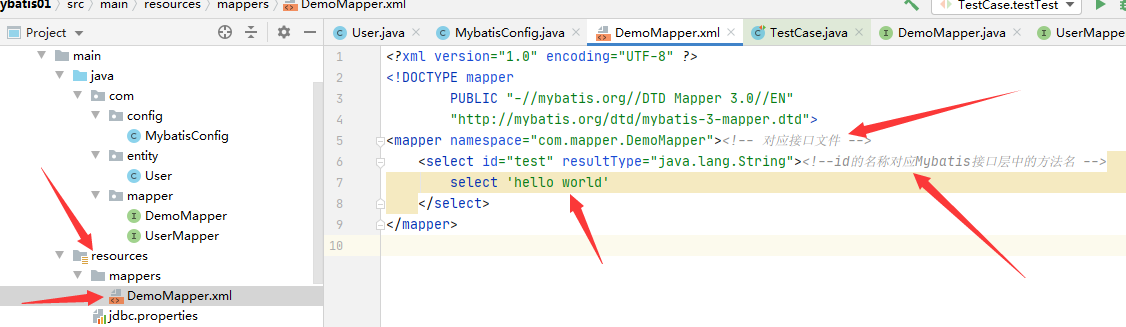
用配置文件的话,要将MybatisConfig配置文件中的——mybatis的核心功能的工厂——部分的代码换成如下:
/*

    mybatis的核心功能的工厂,需要将数据连接池datasource注入给它。

     */

    @Bean

    public SqlSessionFactory sqlSessionFactory(DataSource dataSource,

    @Value("classpath:mappers/*.xml") Resource[] mapperLocations//第二个属性是xml文件配置所需要的

    ) throws Exception {

        SqlSessionFactoryBean bean = new SqlSessionFactoryBean();

        bean.setDataSource(dataSource);//注入

        bean.setMapperLocations(mapperLocations);//xml文件操作数据库所需要的注入

        return bean.getObject();

    }
创建整合Mybatis的——xml配置文件:
总结:做这个的时候,遇到了几个问题
①在接口层写方法的时候,遇到了(注意事项)的问题,往上翻注释查阅。
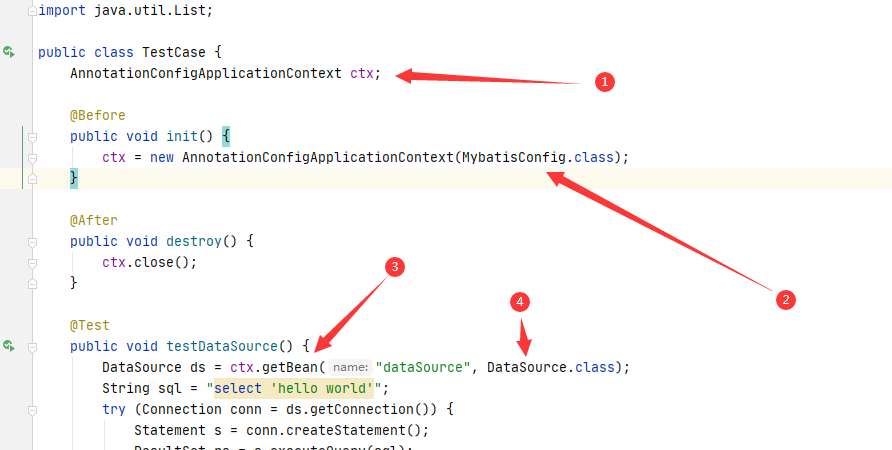
②为什么在MybatisConfig中删去@Configuration这个注解还能有效的装配实例类(就是为什么@Bean还能用)?
个人理解:因为在测试类中,用到了AnnotationConfigApplicationContext这个类方法,
初始化spring的时候装配了MybatisConfig这个类,然后用getBean的方法装配了对应的类对象(例如此处的:DataSource)
mysql的连接驱动包
Mybatis数据连接池的配置---增删改查(以及遇见的问题)的更多相关文章
- MyBatis数据持久化(三)增删改查
上篇文章中我们使用mybatis成功建立数据库会话,并从表中查询出相应的数据,本文在此基础上介绍MyBatis另外几种操作,即插入.修改.删除记录. 1.修改User.xml文件,增加几条sql语句: ...
- Mybatis实现简单的CRUD(增删改查)原理及实例分析
Mybatis实现简单的CRUD(增删改查) 用到的数据库: CREATE DATABASE `mybatis`; USE `mybatis`; DROP TABLE IF EXISTS `user` ...
- MyBatis学习(三)MyBatis基于动态代理方式的增删改查
1.前言 上一期讲到MyBatis-Statement版本的增删改查.可以发现.这种代码写下来冗余的地方特别多.写一套没啥.如果涉及到多表多查询的时候就容易出现问题.故.官方推荐了一种方法.即MyBa ...
- java jdbc 连接mysql数据库 实现增删改查
好久没有写博文了,写个简单的东西热热身,分享给大家. jdbc相信大家都不陌生,只要是个搞java的,最初接触j2ee的时候都是要学习这么个东西的,谁叫程序得和数据库打交道呢!而jdbc就是和数据库打 ...
- Mybatis学习笔记之---CRUD(增删改查)
Mybatis的CRUD(增删改查) 1.pom.xml <dependencies> <dependency> <groupId>junit</groupI ...
- C++ API方式连接mysql数据库实现增删改查
这里复制的 http://www.bitscn.com/pdb/mysql/201407/226252.html 一.环境配置 1,装好mysql,新建一个C++控制台工程(从最简单的弄起,这个会了, ...
- 【C#】使用NHibernate连接MySQL数据库及增删改查
学习资料 http://www.sikiedu.com/course/51/task/891/show https://www.codeproject.com/Articles/26123/NHibe ...
- 02.Mybatis的动态代理方式实现增删改查
动态代理的方式实现增删改查: 通过约定的方式定位sql语句 约定 > 配置文件 > 硬编码 约定的目标是省略掉通过硬编码的方式定位sql的代码,通过接口直接定位出sql语句,以下代码为通过 ...
- 使用nodejs连接mysql数据库实现增删改查
首先要有数据库 使用xampp 或者 phpstudy 可以傻瓜式安装 新建一个项目文件夹 之后在这个目录下初始化package.json (npm init) 先在项目中安装mysql 和 ex ...
随机推荐
- SpringBoot JPA + 分页 + 单元测试SpringBoot JPA条件查询
application.properties 新增数据库链接必须的参数 spring.jpa.properties.hibernate.hbm2ddl.auto=update 表示会自动更新表结构,所 ...
- 修改composer配置(以修改cache-files-maxsize为例)修改composer拉取包出现"Content-Length mismatch"的问题
1.composer config -l -g查看composer配置信息 2.修改配置:composer config --global cache-files-maxsize 1024MiB
- IIS部署.Net5全流程
介绍 Internet Information Services (IIS) 是一种灵活.安全且可管理的 Web 服务器,用于托管 Web 应用(包括 ASP.NET Core).虽然我们的程序可以跨 ...
- linux跨文件复制粘贴
跨文件是这样的: 复制a.txt的第20行至第30行到b.txt中vi a.txt:2010yy:e b.txtp
- [Linux] Linux命令行与Shell脚本编程大全 Part.3
Shell Shell 是管理命令行的程序(包在内核外的壳) 不同Shell版本演化关系如下,一般Linux中会自动安装Sh和Bash(Bash比Sh好写,Zsh最好用) .bashrc:Bash 的 ...
- 利用stat指令查看文件创建时间
-shroot@test-W330-C30:/# stat * 文件:'b' 大小:4096 块:8 IO 块:4096 目录设备:802h/2050d Inode:5636097 硬链接:2权限:( ...
- Linux 核心系统命令目录
S5 Linux信息显示与搜索文件命令 S6 文件备份与压缩命令 S7 Linux用户管理及用户信息查询命令 S8 Linux磁盘与文件系统管理命令 S9 Linux 进程管理命令 S10 Linux ...
- linux动态链接库和静态链接库
Linux下静态链接库与动态链接库的区别 引言 通常情况下,对函数库的链接是放在编译时期(compile time)完成的.所有相关的对象文件 (object file)与牵涉到的函数库(librar ...
- mysql中的实例、数据库关系简介
MySQL是单进程多线程(而Oracle等是多进程),也就是说MySQL实例在系 统上表现就是一个服务进程,即进程(通过多种方法可以创建多实例,再安装一个端口号不同的mysql,或者通过workben ...
- 4.3 Python3进阶-函数嵌套和嵌套调用
>>返回主目录 源码 # 函数嵌套 def func1(): print("这是外部函数") def func2(): print("这是内部函数1" ...