
JDK1.8源码(二)——java.lang.Integer类
一、初识
1、介绍
int 是Java八大基本数据类型之一,占据 4 个字节,范围是 -2^31~2^31 - 1,即 -2147483648~2147483647。而 Integer 是 int 包装类。
Integer 是类,默认值为null;int是基本数据类型,默认值为0。
Integer 表示的是对象,用一个引用指向这个对象,而 int 是基本数据类型,直接存储数值。
二、自动装箱和拆箱
1、案例
先看如下代码执行结果:
 1 int i1 = 59;

 2

 3 Integer i2 = 59;

 4

 5 Integer i3 = new Integer(59);

 6 Integer i4 = new Integer(59);

 7

 8 Integer i5 = Integer.valueOf(59);

 9 Integer i6 = Integer.valueOf("59");

10

11 System.out.println("----" + (i1 == i2)); // true

12 System.out.println("----" + (i1 == i3)); // true

13 System.out.println("----" + (i1 == i4)); // true

14 System.out.println("----" + (i1 == i5)); // true

15 System.out.println("----" + (i1 == i6)); // true

16

17 System.out.println("----" + (i2 == i3)); // false

18 System.out.println("----" + (i2 == i4)); // false

19 System.out.println("----" + (i2 == i5)); // true

20 System.out.println("----" + (i2 == i6)); // true

21

22 System.out.println("----" + (i3 == i4)); // false

23 System.out.println("----" + (i3 == i5)); // false

24 System.out.println("----" + (i3 == i6)); // false

25

26 System.out.println("----" + (i4 == i5)); // false

27 System.out.println("----" + (i4 == i6)); // false

28

29 System.out.println("----" + (i5 == i6)); // true
结论:先记下上述结果,后续会详细解释。
①基本数据类型 int 和其他任何形式创建的 Integer 比较都是true;
②Integer 表示的是对象,它是一个引用,存储的是对象在堆空间的地址。如图:
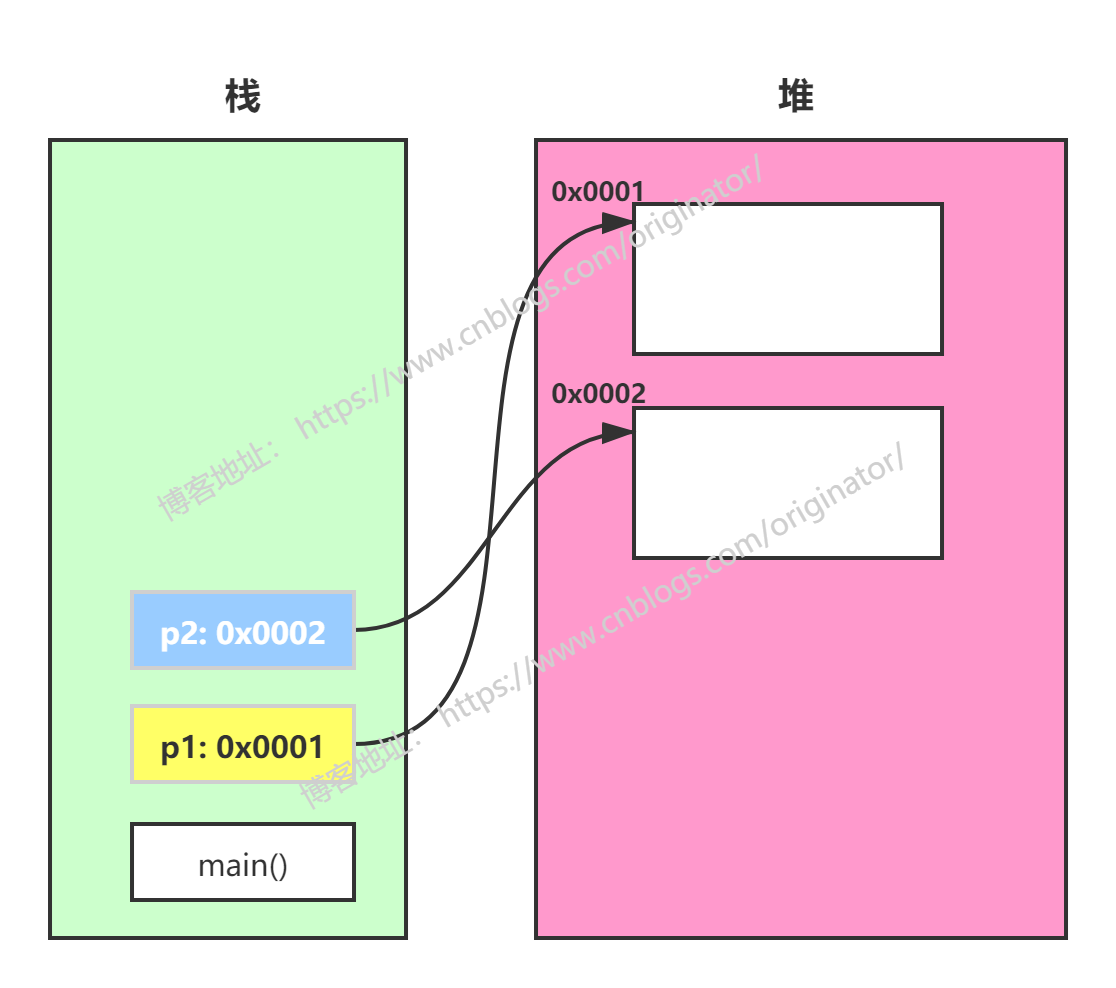
所以:int 的比较结果不难理解(后面还会解释),而对象的比较应该全是 false,因为他们创建了不同的对象,地址自然是不同的。那这里 i2 == i5,i2 == i6,i5 == i6 为什么是true呢?
因为 Integer 的自动拆箱和装箱原理,以及缓存机制。
自动拆箱和装箱是 JDK1.5 以后才有的功能,也是 Java 众多的语法糖之一,它的执行是在编译期,会根据代码的语法,在生成class文件的时候,决定是否进行拆箱和装箱动作。
2、自动拆箱
将 Integer 类表示的数据赋值给基本数据类型int,就执行了自动拆箱。
1 Integer a = new Integer(59);

2 int m = a;
反编译生成的class文件,上述表达式等价于:
1 Integer a = new Integer(59);

2 int m = a.intValue();
所以,在上述代码比较时,与 int 类型的比较都是true,因为包装类Integer会自动拆箱为数值型,数值的比较当然是true。等价于:
1 System.out.println("----" + (i1 == i2.intValue())); // true

2 System.out.println("----" + (i1 == i3.intValue())); // true

3 System.out.println("----" + (i1 == i4.intValue())); // true

4 System.out.println("----" + (i1 == i5.intValue())); // true

5 System.out.println("----" + (i1 == i6.intValue())); // true
3、自动装箱
一般地,创建对象是通过 new 关键字,比如:
1 Object obj = new Object();
对于 Integer 类,可以:
1 Integer a = 59;
反编译生成的class文件,上述表达式等价于:
1 Integer a = Integer.valueOf(59);
它其实等价的创建了一个对象,这种语法帮我们完成了而已。既然是对象,那么存储的就是引用,也就不难理解上述代码那些为 false 的结果。
那为什么 i2 == i5,i2 == i6,i5 == i6 是 true 呢?
4、缓存机制(新特性)
前面我们知道
1 Integer a = 59; 等价于 Integer a = Integer.valueOf(59);
查看一下valueOf()方法的源码,它有三个重载的方法。
源码示例:Integer.valueOf()


1 public static Integer valueOf(String s) throws NumberFormatException {

2     return Integer.valueOf(parseInt(s, 10));

3 }

4

5 public static Integer valueOf(int i) {

6     if (i >= Integer.IntegerCache.low && i <= Integer.IntegerCache.high)

7         return Integer.IntegerCache.cache[i + (-Integer.IntegerCache.low)];

8     return new Integer(i);

9 }
源码示例
很容易看到,这里 -128 <= i <= 127,是直接 return 了 IntegerCache 里的对象,并没有新建对象。
数值在byte(-128~127)范围内,如果该数值已存在,则不会再开辟新的空间,会使用常量池,指向了同一个 Integer 对象。也就不难理解 i2 == i5,i2 == i6,i5 == i6 是 true。如果将上述代码的数值改为128,再执行,除了 int 的比较是true,其他就都是 false 了。读者可自行验证。
结论:
①int 型比较,由于自动拆箱,比较结果都是true;
②Integer 比较,由于自动装箱和缓存。数值在 -128~127 ,为true,否则为false。注意:如果通过 new 关键字新建的对象,是不存在缓存的概念的,不管数值的大小,都是 false。
三、类源码
1、介绍
源码示例:类声明
1  * @author  Lee Boynton

2  * @author  Arthur van Hoff

3  * @author  Josh Bloch

4  * @author  Joseph D. Darcy

5  * @since JDK1.0

6  */

7 public final class Integer extends Number implements Comparable<Integer> {

8 }
Integer 类在JDK1.0的时候就有了,它是一个类,是 int 基本数据类型的封装类,是用 final 声明的常量类,不能被任何类所继承,它继承了 Number 类和实现了 Comparable 接口。
Number 类是一个抽象类,8 中基本数据类型的包装类除了Character 和 Boolean 没有继承该类外,其他的都继承了 Number 类,该类的方法用于各种数据类型的转换。
Comparable 接口就一个 compareTo 方法,用于元素之间的比较。
官方文档:
https://docs.oracle.com/javase/8/docs/api/java/lang/Integer.html
2、类构造器
源码示例:类构造器
 1 public Integer(int value) {

 2     this.value = value;

 3 }

 4

 5 public Integer(String s) throws NumberFormatException {

 6     // 其中s表示我们需要转换的字符串,10表示以十进制输出,默认也是10进制

 7     this.value = parseInt(s, 10);

 8 }

 9

10

11 public static int parseInt(String s, int radix)

12             throws NumberFormatException

13 {

14

15     // 如果转换的字符串为null,直接抛出数字格式异常

16     if (s == null) {

17         throw new NumberFormatException("null");

18     }

19

20     // 如果转换的radix(默认是10)<2 则抛出数字格式异常,因为进制最小是 2 进制

21     if (radix < Character.MIN_RADIX) {

22         throw new NumberFormatException("radix " + radix +

23                                         " less than Character.MIN_RADIX");

24     }

25

26     // 如果转换的radix>36,也一样

27     if (radix > Character.MAX_RADIX) {

28         throw new NumberFormatException("radix " + radix +

29                                         " greater than Character.MAX_RADIX");

30     }

31

32     int result = 0;

33     boolean negative = false;

34     int i = 0, len = s.length(); //len是待转换字符串的长度

35     int limit = -Integer.MAX_VALUE;

36     int multmin;

37     int digit;

38

39     if (len > 0) {

40         char firstChar = s.charAt(0);

41         // 主要判断第一个字符是"+"或者"-",因为这两个字符的 ASCII码都小于字符'0'

42         if (firstChar < '0') { // Possible leading "+" or "-"

43             if (firstChar == '-') { // 如果第一个字符是'-'

44                 negative = true;

45                 limit = Integer.MIN_VALUE;

46             } else if (firstChar != '+') // 如果第一个字符不是'+'

47                 throw NumberFormatException.forInputString(s);

48

49             // 待转换字符长度是1,不能是单独的"+"或者"-",否则抛出异常

50             if (len == 1) // Cannot have lone "+" or "-"

51                 throw NumberFormatException.forInputString(s);

52             i++;

53         }

54         multmin = limit / radix;

55

56         //通过循环,将字符串除掉第一个字符之后,根据进制不断相乘在相加得到一个正整数

57         //比如 parseInt("2abc",16) = 2*16的3次方+10*16的2次方+11*16+12*1

58         //parseInt("123",10) = 1*10的2次方+2*10+3*1

59         while (i < len) {

60             // Accumulating negatively avoids surprises near MAX_VALUE

61             digit = Character.digit(s.charAt(i++),radix);

62             if (digit < 0) {

63                 throw NumberFormatException.forInputString(s);

64             }

65             if (result < multmin) {

66                 throw NumberFormatException.forInputString(s);

67             }

68             result *= radix;

69             if (result < limit + digit) {

70                 throw NumberFormatException.forInputString(s);

71             }

72             result -= digit;

73         }

74     } else {

75         // 如果待转换字符串长度小于等于0,直接抛出异常

76         throw NumberFormatException.forInputString(s);

77     }

78     //根据第一个字符得到的正负号,在结果前面加上符号

79     return negative ? result : -result;

80 }
类构造器
3、toString()方法
这个方法有三个重载方法,能返回一个整型数据所表示的字符串形式。toString(int) 方法内部调用了 stringSize() 和 getChars() 方法。
源码示例:stringSize()
1 final static int [] sizeTable = { 9, 99, 999, 9999, 99999, 999999, 9999999,

2                                   99999999, 999999999, Integer.MAX_VALUE };

3

4 // Requires positive x

5 static int stringSize(int x) {

6     for (int i=0; ; i++)

7         if (x <= sizeTable[i])

8             return i+1;

9 }
stringSize()方法
stringSize() 它是用来计算参数 i 的位数,也就是转成字符串之后的字符串的长度,内部结合一个已经初始化好的int类型的数组sizeTable来完成这个计算。注意,负数包含符号位,所以对于负数的位数是 stringSize(-i) + 1。
源码示例:getChars()
 1 static void getChars(int i, int index, char[] buf) {

 2     int q, r;

 3     int charPos = index;

 4     char sign = 0;

 5

 6     if (i < 0) {

 7         sign = '-'; // sign记下它的符号"-"

 8         i = -i; // 将 i 转成正数。

 9     }

10

11     // Generate two digits per iteration

12     while (i >= 65536) {

13         q = i / 100;

14     // really: r = i - (q * 100);

15         r = i - ((q << 6) + (q << 5) + (q << 2));

16         i = q;

17         buf [--charPos] = DigitOnes[r];

18         buf [--charPos] = DigitTens[r];

19     }

20

21     // Fall thru to fast mode for smaller numbers

22     // assert(i <= 65536, i);

23     for (;;) {

24         q = (i * 52429) >>> (16+3);

25         r = i - ((q << 3) + (q << 1));  // r = i-(q*10) ...

26         buf [--charPos] = digits [r];

27         i = q;

28         if (i == 0) break;

29     }

30     if (sign != 0) {

31         // 将 sign 的值放在char数组的首位。

32         buf [--charPos] = sign;

33     }

34 }
getChars()方法
i:被初始化的数字。
index:这个数字的长度(包括负数的符号"-")。
buf:字符串的容器,一个char型数组。
4、equals(Object obj)方法
源码示例:equals()
1 public boolean equals(Object obj) {

2     if (obj instanceof Integer) {

3         return value == ((Integer)obj).intValue();

4     }

5     return false;

6 }
equals()方法
5、hashCode()方法
源码示例:hashCode()
1 @Override

2 public int hashCode() {

3     return Integer.hashCode(value);

4 }

5

6 public static int hashCode(int value) {

7     return value;

8 }
hashCode()方法
直接返回其 int 类型的值作为哈希值。
6、parseInt()方法
这个方法有两个重载方法,能将字符串转换成整型输出。构造器中已经调用了parseInt()方法。
7、compareTo()/compare()方法
源码示例:
1 public int compareTo(Integer anotherInteger) {

2     return compare(this.value, anotherInteger.value);

3 }

4

5 public static int compare(int x, int y) {

6     return (x < y) ? -1 : ((x == y) ? 0 : 1);

7 }
源码示例
这个源码不难读懂。值得注意的是,compareTo()方法是实现 Comparable 接口后,需要实现的方法。而 compare 是 Integer 内自己定义的一个方法。
四、其他
 1 public static void main(String[] args) {

 2     Integer i = 42;

 3     Long j = 42L;

 4     Double k = 42.0;

 5

 6     System.out.println(i == j); // java: 不可比较的类型: java.lang.Integer和java.lang.Long

 7     System.out.println(i == k); // java: 不可比较的类型: java.lang.Integer和java.lang.Double

 8     System.out.println(j == k); // java: 不可比较的类型: java.lang.Long和java.lang.Double

 9

10     System.out.println(i.equals(j)); // false

11     System.out.println(i.equals(k)); // false

12     System.out.println(j.equals(k)); // false

13

14     System.out.println(j.equals(42L)); // true

15 }
JDK1.8源码(二)——java.lang.Integer类的更多相关文章
- JDK1.8源码(二)——java.lang.Integer 类
上一篇博客我们介绍了 java.lang 包下的 Object 类,那么本篇博客接着介绍该包下的另一个类 Integer.在前面 浅谈 Integer 类 博客中我们主要介绍了 Integer 类 和 ...
- JDK1.8源码(一)——java.lang.Object类
本系列博客将对JDK1.8版本的相关类从源码层次进行介绍,JDK8的下载地址. 首先介绍JDK中所有类的基类——java.lang.Object. Object 类属于 java.lang 包,此包下 ...
- JDK1.8源码(三)——java.lang.String 类
String 类也是java.lang 包下的一个类,算是日常编码中最常用的一个类了,那么本篇博客就来详细的介绍 String 类. 1.String 类的定义 public final class ...
- JDK1.8源码(三)——java.lang.String类
一.概述 1.介绍 String是一个final类,不可被继承,代表不可变的字符序列,是一个类类型的变量.Java程序中的所有字符串字面量(如"abc")都作为此类的实例实现,&q ...
- JDK1.8源码(八)——java.lang.ThreadLocal类
https://www.cnblogs.com/xdd666/p/14734047.html ThreadLocal https://www.cnblogs.com/yanfei1819/p/1473 ...
- JDK1.8源码(五)——java.util.Vector类
JDK1.8源码(五)--java.lang. https://www.cnblogs.com/IT-CPC/p/10897559.html
- JDK1.8源码(四)——java.util.Arrays类
一.概述 1.介绍 Arrays 类是 JDK1.2 提供的一个工具类,提供处理数组的各种方法,基本上都是静态方法,能直接通过类名Arrays调用. 二.类源码 1.asList()方法 将一个泛型数 ...
- JDK1.8源码(七)——java.util.HashMap 类
本篇博客我们来介绍在 JDK1.8 中 HashMap 的源码实现,这也是最常用的一个集合.但是在介绍 HashMap 之前,我们先介绍什么是 Hash表. 1.哈希表 Hash表也称为散列表,也有直 ...
- JDK1.8源码(四)——java.util.Arrays 类
java.util.Arrays 类是 JDK 提供的一个工具类,用来处理数组的各种方法,而且每个方法基本上都是静态方法,能直接通过类名Arrays调用. 1.asList public static ...
随机推荐
- Oracle 分页查询的一个实例
1.分页模板 select * from ( select rownum as rn , a.* from( 某个表名) a) where rn between 0 and 6 2 某个表名 sele ...
- linux系统下操作mysql数据库常见命令
一. 备份数据库(如: test): ①可直接进入后台即可.(MySQL的默认目录:/var/lib/mysql ) ②输入命令: [root@obj mysql]# mysqldump -u roo ...
- empty(), is_null(), isset()真值表(区别)
- Supervisord 远程命令执行漏洞(CVE-2017-11610)
漏洞影响范围: Supervisor version 3.1.2至Supervisor version 3.3.2 poc 地址.https://github.com/vulhub/vulhub/tr ...
- 博主从零开始学习HTML(入门基础)
目录 从零开始学习HTML(入门基础) 互联网三大基石 HTML的Head标签中的常用元素 字体格式化标签 字符实体,以下写最常用的几个 html常用标签及解析 a标签 img标签 媒体标签audio ...
- 探索HashMap源码 一行一行解析 jdk1.7版本
今天我们来说一说,HashMap的源码到底是个什么? 面试大厂这方面一定会经常问到,很重要的.以jdk1.7 为标准 先带着大家过一遍 是由数组.链表组成 , 数组的优点是:每个元素有对应下标, ...
- 自学vue第二天,从入门到放弃(生命周期的理解)
生命周期的理解 beforeCreate 创建前 数据还没有监听,没有绑定到vue对象实例,同时也没有挂载对象 没有数据也没有方法 created 在创建后 数据和方法已经 data数据已经绑定好了 ...
- JavaGUI三种布局管理器FlowLayout,BorderLayout,GridLayout的使用
三种布局管理器 流式布局FlowLayout package GUI; import java.awt.*; import java.awt.event.WindowAdapter; import j ...
- Java代码搭建Dubbo+ZooKeeper 的示例
.personSunflowerP { background: rgba(51, 153, 0, 0.66); border-bottom: 1px solid rgba(0, 102, 0, 1); ...
- Mantis安装过程笔记
安装平台:Windows Server 2003 R2 Enterprise x64 Edition 软件: EasyPHP-5.3.6.1 mantisbt-1.2.6 安装过程: 首先安装Easy ...