
使用ice-plugin-fusion给icedesign的模板加个主题(theme)
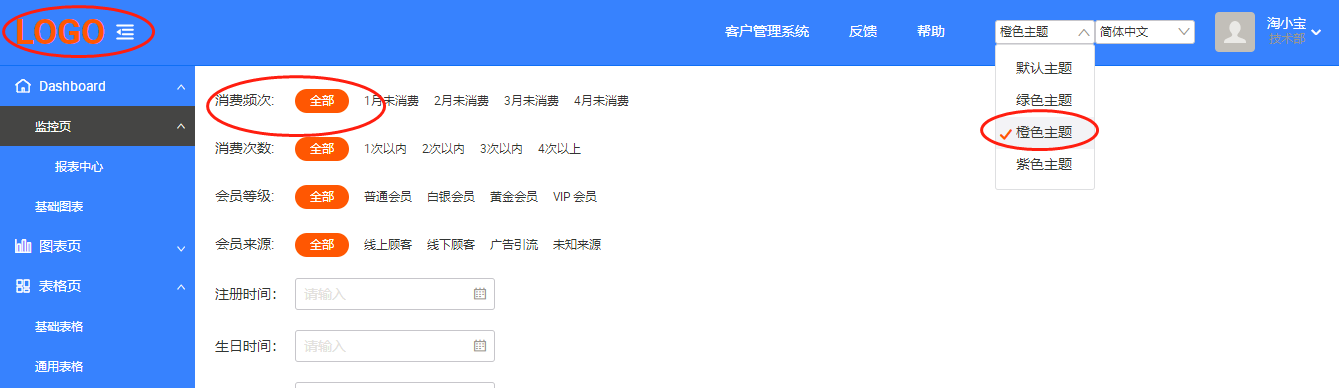
最近一直处于半失业状态,好多年没有更新对前端的理解了,闲来看看前端技术的发展。因为一直是个草台班子,身兼多职东看看西看看,一直没太搞清楚iceworks、ant design, fusion等等一堆阿里系的开源项目。用了半小时用iceworks搭了一个react的模板出来,感觉好像自己突然成了react砖家似的,花了几天时间像猫吃刺猬一样,难以下嘴。总是觉得“ICE Design Pro”没有动态主题配置很不方便。摸索了两天,算是磕磕绊绊的抄出了一个功能。那就仿照这“多语言”设置依葫芦画瓢整一个多主题配置吧。
在路径“\src\layouts\BasicLayout\components\Header”下找到了index.jsx
import SelectLang from '@/components/SelectLang';
import SelectTheme from '@/components/SelectTheme'; //添加一个不存在的组件
        <div className={styles.headerAction}>

{/*依葫芦画瓢整个标签,来切换主题*/}

          {/*多主题选择*/}

          <SelectTheme />

{/*依葫芦画瓢整个标签,来切换主题*/}

          {/* 多语言选择 */}

          <SelectLang />
然后,照样在“src\components”下把SelectLang文件夹拷贝更名为“SelectTheme”,然后修改"\src\components\SelectTheme\index.jsx"
import React from 'react';

import { Select } from '@alifd/next';

import { getTheme, setTheme } from '@/utils/theme';

const Option = Select.Option;

const Theme_CONFIG = {

  '@icedesign/theme': {

    text: '默认主题',

    icon: '',

  },

  '@alifd/theme-ice-green': {

    text: '绿色主题',

    icon: '',

  },

  '@alifd/theme-ice-orange': {

    text: '橙色主题',

    icon: '',

  },

  '@alifd/theme-ice-purple': {

    text: '紫色主题',

    icon: '',

  },

};

function changeTheme(key) {

  setTheme(key);

}

export default function SelectTheme() {

  const selectedTheme = getTheme();

  return (

    <Select

      onChange={changeTheme}

      defaultValue={selectedTheme}

      size="small"

      style={{ display: 'flex', alignItems: 'center' }}

    >

      {Object.keys(Theme_CONFIG).map((theme) => {

        return (

          <Option value={theme} key={theme}>

            {Theme_CONFIG[theme].text}

          </Option>

        );

      })}

    </Select>

  );

}
然后拷贝“src\utils\locale.js”改名为"theme.js"
/**

 * 设置当前主题

 * @param {String} cTheme

 */

function setTheme(cTheme) {

  if (cTheme === undefined) {

	cTheme = '@icedesign/theme';

  }

  if (getTheme() !== cTheme) {

    window.localStorage.setItem('theme', cTheme);

    // 可以在设置的主题包 @icedesign/theme 和 @alifd/theme-ice-purple 之间切换

	window.__changeTheme__(cTheme);

  }

}

/**

 * 获取当前主题

 */

function getTheme() {

  if (!window.localStorage.getItem('theme')) {

    window.localStorage.setItem('theme', navigator.theme);

  }

  return localStorage.getItem('theme');

}

export { setTheme, getTheme };
测试一下,没问题了。总算抄出来一个功能,比较有装逼的成就感了。
当然用iceworks的GUI还需要改一下"ice.config.js"
  plugins: [

	['ice-plugin-fusion', {

      // 通过数组方式配置多主题包

      themePackage: [{

        name: '@icedesign/theme',

        // 设置默认加载主题,如果不进行设置,默认以最后添加主题包作为默认主题

        default: true,

        // 设置自定义主题颜色,可以在 scss 文件中直接使用该变量,比如: .bg-color { background: $custom-color; }

        themeConfig: {

          'custom-color': '#000',//测试自定义

        },

      }, {

        name: '@alifd/theme-ice-orange',

        themeConfig: {

          'custom-color': '#fff', //测试自定义

        },

      }, {

        name: '@alifd/theme-ice-green',

        themeConfig: {

          'custom-color': '#fff',//测试自定义

        },

      }, {

        name: '@alifd/theme-ice-purple',

        themeConfig: {

          'custom-color': '#fff',//测试自定义

        },

      }],

    }],

    ['ice-plugin-moment-locales', {

      locales: ['zh-cn'],

    }]

  ],
剩下的就是用npm把这几个主题引入到工程中了,另外fusion提供了一个可以在线编辑主题的功能,可以访问“Fusion”
@alifd 的<Select/>组件貌似还是有一个bug,设置的defaultValue,在页面第一次装置的时候不会触发onChange事件,用 window.onload 来解决,找到根目录下的“src\index.jsx”,修改为:
import React from 'react';

import ReactDOM from 'react-dom';

import './global.scss';

// 引入基础配置文件

import router from './router';

import LanguageProvider from './components/LocaleProvider';

import { getLocale } from './utils/locale';

const locale = getLocale();

/**

 * 初始进入加载默认主题

 */

const loadDefaultTheme = function(){

	var cTheme = window.localStorage.getItem('theme');

	if (cTheme === undefined || cTheme === null) {

		cTheme = '@icedesign/theme';

	}

	window.__changeTheme__(cTheme);

};

const ICE_CONTAINER = document.getElementById('ice-container');

if (!ICE_CONTAINER) {

  throw new Error('当前页面不存在 <div id="ice-container"></div> 节点.');

}

else

{

  window.onload= loadDefaultTheme;

}

ReactDOM.render(

  <LanguageProvider locale={locale}>

    {router()}

  </LanguageProvider>,

  ICE_CONTAINER

);
页面初始化进入,主题可自动引用上一次记忆的设置了。
参考材料:
使用ice-plugin-fusion给icedesign的模板加个主题(theme)的更多相关文章
- 20款时尚的 WordPress 企业模板【免费主题下载】
在这篇文章中,我们收集了20款时尚的 WordPress 企业模板.WordPress 作为最流行的博客系统,插件众多,易于扩充功能.安装和使用都非常方便,而且有许多第三方开发的免费模板,安装方式简单 ...
- Struts2的模板和主题theme及自定义theme的使用
Struts2的模板和主题theme及自定义theme 标签: struts2 2016-03-29 11:22 190人阅读 评论(0) 收藏 举报 分类: javaweb(8) Struts2 ...
- angular模板加载 ----ng-template
Angularjs作为mvc(或者说mvvm)框架,同样具备模板这一基本概念. NG加载模板的顺序为 内存加载---AJAX加载. 如果排版乱掉,请查阅https://www.zybuluo.com/ ...
- freemarker模板加载TemplateLoader常见方式
使用过freemarker的肯定其见过如下情况: java.io.FileNotFoundException: Template xxx.ftl not found. 模板找不到.可能你会认为我明明指 ...
- velocity模板加载
http://hi.baidu.com/ly_dayu/item/828b09c5c3c5e547a8ba9409 velocity使用基本来说比较简单,但在加载模板时老出问题,很多初学者经常会遇到找 ...
- wordpress模板加载顺序汇总
我们要创建一个新的wordpress模板需要先了解有哪些页面模板,这些页面模板的文件是什么?它们是怎么工作的?下面ytkah汇总了一些常用的wordpress模板结构方便大家查找 首页 首先WordP ...
- legend3---10、vue与lavarel的blade模板加jquery页面开发方式比较
legend3---10.vue与lavarel的blade模板加jquery页面开发方式比较 一.总结 一句话总结: lavarel的blade模板加jquery:速度快一点:速度快一点,页面加载数 ...
- Jquery使用ajax以及angularjs 动态模板加载并进行渲染
1. 源码 <!DOCTYPE html> <html> <head> <meta charset="utf-8"> <tit ...
- nodejs模板加载的问题
JADE模板:http://jumplink.github.io/jade2html2jade/ HTML转JADE,跟imooc上一步步来就搞定了 直接加载HTML静态资源: var express ...
随机推荐
- python学习-5 python基础-2 条件语句(if的简单用法2---elif)
1.if的基本语句 if条件: 内部代码块 else: ........ print(‘.......’) 2.if语句支持嵌套 if条件: 内部代码块 if条件: 内部代码块 else: ..... ...
- 17.tmux相关
Linux终端复用神器-Tmux使用梳理 Tmux是一个优秀的终端复用软件,类似GNU Screen,但来自于OpenBSD,采用BSD授权.使用它最直观的好处就是,通过一个终端登录远程主机并运行tm ...
- [Vue]vue-router的push和replace的区别
1.this.$router.push() 描述:跳转到不同的url,但这个方法会向history栈添加一个记录,点击后退会返回到上一个页面. 2.this.$router.replace() 描述: ...
- No database provider has been configured for this DbContext
var context = ((IInfrastructure<IServiceProvider>)set).GetService<DbContext>(); 在EF Core ...
- SPOJ-MobileService--线性DP
题目链接 https://www.luogu.org/problemnew/show/SP703 方法一 分析 很显然可以用一个四维的状态\(f[n][a][b][c]\)表示完成第i个任务时且三人 ...
- 判断ubuntu是32位还是64位
在终端输入 sudo uname -m 显示 如果显示i686,你安装了32位操作系统 如果显示 x86_64,你安装了64位操作系统 更多: sudo uname -s 显示内核名字s sudo u ...
- 简要了解web安全之sql注入
什么是sql注入? 通俗来讲就是通过 将可执行sql语句作为参数 传入查询sql 中,在sql编译过程中 执行了传入进来的恶意 sql,从而 得到 不应该查到或者不应该执行的sql语句,对网站安全,信 ...
- 关于iReport5.6.0无法正常启动或者闪退或者JDK8不兼容的解决方案
参考网址: https://blog.csdn.net/erlian1992/article/details/76359191?locationNum=6&fps=1 说白了 ,即 jaspe ...
- VC文件扩展名
.APS:存放二进制资源的中间文件,VC把当前资源文件转换成二进制格式,并存放在APS文件中,以加快资源装载速度. .BMP:位图资源文件. .BSC:浏览信息文件,由浏览信息维护工具(BSCMAKE ...
- Flutter——Image组件(图片组件)
Image组件有很多构造函数,这里只说两个. Image.asset 本地图片 1.在根目录新建文件夹 /images 2.在 images 文件夹下建立两个文件夹 /images/2.0x /i ...