
[修正] iOS 10 使用相机及相簿闪退的问题修正
iOS 10 新规定,在取用相机,相簿,联络资讯,麦克风需要在 Version Info 加入指定的 key,否则闪退:
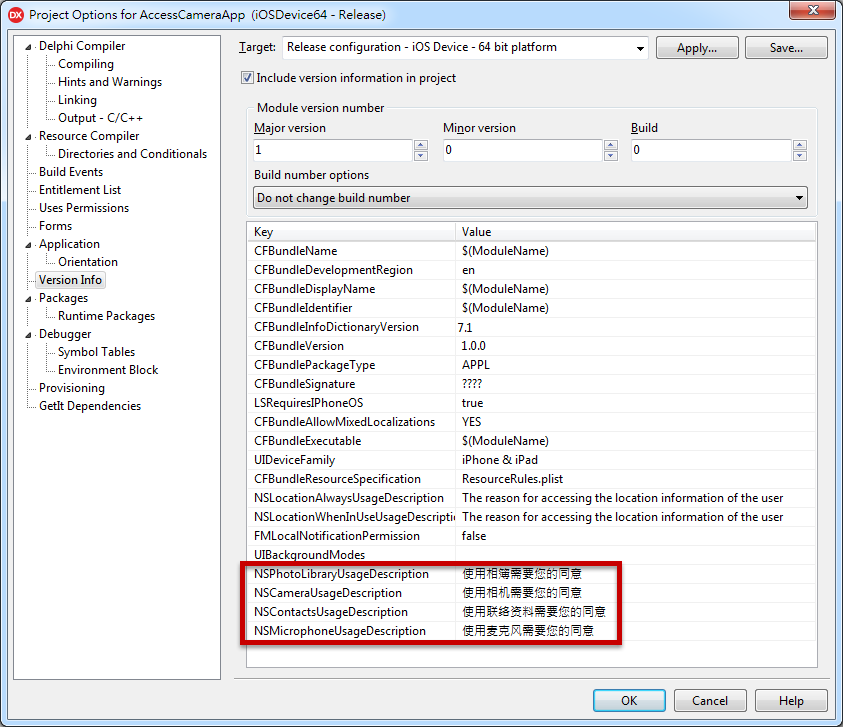
注:将下面的 Key 复制到工程 Option -> Version Info 里(按鼠标右键可以新增 Key)
常用 Key
<key>NSPhotoLibraryUsageDescription</key>

<string>使用相簿需要您的同意</string>

<key>NSCameraUsageDescription</key>

<string>使用相机需要您的同意</string>

<key>NSContactsUsageDescription</key>

<string>使用联络资料需要您的同意</string>

<key>NSMicrophoneUsageDescription</key>

<string>使用麦克风需要您的同意</string>

2018.01.08 新增:iOS 11.x 必需要加入下列,否則閃退

<key>NSPhotoLibraryAddUsageDescription</key>

<string>使用相簿需要您的同意</string>
完整列表:
Apple Music:

<key>NSAppleMusicUsageDescription</key>

<string>My description about why I need this capability</string>

Bluetooth:

<key>NSBluetoothPeripheralUsageDescription</key>

<string>My description about why I need this capability</string>

Calendar:

<key>NSCalendarsUsageDescription</key>

<string>My description about why I need this capability</string>

Camera:

<key>NSCameraUsageDescription</key>

<string>My description about why I need this capability</string>

Contacts:

<key>NSContactsUsageDescription</key>

<string>My description about why I need this capability</string>

Health Share:

<key>NSHealthShareUsageDescription</key>

<string>My description about why I need this capability</string>

Health Update:

<key>NSHealthUpdateUsageDescription</key>

<string>My description about why I need this capability</string>

Home Kit:

<key>NSHomeKitUsageDescription</key>

<string>My description about why I need this capability</string>

Location:

<key>NSLocationUsageDescription</key>

<string>My description about why I need this capability</string>

Location (Always):

<key>NSLocationAlwaysUsageDescription</key>

<string>My description about why I need this capability</string>

Location (When in use):

<key>NSLocationWhenInUseUsageDescription</key>

<string>My description about why I need this capability</string>

Microphone:

<key>NSMicrophoneUsageDescription</key>

<string>My description about why I need this capability</string>

Motion (Accelerometer):

<key>NSMotionUsageDescription</key>

<string>My description about why I need this capability</string>

Photo Library:

<key>NSPhotoLibraryUsageDescription</key>

<string>My description about why I need this capability</string>

Reminders:

<key>NSRemindersUsageDescription</key>

<string>My description about why I need this capability</string>

Siri:

<key>NSSiriUsageDescription</key>

<string>My description about why I need this capability</string>

Speech Recognition:

<key>NSSpeechRecognitionUsageDescription</key>

<string>My description about why I need this capability</string>
Apple 官方列表:
[修正] iOS 10 使用相机及相簿闪退的问题修正的更多相关文章
- iOS 10 使用相机及相簿闪退的问题修正
http://www.cnblogs.com/onechen/p/5935579.html
- iOS 10 因苹果健康导致闪退 crash-b
如果在app中调用了苹果健康,iOS10中会出现闪退.控制台报出的原因是: Terminating app due to uncaught exception 'NSInvalidArgumentEx ...
- iOS 10 因苹果健康导致闪退 crash
如果在app中调用了苹果健康,iOS10中会出现闪退.控制台报出的原因是: Terminating app due to uncaught exception 'NSInvalidArgumentEx ...
- iOS 10 开发 相机相关的适配
升级 iOS 10 之后目测坑还是挺多的,记录一下吧,看看到时候会不会成为一个系列. 直入正题吧 今天在写 Swift 3 相关的一个项目小小练下手,发现调用相机,崩了.试试看调用相册,又特么崩了.然 ...
- iOS 10 之后,相机权限问题及易出现的Crash
1: iOS 10 之后,访问相机需要设置相关的权限 麦克风权限:Privacy - Microphone Usage Description 是否允许此App使用你的麦克风? 相机权限: Priva ...
- phonegap创建的ios项目推送消息出现闪退现象
使用phonegap创建的ios项目,推送消息时,当程序在前台运行或者在后台运行状态下,推送消息过来,可以解析并且跳转: 但是在程序从后台退出的状态下,当消息推送过来的时候,点击通知栏,打开程序,程序 ...
- Ubuntu18.10下运行blender2.80bate闪退(问题?)
Ubuntu18.10下直接运行blender2.80bate闪退, 运行blender2.79正常. ================= root@tom-laptop:/# uname -aLin ...
- iOS 10 新特性 大汇总 及iOS 10 的一些小问题和 xcode 8 的新版本小问题
iOS 10正式版是很值得升级的,特别是那些不打算购买iPhone 7的老用户,毕竟新系统在体验.流畅性上都做了一些升级. 1.开放电话接口 支持垃圾电话提醒 对于使用iPhone的国人来说,这个功能 ...
- iOS开发-闪退问题-解决之前上架的 App 在 iOS 9 会闪退问题
最新更新:(2015.10.02) 开发环境: Delphi 10 Seattle OS X El Capitan v10.11 需使用下列 HotfixID: 30398, PAServer Hot ...
随机推荐
- 企业IT管理员IE11升级指南【2】—— Internet Explorer 11 对Adobe Flash的支持
企业IT管理员IE11升级指南 系列: [1]—— Internet Explorer 11增强保护模式 (EPM) 介绍 [2]—— Internet Explorer 11 对Adobe Flas ...
- C#开发EyeLink眼动仪的实验程序
[题外话] Eyelink眼动仪是SR Research推出的一款眼动仪,很多高校都在使用其做实验.其官方提供了COM的接口,所以支持COM接口的开发平台都可以开发使用.官方甚至提供了一个C#的样例供 ...
- Linux 挂载管理(mount)
标签:mount,umount 概述 在上一章增加linux操作系统空间中已经使用过了mount命令对分区进行挂载,这一章详细介绍挂载管理,该命令涉及的知识点也挺多的而且也还比较重要,是需要掌握的一个 ...
- Module-Zero之组织单元(OU)管理【新增】
返回<Module Zero学习目录> 概览介绍 OrganizationUnit实体 OrganizationUnit管理者 公共用例 设置 概览介绍 组织单元(Organization ...
- 浅析Yii2的view层设计
Yii2.0的view层提供了若干重要的功能:assets资源管理,widgets小组件,layouts布局... 下面将通过对Yii2.0代码直接进行分析,看一下上述功能都是如何实现的,当然细枝末节 ...
- SQL Server 跨网段(跨机房)复制
一.本文所涉及的内容(Contents) 本文所涉及的内容(Contents) 背景(Contexts) 解决方案(Solution) 搭建过程(Process) 注意事项(Attention) 参考 ...
- Dnsmasq安装与配置
默认的情况下,我们平时上网用的本地DNS服务器都是使用电信或者联通的,但是这样也导致了不少的问题,首当其冲的就是上网时经常莫名地弹出广告,或者莫名的流量被消耗掉导致网速变慢.其次是部分网站域名不能正常 ...
- .Net处理Oracle中Clob类型字段总结
最近在做项目中用到Clob这个字段,Clob是存储无限长字符的Oracle字段,用的时候网上找资料找了好久,内容不是很多,大部分都不能用,当然也有可以用的,测试了不同版本,整理了一下,给大家在做项目的 ...
- mysql乐观锁总结和实践--转
原文地址:http://chenzhou123520.iteye.com/blog/1863407 上一篇文章<MySQL悲观锁总结和实践>谈到了MySQL悲观锁,但是悲观锁并不是适用于任 ...
- CSS浮动文摘
很早以前就接触过CSS,但对于浮动始终非常迷惑,可能是自身理解能力差,也可能是没能遇到一篇通俗的教程. 写在前面的话: 由于CSS内容比较多,没有精力从头到尾讲一遍,只能有 ...