
IIS7 伪静态 web.config 配置方法【详解】
IIS7 做伪静态比较的简单方便
<?xml version="1.0"?>

<configuration>

<system.webServer>

        <rewrite>

            <rules>

                <!--301重定向把不带3W的域名 定向到带3W-->

                <rule name="Redirect" stopProcessing="true">

                    <match url=".*" />

                    <conditions>

                        <add input="{HTTP_HOST}" pattern="^haoxinwen.info$" />

                    </conditions>

                    <action type="Redirect" url="http://www.haoxinwen.info/{R:0}" redirectType="Permanent" />

                </rule>

                <!--首页-->

                <rule name="rD">

                    <match url="^$" />

                    <action type="Rewrite" url="Default.aspx" />

                </rule>

                <!--产品列表-->

                <rule name="rP">

                    <match url="^product/$" />

                    <action type="Rewrite" url="ProductList.aspx" />

                </rule>

                <!--产品列表第几页-->

                <rule name="rPL">

                    <match url="^product/list-([0-9]*).html$" />

                    <action type="Rewrite" url="ProductList.aspx?page={R:1}" />

                </rule>

                <!--产品类别列表-->

                <rule name="rPT">

                    <match url="^product/([A-Za-z0-9-]*)/$" />

                    <action type="Rewrite" url="ProductList.aspx?typeUrl={R:1}" />

                </rule>

                <!--产品类别列表第几页-->

                <rule name="rPTL2">

                    <match url="^product/([A-Za-z0-9-]*)/list-([0-9]*).html$" />

                    <action type="Rewrite" url="ProductList.aspx?typeUrl={R:1}&page={R:2}" />

                </rule>

                <!--产品详细-->

                <rule name="rPd">

                    <match url="^product/([A-Za-z0-9-]*)/([A-Za-z0-9-]+).html$" />

                    <action type="Rewrite" url="ProductDetail.aspx?typeUrl={R:1}&url={R:2}" />

                </rule>

            </rules>

        </rewrite>

    </system.webServer>

</configuration>
IIS7 伪静态 web.config 配置方法
iis6 伪静态 iis配置方法 图解
iis6 web.config 伪静态配置方法
举个栗子:
安装URL Rewrite
在iis新建了一个叫做hello的站点,端口:8088
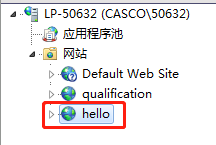
站点目录新建一个index.html文件

<h1>hello world</h1>
启动站点,浏览器输入:http://localhost:8088/

ok,站点已经成功运行
打开站点目录,新建一个web.config 文件

<?xml version="1.0"?>

<configuration>

<system.webServer>

        <rewrite>

            <rules>

				<!--我的规则-->

                <rule name="myrule">

                    <match url="^hello$" />

                    <action type="Rewrite" url="index.html" />

                </rule>

				<!--我的规则2-->

                <rule name="myrule2">

                    <match url="^jy/good$" />

                    <action type="Rewrite" url="jy/good.html" />

                </rule>

            </rules>

        </rewrite>

    </system.webServer>

</configuration>
ps:安装 URL Rewrite 后才可以使用rewrite标签
启动站点,打开浏览器,输入路由地址:http://localhost:8088/jy/good
然后会匹配到站点的 jy/good.html 文件,如下:
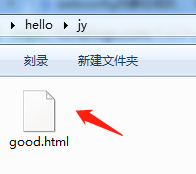
good.html
<h1>Good</h1>
浏览器显示:

参考:https://www.cnblogs.com/yanzhen/archive/2012/01/07/iis7-wei-jing-tai.html
IIS7 伪静态 web.config 配置方法【详解】的更多相关文章
- IIS7 伪静态 web.config 配置方法
<rule name="Redirect" stopProcessing="true"> <match url=".*" ...
- 局域网内远程连接OPC配置方法详解
局域网内远程连接OPC配置方法详解 https://wenku.baidu.com/view/20fb8ea6d1d233d4b14e852458fb770bf78a3bcc.html OPC服务 ...
- 【Python】Linux crontab定时任务配置方法(详解)
CRONTAB概念/介绍 crontab命令用于设置周期性被执行的指令.该命令从标准输入设备读取指令,并将其存放于“crontab”文件中,以供之后读取和执行. cron 系统调度进程. 可以使用它在 ...
- Tomcat web.xml配置参数详解
Apache Tomcat Configuration Reference - The Context Containerhttps://tomcat.apache.org/tomcat-5.5-do ...
- Linux操作系统下IPTables配置方法详解
如果你的IPTABLES基础知识还不了解,建议先去看看. 们来配置一个filter表的防火墙 1.查看本机关于IPTABLES的设置情况 [root@tp ~]# iptables -L -n Cha ...
- caffe-windows环境配置(github上官方BVLC/caffe的推荐配置方法详解)
[转载来的文章:如有侵权,请联系我!我将马上删除!] 首先声明一下,如标题,本教程是caffe在windows系统上的配置方法,而且是github上官方BVLC/caffe目前推荐的配置方法,并不是使 ...
- CentOS防火墙iptables的配置方法详解
CentOS系统也是基于linux中的它的防火墙其实就是iptables了,下面我来介绍在CentOS防火墙iptables的配置教程,希望此教程对各位朋友会有所帮助. iptables是与Linux ...
- servlet两种配置方法详解
1.web.xml中Servlet的注解 <servlet> <!-- servlet的内部名称,自定义 --> <servlet-name>DemoAction ...
- servlet web.xml配置选项详解
一般的web工程中都会用到web.xml,web.xml主要包括一些配置标签,例如Filter.Listener.Servlet等,可以用来预设容器的配置,可以方便的开发web工程.但是web.xml ...
随机推荐
- CSS 实现盒子水平居中、垂直居中和水平垂直居中的方法
CSS 实现盒子模型水平居中 水平居中效果图如下: HTML: CSS 全局样式: 方法一:使用margin: 0 auto;(只适用于子盒子有宽的时候) 方法二:text-align + disp ...
- springmvc集成cxf的方法
最近需要在项目中增加webservice接口,供三方调用,下面就把集成的方法展示如下,供大家参考: 第一步:服务端的发布; 1:配置web.xml文件,添加cxf的servlet <servle ...
- viewer 图片点击放大 用法汇总
A 不用viewer插件 1弹出框 https://www.cnblogs.com/web1/p/8989967.html 2表格中 https://www.jianshu.com/p/c17f4f6 ...
- MySQL Lock--MySQL加锁学习1
准备测试数据: ## 开启InnoDB Monitor SET GLOBAL innodb_status_output=ON; SET GLOBAL innodb_status_output_lock ...
- [https][tls] 如何使用wireshark查看tls/https加密消息--使用keylog
姊妹篇: [ipsec][strongswan] 使用wireshark查看strongswan ipsec esp ikev1 ikev2的加密内容 [https][tls] 如何使用wiresha ...
- 在vue中使用jsx语法
什么是JSX? JSX就是Javascript和XML结合的一种格式.React发明了JSX,利用HTML语法来创建虚拟DOM.当遇到<,JSX就当HTML解析,遇到{就当JavaScript解 ...
- zabbix-web切换为nginx及https
目录 zabbix-web切换为nginx及https 1.背景和环境 2.安装nginx 2.1.编译参数 2.2.修改配置文件并配置https 2.3.配置nginx为系统服务 3.安装php 3 ...
- C++(四十四) — 数组模板类(vector工具)
实现 stl 中的 vector 操作. 1.MyVector.h #pragma once #include <iostream> using namespace std; templa ...
- WEB监控手段
WEB监控手段: 1.端口 本地: ss . netstat .lsof ss -ntlp|grep 80|wc -l (大于等于1) netsta ...
- [software test - 001] Why we need software test?
/* This is a conclusion about the software testing job. */ /* Scope: middle level software tasks, ...