
四元数, Physx中的四元数
四元数的概念 & 如何使用四元数:
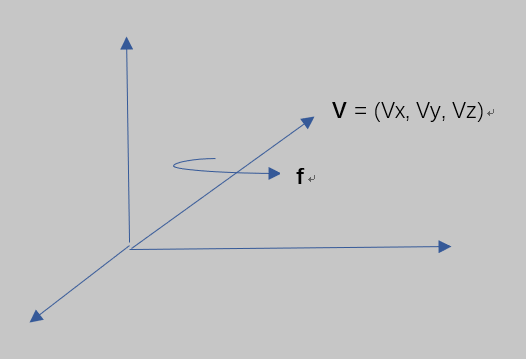
绕V轴旋转 f 角,对应的四元数:
q = ( cos(f/2), Vx*sin(f/2), Vy*sin(f/2), Vz*sin(f/2) )
= cos(f/2) + Vx*sin(f/2)*i + Vy*sin(f/2)*j + Vz*sin(f/2)*k
q的共轭:
q' = ( cos(f/2), -Vx*sin(f/2), -Vy*sin(f/2), -Vz*sin(f/2) ) (不应该用q'这个符号,只是为了方便打字)
当前有空概念中的一个点(Wx, Wy,Wz),求在该旋转下的新坐标W',即绕着V旋转f角, 计算方法如下:
(1)定义一个纯四元数: P = (0, Wx, Wy,Wz)
(2)运算: P' = q*P*q', 该运算的结果P'是一个纯四元数,即第一项为0, P'的后三项即是W'的坐标哦。
同理,若存在一个四元数 q = (q1,q2,q3,q4) = ( cos(f/2), Vx*sin(f/2), Vy*sin(f/2), Vz*sin(f/2) ),则,其对应一个以向量(Vx,Vy,Vz)为轴 旋转f角的动作,右手法则。
四元数的乘法:
四元数有i, j, k三个虚部,i^2 = j^2 = k^2 = i*j*k = -1。
两个四元数p和q相乘的公式:
p*q = (p0,p1,p2,p3) * (q0,q1,q2,q3), 记列向量 P=(p1,p2,p3), Q = (q1,q2,q3)
= (p0*q0 - P*Q, p0*Q + q0*P + P x Q), 其中p0*Q + q0*P + P x Q对应一个三维向量,其三个分量为结果的i,j,k部分。
= [ p0*q0 - p1*q1 - p2*q2 - p3*q3 ]
[ p0*q1 + q0*p1 + p2*q3 - p3*q2]
[ p0*q2 + q0*p2 + p3*q1 - p1*q3]
[ p0*q3 + q0*p3 + p1*q2 - p2*q1]
其中蓝色部分对应的是P x Q得到的向量的三个分量:
P x Q =

Physx引擎中的四元数
physx中的PxTransForm类:https://github.com/NVIDIAGameWorks/PhysX/blob/4.1/pxshared/include/foundation/PxTransform.h
PxQuat类 https://github.com/NVIDIAGameWorks/PhysX/blob/4.1/pxshared/include/foundation/PxQuat.h
class PxTransform

{

    PxQuat q; //四元数类,四个成员变量:(w,x,y,z)。Physx用四元数表示刚体的姿态。

    PxVec3 p; //表示刚体的位置

    PxVec3 rotate(PxVec3& input) //对输入向量做旋转,返回旋转后的向量

   {

        return q.rotate(input);

   }

   ....

};
/**

    rotates passed vec by this (assumed unitary)

    */

    PX_CUDA_CALLABLE PX_FORCE_INLINE const PxVec3 rotate(const PxVec3& v) const

    {

        const float vx = 2.0f * v.x;

        const float vy = 2.0f * v.y;

        const float vz = 2.0f * v.z;

        const float w2 = w * w - 0.5f;

        const float dot2 = (x * vx + y * vy + z * vz);

        return PxVec3((vx * w2 + (y * vz - z * vy) * w + x * dot2), (vy * w2 + (z * vx - x * vz) * w + y * dot2), (vz * w2 + (x * vy - y * vx) * w + z * dot2));

    }

    /**

    inverse rotates passed vec by this (assumed unitary)

    */

    PX_CUDA_CALLABLE PX_FORCE_INLINE const PxVec3 rotateInv(const PxVec3& v) const

    {

        const float vx = 2.0f * v.x;

        const float vy = 2.0f * v.y;

        const float vz = 2.0f * v.z;

        const float w2 = w * w - 0.5f;

        const float dot2 = (x * vx + y * vy + z * vz);

        return PxVec3( (vx * w2 - (y * vz - z * vy) * w + x * dot2), (vy * w2 - (z * vx - x * vz) * w + y * dot2),  (vz * w2 - (x * vy - y * vx) * w + z * dot2));

    }
Physx的上面代码经验证,对向量做旋转时,Physx使用的方法同《quaternions for computer graphics》中的方法一致:
存在四元数(s,x,y,z),其中s为scalar part,用其对向量(xp,yp,zp)做一次旋转:
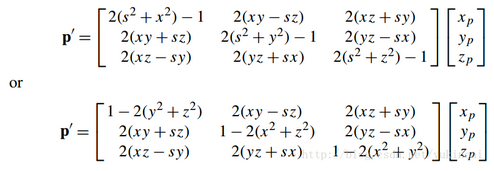
但是,跟该网页提供的matlab计算四元数旋转的方法不同::(https://ww2.mathworks.cn/help/aerotbx/ug/quatrotate.html) 该网页中的第一个简单例子的结果,套用文末的公式,得出不同的结果!
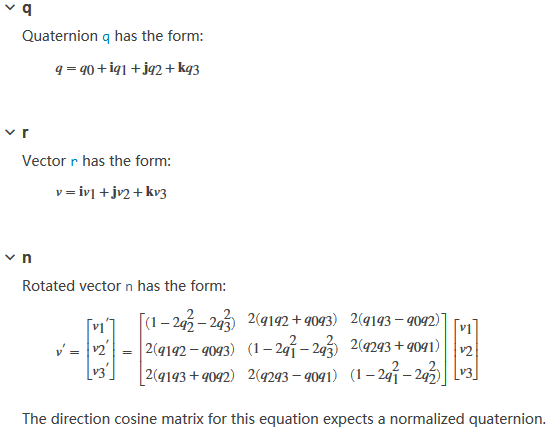
-----------严重怀疑matlab的正确性:
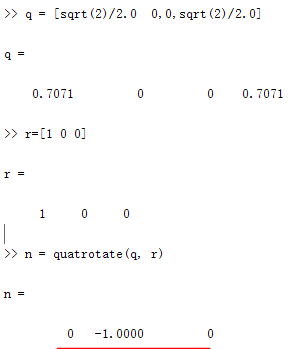
用例子验证:绕Z轴(0,0,1)旋转90°的四元数为( cos(45), 0*sin(45), 0*sin(45), 1*sin(45) ) = (sqrt(2)/2, 0, 0, sqrt(2)/2);
用该四元数旋转(1,0,0):
----使用Physx中的方法结果为(0,1,0)
----使用matlab的计算结果为(0,-1,0), 是沿着反方向转了90°。----- (在physx的方法中,输入的四元数对应的是旋转角度的一般,难道matlab中输入的四元数意义不同吗,默认是左手法则吗,这导致上面的公式中 与书本上的公式有正负号差异吗?待探索)
Physx中的四元数类的使用总结哦:
有全局坐标系A和局部坐标系A’, A经过一定的动作后与A’的姿态重合,(例如,A绕自己的Z(0,0,1)轴旋转90度),该动作可以用一个四元数表示出来(eg. quat(x,y,z ,w) = (0, 0, 1*sin(90/2), cos(90/2)), w为scalar part )。
1) 局部系转到全局系:
存在一个空间向量b,该向量在A’中的表示为b_local=(1,0,0), 则该向量在A中的表示为:
将全局系下的(1,0,0)绕z轴旋转90度(画图便理解): quat.rotate(b_local)。
2)全局系转到局部系:
存在一个空间向量c,该向量在A中的表示为c_local=(1,0,0), 则该向量在A’中的表示为:
方法1:将全局系下的(1,0,0)绕z轴旋转-90度:
quat_new(x,y,z ,w) = (0, 0, 1*sin(-90/2), cos(-90/2))
quat_new.rotate(c_local)。
方法2:quat. rotateInv(c_local)
3)

-----可以得到对应的旋转矩阵啦!
四元数与欧拉角
关于欧拉角很好文章: https://www.cnblogs.com/21207-iHome/p/6894128.html
四元数转换为欧拉角: (Physx中的四元数类并没有提供这个功能)
以下为一种转换方法:(推测来自开源opengl库https://github.com/g-truc/glm)
vec3 eulerAngles(const quat& x)

{

	return vec3(pitch(x), yaw(x), roll(x));//三个原始分别是绕x,y,z轴转的弧度

}

float roll(quat const & q)

{

	return float(atan2f(float(2) * (q.x * q.y + q.w * q.z), q.w * q.w + q.x * q.x - q.y * q.y - q.z * q.z));

}

float pitch(quat const & q)

{

	return float(atan2f(float(2) * (q.y * q.z + q.w * q.x), q.w * q.w - q.x * q.x - q.y * q.y + q.z * q.z));

}

float yaw(quat const & q)

{

	return asinf(clamp(float(-2) * (q.x * q.z - q.w * q.y), -1.0f, 1.0f));//clamp到-1,1范围。

}
其他:

Matlab: 四元数与欧拉角转换
https://www.mathworks.com/help/fusion/ref/quaternion.eulerd.html
四元数连乘的意义
以下自自己想的,还没看其他资料的解释,应该是对的吧:
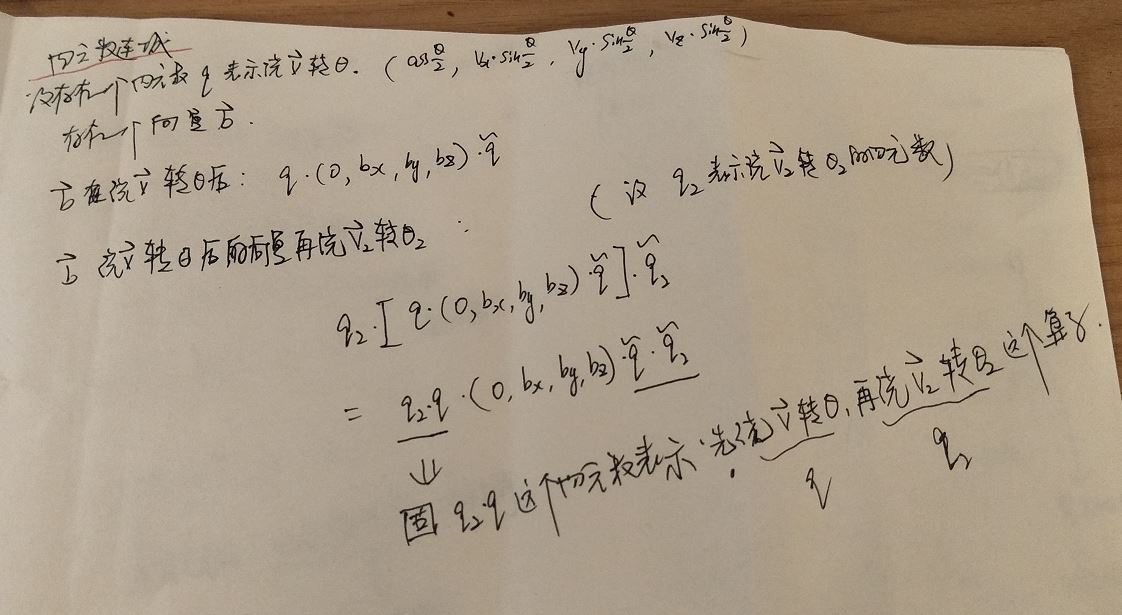
“现在主流游戏或动画引擎都会以 缩放向量+旋转四元数+平移向量的形式进行存储角色的运动数据。”
https://www.zhihu.com/question/23005815/answer/33971127、
https://zhuanlan.zhihu.com/p/27471300
https://www.zhihu.com/topic/19594299/top-answers
经典书: 《quaternions for computer graphics 》https://max.book118.com/html/2018/0220/153945618.shtm
===2019.10.26 将physx中的class PxTransform类的四元数旋转函数终于搞清楚了:
查阅的链接:
https://docs.nvidia.com/gameworks/content/gameworkslibrary/physx/apireference/files/
https://docs.nvidia.com/gameworks/content/gameworkslibrary/physx/apireference/files/hierarchy.html
http://www.doc88.com/p-805243984870.html
https://ww2.mathworks.cn/help/robotics/ref/eul2quat.html
https://ww2.mathworks.cn/help/robotics/ref/quaternion.rotmat.html
https://ww2.mathworks.cn/help/robotics/ref/quaternion.mtimes.html
https://ww2.mathworks.cn/help/robotics/ref/quaternion.html
该文章相当好:
http://www.geeks3d.com/20141201/how-to-rotate-a-vertex-by-a-quaternion-in-glsl/
摘录在此:
In a vertex shader, the rotation and position are usually encoded in the model matrix and we have something like this:
vec4 worldPos = ModelMatrix * InPosition; -- 旋转矩阵的形式
Here is another method to transform the position of a vertex, using a quaternion to hold the rotation information. Quaternions are a fantastic mathematics tool discovered by Sir William Rowan Hamilton in 1843. We’re not going to review quaternions in detail here, because I’m not a mathematician and it’s not the point. We’re going to see how to use them in practice in a GLSL program to rotate a vertex.
A quaternion can be seen as a object that holds a rotation around any axis. A quaternion is a 4D object defined as follows:
q = [s, v]

q = [s + xi + yj + zk]
where s, x, y and z are real numbers. s is called the scalar part while x, y and z form the vector part. i, j and k are imaginary numbers. Quaternions are the generalization of complex numbers in higher dimensions.
In 3D programming, we store quaternions in a 4D vector:
q = [x, y, z, w] -- x,y,z对应向量部分。
where w = s and [x, y, z] = v.
Now let’s see the fundamental relation that makes it possible to rotate a point P0 around an rotation axis encoded in the quaternion q:
P1 = q P0 q-1
where P1 is the rotated point and q-1 is the inverse of the quaternion q (q的共轭).
From this relation we need to know:
1 – how to transform a rotation axis into a quaternion.
2 – how to transform a position into a quaternion.
3 – how to get the inverse of a quaternion.
4 – how to multiply two quaternions.
Remark: all the following rules expect an unit quaternion. An unit quaternion is a quaternion with a norm of 1.0. A quaternion can be normalized with:
norm = sqrt(q.x*q.x + q.y*q.y + q.z*q.z + q.w*q.w)

q.x =  q.x / norm

q.y =  q.y / norm

q.z =  q.z / norm

q.w =  q.w / norm
1 – How to transform a rotation axis into a quaternion
Here is a formula that converts a rotation around an axis (defined by the couple [axis, angle]) into a quaternion:
绕向量(axis.x, axis.y, axis.z)旋转angle对应的四元数:
half_angle = angle/2

q.x = axis.x * sin(half_angle)

q.y = axis.y * sin(half_angle)

q.z = axis.z * sin(half_angle)

q.w = cos(half_angle)
2 – How to transform a position into a quaternion
The position is usually a 3D vector: {x, y, z}. This position can be represented in a quaternion by setting to zero the scalar part and initializing the vector part with the xyz-position:
q.x = position.x

q.y = position.y

q.z = position.z

q.w = 0
The quaternion q=[x, y, z, 0] is a pure quaternion because it has not real part.
------- 这部分的作用应该是:要对向量{x, y, z}基于四元数做旋转时,需要先将该向量转换为一个纯四元数。
3 – How to get the inverse of a quaternion
The inverse of a quaternion is defined by the following relation:
q = [x, y, z, w]

norm = |q| = sqrt(q.x*q.x + q.y*q.y + q.z*q.z + q.w*q.w)

q
-1
 = [-x, -y, -z, w] / |q|        -------------------------------------------即,将旋转角取反。

q
-1
= [-x/|q|, -y/|q|, -z/|q|, w/|q|]
If we have an unit quaternion, |q|=1 and the inverse is equal to the conjugate (q*) of the quaternion: ---- 看来四元数q的逆等于其共轭除以其模长。
q
-1
= q
*
= [-x, -y, -z, w]
4 – How to multiply two quaternions
Quaternions can be multiplied:
q = q1 * q2
But like for matrix multiplication, quaternion multiplication is non-commutative:
(q1 * q2) != (q2 * q1)
The multiplication of two quaternions is defined by:
q.x = (q1.w * q2.x) + (q1.x * q2.w) + (q1.y * q2.z) - (q1.z * q2.y)

q.y = (q1.w * q2.y) - (q1.x * q2.z) + (q1.y * q2.w) + (q1.z * q2.x)

q.z = (q1.w * q2.z) + (q1.x * q2.y) - (q1.y * q2.x) + (q1.z * q2.w)

q.w = (q1.w * q2.w) - (q1.x * q2.x) - (q1.y * q2.y) - (q1.z * q2.z)
Now we have all tools to rotate a point around an axis in a GLSL vertex shader:
#version

in vec4 gxl3d_Position;

in vec4 gxl3d_TexCoord0;

in vec4 gxl3d_Color;

out vec4 Vertex_UV;

out vec4 Vertex_Color;

uniform mat4 gxl3d_ViewProjectionMatrix;

struct Transform

{

  vec4 position;

  vec4 axis_angle;

};

uniform Transform T;

vec4 quat_from_axis_angle(vec3 axis, float angle) -- 给定一个向量,以及绕该向量旋转的角,求其对用的四元数

{

  vec4 qr;

  float half_angle = (angle * 0.5) * 3.14159 / 180.0;

  qr.x = axis.x * sin(half_angle);

  qr.y = axis.y * sin(half_angle);

  qr.z = axis.z * sin(half_angle);

  qr.w = cos(half_angle);

  return qr;

}

vec4 quat_conj(vec4 q)------------------------------给定一个四元数,求其共轭

{

  return vec4(-q.x, -q.y, -q.z, q.w);

}

vec4 quat_mult(vec4 q1, vec4 q2)---------------------给定两个四元数,求其乘积

{

  vec4 qr;

  qr.x = (q1.w * q2.x) + (q1.x * q2.w) + (q1.y * q2.z) - (q1.z * q2.y);

  qr.y = (q1.w * q2.y) - (q1.x * q2.z) + (q1.y * q2.w) + (q1.z * q2.x);

  qr.z = (q1.w * q2.z) + (q1.x * q2.y) - (q1.y * q2.x) + (q1.z * q2.w);

  qr.w = (q1.w * q2.w) - (q1.x * q2.x) - (q1.y * q2.y) - (q1.z * q2.z);

  return qr;

}

vec3 rotate_vertex_position(vec3 position, vec3 axis, float angle)----给定一个轴以及绕该轴旋转的角,以及一个空间向量,求该向量绕该轴旋转后的向量

{

  vec4 qr = quat_from_axis_angle(axis, angle);

  vec4 qr_conj = quat_conj(qr);

  vec4 q_pos = vec4(position.x, position.y, position.z, );

  vec4 q_tmp = quat_mult(qr, q_pos);

  qr = quat_mult(q_tmp, qr_conj);

  return vec3(qr.x, qr.y, qr.z);

}

void main()

{

  vec3 P = rotate_vertex_position(gxl3d_Position.xyz, T.axis_angle.xyz, T.axis_angle.w);

  P += T.position.xyz;

  gl_Position = gxl3d_ViewProjectionMatrix * vec4(P, );

  Vertex_UV = gxl3d_TexCoord0;

  Vertex_Color = gxl3d_Color;

}
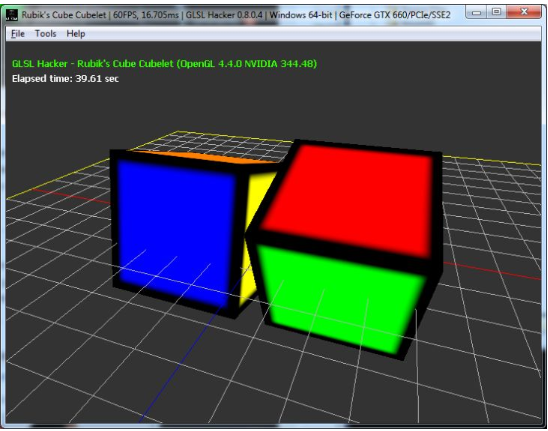
This powerful vertex shader comes from the host_api/RubikCube/Cube_Rotation_Quaternion/demo_v3.xml demo you can find in the code sample pack. To play with this demo, GLSL Hacker v0.8+ is required.
Some references:
- Quaternions
- Quaternions and spatial rotation
- Understanding Quaternions
- Quaternions – transforming spatials – Kri, modern OpenGL 3 engine
- Book: Mathematics for Computer Graphics by John Vince

四元数, Physx中的四元数的更多相关文章
- 【Unity编程】Unity中关于四元数的API详解
本文为博主原创文章,欢迎转载,请保留出处:http://blog.csdn.net/andrewfan Unity中关于四元数的API详解 Quaternion类 Quaternion(四元数)用于计 ...
- 四元数--结合《real time rendering》中关于四元数部分
四元数产生于1843年,是复数的一个扩展,所以里面包含了一些复数的运算.直到1985年才在图形学中使用. 四元数的优势是,相对与矩阵和欧拉角,四元数更直观和方便.四元数还可以用作某些方向上的插值,而欧 ...
- 视觉SLAM中的数学基础 第二篇 四元数
视觉SLAM中的数学基础 第二篇 四元数 什么是四元数 相比欧拉角,四元数(Quaternion)则是一种紧凑.易于迭代.又不会出现奇异值的表示方法.它在程序中广为使用,例如ROS和几个著名的SLAM ...
- eigen 中四元数、欧拉角、旋转矩阵、旋转向量
一.旋转向量 1.0 初始化旋转向量:旋转角为alpha,旋转轴为(x,y,z) Eigen::AngleAxisd rotation_vector(alpha,Vector3d(x,y,z)) 1. ...
- CSharpGL(32)矩阵与四元数与角度旋转轴的相互转换
CSharpGL(32)矩阵与四元数与角度旋转轴的相互转换 三维世界里的旋转(rotate),可以用一个3x3的矩阵描述:可以用(旋转角度float+旋转轴vec3)描述.数学家欧拉证明了这两种形式可 ...
- Unity四元数小问题整理
1.Unity中,四元数不能保存超过360度的旋转,所以如此大范围的旋转不能直接两个四元数做插值(当你用0度和721度的四元数做插值,它只会转1度,而不会转两圈). 2.要把旋转设置成某个方向,用Lo ...
- 3D数学基础:四元数与欧拉角之间的转换
在3D图形学中,最常用的旋转表示方法便是四元数和欧拉角,比起矩阵来具有节省存储空间和方便插值的优点.本文主要归纳了两种表达方式的转换,计算公式采用3D笛卡尔坐标系: 单位四元数可视化为三维矢量加上第四 ...
- 【转】四元数(Quaternion)和旋转
四元数介绍 旋转,应该是三种坐标变换--缩放.旋转和平移,中最复杂的一种了.大家应该都听过,有一种旋转的表示方法叫四元数.按照我们的习惯,我们更加熟悉的是另外两种旋转的表示方法--矩阵旋转和欧拉旋转. ...
- 四元数(Quaternion)和旋转(转)
http://blog.csdn.net/candycat1992/article/details/41254799 四元数介绍 旋转,应该是三种坐标变换--缩放.旋转和平移,中最复杂的一种了.大家应 ...
随机推荐
- template might not exist or might not be accessible by any of the configured Template Resolvers 完美解决
初学者在maven spring boot web项目中使用thymeleaf 模板,经常会遇到 “template might not exist or might not be accessib ...
- javascript实现上传图片并展示
我们也都知道上传图片的样子是这样的(选择前)是这样的(选择后). 先在HTML设置图片上传 <form action="" method=""> & ...
- 选美?作秀?MES系统的选择更应该从实际出发
MES选型不是做秀,不是选美. 如今不少企业在信息化推广应用过程中面面求好.追求完美,用意没错,然而在MES开发过程中,软件商不可能将今后各种可能出现的问题考虑周全,不可能将系统做到十全十美.随着系统 ...
- 浅谈MongoDB基础及架构
1.简述MongDB是一个强大.灵活而可扩展的数据存储系统,其将强大的可扩展特性与关系库最有用的特性进行了整合,像:次级索引,范围查询和排序等特性.而MongDB也内建了类似MapReduce汇聚和地 ...
- Python Django 实现简单注册功能
Python Django 实现简单注册功能 项目创建略,可参考前期文档介绍. 目录结构如下 编辑views.py from django.shortcuts import render # Crea ...
- java基本类型的长度
bit:位,一个二进制数据(0或者1),是1bit byte:字节,存储空间的基本单位,1byte=8bit 一个英文占一个字节,1字母=1byte=8bit 一个中文占两个字节,1汉字=2byte= ...
- 是否注意过isEmpty 和 isBlank 区别?
isEmpty 和 isBlank 区别 org.apache.commons.lang.StringUtils 类提供了 String 的常用操作,最为常用的判空有如下两种 isEmpty(Stri ...
- ELK+Logback进行业务日志分析查看
第1章 Elasticsearch安装部署 1.1 下载软件包并创建工作目录 程序下载地址:https://artifacts.elastic.co/downloads/elasticsearch/e ...
- openCV CV2用法(转)
文章转自:https://www.kancloud.cn/aollo/aolloopencv/262768 一.读入图像 使用函数cv2.imread(filepath,flags)读入一副图片 fi ...
- flask实战-个人博客-数据库-生成虚拟数据 --
3.生成虚拟数据 为了方便编写程序前台和后台功能,我们在创建数据库模型后就编写生成虚拟数据的函数. 1)管理员 用于生成虚拟管理员信息的fake_admin()函数如下所示: personalBlog ...