
部署redis5.0.3
一、准备环境
1、下载
# wget http://download.redis.io/releases/redis-5.0.3.tar.gz
[root@localhost ~]# wget http://download.redis.io/releases/redis-5.0.3.tar.gz

---- ::--  http://download.redis.io/releases/redis-5.0.3.tar.gz

Resolving download.redis.io (download.redis.io)... 109.74.203.151

Connecting to download.redis.io (download.redis.io)|109.74.203.151|:... connected.

HTTP request sent, awaiting response...  OK

Length:  (1.9M) [application/x-gzip]

Saving to: 'redis-5.0.3.tar.gz'

%[============================================================================================================================>] ,,    751KB/s   in .5s

-- :: ( KB/s) - 'redis-5.0.3.tar.gz' saved [/]

[root@localhost ~]# ls

redis-5.0..tar.gz
2、解压
[root@localhost ~]# tar xzf redis-5.0..tar.gz

[root@localhost ~]#

[root@localhost ~]# ls

anaconda-ks.cfg  redis-5.0.  redis-5.0..tar.gz

[root@localhost ~]#

[root@localhost ~]# cd redis-5.0.

[root@localhost redis-5.0.]#

[root@localhost redis-5.0.]# ls

-RELEASENOTES  CONTRIBUTING  deps     Makefile   README.md   runtest          runtest-sentinel  src    utils

BUGS             COPYING       INSTALL  MANIFESTO  redis.conf  runtest-cluster  sentinel.conf     tests
3、yum安装gcc依赖
# yum install gcc -y
4、编译
# make
[root@localhost redis-5.0.]# make

……………………

……………………

Hint: It's a good idea to run 'make test' ;)

make[]: Leaving directory `/root/redis-5.0./src'
5、简单启动
进入到解压后的 src 目录,通过如下命令启动Redis:
# ./redis-server
[root@localhost redis-5.0.]# ls

-RELEASENOTES  CONTRIBUTING  deps     Makefile   README.md   runtest          runtest-sentinel  src    utils

BUGS             COPYING       INSTALL  MANIFESTO  redis.conf  runtest-cluster  sentinel.conf     tests

[root@localhost redis-5.0.]#

[root@localhost redis-5.0.]# cd src/

[root@localhost src]#

[root@localhost src]# ./redis-server

:C  Mar  ::12.145 # oO0OoO0OoO0Oo Redis is starting oO0OoO0OoO0Oo

:C  Mar  ::12.145 # Redis version=5.0., bits=, commit=, modified=, pid=, just started

:C  Mar  ::12.145 # Warning: no config file specified, using the default config. In order to specify a config file use ./redis-server /path/to/redis.conf

:M  Mar  ::12.147 * Increased maximum number of open files to  (it was originally set to ).

                _._

           _.-``__ ''-._

      _.-``    `.  `_.  ''-._           Redis 5.0. (/)  bit

  .-`` .-```.  ```\/    _.,_ ''-._

 (    '      ,       .-`  | `,    )     Running in standalone mode

 |`-._`-...-` __...-.``-._|'` _.-'|     Port:

 |    `-._   `._    /     _.-'    |     PID: 6788

  `-._    `-._  `-./  _.-'    _.-'

 |`-._`-._    `-.__.-'    _.-'_.-'|

 |    `-._`-._        _.-'_.-'    |           http://redis.io

  `-._    `-._`-.__.-'_.-'    _.-'

 |`-._`-._    `-.__.-'    _.-'_.-'|

 |    `-._`-._        _.-'_.-'    |

  `-._    `-._`-.__.-'_.-'    _.-'

      `-._    `-.__.-'    _.-'

          `-._        _.-'

              `-.__.-'

:M  Mar  ::12.151 # WARNING: The TCP backlog setting of  cannot be enforced because /proc/sys/net/core/somaxconn is set to the lower value of .

:M  Mar  ::12.151 # Server initialized

:M  Mar  ::12.151 # WARNING overcommit_memory is set to ! Background save may fail under low memory condition. To fix this issue add 'vm.overcommit_memory = 1' to /etc/sysctl.conf and then reboot or run the command 'sysctl vm.overcommit_memory=1' for this to take effect.

:M  Mar  ::12.151 # WARNING you have Transparent Huge Pages (THP) support enabled in your kernel. This will create latency and memory usage issues with Redis. To fix this issue run the command 'echo never > /sys/kernel/mm/transparent_hugepage/enabled' as root, and add it to your /etc/rc.local in order to retain the setting after a reboot. Redis must be restarted after THP is disabled.

:M  Mar  ::12.152 * Ready to accept connections
新打开一个窗口页进行简单的交互
可以使用内置的客户端与Redis进行交互:
# ./redis-cli
[root@localhost src]# ./redis-cli

127.0.0.1:> set foo bar

OK

127.0.0.1:> get foo

"bar"

127.0.0.1:>
二、正常安装
以下两个选项任选其一进行 (推荐选择默认安装)
- 安装命令 (默认安装目录是/usr/local/bin/)
# make install
[root@localhost redis-5.0.]# make install

cd src && make install

make[]: Entering directory `/root/redis-5.0./src'

    CC Makefile.dep

make[]: Leaving directory `/root/redis-5.0./src'

make[]: Entering directory `/root/redis-5.0./src'

Hint: It's a good idea to run 'make test' ;)

    INSTALL install

    INSTALL install

    INSTALL install

    INSTALL install

    INSTALL install

make[]: Leaving directory `/root/redis-5.0./src'

[root@localhost redis-5.0.]#
查看安装目录
# ll /usr/local/bin/redis-*
[root@localhost redis-5.0.]# ll /usr/local/bin/redis-*

-rwxr-xr-x.  root root  Mar  : /usr/local/bin/redis-benchmark

-rwxr-xr-x.  root root  Mar  : /usr/local/bin/redis-check-aof

-rwxr-xr-x.  root root  Mar  : /usr/local/bin/redis-check-rdb

-rwxr-xr-x.  root root  Mar  : /usr/local/bin/redis-cli

lrwxrwxrwx.  root root       Mar  : /usr/local/bin/redis-sentinel -> redis-server

-rwxr-xr-x.  root root  Mar  : /usr/local/bin/redis-server

[root@localhost redis-5.0.]#
- 指定redis安装目录
# make install PREFIX=/usr/local/redis
配置文件
配置文件在redis-5.0.3目录下,文件名是 redis.conf
根据你的安装目录,将配置文件拷贝至对应的目录,比如拷贝到 /root/目录下,命令如下:
[root@localhost redis-5.0.]# ls

-RELEASENOTES  CONTRIBUTING  deps     Makefile   README.md   runtest          runtest-sentinel  src    utils

BUGS             COPYING       INSTALL  MANIFESTO  redis.conf  runtest-cluster  sentinel.conf     tests

[root@localhost redis-5.0.]#

[root@localhost redis-5.0.]# cp redis.conf /root/

[root@localhost redis-5.0.]#

[root@localhost redis-5.0.]# cd

[root@localhost ~]#

[root@localhost ~]# ls

anaconda-ks.cfg  redis-5.0.  redis-5.0..tar.gz  redis.conf

[root@localhost ~]#
三、正常启动
启动redis命令和效果如下,默认是前台启动,按 ctrl+c 停止
# redis-server /root/redis-5.0.3/redis.conf
[root@localhost ~]# redis-server /root/redis-5.0./redis.conf

:C  Mar  ::14.612 # oO0OoO0OoO0Oo Redis is starting oO0OoO0OoO0Oo

:C  Mar  ::14.612 # Redis version=5.0., bits=, commit=, modified=, pid=, just started

:C  Mar  ::14.612 # Configuration loaded

:M  Mar  ::14.614 * Increased maximum number of open files to  (it was originally set to ).

                _._

           _.-``__ ''-._

      _.-``    `.  `_.  ''-._           Redis 5.0. (/)  bit

  .-`` .-```.  ```\/    _.,_ ''-._

 (    '      ,       .-`  | `,    )     Running in standalone mode

 |`-._`-...-` __...-.``-._|'` _.-'|     Port:

 |    `-._   `._    /     _.-'    |     PID: 6991

  `-._    `-._  `-./  _.-'    _.-'

 |`-._`-._    `-.__.-'    _.-'_.-'|

 |    `-._`-._        _.-'_.-'    |           http://redis.io

  `-._    `-._`-.__.-'_.-'    _.-'

 |`-._`-._    `-.__.-'    _.-'_.-'|

 |    `-._`-._        _.-'_.-'    |

  `-._    `-._`-.__.-'_.-'    _.-'

      `-._    `-.__.-'    _.-'

          `-._        _.-'

              `-.__.-'

:M  Mar  ::14.617 # WARNING: The TCP backlog setting of  cannot be enforced because /proc/sys/net/core/somaxconn is set to the lower value of .

:M  Mar  ::14.617 # Server initialized

:M  Mar  ::14.617 # WARNING overcommit_memory is set to ! Background save may fail under low memory condition. To fix this issue add 'vm.overcommit_memory = 1' to /etc/sysctl.conf and then reboot or run the command 'sysctl vm.overcommit_memory=1' for this to take effect.

:M  Mar  ::14.617 # WARNING you have Transparent Huge Pages (THP) support enabled in your kernel. This will create latency and memory usage issues with Redis. To fix this issue run the command 'echo never > /sys/kernel/mm/transparent_hugepage/enabled' as root, and add it to your /etc/rc.local in order to retain the setting after a reboot. Redis must be restarted after THP is disabled.

:M  Mar  ::14.617 * Ready to accept connections
后台启动
后台启动需要修改配置文件 (大概在136行 ),将daemonize no 改为 daemonize yes

重启启动,效果如下
# redis-server /root/redis-5.0.3/redis.conf
[root@localhost ~]# redis-server /root/redis-5.0./redis.conf

:C  Mar  ::35.264 # oO0OoO0OoO0Oo Redis is starting oO0OoO0OoO0Oo

:C  Mar  ::35.264 # Redis version=5.0., bits=, commit=, modified=, pid=, just started

:C  Mar  ::35.264 # Configuration loaded
查看redis服务进程
# ps aux | grep redis
[root@localhost ~]# ps aux | grep redis

root         0.2  0.4    ?        Ssl  :   : redis-server 127.0.0.1:

root         0.0  0.0     pts/    S+   :   : grep --color=auto redis

[root@localhost ~]#
本地客户端交互
[root@localhost ~]# redis-cli

127.0.0.1:> keys *

(empty list or set)

127.0.0.1:> set foo bar

OK

127.0.0.1:> get foo

"bar"

127.0.0.1:> exit

[root@localhost ~]#
远程客户端连接
直接使用客户端加参数 redis-cli -h <ip> 进行远程连接
[root@localhost ~]# redis-cli -h 192.168.2.88

Could not connect to Redis at 192.168.2.88:: Connection refused
默认配置会报错,连接被拒绝,需要修改配置文件 redis.conf
默认配置,69行默认绑定了本机地址,注释此配置或修改为自己的IP
# vi redis-5.0.3/redis.conf
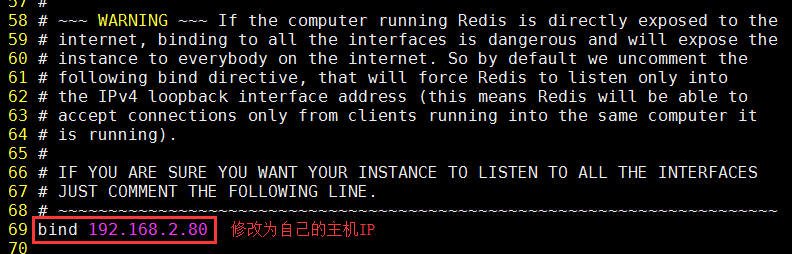
redis-5.0.3 默认开启保护模式,protected-mode yes,修改为 protected-mode no

重新启动
# redis-server /root/redis-5.0.3/redis.conf
[root@localhost ~]# redis-server /root/redis-5.0./redis.conf

:C  Mar  ::06.700 # oO0OoO0OoO0Oo Redis is starting oO0OoO0OoO0Oo

:C  Mar  ::06.700 # Redis version=5.0., bits=, commit=, modified=, pid=, just started

:C  Mar  ::06.700 # Configuration loaded

[root@localhost ~]#
关闭redis服务
[root@localhost ~]# redis-cli shutdown

[root@localhost ~]#

[root@localhost ~]# ps aux | grep redis

root         0.0  0.0     pts/    S+   :   : grep --color=auto redis

[root@localhost ~]#
四、Redis配置文件详解
主要用到的配置文件如下:
#设置节点的IP
bind 127.0.0.1 192.168.2.211
#redis-5.0.3 默认开启保护模式,protected-mode yes,修改为 protected-mode no
protected-mode no

#redis端口号

port

#redis后台运行
#设置后台启动

daemonize yes

#设置连接节点的密码

requirepass

#aof模式持久化文件的名字(appendonly默认是no,yes就是打开aof持久化)

appendfilename "appendonly.aof"

#打开aof持久化

appendonly yes

#pidfile文件对应redis_6379.pid

pidfile /var/run/redis_6379.pid
参考博客:
https://blog.csdn.net/weixin_39979119/article/details/86632582
https://blog.csdn.net/litte_frog/article/details/83278047
Redis配置文件详解
https://www.cnblogs.com/pqchao/p/6558688.html
end
部署redis5.0.3的更多相关文章
- 单机部署redis5.0集群环境
#安装rediscd redis-5.0.0makemake install #部署集群mkdir redis_clustermkdir -p redis_cluster/{7000,7001,700 ...
- 多机部署redis5.0集群环境
redis5.0集群部署 一.集群介绍 Redis 集群是一个可以在多个 Redis 节点之间进行数据共享的设施(installation). Redis 集群不支持那些需要同时处理多个键的 Redi ...
- redis-5.0.3集群搭建
首先部署redis-5.0.3,请参考我的另一篇文章 https://www.cnblogs.com/djlsunshine/p/10592174.html 启动redis服务 # redis-ser ...
- redis-5.0.5 集群部署
之前写过一套基于redis-4.0.6版本的测试集群部署 https://www.cnblogs.com/mrice/p/10730309.html 最近生产环境需要部署一套redis-5.0.5版本 ...
- Redis5.0.8 Cluster集群部署
目录 一.Redis Cluster简介 二.部署 三.创建主库 一.Redis Cluster简介 Redis Cluster集群是一种去中心化的高可用服务,其内置的sentinel功能可以提供高可 ...
- Redis5.0 3台主机三主三从部署Cluster集群
1.下载安装 [root@ip101 redis-5.0.4]# pwd /opt/app/redis-5.0.4 [root@ip101 redis-5.0.4]# ls 00-RELEASENOT ...
- 基于.NetCore的Redis5.0.3(最新版)快速入门、源码解析、集群搭建与SDK使用【原创】
1.[基础]redis能带给我们什么福利 Redis(Remote Dictionary Server)官网:https://redis.io/ Redis命令:https://redis.io/co ...
- Redis-5.0.0集群配置
版本:redis-5.0.0 参考:http://redis.io/topics/cluster-tutorial. 集群部署交互式命令行工具:https://github.com/eyjian/re ...
- Cloud Native Weekly | 华为云抢先发布Redis5.0,红帽宣布收购混合云提供商 NooBaa
1——华为云抢先发布Redis5.0 2——DigitalOcean K8s服务正式上线 3——红帽宣布收购混合云提供商 NooBaa 4——微软发布多项 Azure Kubernetes 服务更新 ...
随机推荐
- hdu4059 The Boss on Mars 容斥原理
On Mars, there is a huge company called ACM (A huge Company on Mars), and it’s owned by a younger bo ...
- LG4091 【[HEOI2016/TJOI2016]求和】
前置:第二类斯特林数 表示把\(n\)个小球放入\(m\)个不可区分的盒子的方案数 使用容斥原理分析,假设盒子可区分枚举至少有几个盒子为空,得到通项: \[S(n,m)=\frac{1}{m!}\su ...
- React中jquery引用
安装jQuery npm i jquery -S 在那个地方使用jQuery就在什么地方引入jQuery import $ from 'jquery'
- nginx配置基于域名的虚拟主机
其实基于域名和基于ip的虚拟主机配置是差不多的,在配置基于ip的虚拟主机上我们只需要修改几个地方就能变成基于域名的虚拟主机,一个是要修改域名,一个是host文件直接看代码 [root@localhos ...
- Power consumption comparison
Here is my draft evaluation when old MCU replacement for power consumption, the comparsion betwween ...
- 客户端代码压缩成zip和服务器开启gzip
1.我说的zip是打包完的js代码,用压缩工具压缩为zip文件,这样放CDN上,下载量会进一步缩小,提高进入游戏的速度 嗯,需要在游戏页用js解压zip文件 2.最简单的就服务器开启gzip
- TypeScript 之 JSX
https://m.runoob.com/manual/gitbook/TypeScript/_book/doc/handbook/JSX.html JSX中,类型断言必须使用as操作符. 类型检查 ...
- mobx 知识点
antd+mobx 项目例子:https://github.com/cag2050/antd_mobx_demo 在 create-react-app 创建的项目中,使用 mobx:https://s ...
- Java的date和string互转
https://blog.csdn.net/angus_17/article/details/7656631
- 同步中的四种锁synchronized、ReentrantLock、ReentrantReadWriteLock、StampedLock
为了更好的支持并发程序,JDK内部提供了多种锁.本文总结4种锁. 1.synchronized同步锁 使用: synchronized本质上就2种锁: 1.锁同步代码块 2.锁方法 可用object. ...