
Eclipse Photon 小技巧(tips)
本文内容:
Eclipse 4.8版本 代号 photon 光量子 ,感觉更像ide了,虽然这些技巧广为认知,但是作为eclipse来说,也是很重要的、
Code completion allows you to quickly complete statements in your code. For example, start typing a part of a method name and press CTRL+Space to complete it. Multiple choices are presents to you via a popup.
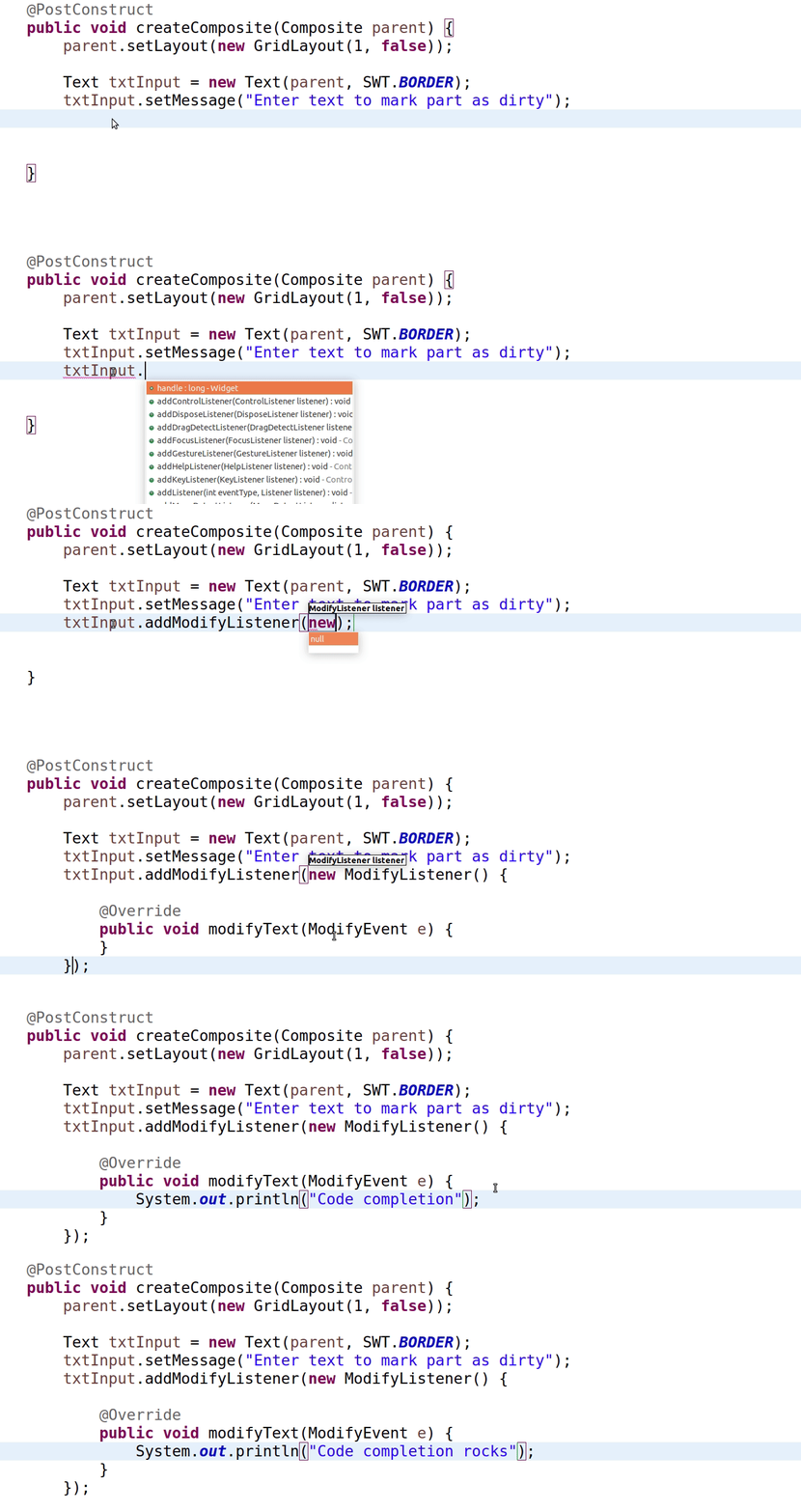
The 'new' Template
Use the 'new' template for quick object creation. (通过键入new 快速选择类)
Extract class refactoring (Alt+Shift+T)
The 'Extract class...' refactoring (from Alt+Shift+T) extracts a group of fields into a separate class and replaces all occurrences to fit the new structure.
Add Module
You don't need to know which module contains a class in Java9. Ctrl-1 can identify the module and add it for you.
The 'ifnull' Template
Use the 'ifnull' template to quickly create an if null check.
Block Selection
Use the Edit -> Block Selection (Alt+Shift+A) while working with Java9.
Use CSV as Parameter Source
You can directly use a CSV file as a parameter source in JUnit5 parameterised tests for a large number of cases.
CSV in Parameterised Tests
In JUnit5 parameterised tests also accept CSV literals (and files) as a source of parameters. Quite handy to feed your tests!
Streams as Test Parameters
You can use methods returning Java streams as a source of parameters in JUnit5 tests. Use @MethodSource as shown below(推荐使用)
Jump to Javadoc on Web
Put your cursor on a class name (or method) and press Shift+F2 to jump to the web version of your library's Javadoc. ()
CTRL+3 - The Master Shortcut
Use the 'Quick Access' box (Ctrl+3) to be more productive. Just type what you want and you'll probably find it.
Private Methods in Interfaces
Private methods in interfaces are allowed in Java9. Here's an example use case with a shared 'worker' method. ]
Invert Equals
Always safer to 'Invert equals' on literal strings in order to avoid a NullPointerException! Ctrl+1 does it for you.
'Show in' for more Details
Whatever element you have selected, code or item, 'Show in...' (Alt+Shift+W) command pops up useful views for various details.
Alt+Up and Alt+Down
Press Alt+Up/Dn to move the selected lines along with the cursor. Indenting is corrected for you. Alt+Shift+Up/Down copies the selection.
Toggle Block Selection
Edit -> Toggle Block Selection tool (or just hit Shift+Alt+A) is demonstrated below.
Inspect Variable Declaration
If you want to see where and how a variable was declared press Shift while hovering and you'll see it in-place.
Show Implementation In-place
Press Shift while hovering a method and it will show implementation in-place.
Select Enclosing Structure
The 'enclosing' selection (Alt+Shift+Up/Dn) shortcut selects the enclosing structure, e.g. var->if->method->class
Java 10 'var'
Use Java 10 and the new 'var' statement in Eclipse with its quick assists (Ctrl+1). Install Java 10 support from Eclipse Marketplace first.
Eclipse Photon 小技巧(tips)的更多相关文章
- [Tools] Eclipse使用小技巧-持续更新
[背景] 使用之中发现一些eclipse使用的小技巧,记录下来供以后查阅 Eclipse保存preferences,并导入到其他workspaces The Export wizard can b ...
- eclipse debug小技巧
测试 Expressions 代码 public static void main(String[] args) { int x=100; System.out.println("----& ...
- Eclipse全面提速小技巧
转自:http://rongmayisheng.com/post/eclipse%E5%85%A8%E9%9D%A2%E6%8F%90%E9%80%9F 欢迎关注我的社交账号: 博客园地址: http ...
- eclipse使用小技巧
1.eclipse中SVN无版本信息显示,window-preference-general-appeerance-label decoration-svn勾上,显示有关项目中受 SVN 控制的资源的 ...
- eclipse的小技巧
Eclipse 保存文件时自动格式化代码 很多同学不知道Eclipse有个很有用的功能,就是自动格式源代码的功能,一般大家都是直接Ctrl+Shift+F手动格式化,多浪费时间. 其实Eclipse里 ...
- eclipse 的小技巧
1. ctrl+o:快速outline 如果想要查看当前类的方法或某个特定方法,但又不想把代码拉上拉下,也不想使用查找功能的话,就用ctrl+o吧.它可以列出当前类中的所有方法及属性,你只需输入你想要 ...
- Eclipse 那些小技巧(值得收藏)
1.菜单命令系列 Edit→content Assist→add Alt+/ 代码关联 Windows→Next Editor→add Ctrl+Tab 切换窗口 Run→Debug Toggle L ...
- 工具——eclipse debug小技巧
1.开启调试: 在代码编辑处右键单击,在弹出菜单中点击Debug As开始调试 2.几个快捷键: F5:跟入Step into, 一般会跟踪进入到调用函数的函数体,Step Over则不会跟踪进入,直 ...
- 软件——eclipse debug小技巧
1.开启调试: 在代码编辑处右键单击,在弹出菜单中点击Debug As开始调试 2.几个快捷键: F5:跟入Step into, 一般会跟踪进入到调用函数的函数体,Step Over则不会跟踪进入,直 ...
随机推荐
- 使用pip安装第三方库报错记录
今天在使用pycharm导入第三方库的时候,报了好多超时错误,还有标题中的找不到版本,应该是网络的原因,记录下解决的办法: raise ReadTimeoutError(self._pool, Non ...
- Spring Boot2.0之注解方式启动Springmvc
回顾下springmvc原理图: DispatcherServlet是Spring MVC的核心,每当应用接受一个HTTP请求,由DispatcherServlet负责将请求分发给应用的其他组件. 在 ...
- 浅析android中的依赖注入
这几年针对Android推出了不少View注入框架,例如ButterKnife.我们首先来了解一下使用这些框架有什么好处,其实好处很明显:它可以减少大量的findViewById以及setOnClic ...
- Codeforces 872C Maximum splitting:数学【分解成合数之和】
题目链接:http://codeforces.com/contest/872/problem/C 题意: 给你一个数n,问你最多能将n分解成多少个合数之和.(若不能分解,输出-1) 题解: 若要让合数 ...
- JS获取首字母
function pySegSort(arr, empty) { if (!String.prototype.localeCompare) return null; var letters = &qu ...
- 【HDU 6126】Give out candies 最小割
题意 有$n$个小朋友,给每个人分$1~m$个糖果,有k个限制 限制形如$(x,y,z)$ 表示第$x$个人分到的糖数减去第$y$个人分到的糖数不大于$z$,给第$i$个人$j$颗糖获 ...
- hashlib加密
一.hashlib的基本组成: 1.hashlib库是python3的标准库,主要用于数据的加密,以下是hashlib的方法及属性. >>> import hashlib>&g ...
- Spring笔记04(DI(给属性赋值),自动装配(autowire))
给不同数据类型注入值: <?xml version="1.0" encoding="UTF-8"?> <beans xmlns="h ...
- Xcode 中的main.m
在几乎所有的程序开发中程序一般都是从main函数开始运行的,那么IOS程序也不例外,在上图中我们可以看到Xcode为我们生成了一个main.m文件: // // main.m // iOS // // ...
- P1150 Peter的烟
题目描述 Peter有n根烟,他每吸完一根烟就把烟蒂保存起来,k(k>1)个烟蒂可以换一个新的烟,那么Peter最终能吸到多少根烟呢? 输入输出格式 输入格式: 每组测试数据一行包括两个整数n( ...