
[iOS基础控件 - 6.9] 聊天界面Demo
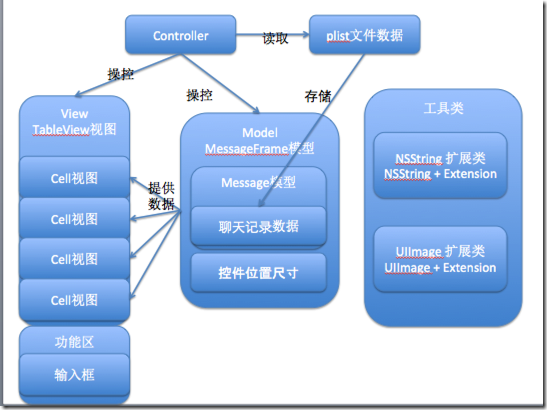
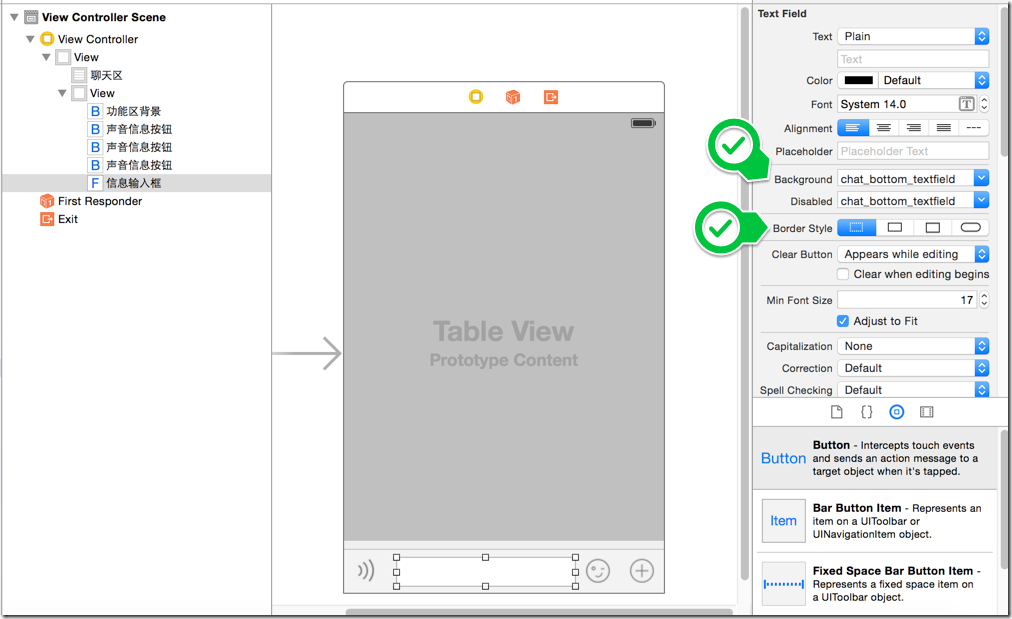
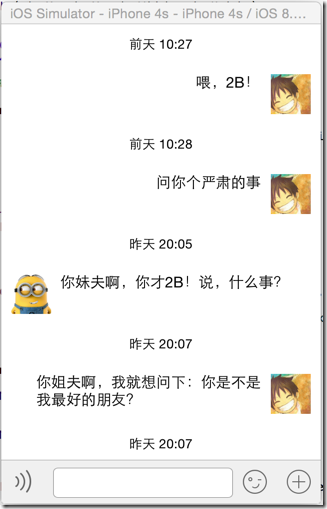
- 自定义message模型
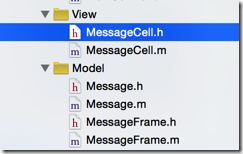
- 自定义cell
- 装载了message模型和cell子控件位置尺寸的frame
 @implementation NSString (Extension)

 /** 测量文本的尺寸 */

 - (CGSize)sizeWithFont:(UIFont *)font maxSize:(CGSize)maxSize {

     NSDictionary *attrs = @{NSFontAttributeName: font};

     CGSize size =  [self boundingRectWithSize:maxSize options:NSStringDrawingUsesLineFragmentOrigin attributes:attrs context:nil].size;

     return size;

 }

 @end
     // 3.信息,尺寸可变

     CGFloat screenWidth = [UIScreen mainScreen].bounds.size.width;

     // 3.1 设置最大尺寸

     CGSize textMaxSize = CGSizeMake(screenWidth - iconWidth - padding * , MAXFLOAT);

     // 3.2 计算真实尺寸

     CGSize textRealSize = [message.text sizeWithFont:MESSAGE_TEXT_FONT maxSize:textMaxSize];

     // 3.3 调整信息的位置

     CGFloat textX;

     if (MessageTypeMe == message.type) {

         // 我方,放在靠右

         textX = CGRectGetMinX(_iconFrame) - textRealSize.width - padding;

     } else {

         // 对方,放在靠左

         textX = CGRectGetMaxX(_iconFrame) + padding;

     }

     CGFloat textY = iconY;

     _textFrame = CGRectMake(textX, textY, textRealSize.width, textRealSize.height);
     // 2.头像

     CGFloat iconWidth = ;

     CGFloat iconHeight = ;

     // 2.1 根据信息的发送方调整头像位置

     CGFloat iconX;

     if (MessageTypeMe == message.type) {

         // 我方,放在右边

         iconX = [UIScreen mainScreen].bounds.size.width - padding - iconWidth;

     } else {

         // 对方,放在左边

         iconX = padding;

     }

     CGFloat iconY = CGRectGetMaxY(_timeFrame) + padding;

     _iconFrame = CGRectMake(iconX, iconY, iconWidth, iconHeight);
 @implementation UIImage (Extension)

 + (UIImage *) resizableImage:(NSString *) imageName {

     UIImage *image = [UIImage imageNamed:imageName];

     // 取图片中部的1 x 1进行拉伸

     UIEdgeInsets insets = UIEdgeInsetsMake(image.size.height/, image.size.width/, image.size.height/ + , image.size.width/ + );

     return [image resizableImageWithCapInsets:insets];

 }

 @end
     // 3.1 设置聊天框

     NSString *chatImageNormalName;

     NSString *chatImageHighlightedName;

     if (MessageTypeMe == messageFrame.message.type) {

         chatImageNormalName = @"chat_send_nor";

         chatImageHighlightedName = @"chat_send_press_pic";

     } else {

         chatImageNormalName = @"chat_receive_nor";

         chatImageHighlightedName = @"chat_receive_press_pic";

     }

     UIImage *chatImageNormal = [UIImage resizableImage:chatImageNormalName];

     UIImage *chatImageHighlighted = [UIImage resizableImage:chatImageHighlightedName];

     [self.textView setBackgroundImage:chatImageNormal forState:UIControlStateNormal];

     [self.textView setBackgroundImage:chatImageHighlighted forState:UIControlStateHighlighted];
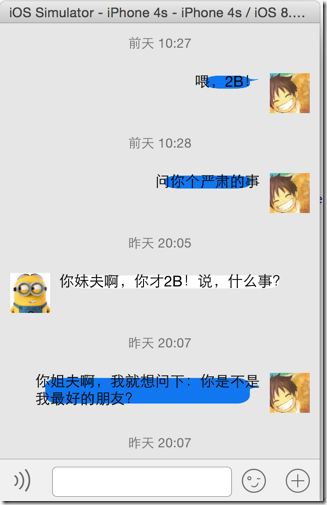
     // 3.2 调整文字的内边距

     textView.contentEdgeInsets = UIEdgeInsetsMake(TEXT_INSET, TEXT_INSET, TEXT_INSET, TEXT_INSET);
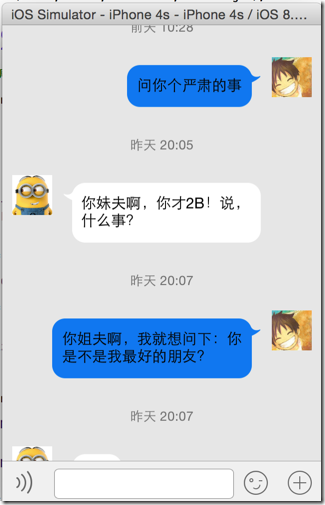
     // 3.信息,尺寸可变

     CGFloat screenWidth = [UIScreen mainScreen].bounds.size.width;

     // 3.1 设置文本最大尺寸

     CGSize textMaxSize = CGSizeMake(screenWidth - iconWidth - padding * , MAXFLOAT);

     // 3.2 计算文本真实尺寸

     CGSize textRealSize = [message.text sizeWithFont:MESSAGE_TEXT_FONT maxSize:textMaxSize];

     // 3.3 按钮尺寸

     CGSize btnSize = CGSizeMake(textRealSize.width + TEXT_INSET*, textRealSize.height + TEXT_INSET*);

     // 3.4 调整信息的位置

     CGFloat textX;

     if (MessageTypeMe == message.type) {

         // 我方,放在靠右

         textX = CGRectGetMinX(_iconFrame) - btnSize.width - padding;

     } else {

         // 对方,放在靠左

         textX = CGRectGetMaxX(_iconFrame) + padding;

     }

     CGFloat textY = iconY;

     _textFrame = CGRectMake(textX, textY, btnSize.width, btnSize.height);
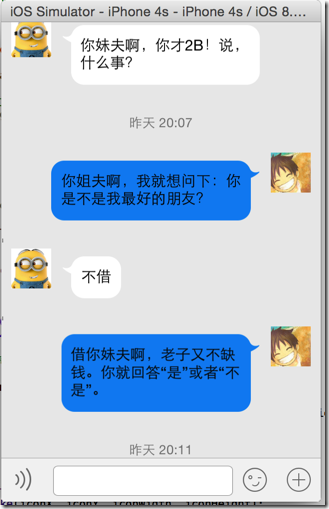
 /** 是否隐藏发送时间 */

 @property(nonatomic, assign) BOOL hideTime;
 // 判断是否发送时间与上一条信息的发送时间相同,若是则不用显示了

 MessageFrame *lastMessageFrame = [mdictArray lastObject];

 if (lastMessageFrame && [message.time isEqualToString:lastMessageFrame.message.time]) {

      message.hideTime = YES;

 }
     // 1.发送时间

     if (NO == message.hideTime) {

         CGFloat timeWidth = [UIScreen mainScreen].bounds.size.width;

         CGFloat timeHeight = ;

         CGFloat timeX = ;

         CGFloat timeY = ;

         _timeFrame = CGRectMake(timeX, timeY, timeWidth, timeHeight);

     }
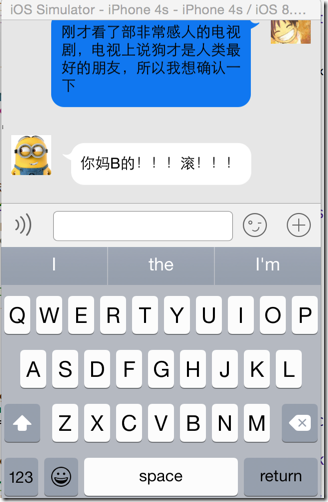
[[NSNotificationCenter defaultCenter] addObserver:self selector:@selector(keyboardWillChangeFrame:) name:UIKeyboardWillChangeFrameNotification object:nil];
 /** 点击拖曳聊天区的时候,缩回键盘 */

 - (void)scrollViewWillBeginDragging:(UIScrollView *)scrollView {

     // 1.缩回键盘

     [self.view endEditing:YES];

 }

 #pragma mark - 监听事件

 - (void) keyboardWillChangeFrame:(NSNotification *) note {

     // 1.取得弹出后的键盘frame

     CGRect keyboardFrame = [note.userInfo[UIKeyboardFrameEndUserInfoKey] CGRectValue];

     // 2.键盘弹出的耗时时间

     CGFloat duration = [note.userInfo[UIKeyboardAnimationDurationUserInfoKey] floatValue];

     // 3.键盘变化时,view的位移,包括了上移/恢复下移

     CGFloat transformY = keyboardFrame.origin.y - self.view.frame.size.height;

     [UIView animateWithDuration:duration animations:^{

         self.view.transform = CGAffineTransformMakeTranslation(, transformY);

     }];

 }
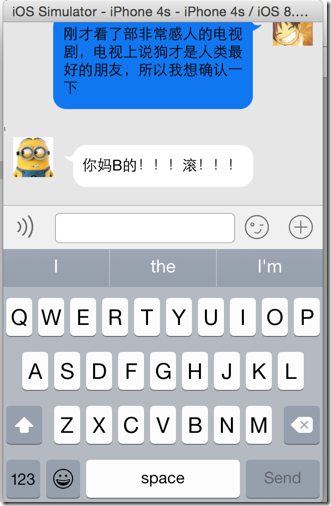
     // 设置信息输入框的代理

     self.inputView.delegate = self;
 #pragma mark - TextField 代理方法

 /** 回车响应事件 */

 - (BOOL)textFieldShouldReturn:(UITextField *)textField {

     // 我方发出信息

     [self sendMessageWithContent:textField.text andType:MessageTypeMe];

     // 自动回复

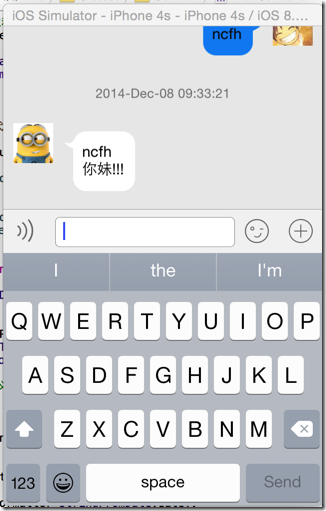
     [self sendMessageWithContent:[NSString stringWithFormat:@"%@\n%@", textField.text, @"你妹!!!"] andType:MessageTypeOhter];

     // 消除消息框内容

     self.inputView.text = nil;

     [self.tableView reloadData];

     // 滚动到最新的消息

     NSIndexPath *lastIndexPath = [NSIndexPath indexPathForRow:self.messages.count -  inSection:];

     [self.tableView scrollToRowAtIndexPath:lastIndexPath atScrollPosition:UITableViewScrollPositionBottom animated:YES];

     return YES; // 返回值意义不明

 }

 // 发送消息

 - (void) sendMessageWithContent:(NSString *) text andType:(MessageType) type {

     // 获取当前时间

     NSDate *date = [NSDate date];

     NSDateFormatter *formatter = [[NSDateFormatter alloc] init];

     formatter.dateFormat = @"yyyy-MMM-dd hh:mm:ss";

     NSString *dateStr = [formatter stringFromDate:date];

     // 我方发出信息

     NSDictionary *dict = @{@"text":text,

                            @"time":dateStr,

                            @"type":[NSString stringWithFormat:@"%d", type]};

     Message *message = [[Message alloc] init];

     [message setValuesForKeysWithDictionary:dict];

     MessageFrame *messageFrame = [[MessageFrame alloc] init];

     messageFrame.message = message;

     [self.messages addObject:messageFrame];

 }
     // 滚动到最新的消息

     NSIndexPath *lastIndexPath = [NSIndexPath indexPathForRow:self.messages.count -  inSection:];

     [self.tableView scrollToRowAtIndexPath:lastIndexPath atScrollPosition:UITableViewScrollPositionBottom animated:YES];
[iOS基础控件 - 6.9] 聊天界面Demo的更多相关文章
- [iOS基础控件 - 5.5] 代理设计模式 (基于”APP列表"练习)
A.概述 在"[iOS基础控件 - 4.4] APP列表 进一步封装,初见MVC模式”上进一步改进,给“下载”按钮加上效果.功能 1.按钮点击后,显示为“已下载”,并且不 ...
- [iOS基础控件 - 6.9.1] 聊天界面Demo 代码
框架: 所有代码文件: Model: // // Message.h // QQChatDemo // // Created by hellovoidworld on 14/12/8. // ...
- [iOS基础控件 - 3.1] QQ登陆界面
A.storyboard 控件版 1.label 2.textfield a.Keyboard Type 账号:Number Pad 密码:Num ...
- iOS 基础控件(下)
上篇介绍了UIButton.UILabel.UIImageView和UITextField,这篇就简短一点介绍UIScrollView和UIAlertView. UIScrollView 顾名思义也知 ...
- [iOS基础控件 - 6.11.3] 私人通讯录Demo 控制器的数据传递、存储
A.需求 1.搭建一个"私人通讯录"Demo 2.模拟登陆界面 账号 密码 记住密码开关 自动登陆开关 登陆按钮 3.退出注销 4.增删改查 5.恢复数据(取消修改) 这个代码 ...
- [iOS基础控件 - 6.10.2] PickerView 自定义row内容 国家选择Demo
A.需求 1.自定义一个UIView和xib,包含国家名和国旗显示 2.学习row的重用 B.实现步骤 1.准备plist文件和国旗图片 2.创建模型 // // Flag.h // Co ...
- [iOS基础控件 - 7.0] UIWebView
A.基本使用 1.概念 iOS内置的浏览器控件 Safari浏览器就是通过UIWebView实现的 2.用途:制作简易浏览器 (1)基本请求 创建请求 加载请求 (2)代理监听webView加载, ...
- [iOS基础控件 - 6.9.3] QQ好友列表Demo TableView
A.需求 1.使用plist数据,展示类似QQ好友列表的分组.组内成员显示缩进功能 2.组名使用Header,展示箭头图标.组名.组内人数和上线人数 3.点击组名,伸展.缩回好友组 code so ...
- [iOS基础控件 - 6.7] 微博展示 使用代码自定义TableCell(动态尺寸)
A.需求 1.类似于微博内容的展示 2.头像 3.名字 4.会员标志 5.内容 6.分割线 7.配图(可选,可有可无) code source: https://github.com/hellov ...
随机推荐
- Android Studio设置,鼠标放上去有提示
设置如下: 1. 2. 勾选就可以了
- [HDOJ2795]Billboard(线段树,单点更新)
题目链接:http://acm.hdu.edu.cn/showproblem.php?pid=2795 题意:w*h的公告板要贴公告,公告是w*1的,每个公告有先后顺序,要使每个公告贴的位置尽可能地高 ...
- C#获取网页中某个元素的位置,并模拟点击
我们在开发中,往往要得到网页中某个元素的位置,并且点击它.要模拟一次鼠标点击并不难,只要调用一个API就行了,关键就是怎么样得到这个元素的位置,还有判断是否要滚动滚动条,要滚动多少行能让元素显示出来. ...
- Spring MVC定义拦截器
拦截器: package sy.Interceptor; import javax.servlet.http.HttpServletRequest; import javax.servlet.http ...
- 安装服务Memcached+Nginx+Php linux下安装
Memcached安装 1. 源码安装libevent(下载地址:http://monkey.org/~provos/libevent/) 2. 源码安装memcached(下载地 ...
- 【转】iOS中定时器NSTimer的使用
原文网址:http://www.cnblogs.com/zhulin/archive/2012/02/02/2335866.html 1.初始化 + (NSTimer *)timerWithTimeI ...
- 她让我懂得了怎样学习Flash
原文:http://www.asv5.cn/blog/article.asp?id=169 最近忙着寻找两样丢失了很久的东西,都是她帮我找回来的,第一样叫做自信,第二样叫做梦想.也正因为有了她,我才从 ...
- JAVA数据库处理(连接,数据查询,结果集返回)
package john import java.io.IOException; import java.util.*; public class QueryDataRow { public Hash ...
- 自己动手写路由器之ioctl获取网络接口信息
最近打算写一个简单路由器,里面有用到ioctl获取网络接口信息,那就先把这部分单独拿出来说一说吧! ioctl这个函数,可以用来对特殊文件的基础设备参数进行操作,它们可以完成与打开文件描述符相关联的控 ...
- Oracle数据库表结构导出
1. 在PL/SQL中找到"工具--导出用户对象"菜单.点击运行.