
xlwings: Write Excel macro using python instead of VBA
i want to write Excel macros to deal with the data, but i am not familiar with VBA language. so i decide to use python instead of VBA.
at the beginning, i find xlrd,xlwt for python Excel operations, but that doesn't support Excel macro. Finally i find xlwings.
xlwings - Make Excel Fly!
- Scripting: Automate/interact with Excel from Python using a syntax close to VBA.
- Macros: Replace VBA macros with clean and powerful Python code.
- UDFs: Write User Defined Functions (UDFs) in Python (Windows only)
You can find more details in the offical document links: https://www.xlwings.org/
xlwings have many power functions, i will only introduce how to write Excel macros
1. Installation
The easiest way to install xlwings is via pip:
pip install xlwings
or conda:
conda install xlwings
i suggest that you install Anaconda, it already includes a lot of useful moudles, and xlwings will depend on part of them.
2. Add-in
you need Windows command line to install/remove the add-in in Excel.
xlwings addin install: Copies the xlwings add-in to the XLSTART folder

After installing the add-in, it will be available as xlwings tab on the Excel Ribbon. you need to give the interpreter path.
Interpreter: This is the path to the Python interpreter (works also with virtual or conda envs), e.g. "C:\Python35\pythonw.exe" or "/usr/local/bin/python3.5". An empty field defaults to pythonwthat expects the interpreter to be set in the PATH on Windows or .bash_profile on Mac.

3.Quickstart
you need Windows command line to create necessary files automatically.
xlwings quickstart myproject

This command is by far the fastest way to get off the ground: It creates a new folder myprojectwith an Excel workbook that already has the reference to the xlwings addin and a Python file, ready to be used right away:
myproject

  |--myproject.xlsm

  |--myproject.py
4.VBA: RunPython
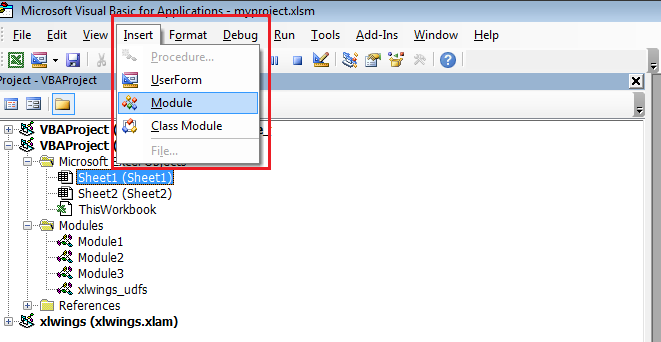
In the VBA Editor (Alt-F11), write the code below into a VBA module. you can add new module via Insert > Module
Sub HelloWorld()

    RunPython ("import hello; hello.world()")

End Sub
This calls the following code in hello.py:
# hello.py

import numpy as np

import xlwings as xw

def world():

    wb = xw.Book.caller()

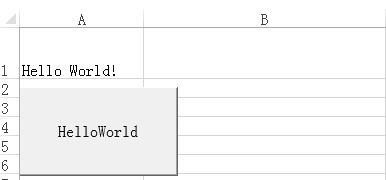
    wb.sheets[0].range('A1').value = 'Hello World!'
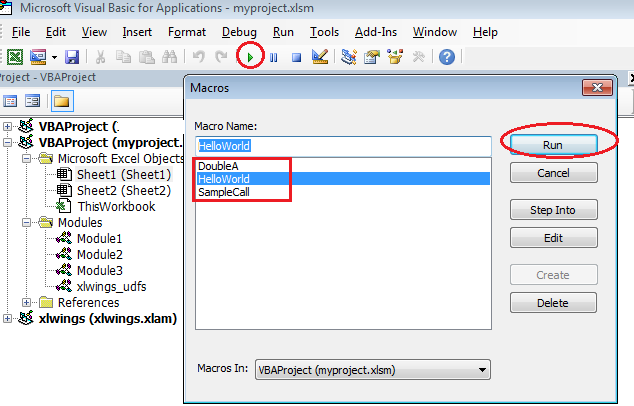
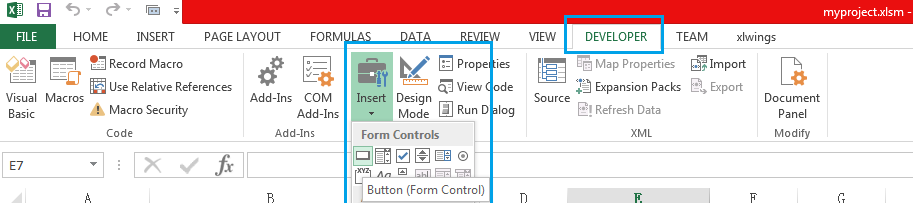
You can then attach HelloWorld to a button or run it directly in the VBA Editor by hitting F5.
xlwings: Write Excel macro using python instead of VBA的更多相关文章
- 利用 Python 插件 xlwings 读写 Excel
Python 通过 xlwings 读取 Excel 数据 去年底公司让我做设备管理,多次委婉拒绝,最终还是做了.其实我比较喜欢技术.做管理后发现现场没有停机率统计,而原始数据有,每次要自己在Exce ...
- 一个使用xlwings操作excel数据优化60倍处理效率的案例
☞ ░ 前往老猿Python博文目录 ░ 一.引言 老猿在将自己的博文数据(包括url地址.标题和阅读数量)从博客中获取后,使用xlwings保存到excel对象时发现,不同的处理方法性能相差非常大. ...
- Working with Excel Files in Python
Working with Excel Files in Python from: http://www.python-excel.org/ This site contains pointers to ...
- 像Excel一样使用python进行数据分析
Excel是数据分析中最常用的工具,本篇文章通过python与excel的功能对比介绍如何使用python通过函数式编程完成excel中的数据处理及分析工作.在Python中pandas库用于数据处理 ...
- python excel 像 Excel 一样使用 python 进行数据分析
https://www.jb51.net/article/63216.htm 像 Excel 一样使用 python 进行数据分析 : https://www.cnblogs.com/nxld/p/ ...
- [转]Introduction - Run Excel Macro using VBScript
本文转自:https://wellsr.com/vba/2015/excel/run-macro-without-opening-excel-using-vbscript/ Have you ever ...
- 用python批量执行VBA代码
先说下背景环境 1. 公司需要问卷调查,有两份问卷, 1)是spss问卷,2)是excel问卷.spss问卷数据不全,但有各种标签, excel呢, 生成的数据直接把选项变成了值 2. 现在需要把ex ...
- 个人永久性免费-Excel催化剂功能第47波-VBA开发者喜爱的加密函数类
VBA的确是个很不错的编程工具,寄生在OFFICE内,无需安装庞大的开发环境,即开即用,方便灵活,能实现的事情也很多,但毕竟VBA是微软停止更新维护将近20年的一种语言,计算机的世界发展速度有多快大家 ...
- Python 使用 xlwings 往 excel 中写入一行数据的两种方法
该方法跟上一篇写入一列的方法相反,代码如下: # -*- coding:utf-8 -*- import xlwings as xw list1 = [1,2,3,4,5] list2 = [[1], ...
随机推荐
- Python——模块以及导入注意事项
在Python中,每一个文件都应该是可以被导入的. 每一个独立的python文件都是一个模块 在导入文件时,文件中所有没有任何缩进的代码都会被执行一遍. 而在实际应用时,每个模块都是有专人负责独立开发 ...
- python3 zip压缩
参考: https://docs.python.org/3/library/zipfile.html https://zhidao.baidu.com/question/149840976436638 ...
- Linux 时间日期类、搜索查找类、 压缩和解压类指令
l 时间日期类 date指令-显示当前日期 基本语法 1) date (功能描述:显示当前时间) 2) date +%Y (功能描述:显示当前年份) 3) date +%m (功能描述:显示当前月份) ...
- DP Intro - poj 1947 Rebuilding Roads(树形DP)
版权声明:本文为博主原创文章,未经博主允许不得转载. Rebuilding Roads Time Limit: 1000MS Memory Limit: 30000K Total Submissi ...
- Golang教程:结构体
结构体(struct)是用户自定义的类型,它代表若干字段的集合.有些时候将多个数据看做一个整体要比单独使用这些数据更有意义,这种情况下就适合使用结构体. 比如将一个员工的 firstName, las ...
- 记录日志好习惯——Log4net入门(WCF篇)
本篇是在学习了“编码之道”的Log4net入门(WCF篇)http://www.cnblogs.com/yonghuacui/p/6181864.html之后,总结了一些自认为比较重要的细节.顺便把创 ...
- JVM(二) 对象存活判断和垃圾回收算法
对象的创建 概述 下面简要介绍创建对象的几个重要步骤 : 检查能否在常量池定位到一个类的符号引用,并检查这个符号代表的类是否已被加载,解析和初始化过.如果没有则执行类加载的操作.(即是说对象的引用放在 ...
- OkHttp完全解析之整体调用流程
前言:阅读好的代码如同观赏美景一样的美妙 OkHttp是一个Square公司在github开源的Java网络请求框架,非常流行.OkHttp 的代码并不是特别庞大,代码很多巧妙的实现,非常值得学习. ...
- Maven 配置tomcat和findbug插件(在eclipse建立的项目中)
tomcat插件 a) tomcat的maven插件可以在tomcat的官网上寻找,这就是tomcat插件的plugin b) 将tomcat的plugin配置到项目的po ...
- PAT 1028. List Sorting
#include <cstdio> #include <cstring> #include <cstdlib> #include <algorithm> ...